
My Arcade DGUNL-3283
My Arcade Street Fighter II Champion Edition Micro Player Instruction Manual
Model: DGUNL-3283
Introduction
This manual provides essential information for the setup, operation, and maintenance of your My Arcade Street Fighter II Champion Edition Micro Player. This officially licensed mini arcade machine brings the classic arcade version of Street Fighter II Champion Edition directly to your home, offering an authentic gaming experience with mechanical switches for precise control.

The My Arcade Street Fighter II Champion Edition Micro Player, a compact replica of the classic arcade cabinet.
Important Safety Information
WARNING: Not suitable for children under 3 years old. This product contains chemicals known to the State of California to cause cancer and birth defects or other reproductive harm.
Please read all instructions before use and retain this manual for future reference. Ensure the device is used in a safe environment and handled with care to prevent damage.
Setup
Powering the Device
Your Micro Player can be powered in two ways:
- Batteries: Insert 4 AA batteries (not included) into the battery compartment located on the back of the unit. Ensure correct polarity.
- Micro-USB: Connect a micro-USB cable (not included) to the micro-USB port on the back of the unit and plug it into a compatible power source.

Rear view of the Micro Player, highlighting the battery compartment and micro-USB port for power.
Initial Power On
Once powered, press the MENU button located on the front panel to turn on the device. The screen will display the My Arcade logo followed by the game title.
Official product video demonstrating the power-on sequence and initial game screen of the Street Fighter II Champion Edition Micro Player.
Operating Instructions
Controls Overview
The Micro Player features a classic arcade joystick and six action buttons (Jab, Strong, Fierce, Short, Forward, Roundhouse) for authentic gameplay. A START button is available to begin games, and a COIN button simulates inserting a coin for credits.

Detailed view of the Micro Player's control panel, including the joystick and punch/kick buttons.
Single Player Mode
To play alone, select "Single Player" from the main menu using the joystick and confirm with an action button. Choose your character and begin your fight against the CPU opponents.
Head-to-Head (CO/VS) Play
For multiplayer action, connect two My Arcade Street Fighter II Champion Edition Micro Players using the included CO/VS cable. Select "Player 2" or "CO/VS Link" option on both units to initiate head-to-head gameplay.

Two Micro Players linked via the CO/VS cable, enabling competitive two-player matches.
Audio Control
Adjust the game volume using the dedicated volume controls on the back of the unit. For private listening, plug any standard 3.5mm headphones into the headphone jack, also located on the back panel.
Maintenance
- Cleaning: Use a soft, dry cloth to clean the exterior of the Micro Player. Avoid abrasive cleaners or solvents.
- Storage: Store the device in a cool, dry place away from direct sunlight and extreme temperatures.
- Battery Care: If the device will not be used for an extended period, remove the AA batteries to prevent leakage.
- General Handling: Handle the unit with care. Avoid dropping or subjecting it to strong impacts.
Troubleshooting
- Device does not power on:
- Ensure batteries are correctly installed and not depleted.
- If using micro-USB, verify the cable and power source are functional.
- Press the MENU button firmly.
- Game is unresponsive or controls are erratic:
- Turn the device off and on again.
- Replace batteries if using battery power.
- Ensure the joystick is not being pressed down too hard, which can sometimes cause unintended inputs.
- No sound or distorted sound:
- Check the volume level using the volume controls.
- If using headphones, ensure they are fully plugged into the 3.5mm jack and are functional.
- CO/VS link not connecting:
- Ensure both Micro Players are powered on and the CO/VS cable is securely connected to both units.
- Verify that the correct multiplayer option is selected on both devices.
Specifications
| Brand | My Arcade |
| Model Number | DGUNL-3283 |
| Game Title | Street Fighter II Champion Edition |
| Number of Players | 2 (via CO/VS link) |
| Controller Type | Joystick with Mechanical Switches |
| Screen Size | 3.25 inches |
| Power Source | 4 AA Batteries (not included) or Micro-USB (cable not included) |
| Item Dimensions (L x W x H) | 6.9" x 5.6" x 8.7" |
| Item Weight | 850 Grams |
| Material Type | Plastic |
| Included Components | Micro Player, User Guide, CO/VS Cable |
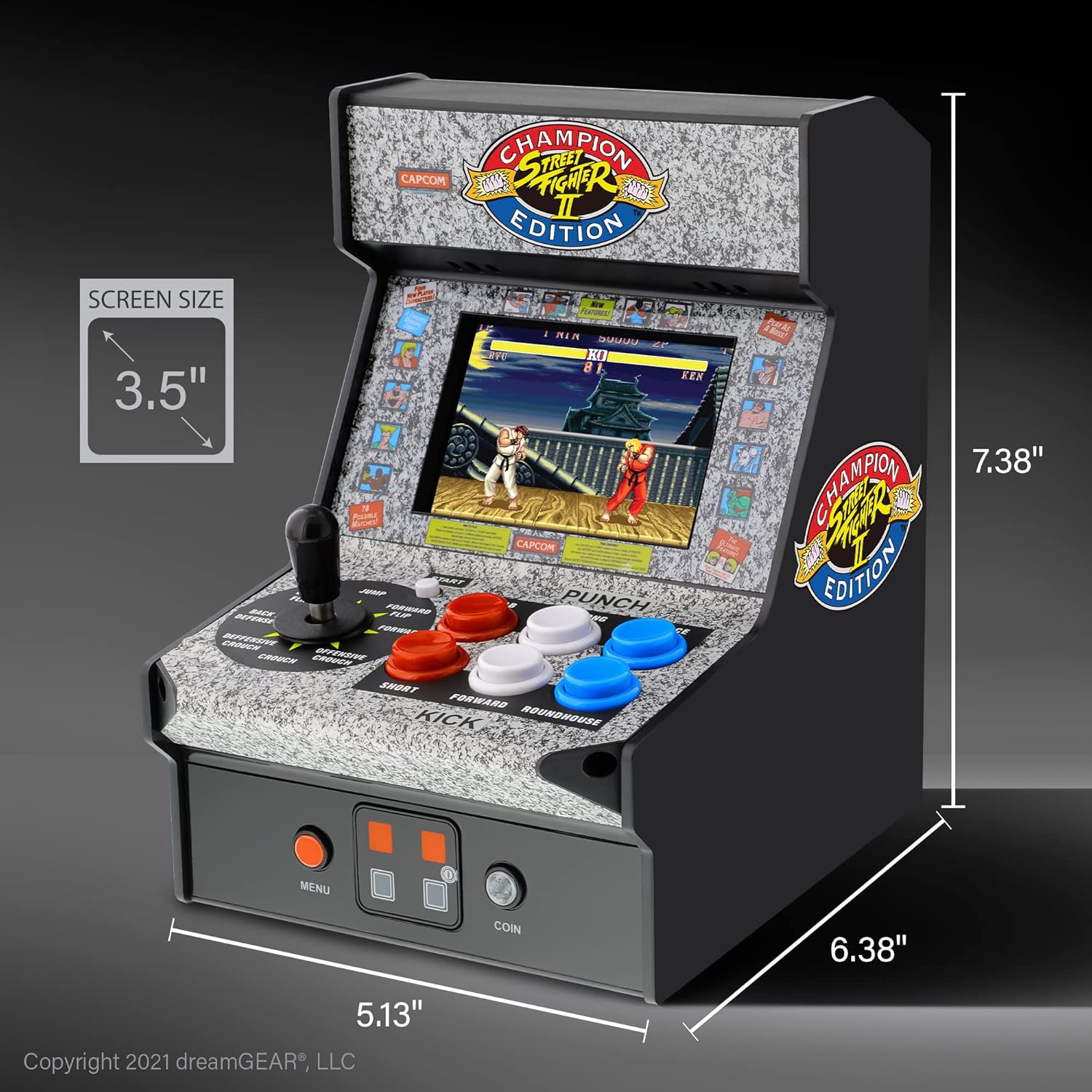
The Micro Player showing its compact dimensions for easy portability and display.
Warranty Information
The My Arcade Street Fighter II Champion Edition Micro Player comes with a manufacturer's warranty of 120 days from the date of purchase. Please retain your proof of purchase for any warranty claims. For detailed warranty terms and conditions, refer to the official My Arcade website or contact customer support.
Customer Support
For further assistance, technical support, or inquiries regarding your My Arcade Street Fighter II Champion Edition Micro Player, please visit the official My Arcade website or contact their customer service department. Contact information can typically be found on the product packaging or the brand's official website.
Online Resources: www.myarcadegaming.com
Related documentsDGUNL-3283


Ask a question about this manual
Ask about setup, troubleshooting, compatibility, parts, safety, or missing instructions. Manuals+ will review the question and use this page’s manual context to help answer it.