
1. Introduction
This manual provides detailed instructions for the installation, operation, and maintenance of the TSL LTS CMIP8342W-M Platinum Network Mini Bullet IP Camera. Please read this manual thoroughly before using the product to ensure proper setup and optimal performance. Keep this manual for future reference.
2. Product Overview
The TSL LTS CMIP8342W-M is a 4MP High Definition Network Mini Bullet IP Camera designed for robust surveillance. It offers clear imaging up to 2560x1520 at 30 frames per second with a 4mm fixed lens. Key features include True WDR 120dB for balanced images in varying light conditions, Matrix IR 2.0 for night vision up to 100 feet, and support for H.265/H.264 video compression. The camera is WEATHERPROOF IP67 rated, making it suitable for both indoor and outdoor use, and includes a MicroSD slot for local storage up to 128GB. It supports both DC 12V and Power over Ethernet (PoE) for flexible power options. Advanced Video Content Analytics (VCA) features such as Line Crossing, Intrusion Detection, and Face Detection enhance its surveillance capabilities.
- Resolution: 4MP - Image Sensor 1/3” sensor - True WDR 120dB
- Lens: 4mm @F1.6: horizontal FOV: 83°, vertical FOV: 45°, diagonal FOV: 99°
- Video Compression: Main stream: H.265/H.264; Sub-stream: H.265/H.264/MJPEG; Third stream: H.265/H.264
- Frame Rate: 60Hz: 15fps (2048 x 1536), 30fps (1920 × 1080), 30fps (1280 x 720); 50Hz: 12.5fps (2048 x 1536), 25fps (1920 × 1080), 25fps (1280 x 720)
- Max. Resolution: 2688 × 1520 - WEATHERPROOF IP67
3. Safety Information
- Ensure the power supply voltage is correct before connecting the camera.
- Do not expose the camera to extreme temperatures, humidity, or corrosive environments.
- Avoid pointing the camera lens directly at strong light sources for extended periods.
- Handle the camera with care. Do not drop or subject it to strong physical shocks.
- Only use accessories specified by the manufacturer.
- Installation and servicing should be performed by qualified personnel.
4. Package Contents
Verify that all items are present and in good condition upon opening the package:
- TSL LTS CMIP8342W-M IP Camera
- Mounting Screws and Wall Plugs
- Waterproof Connector for Ethernet Cable
- Quick Start Guide
- Drill Template (if applicable)
Note: A power adapter (DC 12V) may be sold separately or included depending on the specific package. An Ethernet cable is required for network connection.
5. Setup
5.1 Physical Installation
- Choose a Mounting Location: Select a location that provides the desired field of view and is within range of power and network connections. Ensure the surface is strong enough to support the camera.
- Mount the Camera: Use the provided drill template to mark and drill holes. Secure the camera base to the wall or ceiling using the mounting screws and wall plugs.
- Adjust Camera Angle: Loosen the adjustment screws on the camera body to position the lens for optimal coverage. Tighten the screws once the desired angle is achieved.
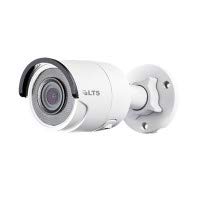
Figure 5.1: Front view of the TSL LTS CMIP8342W-M Platinum Network Mini Bullet IP Camera, showing the lens and IR illuminators.
5.2 Power and Network Connection
- Power Connection:
- PoE (Power over Ethernet): If using a PoE-enabled switch or NVR, connect an Ethernet cable from the camera's RJ45 port directly to the PoE port. No separate power adapter is needed.
- DC 12V Power: If not using PoE, connect a 12V DC power adapter (not included) to the camera's power input port.
- Network Connection: Connect an Ethernet cable from the camera's RJ45 port to your network switch or router. Use the waterproof connector for outdoor installations to protect the RJ45 connection.
- MicroSD Card Installation (Optional): If local storage is desired, carefully open the MicroSD card slot cover (refer to the camera diagram in the quick start guide) and insert a MicroSD card (up to 128GB) with the contacts facing down. Close the cover securely.
Figure 5.2: Side view of the TSL LTS CMIP8342W-M Platinum Network Mini Bullet IP Camera, illustrating the mounting bracket and cable connections.
5.3 Initial Configuration
- Discover the Camera: Use the manufacturer's IP camera search tool (e.g., SADP Tool) on a computer connected to the same network to find the camera's IP address.
- Activate the Camera: For first-time use, you may need to activate the camera by setting a strong password.
- Access Web Interface: Open a web browser and enter the camera's IP address. Log in with the newly set password.
- Network Settings: Configure network settings (e.g., static IP, DHCP) as needed for your network environment.
- Date and Time: Set the correct date and time, preferably using NTP (Network Time Protocol) for synchronization.
6. Operating
6.1 Live View and Recording
Once configured, access the camera's live view through the web interface, a compatible NVR, or a mobile application. From the live view, you can:
- Monitor real-time video feed.
- Manually start/stop recordings.
- Take snapshots.
- Adjust image parameters (brightness, contrast, saturation).
6.2 Advanced Features
- True WDR 120dB: Enable Wide Dynamic Range in settings to improve image clarity in scenes with both very bright and very dark areas.
- Matrix IR 2.0: The camera automatically activates its infrared illuminators in low-light conditions for night vision.
- Motion Detection: Configure motion detection zones and sensitivity. Set up actions such as recording, sending notifications, or triggering alarms upon detection.
- VCA (Video Content Analytics): Utilize Line Crossing Detection, Intrusion Detection, and Face Detection features by defining specific rules and areas in the camera's settings.
- SD Card Recording: Configure continuous, scheduled, or event-triggered recording to the installed MicroSD card.
7. Maintenance
- Cleaning: Regularly clean the camera lens with a soft, dry cloth. For stubborn dirt, use a mild lens cleaning solution. Do not use harsh chemicals.
- Firmware Updates: Check the manufacturer's website periodically for firmware updates. Updating firmware can improve performance, add new features, and fix bugs. Follow the provided instructions carefully during the update process.
- Storage Management: If using a MicroSD card, regularly back up important recordings and format the card periodically to maintain optimal performance.
- Cable Inspection: Periodically inspect all cables and connections for wear, damage, or corrosion, especially in outdoor installations.
8. Troubleshooting
| Problem | Possible Cause | Solution |
|---|---|---|
| No power to camera | Loose power connection, faulty power adapter/PoE switch, power outage. | Check all power connections. Verify power adapter/PoE switch is functioning. Restore power. |
| No image on screen | Network connection issue, incorrect IP address, camera not activated, software/browser issue. | Verify network cable is connected. Check camera's IP address. Ensure camera is activated and logged in. Try a different browser or client software. |
| Poor image quality | Dirty lens, incorrect focus, low bandwidth, improper settings (WDR, exposure). | Clean the lens. Adjust focus if applicable. Check network bandwidth. Adjust image settings in the web interface. |
| Cannot access camera via network | Incorrect IP address, network configuration mismatch, firewall blocking. | Use the discovery tool to find the correct IP. Ensure camera and computer are on the same subnet. Check firewall settings on your computer or router. |
| SD card not recording | SD card full, faulty SD card, incorrect recording schedule, SD card not formatted. | Check SD card status in settings. Replace faulty card. Verify recording schedule. Format the SD card via the camera's web interface. |
9. Specifications
| Feature | Specification |
|---|---|
| Model Number | CMIP8342W-M |
| Video Capture Resolution | 4 MP |
| Effective Still Resolution | 4 MP |
| Lens | 4mm @F1.6 |
| Frame Rate | 30 fps (max) |
| Night Vision Range | 100 Feet |
| Low Light Technology | Night Color |
| True WDR | 120dB |
| Video Compression | H.265, H.265+, H.264, H.264+, MJPEG |
| MicroSD Slot | Up to 128GB |
| Power Supply | DC 12V, PoE |
| International Protection Rating | IP67 |
| Mounting Type | Wall Mount |
| Form Factor | Bullet |
| Connectivity Technology | Wired (Ethernet) |
| Indoor/Outdoor Usage | Indoor, Outdoor |
| Alert Type | Motion Only (VCA: Line Crossing, Intrusion Detection, Face Detection) |
10. Warranty and Support
For warranty information and technical support, please refer to the official TSL website or contact your authorized dealer. Keep your purchase receipt as proof of purchase for warranty claims.
Manufacturer: LTS
Brand: TSL