
1. Introduction
The Teach Tech KC3 Keypad Coding Robot is an innovative, hands-on educational kit designed to introduce young learners to the fundamentals of robotics and coding. This unique build-it-yourself robot allows for the creation of three distinct configurations: the Doodler, Shooter, and Sweeper. All programming is done directly on the robot's integrated keypad, requiring no external devices. The KC3 promotes critical thinking, problem-solving, and STEM skills through engaging, interactive play.
2. Safety Information
- Adult Supervision: Recommended for children aged 8 and up. Adult supervision is advised during assembly and operation.
- Small Parts: This kit contains small parts which may pose a choking hazard for children under 3 years of age. Keep out of reach of infants and toddlers.
- Battery Safety: Use only the specified battery type (4 x AAA). Do not mix old and new batteries, or different types of batteries. Insert batteries with correct polarity. Remove batteries if the robot will not be used for an extended period.
- Moving Parts: Keep fingers, hair, and loose clothing away from moving gears and wheels during operation.
- Eye Protection: When operating the Shooter robot, do not aim at eyes or face. Only use projectiles provided with the kit.
3. Package Contents
Before beginning assembly, please verify that all components are present. The KC3 kit includes 182 pieces for building the robot and its various configurations.

Image: Back of the KC3 product box, illustrating the various components included in the kit and the tools required for assembly.
Tools Required (Not Included):
- Phillips Head Screwdriver (+)
- Marker Pen (for Doodler configuration)
- Ruler
- Diagonal Cutter
- 4 x AAA Batteries
- Safety Glasses (recommended)
4. Assembly
The KC3 robot can be assembled into three distinct forms: the Doodler, Shooter, and Sweeper. Follow the detailed step-by-step instructions provided in the included manual for each configuration. Ensure all connections are secure for proper functionality.

Image: The three possible robot configurations: Shooter, Doodler, and Sweeper, highlighting their unique features.
Key Assembly Steps:
- Prepare Components: Carefully detach all pieces from their frames using a diagonal cutter. Smooth any rough edges.
- Gearbox Assembly: Assemble the two gearboxes according to the instructions. These are crucial for the robot's movement.
- Battery Module: Install 4 AAA batteries into the battery module, ensuring correct polarity.
- Keypad Module Integration: Connect the keypad module to the main robot body. This module serves as the brain for all coding commands.
- Choose Configuration: Decide whether to build the Doodler, Shooter, or Sweeper, and follow the specific assembly steps for your chosen model.
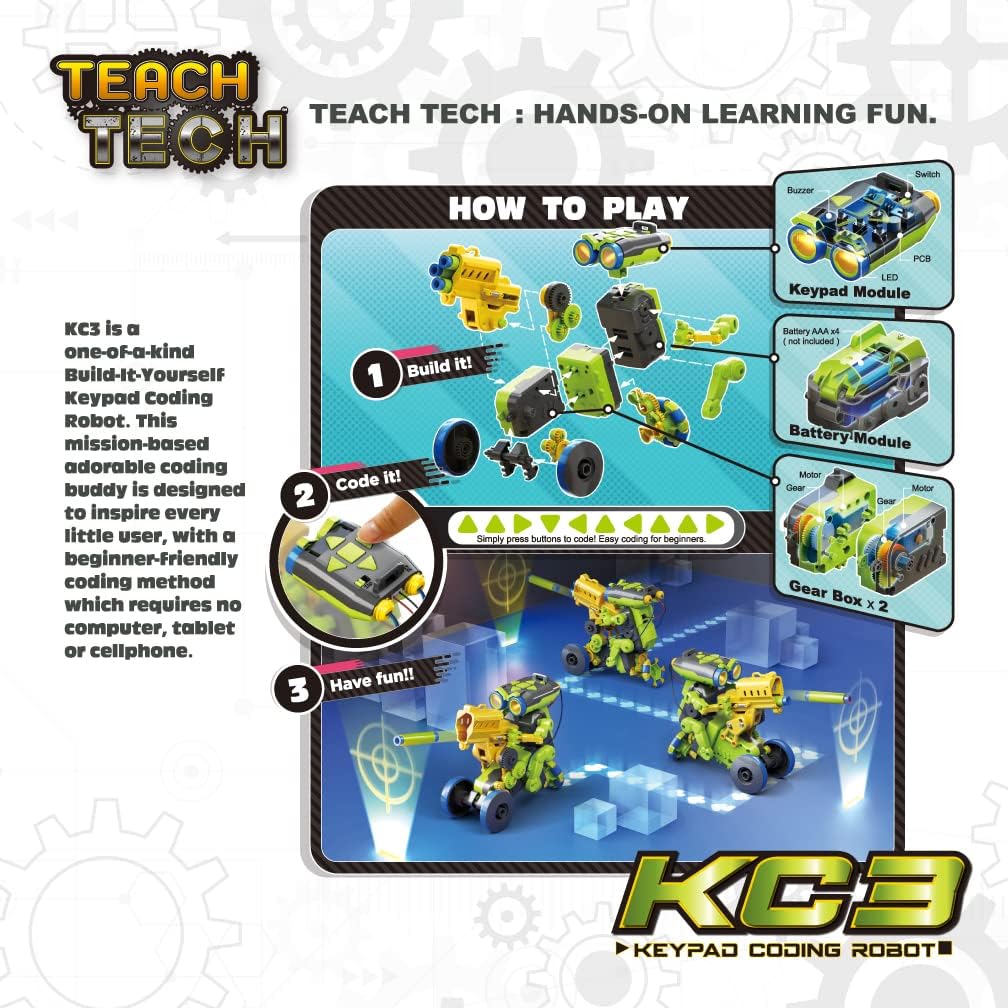
Image: A visual guide demonstrating the three core stages of interaction with the KC3 robot: building, coding, and enjoying the results.
5. Operating Instructions
The KC3 robot is programmed directly via its integrated keypad. No external computer or smart device is needed. The robot can be programmed to move and rotate in 8 different directions.
Basic Coding with the Keypad:
- Power On: Locate the power switch on the keypad module and turn the robot ON.
- Enter Commands: Use the numerical and directional buttons on the keypad to input a sequence of commands. Each button corresponds to a specific action (e.g., move forward, turn left, specific number of steps).
- Execute Program: Press the 'Run' or 'Execute' button (refer to the manual for exact button label) to make the robot perform the entered sequence of commands.
- Clear Program: To enter a new sequence, clear the previous program using the 'Clear' or 'Reset' button.
Robot Specific Operations:
5.1 Doodler Robot
The Doodler robot is designed to draw patterns. Insert a marker pen into the designated holder. Program the robot to move in various paths to create unique drawings.

Image: The KC3 Doodler robot in action, demonstrating its ability to draw lines on a flat surface.

Image: The KC3 Doodler robot drawing a cloud shape, showcasing its precision in executing programmed paths.
Video: A short preview demonstrating the KC3 Doodler robot's drawing capabilities.
5.2 Shooter Robot
The Shooter robot can launch small projectiles. Load the projectiles into the launcher. Program the robot to move to a target position and then activate the shooting mechanism.
Video: A brief demonstration of the KC3 Shooter robot's projectile launching function.
5.3 Sweeper Robot
The Sweeper robot is designed to push small, lightweight objects. Attach the sweeping mechanism. Program the robot to navigate an area and clear small debris.

Image: The KC3 Sweeper robot actively pushing small, colorful objects across a surface, demonstrating its sweeping function.
Video: A short clip showcasing the KC3 Sweeper robot's ability to clear small items from a path.
Video: A general overview video demonstrating the Teach Tech KC3 Keypad Coding Robot in action.
6. Maintenance
- Cleaning: Wipe the robot's surfaces with a soft, dry cloth. Do not use harsh chemicals or abrasive cleaners.
- Battery Replacement: Replace all 4 AAA batteries when the robot's performance diminishes or it fails to respond to commands. Ensure correct polarity.
- Storage: Store the robot and its components in a cool, dry place away from direct sunlight and extreme temperatures.
- Component Check: Periodically inspect all connections and moving parts for wear or damage. Replace any broken components if possible, or contact support.
7. Troubleshooting
| Problem | Possible Cause | Solution |
|---|---|---|
| Robot does not power on. | Batteries are dead or incorrectly inserted. | Replace batteries with new ones, ensuring correct polarity. Check power switch is ON. |
| Robot does not move or moves erratically. | Incorrect assembly; gears are not meshing; program error; low batteries. | Review assembly instructions, especially gearbox. Re-enter program carefully. Replace batteries. |
| Keypad commands are not registering. | Loose connection to keypad module; keypad malfunction. | Check all connections to the keypad module. Ensure batteries are fresh. |
| Doodler/Sweeper/Shooter mechanism not working. | Mechanism not correctly attached; specific command not entered. | Verify the attachment of the specific mechanism. Ensure the correct command for activation is part of the program. |
8. Specifications
- Model Number: TTG-897
- Educational Objective(s): Coding Skills, Exploratory Skills, STEM
- Number of Pieces: 182
- Assembly Required: Yes
- Batteries Required: Yes (4 x AAA, not included)
- Material Type(s): Plastic, Metal
- Product Dimensions: 17.78 x 10.16 x 15.24 cm
- Recommended Age: 8 years and up
- Color: Yellow
9. Warranty & Support
For information regarding warranty, replacement parts, or technical support, please refer to the contact details provided in the original product packaging or visit the official TEACH TECH website. Keep your proof of purchase for any warranty claims.
Online Resources: For additional tips, project ideas, and community support, search for 'Teach Tech KC3' online or visit educational robotics forums.