
1. Introduction
This manual provides comprehensive instructions for the safe and effective use of your Satisfyer Mono Flex Connect App Vibrator. Please read this manual thoroughly before first use and retain it for future reference.
The Satisfyer Mono Flex is a premium rabbit vibrator crafted from flexible silicone, designed to contour to the body for enhanced sensation. It features dual stimulation capabilities and can be controlled manually or via the Satisfyer Connect App, offering a wide range of vibration patterns and customization options.
2. Package Contents
- Satisfyer Mono Flex Connect App Vibrator
- Magnetic USB Charging Cable
- Quick Start Guide (multi-language)
- Safety Information
- Guarantee Information

Image: The Satisfyer Mono Flex vibrator, its retail box, magnetic USB charging cable, and included quick start guide and safety information.
3. Product Features
- Material: Made from body-friendly, medical-grade silicone for a soft and comfortable experience.
- Design: Flexible shaft for internal stimulation and a separate arm for external clitoral stimulation.
- Motors: Equipped with two powerful motors for G-spot and clitoral stimulation.
- Control: Manual control via integrated buttons or extended control via the Satisfyer Connect App.
- Vibration Modes: 12 pre-set vibration patterns with 5 intensity levels (manual control). Unlimited patterns and customization via the app.
- App Functions: Remote control, vibration creator, ambient vibrations, playlist vibration, 100% data security.
- Waterproof: IPX7 rated, making it suitable for use in water and easy to clean.
- Charging: Magnetic USB charging.
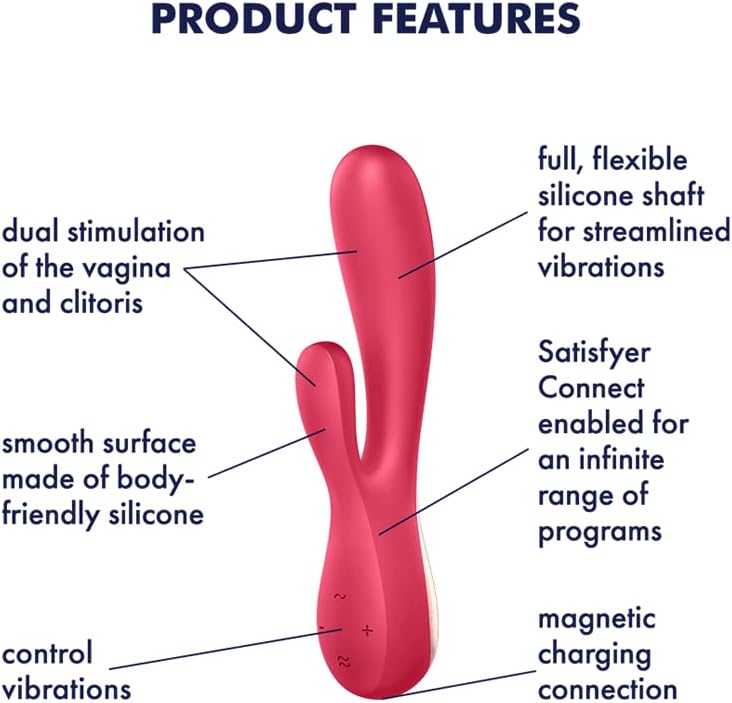
Image: A diagram highlighting key features such as the flexible silicone shaft, dual stimulation, smooth body-friendly silicone, Satisfyer Connect app enablement, and magnetic charging connection.

Image: An overview of the Satisfyer Connect App's capabilities, including remote control, custom vibration patterns, and music synchronization.
4. Setup
4.1 Charging the Device
- Connect the magnetic USB charging cable to the charging contacts on the device.
- Plug the USB end into a suitable USB power source (e.g., computer, USB wall adapter - not included).
- During charging, the indicator light on the device will flash.
- A full charge takes approximately 4 hours. The light will become solid when fully charged.
- A full charge provides approximately 60 minutes of operating time.

Image: The base of the Satisfyer Mono Flex, highlighting the magnetic charging contacts.
4.2 Connecting to the Satisfyer Connect App
- Download the 'Satisfyer Connect' app from the Apple App Store or Google Play Store.
- Ensure Bluetooth is enabled on your smartphone or tablet.
- Press and hold the power button (double wave symbol) on the device for approximately 4 seconds until the indicator light begins to flash. This indicates pairing mode.
- Open the Satisfyer Connect App and follow the on-screen instructions to connect your device.
- Once connected, the app will display the device's battery percentage and allow full control.
Video: A demonstration of the Satisfyer Mono Flex, showcasing its design, features, and how to operate it manually and connect it to the Satisfyer Connect App. This video provides a visual guide to the product's functionality and setup process.
5. Operating Instructions
5.1 Manual Control
- Power On/Off: Press and hold the power button (double wave symbol) for 2 seconds to turn the device on or off.
- Change Vibration Pattern: Once powered on, short press the power button to cycle through the 12 pre-set vibration patterns.
- Adjust Intensity: Use the '+' and '-' buttons to increase or decrease the vibration intensity within each pattern. There are 5 intensity levels.
5.2 App Control
For an expanded range of possibilities, connect your Satisfyer Mono Flex to the Satisfyer Connect App. The app offers:
- Unlimited Patterns: Access a vast library of vibration patterns.
- Custom Creation: Design and save your own unique vibration patterns.
- Remote Control: Allow a partner to control your device from any distance.
- Music Sync: Synchronize vibrations with your favorite music via Spotify.
- Ambient Vibrations: Experience vibrations based on ambient sounds.
5.3 Usage Tips
- Always use a water-based lubricant with the device, especially for internal use, to ensure comfort and protect the silicone material.
- The flexible design allows for versatile positioning. Experiment to find the angles and depths that best suit your anatomy and preferences for both internal and external stimulation.
- For external stimulation, the flexible arm can be positioned against the clitoris, while the main shaft can provide perineum stimulation or be held between the thighs.
6. Maintenance and Cleaning
Proper maintenance ensures the longevity and hygiene of your Satisfyer Mono Flex.
- Clean the device thoroughly before and after each use.
- Wash with warm water and a mild, antibacterial soap or a specialized toy cleaner.
- Rinse the device thoroughly to remove all soap residue.
- Dry the device completely with a lint-free cloth before storing.
- Store in a clean, dry place away from direct sunlight and extreme temperatures.

Image: The waterproof design of the device facilitates easy cleaning.
7. Troubleshooting
- Device not turning on: Ensure the device is fully charged. Connect it to the magnetic USB charging cable and allow it to charge for 4 hours.
- Device not charging: Verify that the magnetic charging cable is correctly attached to the device's contacts and that the USB end is securely plugged into a working power source. Try a different USB port or adapter.
- App connection issues: Make sure the device is in pairing mode (flashing light) and Bluetooth is enabled on your mobile device. Ensure the Satisfyer Connect App is updated to the latest version. Try restarting both the device and the app.
- Vibrations feel weak or inconsistent: The battery might be low. Recharge the device. If the issue persists after a full charge, contact customer support.
- Discomfort during use: Ensure you are using ample water-based lubricant. If discomfort persists, discontinue use and consult a healthcare professional.
8. Specifications
| Model Number | E31139 |
| Dimensions (L x W x H) | 4.72 x 3.15 x 9.84 inches |
| Weight | 5.29 ounces |
| Material | Silicone |
| Color | Red |
| Battery | 1 Lithium Ion battery (included) |
| Waterproof Rating | IPX7 |
| App Compatibility | Satisfyer Connect App (iOS, Android) |
| Connectivity | Bluetooth |
9. Warranty and Support
9.1 Warranty Information
The Satisfyer Mono Flex comes with a 15-year guarantee, ensuring long-lasting satisfaction and product protection. Please refer to the included Guarantee Information for full terms and conditions.

Image: The product is covered by a 15-year warranty.
9.2 Customer Support
For any questions, technical assistance, or warranty claims, please visit the official Satisfyer website or contact their customer service department. Contact details can typically be found in the product packaging or on the brand's website.
10. Important Safety Information
Please adhere to the following safety guidelines to ensure a safe experience:
- This device is intended for adult use only.
- Do not use if the device appears damaged or defective.
- Always use a water-based lubricant. Oil-based lubricants can damage silicone products.
- Clean the device thoroughly before and after each use.
- Discontinue use immediately if you experience any pain, irritation, or discomfort. Consult a physician if symptoms persist.
- Keep out of reach of children.
10.1 Legal Disclaimer
The Bluetooth® word mark and logos are registered trademarks owned by Bluetooth SIG, Inc. and any use of such marks by EIS GmbH is under license. Apple, the Apple logo and Apple Watch are trademarks of Apple Inc., The Android name and the logo are trademarks and property of Google LLC.