
Horizon ANDES 5
Horizon Fitness Andes 5 Elliptical Exercise Machine User Manual
Model: ANDES 5
1. Introduction
Welcome to the user manual for your new Horizon Fitness Andes 5 Elliptical Exercise Machine. This manual provides essential information for the safe assembly, operation, maintenance, and troubleshooting of your elliptical. Please read this manual thoroughly before using the machine to ensure proper function and your safety.
The Horizon Andes 5 elliptical is designed to provide an effective and low-impact cardiovascular workout. Its compact design and one-step folding mechanism make it suitable for various home environments. Key features include an energy-saving mode, integrated handle for folding, device compatibility, performance heart rate monitoring, and a convenient bottle holder.
2. Important Safety Instructions
Before using this equipment, it is imperative to read the entire owner's manual. Failure to do so could result in serious injury or death. Keep this manual for future reference.
- Consult your physician before beginning any exercise program.
- Keep children and pets away from the equipment.
- Place the equipment on a solid, level surface with at least 0.6 meters (2 feet) of clear space around it.
- Inspect the equipment before each use for loose parts or signs of wear. Do not use if damaged.
- Wear appropriate exercise clothing and athletic shoes.
- Do not exceed the maximum user weight of 136 kg (300 lbs).
- Use the equipment only for its intended purpose as described in this manual.
- If you feel faint, dizzy, or experience pain, stop exercising immediately and consult your physician.
3. Assembly & Setup
3.1 Unpacking
Carefully remove all components from the packaging. Place all parts on a clear, level surface. Retain packaging materials until assembly is complete to ensure no parts are discarded.
3.2 Component Identification
Verify that all parts listed in the hardware kit and parts list are present. If any parts are missing, contact customer support.
3.3 Assembly Steps
Follow these steps to assemble your Horizon Andes 5 Elliptical. It is recommended to have two people for assembly.
- Attach the front and rear stabilizers to the main frame using the provided bolts and washers.
- Secure the upright post to the main frame. Ensure all cables are properly routed.
- Connect the console mast to the upright post and attach the console.
- Install the left and right pedal arms and handlebars. Ensure they move freely.
- Attach the pedal platforms to the pedal arms.
- Tighten all bolts and nuts securely. Do not overtighten.
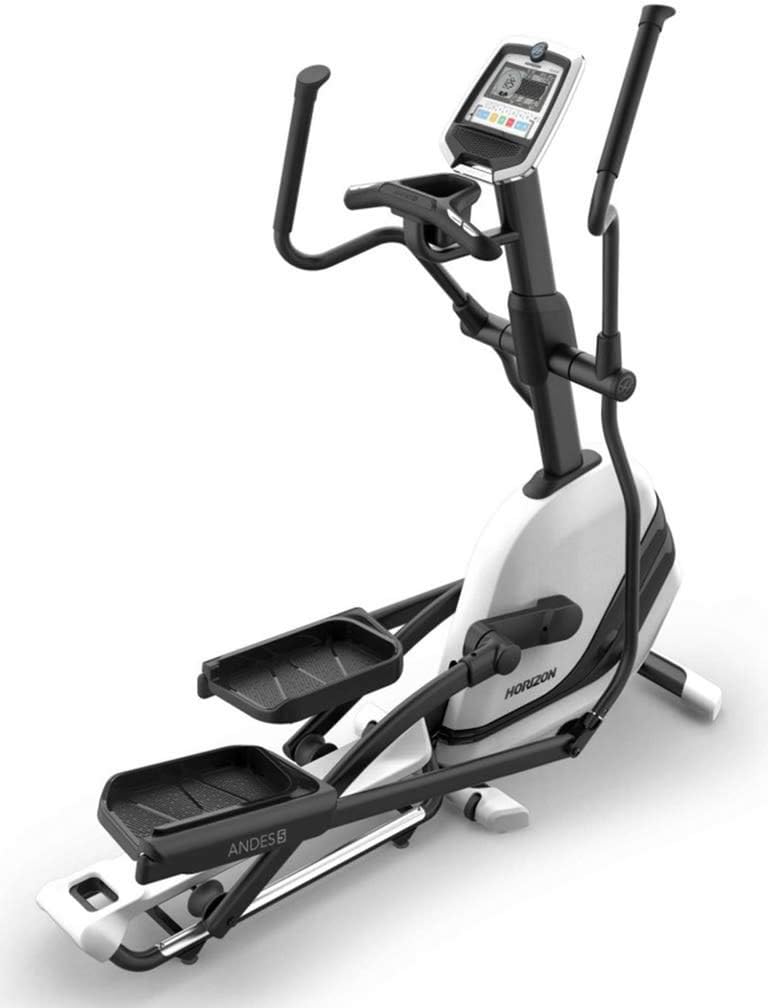
Image: Angled view of the Horizon Andes 5 Elliptical, illustrating its overall structure and key components for assembly reference.
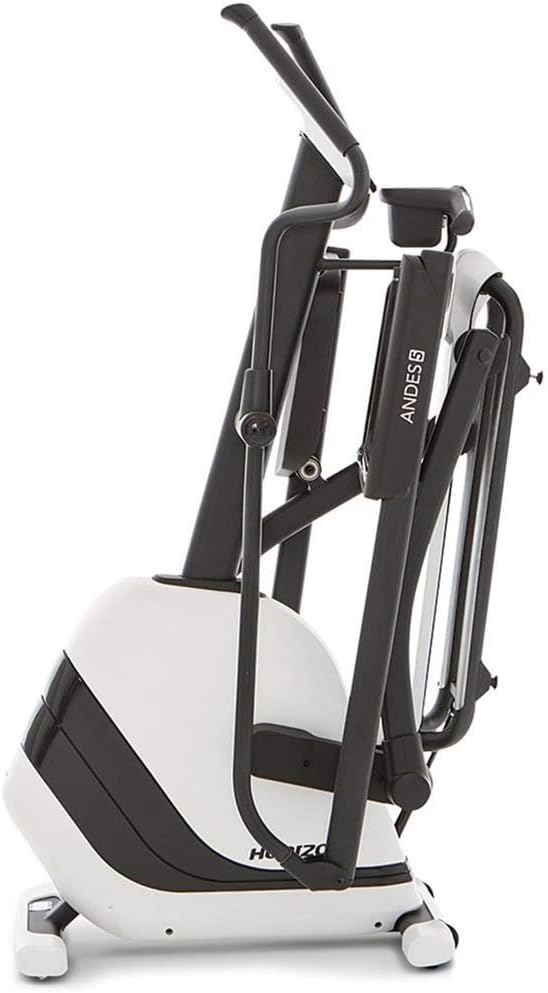
Image: The Horizon Andes 5 Elliptical shown in its folded position, highlighting its space-saving design for storage.
4. Operating Instructions
4.1 Console Overview
The console is your primary interface for controlling the elliptical and monitoring your workout data. It displays time, distance, calories, speed, RPM, resistance, heart rate, watts, and other physical indicators.
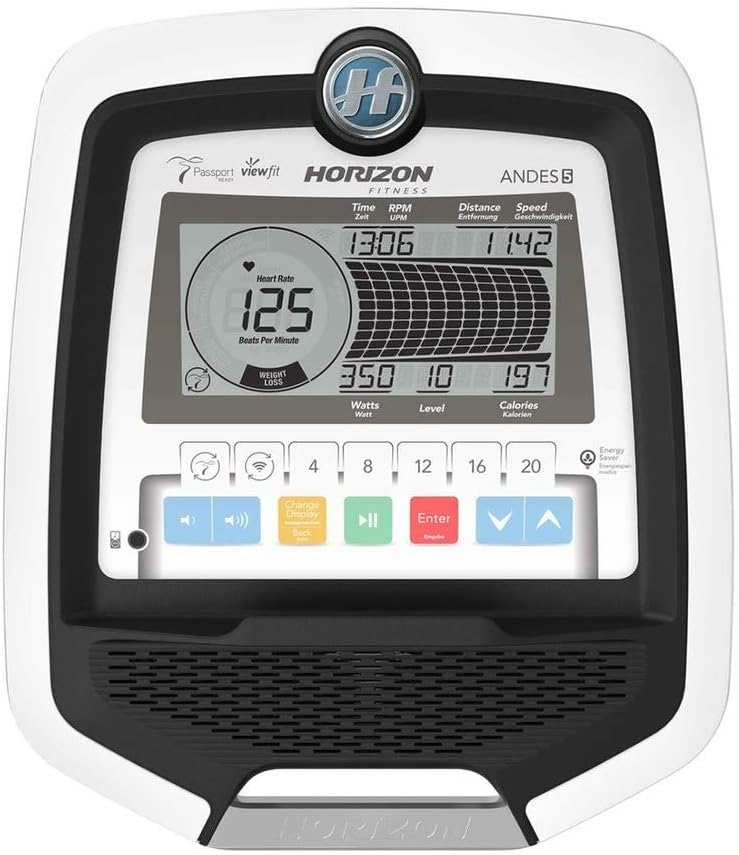
Image: Detailed view of the Horizon Andes 5 console, displaying workout metrics and control buttons for various functions.
4.2 Basic Operation
- Power On: The console will power on automatically when you begin pedaling or press any button.
- Start Workout: Begin pedaling to start a manual workout. The console will track your progress.
- Adjust Resistance: Use the '+' and '-' buttons on the console to increase or decrease the resistance level.
- Stop Workout: Stop pedaling. The console will pause or end the workout after a period of inactivity.
4.3 Workout Programs
Your Andes 5 elliptical comes with various pre-set workout programs designed to help you achieve different fitness goals. Refer to the console manual for detailed instructions on selecting and customizing programs.
4.4 Heart Rate Monitoring
The elliptical features remote heart rate measurement. To use this function, ensure you are wearing a compatible heart rate monitor (sold separately) or use the integrated contact grips on the handlebars. Your heart rate will be displayed on the console, providing clearly organized training feedback.

Image: A user demonstrating the proper posture and movement while exercising on the Horizon Andes 5 Elliptical.
5. Maintenance and Care
Regular maintenance is crucial for the longevity and optimal performance of your Horizon Andes 5 Elliptical.
5.1 Regular Cleaning
- Wipe down the machine after each use with a damp cloth to remove sweat and dust.
- Do not use abrasive cleaners or solvents, as they may damage the finish.
5.2 Lubrication
- Periodically check moving parts for smooth operation. Lubricate pivot points and joints as recommended in the full service manual (if applicable).
5.3 Inspection
- Regularly inspect all bolts and nuts to ensure they are tightened.
- Check for any signs of wear or damage on cables, belts, and other components. Replace worn parts immediately.
6. Troubleshooting Guide
This section addresses common issues you might encounter with your elliptical.
| Problem | Possible Cause | Solution |
|---|---|---|
| Console not powering on | Loose power connection; Batteries dead (if applicable) | Check power adapter connection; Replace batteries. |
| Squeaking or grinding noise | Loose bolts; Lack of lubrication; Worn parts | Tighten all bolts; Lubricate moving parts; Inspect for worn components. |
| Inaccurate heart rate reading | Improper hand placement; Sensor dirty; Incompatible monitor | Ensure firm grip on sensors; Clean sensors; Use compatible heart rate monitor. |
| Resistance not changing | Cable disconnected; Console malfunction | Check cable connections; Contact customer support if issue persists. |
7. Product Specifications
| Specification | Detail |
|---|---|
| Brand | Horizon |
| Model Name | Cross Trainer |
| Item Model Number | ANDES 5 |
| Color | Black |
| Material Type | Aluminum |
| Product Dimensions (L x W x H) | 173 x 67 x 171 cm |
| Item Weight | 81 kg |
| Maximum Weight Recommendation | 136 kg |
| Maximum Stride Length | 18 inches |
| Resistance Mechanism | Magnetic |
| Display Size | 5.5 inches |
| Included Components | 1 x Horizon Andes 5 Elliptical Fitness Trainer |
| First Available Date | September 4, 2020 |
8. Warranty Information
Horizon Fitness products are manufactured with high-quality materials and craftsmanship. For specific warranty details regarding your Andes 5 Elliptical, please refer to the warranty card included with your purchase or visit the official Horizon Fitness website. Keep your proof of purchase for warranty claims.
9. Customer Support
If you have any questions, require assistance with assembly, operation, or maintenance, or need to report a problem, please contact Horizon Fitness customer support. Contact information can typically be found on the Horizon Fitness website or on the product packaging.
Related documentsANDES 5


Ask a question about this manual
Ask about setup, troubleshooting, compatibility, parts, safety, or missing instructions. Manuals+ will review the question and use this page’s manual context to help answer it.