
Introduction
This instruction manual provides detailed guidance for the FERM CDM1141P Industrial 20V Cordless Drill. Designed for professional and intensive daily use, this drill features a powerful four-pole Mabuchi motor, a high-quality Jacobs metal chuck, and NSK bearings, ensuring durability and consistent performance. It includes Samsung batteries for reliable power. Please read this manual carefully before operating the tool to ensure safe and efficient use.
General Safety Instructions
WARNING! Read all safety warnings, instructions, illustrations, and specifications provided with this power tool. Failure to follow all instructions listed below may result in electric shock, fire, and/or serious injury.
- Keep the work area clean and well-lit. Cluttered or dark areas invite accidents.
- Do not operate power tools in explosive atmospheres, such as in the presence of flammable liquids, gases, or dust. Power tools create sparks which may ignite the dust or fumes.
- Keep children and bystanders away while operating a power tool. Distractions can cause you to lose control.
- Always wear eye protection. Use safety glasses, goggles, or a face shield.
- Dress properly. Do not wear loose clothing or jewelry. Keep your hair and clothing away from moving parts.
- Avoid accidental starting. Ensure the switch is in the off-position before connecting to a battery pack, picking up or carrying the tool.
- Do not overreach. Keep proper footing and balance at all times. This enables better control of the power tool in unexpected situations.
- Use the correct power tool for your application. Do not force the tool.
- Disconnect the battery pack from the power tool before making any adjustments, changing accessories, or storing power tools.
- Store idle power tools out of the reach of children and do not allow persons unfamiliar with the power tool or these instructions to operate the power tool.
- Maintain power tools and accessories. Check for misalignment or binding of moving parts, breakage of parts, and any other condition that may affect the power tool’s operation. If damaged, have the power tool repaired before use.
- Use the power tool, accessories, and tool bits in accordance with these instructions, taking into account the working conditions and the work to be performed.
Package Contents
The FERM CDM1141P Industrial 20V Cordless Drill package includes the following items:
- 1 x FERM CDM1141P 20V Cordless Drill/Screwdriver
- 1 x Carrying Case
- 1 x Screw Bit 50 mm (PH3)
- 1 x Flat Screw Bit 4 mm (S2-quality)
- 1 x Flat Screw Bit 6 mm (S2-quality)
- 1 x Fast Charger
- 2 x FI20V 2.0 Ah Li-ion Batteries
Product Features and Components

Figure 1: The FERM CDM1141P Industrial 20V Cordless Drill with an attached 2.0Ah battery, showcasing its compact design and robust build.

Figure 2: Detailed view of the high-quality 1.5-13 mm metal Jacobs chuck and the adjustable torque settings on the drill head.
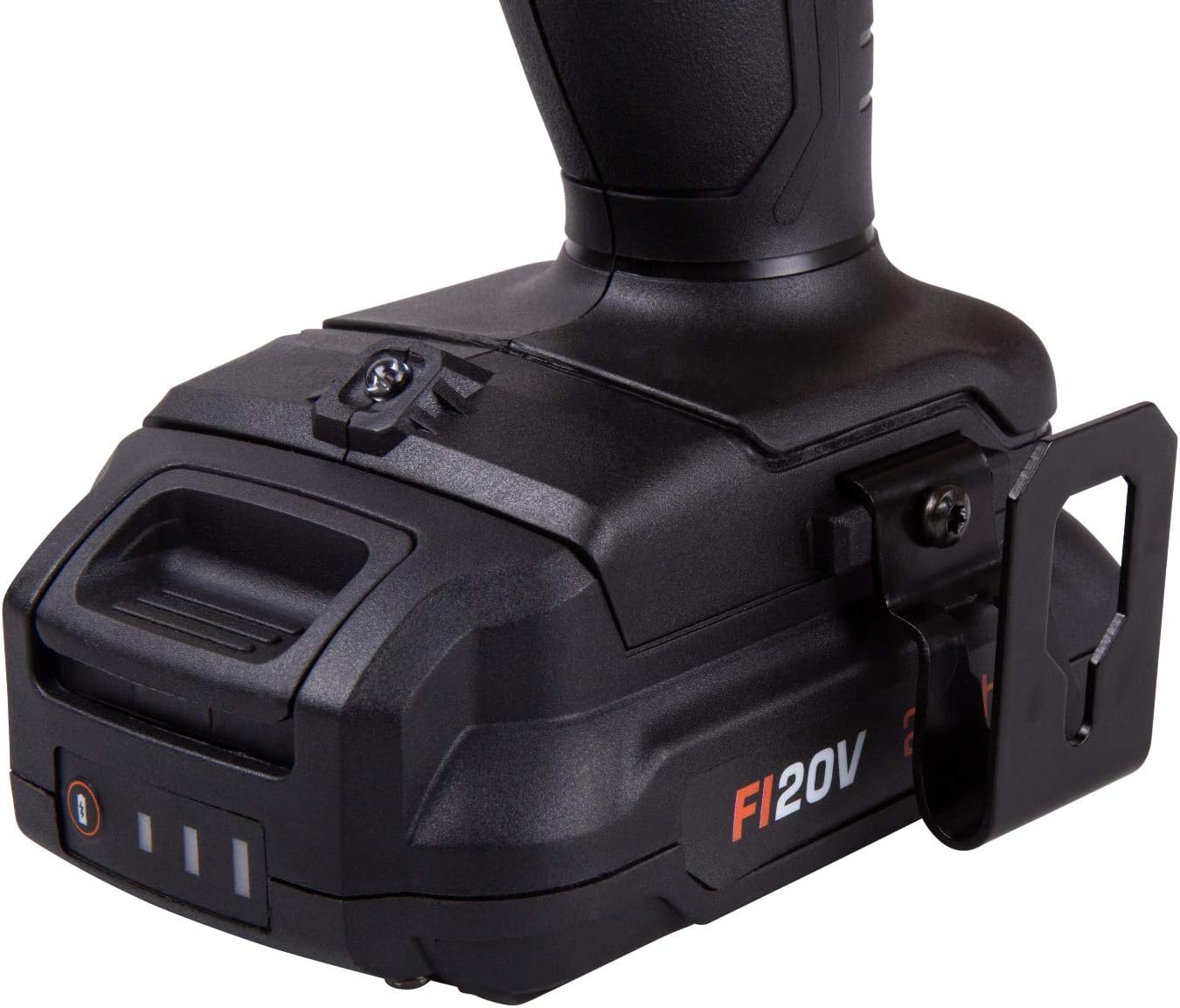
Figure 3: The FI20V 2.0Ah Li-ion battery securely attached to the base of the drill, highlighting the battery release mechanism and power indicator.

Figure 4: The fast charger for FERM FI20V 2.0Ah Li-ion batteries, featuring indicator lights for charging status.

Figure 5: The durable carrying case designed to protect and transport the FERM CDM1141P drill and its accessories.
Key Features:
- Powerful 4-Pole Mabuchi Motor: Provides higher power and more consistent speed compared to 2-pole motors.
- High-Quality Jacobs Metal Chuck: Ensures secure bit retention and durability.
- NSK Bearings: Contributes to the tool's longevity and smooth operation.
- 20V Li-ion Battery System: Part of the FERM Industrial FI20V platform, allowing battery interchangeability with other FI20V tools.
- Two Speed Settings: For optimal control during drilling and screwdriving tasks.
- Adjustable Torque Settings: Prevents overtightening and damage to materials.
Setup
1. Battery Charging
- Connect the fast charger to a suitable power outlet. The charger's indicator light will illuminate.
- Slide the FI20V 2.0 Ah Li-ion battery onto the charger until it clicks into place.
- The charger's indicator light will change to indicate charging is in progress.
- Once fully charged, the indicator light will change again (refer to charger manual for specific light patterns). Disconnect the battery from the charger and unplug the charger from the outlet.
2. Attaching and Removing the Battery
- Attaching: Align the battery with the base of the drill handle. Slide the battery into place until it clicks securely. Ensure it is fully seated.
- Removing: Press the battery release buttons (located on the sides of the battery) and slide the battery off the drill.
3. Installing and Removing Drill Bits/Screwdriver Bits
- Ensure the drill is switched off and the battery is removed for safety.
- Rotate the chuck sleeve counter-clockwise to open the chuck jaws.
- Insert the desired drill bit or screwdriver bit into the chuck, ensuring it is centered.
- Rotate the chuck sleeve clockwise to tighten the jaws firmly around the bit. Hand-tighten only; do not use tools to tighten the chuck.
- To remove, rotate the chuck sleeve counter-clockwise to loosen the jaws and pull the bit out.
Operating Instructions
1. Powering On/Off
- To turn on the drill, press the trigger switch. The drill speed is variable depending on how far the trigger is pressed.
- To turn off the drill, release the trigger switch.
2. Forward/Reverse Rotation
- The forward/reverse selector switch is located above the trigger.
- Push the switch to the left for forward rotation (for drilling and tightening screws).
- Push the switch to the right for reverse rotation (for loosening screws).
- When the switch is in the center position, the trigger is locked, preventing accidental starting.
3. Speed Selection
- The drill has two mechanical speed settings, selected via a switch on top of the drill body.
- Position 1 (Low Speed): For high torque applications like driving large screws or drilling large holes in wood.
- Position 2 (High Speed): For faster drilling in softer materials or smaller holes.
- Always change speed settings when the drill is stopped to prevent gear damage.
4. Torque Adjustment
- The torque adjustment ring is located behind the chuck. Rotate it to select the desired torque setting.
- Lower numbers indicate lower torque for small screws or soft materials.
- Higher numbers indicate higher torque for larger screws or harder materials.
- The drill icon setting is for drilling applications, providing maximum torque without clutch engagement.
5. Drilling and Screwdriving Tips
- Always secure your workpiece in a vise or with clamps.
- Apply steady, even pressure. Do not force the drill.
- For drilling, start with a slow speed to create a pilot hole, then increase speed as needed.
- For screwdriving, select an appropriate torque setting to avoid stripping screw heads or damaging the workpiece.
Maintenance
1. Cleaning
- Always disconnect the battery before cleaning.
- Regularly clean the ventilation slots on the drill to prevent overheating. Use a soft brush or compressed air.
- Wipe the tool housing with a soft, damp cloth. Do not use harsh chemicals or abrasive cleaners.
- Keep the chuck jaws clean and free of debris to ensure proper bit gripping.
2. Storage
- Store the drill and batteries in a cool, dry place, away from direct sunlight and moisture.
- Ensure the battery is removed from the drill before storage.
- Store batteries partially charged (around 50%) if storing for extended periods to prolong battery life.
- Use the provided carrying case for organized and protected storage.
Troubleshooting
If you encounter issues with your FERM CDM1141P drill, refer to the table below for common problems and solutions.
| Problem | Possible Cause | Solution |
|---|---|---|
| Drill does not start. | Battery not charged or improperly inserted. Forward/reverse switch in center (locked) position. | Charge battery. Ensure battery is fully inserted. Move forward/reverse switch to forward or reverse. |
| Loss of power during operation. | Battery charge is low. Overload protection activated. | Recharge battery. Reduce pressure on the tool; allow it to cool down. |
| Bit slips in chuck. | Chuck not tightened sufficiently. Bit shank is dirty or damaged. | Ensure chuck is hand-tightened firmly. Clean or replace the bit. |
| Drill overheats. | Blocked ventilation slots. Continuous heavy use. | Clean ventilation slots. Allow the tool to cool down; reduce workload. |
Specifications
| Specification | Value |
|---|---|
| Model Number | CDM1141P |
| Brand | FERM |
| Power Source | Battery-powered |
| Voltage | 20 Volt |
| Amperage | 2 Ampere |
| Max Chuck Size | 13 Millimeter |
| Max Torque | 36.88 Inch-pounds / 36.88 Foot Pounds |
| Number of Speeds | 2 |
| Drill Capacity (Wood) | 15 Millimeter |
| Drill Capacity (Metal) | 13 Millimeter |
| Material | Metal |
| Special Features | Four-pole motor |
| Item Weight | 4.2 Kilograms |
| Country of Origin | China |
Warranty and Support
FERM Industrial products are manufactured to high-quality standards and are guaranteed against defects in materials and workmanship. For specific warranty terms and conditions, please refer to the warranty card included with your product or visit the official FERM website. For technical support, spare parts, or service inquiries, please contact your local FERM dealer or authorized service center. Always provide the model number (CDM1141P) and serial number (if applicable) when contacting support.
For further assistance, please visit: www.ferm.com