
Brookstone BKS800
Brookstone Big Blue Go Party Speaker User Manual
Brand: Brookstone | Model: BKS800
Product Overview
The Brookstone Big Blue Go Party Speaker is a high-powered, portable Bluetooth speaker designed for both indoor and outdoor use. Featuring 60-watt RMS drivers for incredible sound and extreme bass, it includes a mixed-color LED light show with three selectable modes (Chill, Mood, Party). Its IPX5 waterproof rating makes it suitable for poolside or beach use. The speaker offers easy linking for endless stereo sound, a built-in mic input for karaoke, and a convenient wireless charging pad for smartphones. With a durable design and long battery life, it's built to deliver powerful audio and vibrant visuals for any gathering.

Front view of the Brookstone Big Blue Go Party Speaker, showcasing its dual speakers and vibrant LED lighting.
What's in the Box
- Brookstone Big Blue Go Party Speaker
- Charging Cable
- Auxiliary Cable
- User Manual
Setup
Initial Charging
Before first use, fully charge your speaker for approximately 15 hours. The battery life is up to 20 hours depending on usage.
Powering On/Off
To power on the speaker, press and hold the central button on the front panel until the lights activate and you hear an audible prompt. To power off, press and hold the same button.
Placement
The speaker can be placed vertically or horizontally. Both orientations feature strong rubber grips on the sides to ensure stability and prevent slipping.

The speaker is designed for versatile placement, featuring rubber grips for stability in both vertical and horizontal positions.
Operating Instructions
Bluetooth Pairing
Press the Bluetooth button on the top panel to enter pairing mode. The speaker will announce "Connected" once successfully paired with your device. It quickly recognizes previously paired devices.
LED Light Show
The speaker features a mixed-color LED light show with three selectable modes: Chill, Mood, and Party. Press the light bulb button on the top panel to cycle through the modes. The Party mode synchronizes with the rhythm of your music.

The speaker's LED lights offer various modes to enhance your listening experience.
Audio Controls
Adjust volume using the '+' and '-' buttons on the top panel. Fine-tune your audio experience with dedicated knobs on the back for Bass, Treble, Mic volume, and Echo effects.

The speaker delivers serious hi-res sound with 60W of power, dual 5.25" subwoofers, dual 2" tweeters, and dual 5x7" passive radiators.
Microphone Input
Connect a microphone to the dedicated mic input on the back panel for karaoke or public speaking. Adjust mic volume and echo using the corresponding knobs.

Enjoy karaoke nights by connecting a microphone to the speaker.
Wireless Charging Pad
Place your Qi-compatible smartphone on the integrated wireless charging pad located on the top of the speaker to charge your device while enjoying music.

The speaker features a convenient wireless charging pad for your smartphone.
Linking Multiple Speakers
Connect endless amounts of Brookstone Big Blue GO Speakers for intense sound quality and volume. Simply press the link button on both speakers to create a right and left channel for a true wireless stereo experience.
Official Product Video
Watch the official product video for a comprehensive overview of the Brookstone Big Blue Go Party Speaker's features and capabilities.
Maintenance
Water Resistance
The speaker is IPX5 waterproof, meaning it is resistant to water splashes. This makes it suitable for outdoor use near pools or at the beach. However, it should not be submerged in water.
Cleaning
Wipe the speaker with a soft, damp cloth. Do not use harsh chemicals or abrasive cleaners.
Troubleshooting
No Power/Not Turning On
- Ensure the speaker is fully charged.
- Press and hold the power button for several seconds.
Bluetooth Pairing Issues
- Ensure Bluetooth is enabled on your device and the speaker is in pairing mode.
- Move your device closer to the speaker.
- Forget the speaker from your device's Bluetooth list and try pairing again.
Sound Distortion
- Reduce the volume on both the speaker and your connected device.
- Adjust the Bass and Treble controls on the back of the speaker.
Resetting the Speaker
If you experience persistent issues, locate the reset button on the back panel (often a small pinhole) and use a thin object (like a paperclip) to press it. This will restore factory settings.
Specifications
| Feature | Detail |
|---|---|
| Brand | Brookstone |
| Model Name | Big Blue High Power |
| Model Number | BKS800 |
| Speaker Type | Bluetooth |
| Special Feature | Multiroom, Stereo pairing |
| Connectivity Technology | Bluetooth |
| Wireless Communication Technology | Bluetooth |
| Speaker Maximum Output Power | 100 Watts |
| RMS Power | 60 Watts |
| Battery Life | 20 Hours |
| Charging Time | 15 Hours |
| Water Resistance Level | IPX5 (Waterproof) |
| Product Dimensions | 10"D x 10"W x 15"H |
| Item Weight | 6 Pounds |
| Material | Metal |
| Color | Black |
| UPC | 680079459093 |
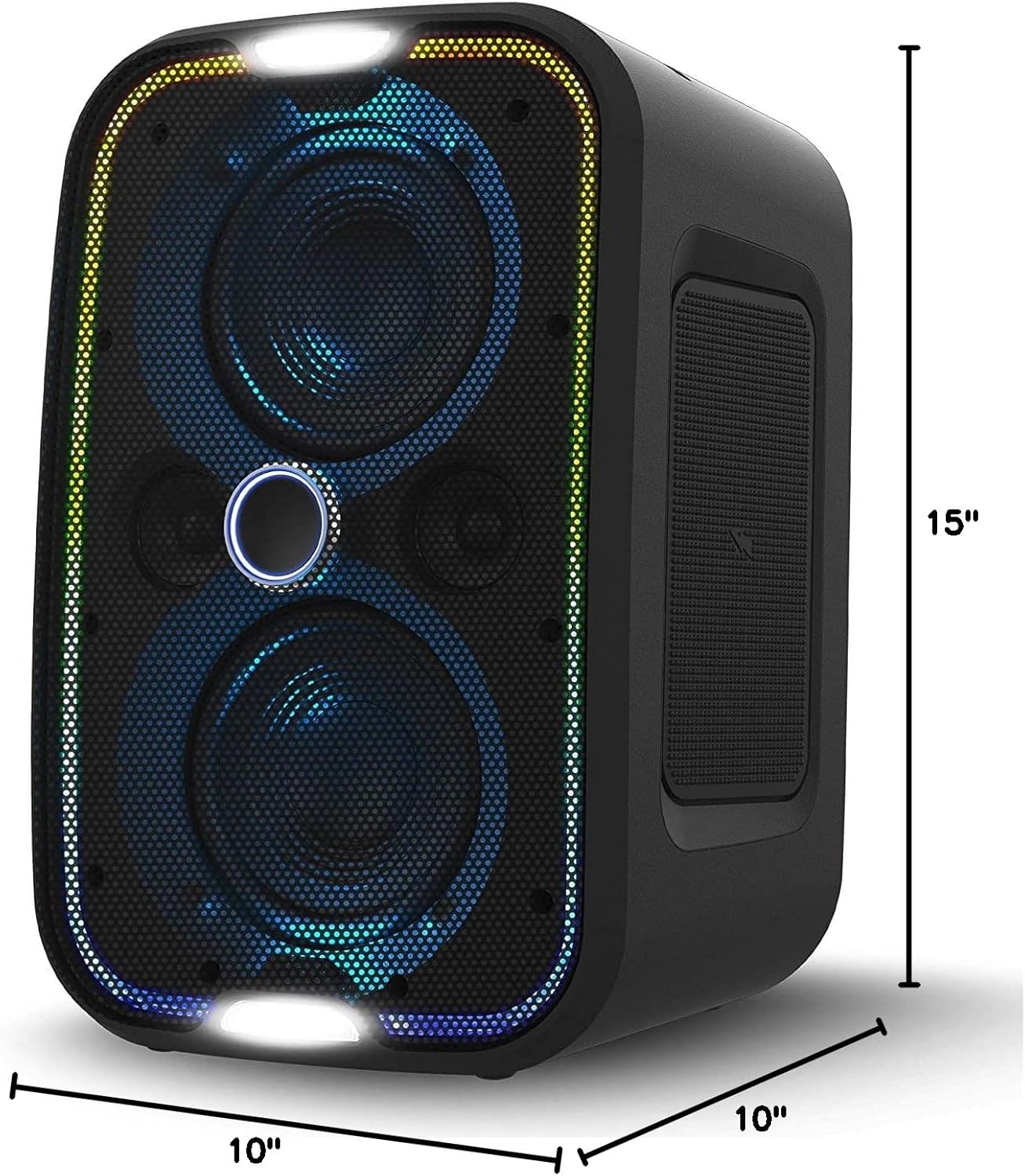
Detailed dimensions of the speaker.
Warranty and Support
For warranty information and customer support, please refer to the documentation included with your product or visit the official Brookstone website. Keep your proof of purchase for any warranty claims.
Ask a question about this manual
Ask about setup, troubleshooting, compatibility, parts, safety, or missing instructions. Manuals+ will review the question and use this page’s manual context to help answer it.