
Introduction
This manual provides essential information for the safe and effective operation, maintenance, and troubleshooting of your FERM Industrial Cordless Hammer Drill FI20V. Please read this manual thoroughly before using the tool and retain it for future reference. Understanding these instructions will help ensure optimal performance and extend the lifespan of your device.
General Safety Instructions
Always observe basic safety precautions when using power tools to reduce the risk of fire, electric shock, and personal injury.
- Read the entire manual: Familiarize yourself with the controls and proper use of the tool.
- Wear appropriate personal protective equipment (PPE): Always wear safety glasses, hearing protection, and suitable gloves.
- Keep work area clean and well-lit: Cluttered or dark areas invite accidents.
- Secure the workpiece: Use clamps or a vise to hold the workpiece stable.
- Avoid hazardous environments: Do not use power tools in damp or wet locations, or in the presence of flammable liquids or gases.
- Stay alert: Pay attention to what you are doing and use common sense. Do not operate the tool when tired or under the influence of drugs, alcohol, or medication.
- Store idle tools: When not in use, tools should be stored in a dry, high, or locked-up place, out of reach of children.
- Maintain tools with care: Keep cutting tools sharp and clean for better and safer performance. Follow instructions for lubricating and changing accessories.
- Check for damaged parts: Before further use of the tool, a guard or other part that is damaged should be carefully checked to determine that it will operate properly and perform its intended function.
Product Overview
The FERM Industrial Cordless Hammer Drill FI20V is a versatile 3-in-1 tool designed for impact drilling, standard drilling, and screwing applications. It features a powerful 4-pole 20V Mabuchi motor and a high-quality 1.5-13mm Jacobs metal chuck for reliable performance.
Components Included
- 1 x FERM Industrial Cordless Hammer Drill (FI20V)
- 2 x 20V 2.0Ah Li-ion Batteries
- 1 x Fast Charger
- 1 x Storage Case
- 2 x Screw Bits
Visual Components

Figure 1: The FERM Industrial Cordless Hammer Drill FI20V, shown with one 20V 2.0Ah Li-ion battery attached and another battery beside it. This image displays the overall design of the drill, including the chuck, speed selector, and handle.

Figure 2: A closer view of the FERM Industrial Cordless Hammer Drill FI20V, demonstrating a drill bit securely inserted into the Jacobs metal chuck. This angle highlights the ergonomic grip and the mode selector ring.
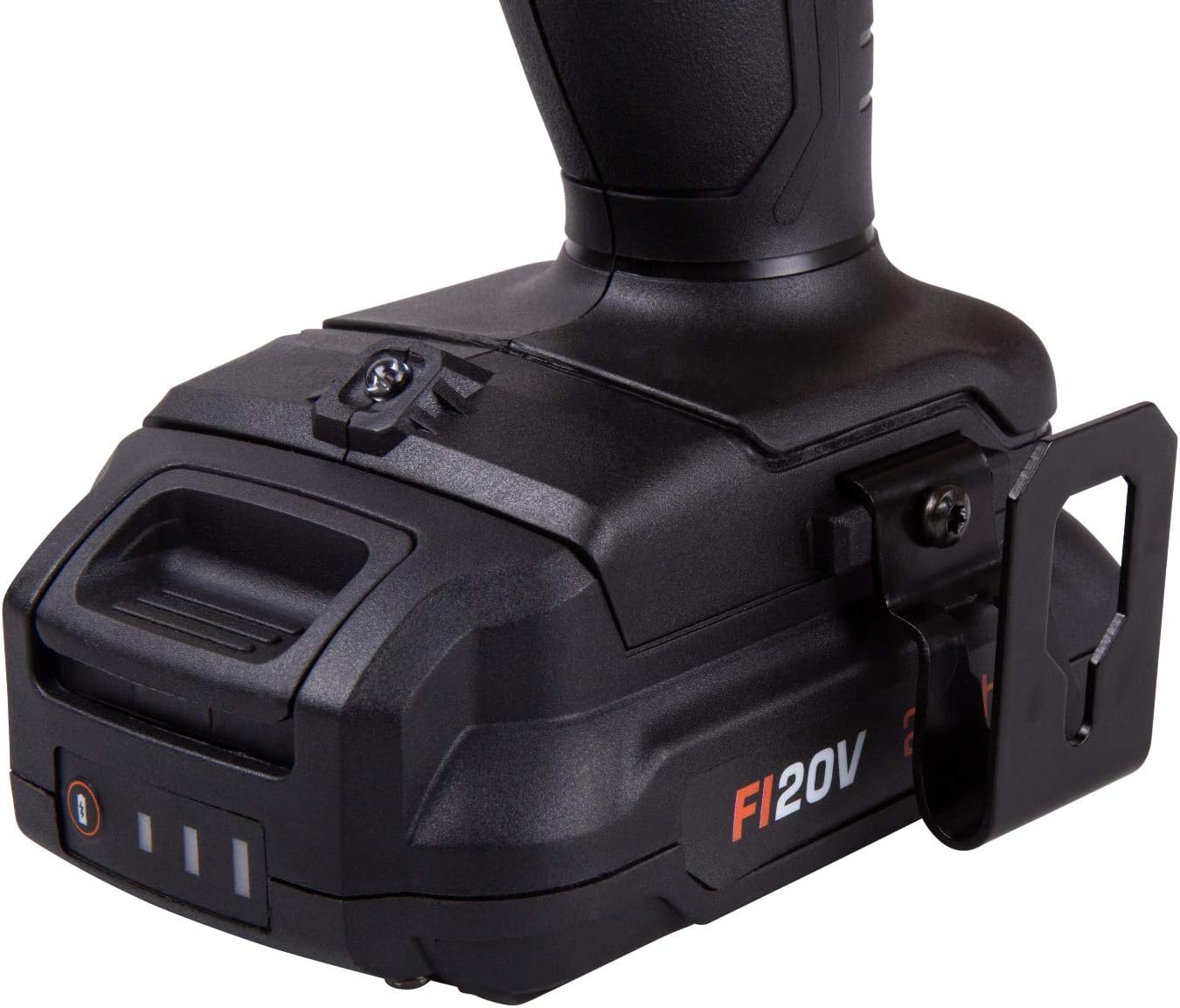
Figure 3: Detailed view of the base of the FERM FI20V drill, showing the battery connection point and an attached belt clip for convenient carrying during work.

Figure 4: The fast charger included with the FERM Industrial Cordless Hammer Drill FI20V, designed for efficient recharging of the 20V Li-ion batteries. Indicator lights are visible on the front.

Figure 5: The durable storage case provided for the FERM Industrial Cordless Hammer Drill FI20V, offering protection and organized transport for the tool and its accessories.
Setup
1. Charging the Battery
- Connect the fast charger to a suitable power outlet.
- Slide the 20V Li-ion battery into the charger until it clicks into place.
- The charging indicator light on the charger will illuminate, typically red for charging and green for fully charged.
- Allow the battery to charge completely before first use. Charging time may vary.
- Once charged, disconnect the charger from the power outlet and remove the battery.
Note: It is recommended to fully charge new batteries before their initial use to ensure optimal performance and battery life.
2. Installing/Removing the Battery
- To Install: Align the battery with the base of the drill handle and slide it in until it clicks securely into place. Ensure it is firmly seated.
- To Remove: Press the battery release button (usually located on the sides of the battery pack) and slide the battery out of the drill handle.
3. Installing/Removing Drill Bits or Screwdriver Bits
- Ensure the drill is switched off and the forward/reverse switch is in the center (locked) position to prevent accidental starting.
- Rotate the chuck sleeve counter-clockwise to open the chuck jaws.
- Insert the drill bit or screwdriver bit into the chuck, ensuring it is centered.
- Rotate the chuck sleeve clockwise to tighten the chuck jaws firmly around the bit. Hand-tighten securely.
- To Remove: Rotate the chuck sleeve counter-clockwise to loosen the jaws and pull the bit out.
Operating Instructions
1. Forward/Reverse Rotation
The forward/reverse switch (typically located above the trigger) controls the direction of rotation. Push it to the left for forward rotation (drilling/screwing in) and to the right for reverse rotation (removing screws). When the switch is in the center position, the trigger is locked, preventing accidental operation.
2. Speed Control
- Variable Speed Trigger: The trigger allows for variable speed control. Pressing the trigger lightly results in lower speeds, while pressing it fully increases the speed.
- Gear Selector: A gear selector switch (usually on top of the drill) allows you to choose between two speed ranges:
- Gear 1 (Low Speed): For high torque applications like driving large screws or drilling large holes.
- Gear 2 (High Speed): For faster drilling in softer materials or smaller holes.
3. Torque Settings (Clutch)
The torque adjustment ring (located behind the chuck) allows you to set the desired torque for screwing applications. Higher numbers indicate higher torque. When the set torque is reached, the clutch will disengage, preventing overtightening or stripping of screws. For drilling, set the ring to the drill symbol for maximum torque.
4. Mode Selection (Drilling, Hammer Drilling, Screwing)
The FERM FI20V offers three operating modes, selected via a ring behind the torque adjustment:
- Screwing Mode (⚙ symbol): Engages the clutch for controlled screw driving. Use with appropriate torque settings.
- Drilling Mode (★ symbol): Provides continuous rotation without clutch engagement or hammer action. Ideal for drilling into wood, metal, or plastics.
- Hammer Drilling Mode (⚒ symbol): Combines rotation with a hammering action. Essential for drilling into masonry, concrete, or brick. Use appropriate masonry drill bits.
5. General Operation Tips
- Always hold the drill firmly with both hands, especially during hammer drilling.
- Apply steady, even pressure. Do not force the drill.
- For drilling, start with a slow speed to create a pilot hole, then increase speed as needed.
- When drilling metal, use cutting oil to prolong bit life and improve cutting efficiency.
- Periodically clear debris from the work area to maintain visibility and prevent overheating.
Maintenance
Regular maintenance ensures the longevity and safe operation of your FERM Industrial Cordless Hammer Drill.
1. Cleaning
- Always disconnect the battery before cleaning.
- Wipe the tool's exterior with a soft, damp cloth. Do not use harsh chemicals or abrasive cleaners.
- Use compressed air to clear dust and debris from ventilation openings and the chuck area.
2. Battery Care
- Store batteries in a cool, dry place away from direct sunlight and extreme temperatures.
- Do not store fully discharged batteries for extended periods. Charge them periodically if not in use.
- Avoid dropping or physically damaging the battery packs.
3. Storage
Store the drill, batteries, and charger in the provided storage case in a dry, secure location, out of reach of children. Ensure the battery is removed from the drill before storage.
Troubleshooting
| Problem | Possible Cause | Solution |
|---|---|---|
| Drill does not start. | Battery not charged or improperly installed. Forward/reverse switch in center (locked) position. | Charge battery fully and ensure it is securely installed. Move forward/reverse switch to desired operating position. |
| Reduced power or performance. | Battery charge is low. Incorrect mode or torque setting for the task. | Recharge the battery. Adjust mode and torque settings according to the material and task. |
| Battery not charging. | Charger not plugged in. Faulty battery or charger. | Ensure charger is securely plugged into a working outlet. Contact FERM customer support if the issue persists. |
| Chuck not holding bit securely. | Chuck not tightened sufficiently. Bit shank is dirty or damaged. | Ensure the chuck is hand-tightened firmly. Clean or replace the drill bit. |
Specifications
| Model Number: | FI20V (CDM1147P) |
| Brand: | FERM |
| Voltage: | 20 Volt |
| Motor Type: | 4-pole Mabuchi Motor |
| Max Torque: | 50 Nm |
| Chuck Size: | 1.5 - 13 mm (Jacobs metal chuck) |
| Battery Type: | Lithium-ion |
| Battery Capacity: | 2.0 Ah (x2 included) |
| Weight (Tool only): | 1.24 Kilogram |
| Product Dimensions: | 42 x 12 x 33 cm (packaging/case dimensions) |
| Special Features: | 3-in-1 functionality (drilling, hammer drilling, screwing) |
Warranty and Support
For warranty information, technical support, or service inquiries regarding your FERM Industrial Cordless Hammer Drill FI20V, please refer to the warranty card included with your product or visit the official FERM website. Ensure you have your model number (FI20V / CDM1147P) and proof of purchase available when contacting support.
Manufacturer: FERM


