1. Introduction
Thank you for choosing the Fafeicy DPS3010U Variable DC Power Supply. This device is designed to provide a stable and adjustable DC power source for various applications, including mobile phone repair, computer repair, electrical maintenance, laboratory research, and production lines. It features adjustable voltage and current, a clear 4-digit display, and a convenient USB fast charging port. Please read this manual thoroughly before operation to ensure safe and efficient use.
2. Safety Instructions
- Always connect the power supply to a grounded outlet.
- Ensure the input voltage switch on the rear panel matches your local power supply (230V or 115V). Incorrect setting can cause severe damage.
- Do not operate the device in wet or damp conditions.
- Avoid blocking ventilation openings to prevent overheating.
- Do not open the casing; there are no user-serviceable parts inside. Refer all servicing to qualified personnel.
- Disconnect power before making any connections or disconnections to the output terminals.
- Be aware of high voltage and current. Improper use can lead to electric shock or damage to connected equipment.
- In case of smoke, unusual odors, or abnormal operation, immediately turn off the power supply and disconnect it from the mains.
3. Product Overview
The Fafeicy DPS3010U features a user-friendly interface with clear digital displays and intuitive controls.
Front Panel

Image: Front panel of the DPS3010U. This view highlights the digital displays for voltage (V), current (A), and power (W), as well as the coarse and fine adjustment knobs for voltage and current. The USB fast charging port and output terminals are also visible.
- Digital Displays: 4-digit white light display for Voltage (V), Current (A), and Power (W).
- V-COARSE / V-FINE: Knobs for coarse and fine adjustment of output voltage.
- A-COARSE / A-FINE: Knobs for coarse and fine adjustment of output current.
- Quick Charge USB Port: Supports multiple fast charging protocols.
- Output Terminals: Red (+) and Black (-) terminals for connecting the load. Green terminal for ground.
- ON/OFF Switch: Main power switch for the unit.
- CV/CC Indicators: Lights indicating Constant Voltage (CV) or Constant Current (CC) mode.
- OCP Indicator: Light indicating Over Current Protection is active.
Rear Panel

Image: Rear panel of the DPS3010U. This view shows the AC power input socket, the red voltage selector switch (230V/115V), and the cooling fan grille.
- AC Power Input Socket: For connecting the provided power cord.
- Voltage Selector Switch: Red switch to select between 230V and 115V input voltage. Ensure this is set correctly before connecting to mains power.
- Cooling Fan: Provides necessary ventilation to prevent overheating.
4. Setup
- Unpacking: Carefully remove the power supply and all accessories from the packaging. Verify that all components listed in the package list are present: 1 x DC Power Supply, 1 x Power Cord, 1 x Clip Cable.
- Input Voltage Selection: Locate the red voltage selector switch on the rear panel. Set it to either "230V" or "115V" according to your local mains power supply. Failure to set this correctly can damage the unit.
- Power Connection: Connect the provided AC power cord to the AC power input socket on the rear panel of the power supply, then plug the other end into a suitable grounded wall outlet.
- Initial Power On: Turn the ON/OFF switch on the front panel to the "ON" position. The digital displays should illuminate.
- Pre-Operation Check: Before connecting any load, ensure the voltage and current adjustment knobs are set to their minimum positions (fully counter-clockwise) to prevent accidental over-voltage or over-current to your device.
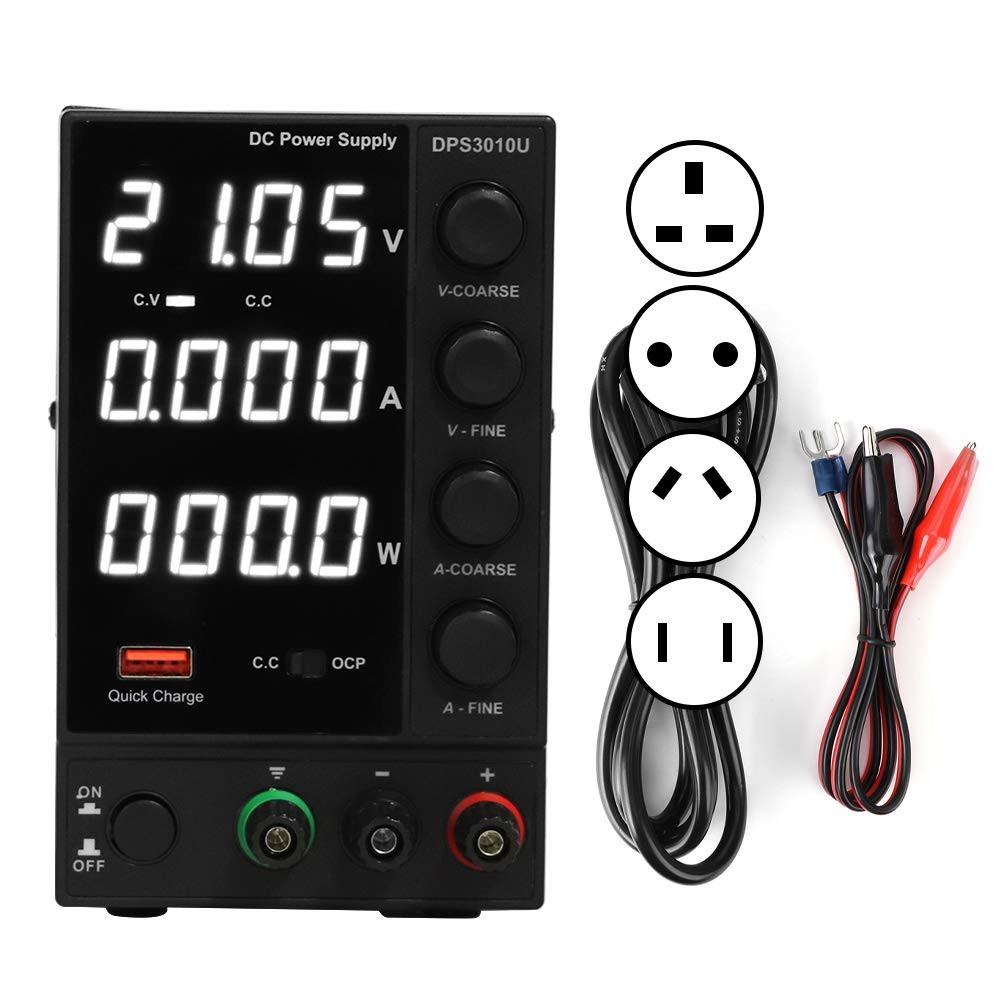
Image: Front and rear view of the DPS3010U. This image provides a comprehensive look at the device, showing both the operational controls on the front and the power input and voltage selection on the back.

Image: Included accessories: power cord and clip cables. These are essential for connecting the power supply to the mains and to your target device.
5. Operating Instructions
5.1 Adjusting Voltage and Current
- Connect Load: Connect your device to the output terminals using the provided clip cable or other suitable cables. Ensure correct polarity (Red to positive, Black to negative).
- Set Voltage: Use the V-COARSE knob for large voltage adjustments and the V-FINE knob for precise adjustments. Turn clockwise to increase voltage, counter-clockwise to decrease. Observe the voltage display.
- Set Current Limit: The current adjustment knobs (A-COARSE and A-FINE) set the maximum current the power supply will deliver. To set a current limit, short the output terminals (briefly connect Red to Black) and then adjust the current knobs to the desired limit. The CC indicator will light up. Remove the short circuit. Alternatively, you can set the current limit while the load is connected, ensuring the voltage is set first.
- Power On Load: Once voltage and current limits are set, you can power on your connected device. The power supply will operate in Constant Voltage (CV) mode if the load draws less than the set current limit, or in Constant Current (CC) mode if the load attempts to draw more than the set current limit.

Image: The DPS3010U in use during an electronic repair task. This illustrates a typical application for the power supply, providing power to a circuit board.
5.2 USB Fast Charging
The integrated USB fast charging port supports various fast charging protocols. Simply connect your USB-compatible device to this port for quick charging. This function operates independently of the main DC output settings.
5.3 Protection Features
- Over Voltage Protection (OVP): Automatically shuts down output if voltage exceeds a safe limit.
- Over Current Protection (OCP): Limits output current to the set value. The OCP indicator will light up.
- Over Temperature Protection: Protects the unit from damage due to excessive internal temperature.
- Short Circuit Alarm: Stops output and triggers an alarm in case of a short circuit, with self-recovery once the short is removed.
6. Specifications
| Parameter | Value |
|---|---|
| Model | DPS3010U |
| Output Power | 300W |
| Output Voltage | 0 ~ 30V (Continuously Adjustable) |
| Output Current | 0 ~ 10A (Continuously Adjustable) |
| Input Voltage | AC230V/115V ± 10%; 50Hz/60Hz (Selectable) |
| Operating Temperature | 0 °C ~ 40 °C |
| Relative Humidity | <80% RH |
| Storage Temperature | -10 °C ~ 70 °C |
| Voltage Stability (CV) | 0.1% ± 3mV |
| Load Stability (CV) | 0.2% ± 3mV |
| Ripple Voltage (CV) | ≤0.5% Vp-p |
| Current Stability (CC) | 0.1% ± 3mA |
| Load Stability (CC) | 0.2% ± 3mA |
| Ripple Current (CC) | ≤0.5% Vp-p |
| Recovery Time | ≤500μS |
| Temperature Coefficient | ≤100ppm/°C |
| Display Accuracy | 0.5% ± 3 digits |
| Display Resolution | Voltage 0.01V, Current 0.001A |
| Auxiliary Function | USB Fast Charging (supports multiple protocols) |
| Material | Aluminum Alloy |
| Weight | Approx. 1759 Grams |
7. Maintenance
- Cleaning: Disconnect the power supply from the mains before cleaning. Use a soft, dry cloth to wipe the exterior. Do not use abrasive cleaners or solvents.
- Ventilation: Ensure the ventilation openings on the sides and rear of the unit are kept clear of dust and obstructions to maintain proper airflow.
- Storage: When not in use for extended periods, store the power supply in a cool, dry place, away from direct sunlight and extreme temperatures.
- No User Serviceable Parts: Do not attempt to open or repair the unit yourself. This will void the warranty and may expose you to dangerous voltages.
8. Troubleshooting
| Problem | Possible Cause | Solution |
|---|---|---|
| No power when switched on | Power cord not connected, wall outlet faulty, rear voltage switch incorrect, internal fuse blown. | Check power cord connection. Test wall outlet. Verify rear voltage switch setting (230V/115V). If fuse is suspected, contact support. |
| No output voltage/current | Output terminals not connected, voltage/current knobs set to zero, protection activated (OCP/OVP). | Ensure load is properly connected. Adjust voltage/current knobs. Check if OCP/OVP indicators are lit; reduce load or adjust settings. |
| OCP indicator is lit | Load is drawing more current than the set limit. | Increase the current limit using the A-COARSE/A-FINE knobs, or reduce the load on the connected device. |
| Unit overheats | Blocked ventilation, prolonged high load operation. | Ensure ventilation openings are clear. Reduce load or allow unit to cool down. |
| USB fast charging not working | Device not compatible with fast charging protocols, faulty USB cable. | Try a different USB device or cable. Ensure the device supports fast charging. |
9. Warranty and Support
This Fafeicy product is typically covered by a 30-day refund/replacement policy from the date of purchase. For specific warranty terms and conditions, please refer to your purchase documentation or contact your retailer.
For technical support, troubleshooting assistance, or inquiries regarding your product, please contact the seller or Fafeicy customer service through the official channels provided at the time of purchase. When contacting support, please have your model number (DPS3010U) and purchase details ready.
You can visit the Fafeicy Store on Amazon for more information and contact options.


