
1. Important Safety Information
Please read all instructions carefully before assembly and use. Retain this manual for future reference.
- Weight Limit: Do not use the chair if your weight exceeds the maximum recommended capacity of 100 kg (220 lbs). Exceeding this limit can cause damage to the chair and potential injury.
- Assembly: Ensure all components are correctly and securely assembled according to the instructions to maintain stability and prevent accidents.
- Stability: Always sit properly in the chair. Avoid standing on the chair or using it as a step stool.
- Children: Keep children away from the assembly area. Small parts can be a choking hazard.
- Maintenance: Regularly check all screws and connections to ensure they remain tight. Tighten if necessary.
2. Package Contents
Before beginning assembly, verify that all parts are present and undamaged. If any parts are missing or damaged, do not proceed with assembly and contact customer support.
- Office Chair Components (Seat, Backrest, Armrests, Base, Gas Lift, Wheels)
- Assembly Hardware (Screws, Washers, Allen Key)
- Assembly Instructions (This Manual)
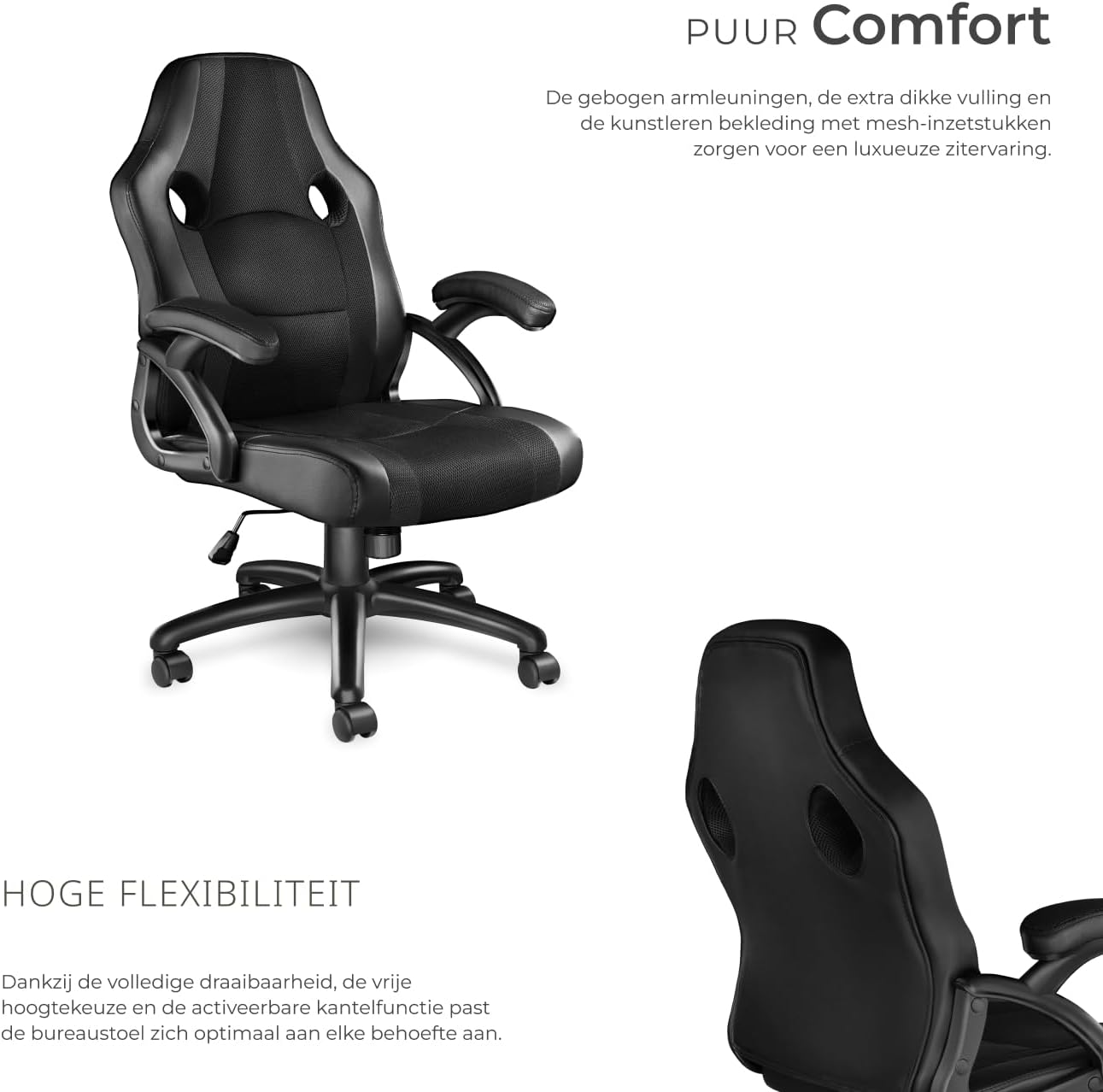
Image 2.1: Overview of chair features and components. This image highlights the extra padding, ergonomic support, breathable mesh fabric, height adjustability, tilt function, robust base, and quick assembly design.
3. Assembly Instructions
Follow these steps carefully to assemble your tectake office chair. It is recommended to assemble the chair on a soft, clean surface to prevent damage.
- Attach Wheels to Base: Insert the five double wheels into the openings at the end of each leg of the star-shaped base. Push firmly until they click into place.
- Insert Gas Lift: Place the gas lift cylinder into the central hole of the assembled base. Ensure it sits securely.
- Attach Mechanism to Seat: Align the seat mechanism (the metal plate with levers) to the underside of the seat cushion. Secure it with the provided screws, ensuring the front of the mechanism faces the front of the seat.
- Attach Armrests: Secure the armrests to the sides of the seat cushion using the designated screws. Do not overtighten initially.
- Attach Backrest: Connect the backrest to the armrests or the seat mechanism (depending on design) using the appropriate screws. Once all connections are made, tighten all armrest and backrest screws evenly.
- Connect Seat to Base: Carefully place the assembled seat and backrest onto the gas lift cylinder, ensuring the gas lift's top fits into the mechanism's central opening. Apply gentle downward pressure to secure.
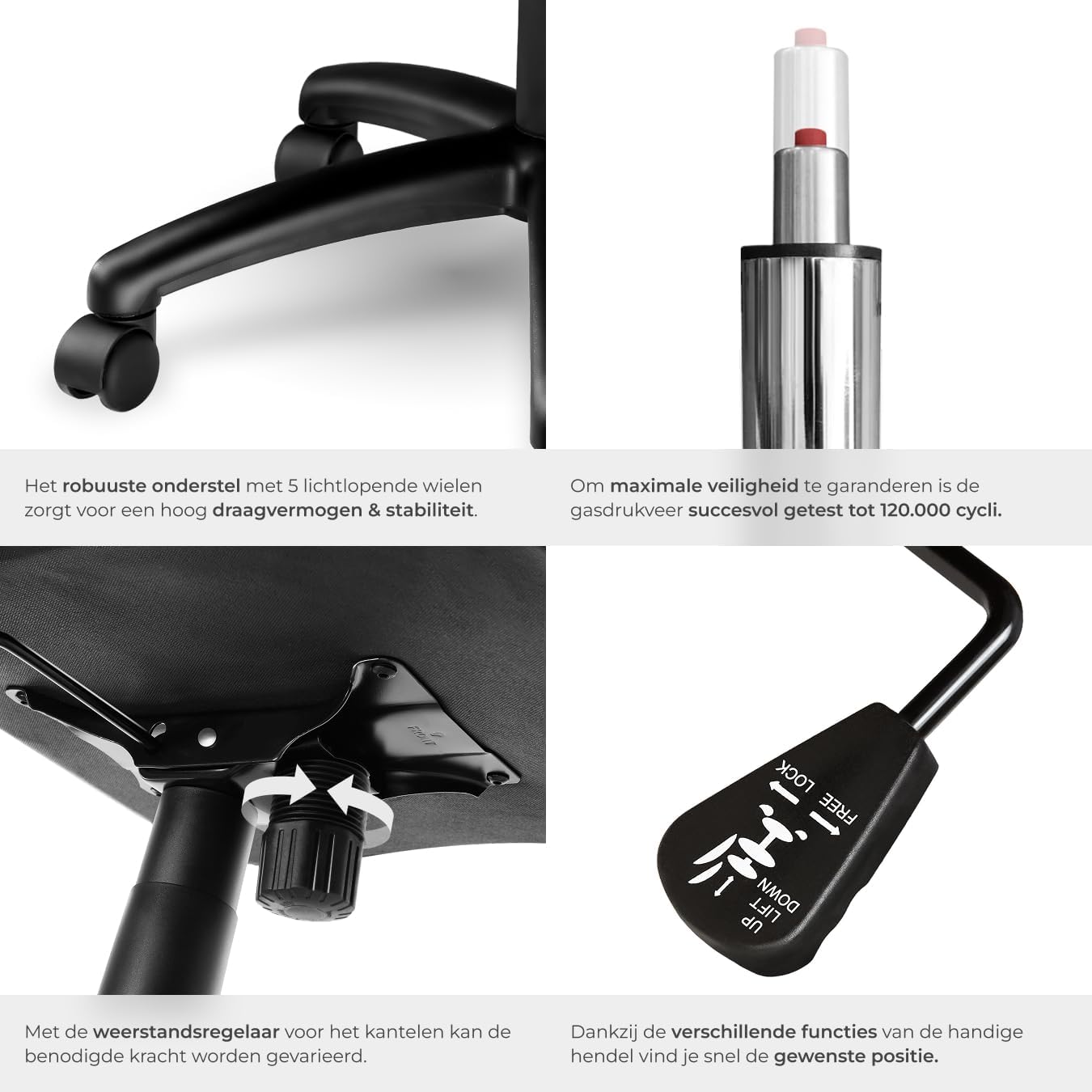
Image 3.1: Detailed view of the robust base, gas lift, and the control mechanism located under the seat. This image illustrates the components involved in height adjustment and tilt resistance.
4. Operating Instructions
4.1. Height Adjustment
To adjust the seat height:
- To raise: While standing, pull the lever located under the right side of the seat upwards. The seat will rise automatically. Release the lever at the desired height.
- To lower: While seated, pull the lever located under the right side of the seat upwards. The seat will lower. Release the lever at the desired height.
4.2. Tilt Function
The chair features a dynamic tilt function for enhanced comfort and flexibility.
- To activate/deactivate tilt: Pull the lever (often the same one used for height adjustment, or a separate one on the left) outwards to allow the chair to recline. Push it inwards to lock the chair in an upright position.
- Adjusting Tilt Resistance: Rotate the round knob located under the front of the seat mechanism. Turn clockwise to increase tilt resistance (making it harder to recline) and counter-clockwise to decrease resistance (making it easier to recline).

Image 4.1: Illustration of the chair's tilt function, allowing recline up to 135 degrees. This image also highlights the comfortable padding and breathable mesh material.
4.3. Swivel Function
The chair offers a full 360-degree swivel, allowing for easy movement and access to different areas of your workspace without needing to reposition the entire chair.
5. Maintenance
Proper care will extend the life and appearance of your tectake office chair.
- Cleaning: The synthetic leather and mesh upholstery are easy to clean. Wipe surfaces with a soft, damp cloth. For stubborn stains, use a mild soap solution and then wipe with a clean, damp cloth. Avoid harsh chemicals or abrasive cleaners.
- Inspection: Periodically inspect all screws, bolts, and connections. Tighten any loose fasteners to ensure the chair remains stable and safe.
- Wheels: Keep the wheels free of hair, dust, and debris to ensure smooth movement.
- Avoid Direct Sunlight: Prolonged exposure to direct sunlight can cause the upholstery to fade or crack.
6. Troubleshooting
If you encounter any issues with your chair, refer to the following common solutions:
- Chair Squeaks: Check and tighten all screws and bolts. A small amount of silicone spray on moving metal parts (avoiding the gas lift cylinder) may help.
- Chair Wobbles: Ensure all screws are fully tightened and the base is correctly assembled. Verify the gas lift is properly seated in the base and mechanism.
- Height Adjustment Not Working: Check if the gas lift lever is fully engaged. Ensure no obstructions are preventing the gas lift from moving freely. If the gas lift is faulty, it may need replacement.
- Wheels Not Rolling Smoothly: Clean any debris (hair, lint) from the wheel casters.
7. Specifications
| Feature | Specification |
|---|---|
| Model Number | 403479 |
| Overall Dimensions (W x D x H) | Approx. 68 x 69 x 104.5 – 114.5 cm (26.8 x 27.2 x 41.1 – 45.1 inches) |
| Seat Height | Approx. 47 – 57 cm (18.5 – 22.4 inches) |
| Seat Surface (W x D) | Approx. 49 x 47 cm (19.3 x 18.5 inches) |
| Backrest Height | Approx. 63 cm (24.8 inches) |
| Armrest Height (from floor) | Approx. 67 – 77 cm (26.4 – 30.3 inches) |
| Maximum Load Capacity | 100 kg (220 lbs) |
| Product Weight | Approx. 13 kg (28.7 lbs) |
| Materials | Polyurethane (PU), Polyvinyl Chloride (PVC), Polypropylene (PP), Nylon |
| Special Features | Ergonomic design, adjustable height, tilt function, 360° swivel, mesh back |
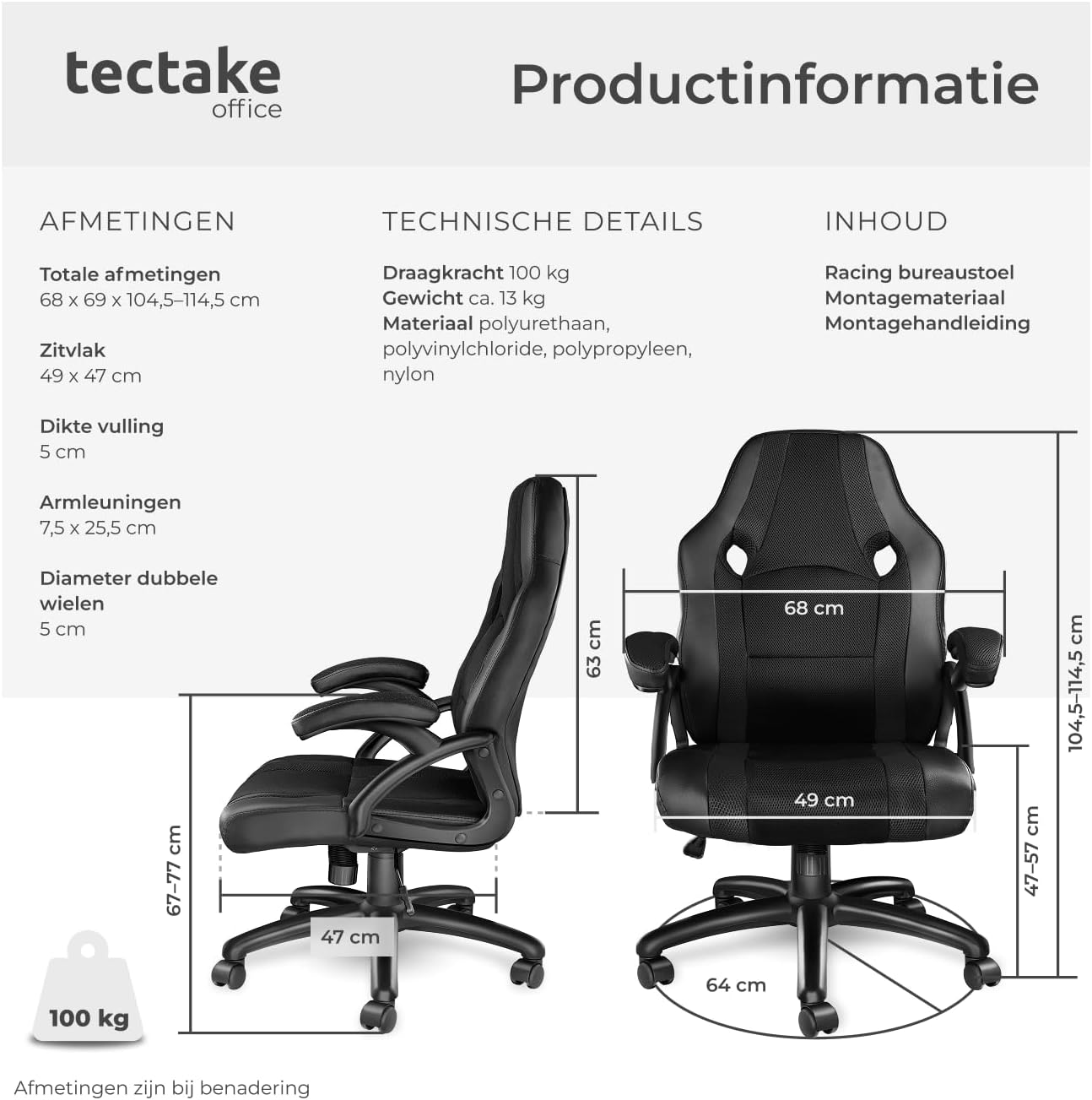
Image 7.1: Visual representation of the chair's key dimensions and weight capacity. This graphic provides a clear overview of the chair's physical attributes.
8. Warranty and Support
For warranty information or technical support, please refer to the documentation provided with your purchase or contact the retailer/manufacturer directly. Keep your proof of purchase for any warranty claims.
Manufacturer: tectake
For further assistance, please visit the official tectake website or contact their customer service department.
