
1. Introduction
This manual provides detailed instructions for the installation, operation, and maintenance of your Geloo 85MM Boat GPS Speedometer Gauge. Please read this manual thoroughly before use to ensure proper functionality and longevity of the product.
Product Overview
The Geloo 85MM GPS Speedometer Gauge is designed for accurate speed and mileage measurement in various vehicles, including cars, tractors, vans, motorcycles, racing vehicles, and boats. It receives speed signals directly from satellites, ensuring high precision and quick location confirmation.
Key Features
- Universal Compatibility: Suitable for all cars, tractors, vans, motorcycles, racing vehicles, and boats.
- GPS Signal: Speed signal derived directly from satellite GPS speed sensor.
- Display Functions: Shows Current Speed, TRIP (resettable), COG (Course Over Ground), and ODO (total mileage, non-resettable).
- Measurement Range: 0-80 MPH (0-120 Km/h).
- Wide Operating Voltage: Supports 9-32VDC.
- Durability: IP67 waterproof and dustproof rating, with a 316L stainless steel front cover and curved anti-fog glass.
- Multi-Color Backlight: Features 8 selectable backlight colors (Red, Green, Blue, White, Yellow, Kelly, Orange, Purple) and an automatic color cycling mode.
Video: Official product overview of the Geloo 85MM GPS Speedometer Gauge.
2. Setup and Installation
Package Contents
Verify that all items are present in the package:
- 1 x GPS Speedometer Gauge
- 1 x GPS Antenna
- 1 x Wiring Harness
- 1 x Instruction Manual
Installation Steps
- Before installation, select a suitable location on your dashboard or panel.
- Cut an 85mm (3 3/8 inch) diameter hole. Ensure there is a minimum depth of 2-3/4 inches (70mm) behind the panel for the gauge and wiring.
- Insert the speedometer gauge into the prepared hole.
- Secure the gauge by screwing down the mounting ring from the back.
- Connect the GPS antenna to the designated port on the back of the speedometer.

Image: Front and back views of the speedometer, showing dimensions (97mm front diameter, 82.5mm depth, 52.5mm back diameter).
Wiring Diagram
Connect the wiring harness according to the following diagram:
- Red Wire: Connect to +9-32VDC power supply.
- Orange Wire: Connect to Backlight (+) power supply.
- Blue Wire: Connect to Ground (-).

Image: Wiring connections showing blue for ground, red for 9-32VDC, and orange for backlight. The GPS antenna is also shown connected.
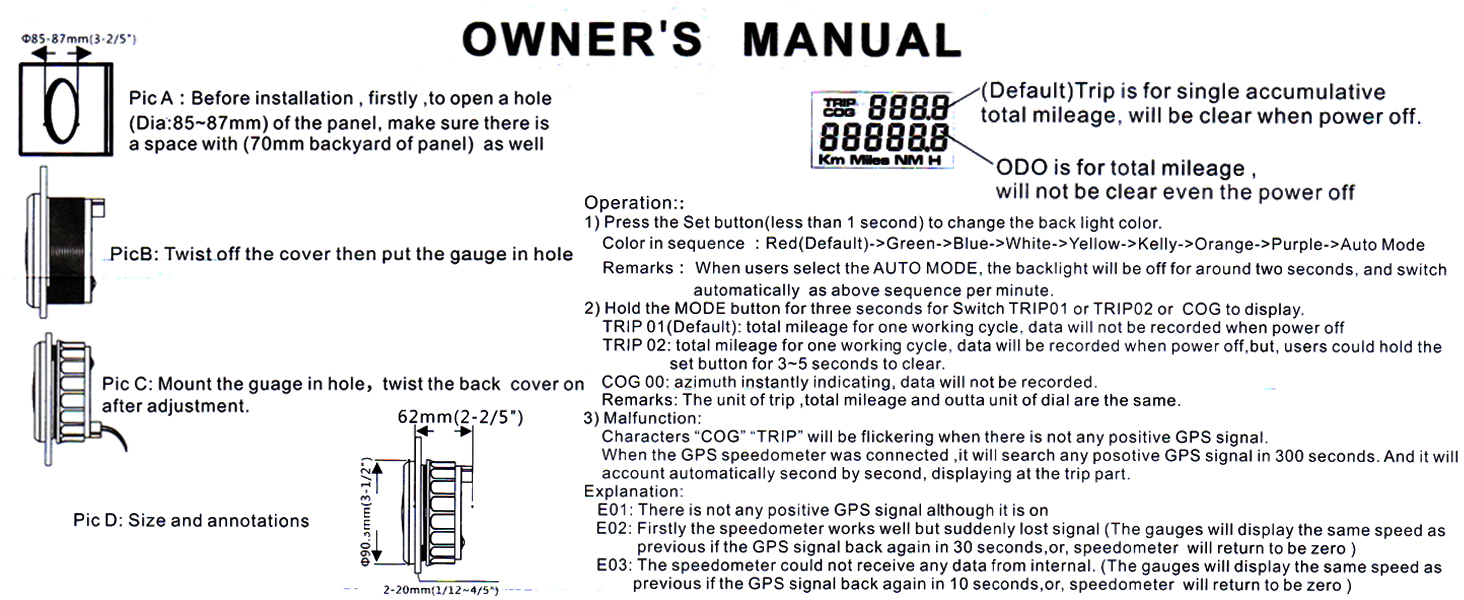
Image: Detailed wiring diagram illustrating connections to a 12V/24V battery, including the GPS antenna connection.
3. Operating Instructions
Power On/Off
The speedometer will power on automatically when connected to a power source within the 9-32VDC range. It will power off when the power supply is disconnected.

Image: Illustration of the speedometer display when powered on (showing readings) and powered off (blank display).
Speedometer Functions
The gauge displays Current Speed, TRIP, COG, and ODO. The TRIP and COG values can be toggled.
- Current Speed: Displays the real-time speed in MPH and Km/h.
- TRIP (Default): Represents the single accumulative total mileage. This value will clear when the power is turned off.
- TRIP 02: Represents the total mileage for one working cycle. This value will be recorded even when power is turned off. To clear TRIP 02, hold the 'Set' button for 3-5 seconds.
- ODO: Displays the total accumulated mileage. This value cannot be reset.
- COG (Course Over Ground) / Azimuth: Provides instantaneous direction indication. This data is not recorded.
To toggle between TRIP 01, TRIP 02, and COG, press the 'Mode' button for three seconds.
Backlight Color Selection
The speedometer features 8 backlight colors. To change the backlight color:
- Press the 'Set' button (less than 1 second) on the back of the gauge.
- The colors will cycle in the following sequence: Red (Default) > Green > Blue > White > Yellow > Kelly > Orange > Purple > Auto Mode.
- In Auto Mode, the backlight will turn off for approximately two seconds, then automatically switch to the next color in the sequence.

Image: The speedometer display showcasing the eight available backlight color options.
4. Maintenance
The Geloo GPS Speedometer Gauge is designed for durability and minimal maintenance.
Waterproof and Dustproof
The gauge has an IP67 waterproof and dustproof rating, meaning it is protected against dust ingress and can withstand immersion in water up to 1 meter for 30 minutes. This makes it suitable for marine and outdoor environments.

Image: The speedometer gauge shown with water splashing over it, highlighting its waterproof design.
Material Durability
The front cover is made of 316L stainless steel, offering excellent corrosion resistance, especially in acidic, alkaline, and humid environments. The curved glass features an anti-fogging function, ensuring clear visibility.
Cleaning
To clean the gauge, wipe the surface with a soft, damp cloth. Avoid using abrasive cleaners or solvents that could damage the display or housing.
5. Troubleshooting
Refer to the following information if you encounter issues with your GPS speedometer.
"COG" / "TRIP" Flickering
If the "COG" or "TRIP" display is flickering, it indicates that there is currently no positive GPS signal. The gauge will automatically search for a positive GPS signal for 300 seconds. Once a signal is acquired, it will accurately display the traveling speed and mileage.
Error Codes and Messages
- E01: This error indicates that there is no positive GPS signal. Ensure the GPS antenna is properly connected and has a clear view of the sky.
- E02: This error signifies that the GPS signal has been suddenly lost. The gauge will display the same speed as the previous reading. If the GPS signal returns within 30 seconds, the display will update. Otherwise, the speedometer will return to zero.
- E03: This error means the speedometer cannot receive data from its internal components. The gauge will display the same speed as the previous reading. If the internal data flow resumes within 10 seconds, the display will update. Otherwise, the speedometer will return to zero.
6. Specifications
| Feature | Specification |
|---|---|
| Brand | Geloo |
| Model Number | Speedometer 80mph |
| Material | Glass, Stainless Steel (316L) |
| Item Dimensions (L x W x H) | 4.09 x 4.02 x 3.78 inches |
| Item Weight | 10.56 ounces |
| Operating Voltage | 9-32VDC |
| Operating Current | ≤100mA (at 24V) |
| Operating Temperature | -30°C to +75°C |
| Storage Temperature | -40°C to +85°C |
| Indication Range | 0-80MPH (0-120 Km/h) |
| Waterproof/Dustproof Rating | IP67 |
7. Support
For any questions regarding the Geloo 85MM Boat GPS Speedometer Gauge, please refer to the contact information provided with your purchase or visit the official Geloo website for assistance.