
1. Introduction
This manual provides essential information for the safe and efficient operation of your Muse M-1938 DJ High-Power Bluetooth Speaker. Please read these instructions thoroughly before using the device and retain them for future reference.

Image 1.1: The Muse M-1938 DJ speaker showcasing its dynamic party lights.
2. Safety Instructions
- Do not expose the unit to rain or moisture to prevent fire or electric shock.
- Ensure proper ventilation around the unit. Do not block any ventilation openings.
- Do not place the unit near heat sources such as radiators, heat registers, stoves, or other apparatus that produce heat.
- Use only attachments/accessories specified by the manufacturer.
- Unplug the unit during lightning storms or when unused for long periods.
- Refer all servicing to qualified service personnel.
3. Package Contents
Verify that all items are present upon unpacking:
- Muse M-1938 DJ High-Power Bluetooth Speaker
- Wired Microphone
- AC Power Adaptor
- User Manual (this document)
4. Product Overview
The Muse M-1938 DJ is a versatile high-power Bluetooth speaker designed for various audio needs, featuring integrated party lights and multiple connectivity options.

Image 4.1: The Muse M-1938 DJ speaker, highlighting its design and model number.
4.1 Top Panel Controls and Features
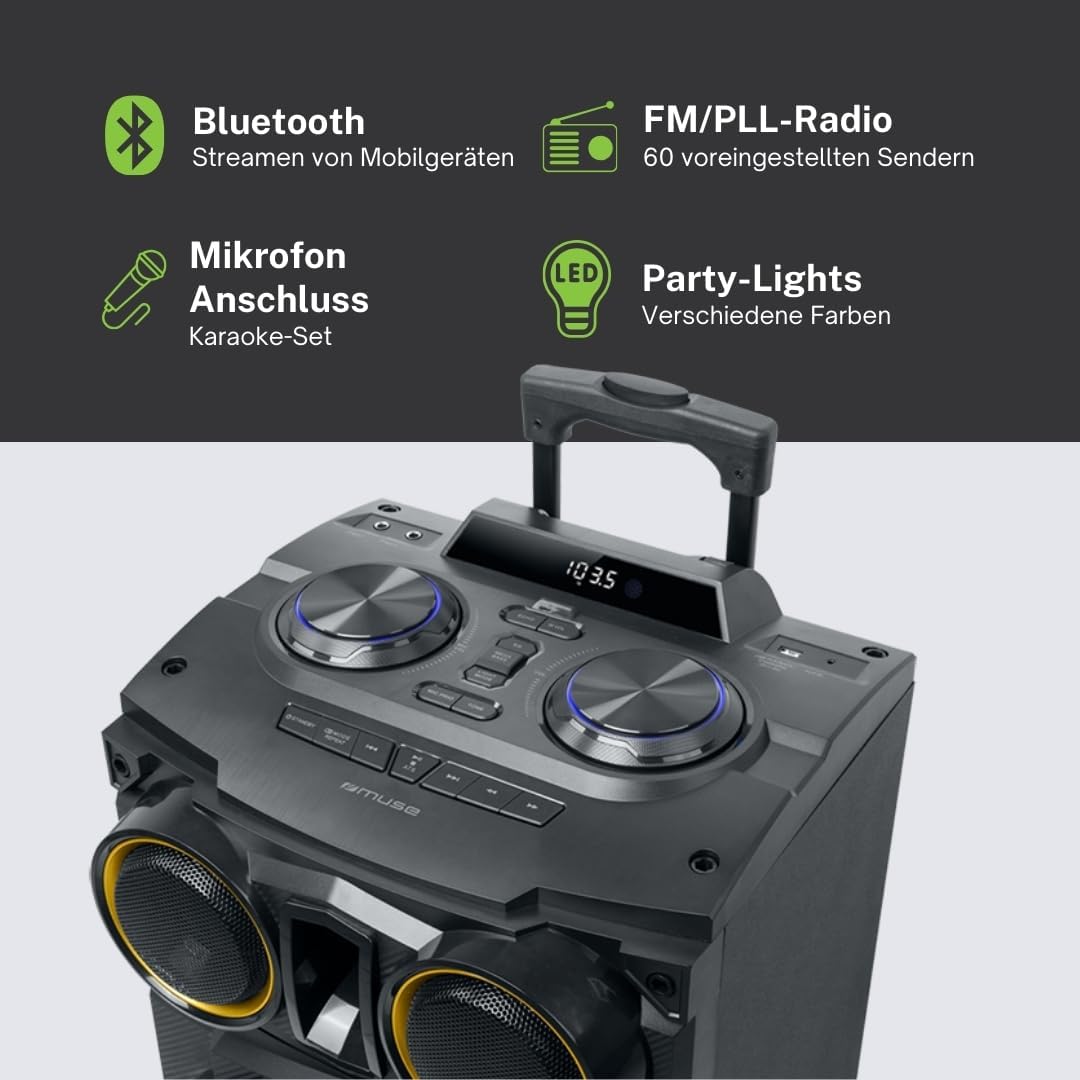
Image 4.2: Detailed view of the top panel, showing control knobs and feature icons.
- Bluetooth Connectivity: Stream audio wirelessly from mobile devices.
- FM/PLL Radio: Access 60 preset radio stations.
- Microphone Input: Connect the wired microphone for karaoke or announcements.
- Party Lights: Integrated LED lights with various colors and flash effects.
- USB Ports: For MP3 playback and device charging.
- AUX Input: Connect external audio sources via a 3.5mm jack.
- Bass & Treble Adjustment: Customize sound output.

Image 4.3: Visual representation of key features including Color Lights, Flash Lights, PLL Radio, White Display, USB for MP3, USB Charging, 4500mAh Battery, Wooden Cabinet, AUX In, Bass & Treble, Wired Microphone, AC Adaptor, and 500W Output Power.
5. Setup
5.1 Powering the Speaker
- AC Power: Connect the supplied AC power adaptor to the speaker's power input and then to a wall outlet.
- Internal Battery: The speaker features a built-in 4500 mAh rechargeable Lithium-ion battery. Ensure the battery is fully charged before initial portable use. Connect the AC power adaptor to charge the battery. The charging indicator will show the battery status.
5.2 Initial Placement
Place the speaker on a stable, flat surface. The unit is designed for floor mounting. Ensure adequate space around the speaker for optimal sound dispersion and ventilation.

Image 5.1: Dimensional diagram of the Muse M-1938 DJ speaker (65cm H x 38cm W x 38cm D).
6. Operating Instructions
6.1 Power On/Off
Press the Power button located on the top panel to turn the speaker ON or OFF. The white display will illuminate when the unit is powered on.
6.2 Bluetooth Pairing
- Turn on the speaker. The Bluetooth indicator will flash, indicating it is in pairing mode.
- Enable Bluetooth on your smartphone, tablet, or other compatible device.
- Search for available devices and select "M-1938 DJ" from the list.
- Once paired, the Bluetooth indicator will stop flashing and remain solid. You can now stream audio wirelessly.
6.3 FM Radio Operation
- Press the Mode button to select FM radio mode.
- Press and hold the Scan button to automatically scan and save available FM stations (up to 60 presets).
- Use the Previous/Next buttons to navigate through the saved stations.
6.4 USB Playback and Charging
- MP3 Playback: Insert a USB flash drive containing MP3 audio files into the designated USB port. The speaker will automatically detect and begin playing the files. Use the playback controls (Play/Pause, Previous/Next) on the top panel.
- USB Charging: Connect your mobile device to the USB charging port to recharge its battery.
6.5 AUX Input
Connect an external audio device (e.g., MP3 player, CD player) to the AUX IN jack using a 3.5mm audio cable. Select AUX mode using the Mode button. Audio will be played through the speaker.
6.6 Microphone Use

Image 6.1: The Muse M-1938 DJ speaker with its included wired microphone.
Plug the wired microphone into the Microphone input jack on the top panel. Adjust the microphone volume using the dedicated knob. The speaker supports two microphone inputs.
6.7 Light Effects
The speaker features integrated color-changing lights and flash effects. Use the dedicated Light button on the top panel to cycle through different light modes or turn them off.
6.8 Sound Adjustment
Use the Bass and Treble control knobs on the top panel to adjust the low and high frequencies of the audio output to your preference.
7. Maintenance
7.1 Cleaning
Wipe the speaker's exterior with a soft, dry cloth. Do not use abrasive cleaners, waxes, or solvents as they may damage the finish. Ensure the unit is powered off and unplugged before cleaning.
7.2 Storage
If storing the speaker for an extended period, ensure the battery is partially charged (around 50%) to prolong its lifespan. Store in a cool, dry place away from direct sunlight and extreme temperatures.
8. Troubleshooting
| Problem | Possible Cause | Solution |
|---|---|---|
| No power | Power cable not connected; Battery depleted | Ensure power cable is securely connected; Charge the internal battery. |
| No sound | Volume too low; Incorrect input mode; Device not connected | Increase volume; Select correct input mode (Bluetooth, AUX, USB, FM); Ensure device is properly paired/connected. |
| Bluetooth pairing fails | Speaker not in pairing mode; Device too far; Interference | Ensure speaker is in pairing mode; Move device closer to speaker; Avoid strong electromagnetic interference. |
| FM radio static | Weak signal; Antenna not extended | Reposition the speaker; Extend the FM antenna fully for better reception. |
9. Specifications
- Model: M-1938 DJ
- Brand: MUSE
- Output Power: 500 W
- Connectivity: Bluetooth, AUX, USB
- Audio Input: Aux, Bluetooth
- Radio: FM PLL with 60 presets
- Battery: Integrated 4500 mAh Lithium-ion (Rechargeable)
- Microphone Inputs: 2 (wired microphone included)
- USB Ports: 2 (for MP3 playback and charging)
- Special Features: Color-changing lights, Flash effects, Bass & Treble adjustment
- Material: Wood cabinet
- Dimensions (L x W x H): 38 x 38 x 65 cm
- Weight: 12.9 kg
- Impedance: 2 ohms
- Frequency Response: 4.26 KHz
- Compatible Devices: Smartphone, Tablet
- Power Source: Electric Cable
10. Warranty and Support
For warranty information and technical support, please refer to the documentation provided at the time of purchase or contact your local MUSE authorized dealer. Keep your proof of purchase for warranty claims.


