
FUJIFILM Instax Square SQ1
FUJIFILM Instax Square SQ1 Instant Camera User Manual
Model: Instax Square SQ1 (16670522)
Brand: FUJIFILM
Introduction
Thank you for purchasing the FUJIFILM Instax Square SQ1 Instant Camera. This manual provides essential information for the safe and effective use of your camera. The Instax Square SQ1 is designed for capturing and instantly printing square-format photographs, offering a unique and creative way to preserve memories. Its simple operation and automatic exposure make it accessible for all users.
What's in the Box
Verify that all items listed below are included in your package:
- FUJIFILM Instax Square SQ1 Instant Camera
- Hand Strap
- Thumb Grip Attachment
- CR2 Lithium Batteries (x2)
- User Manual (this document)
Parts and Controls
Familiarize yourself with the various parts of your Instax Square SQ1 camera.
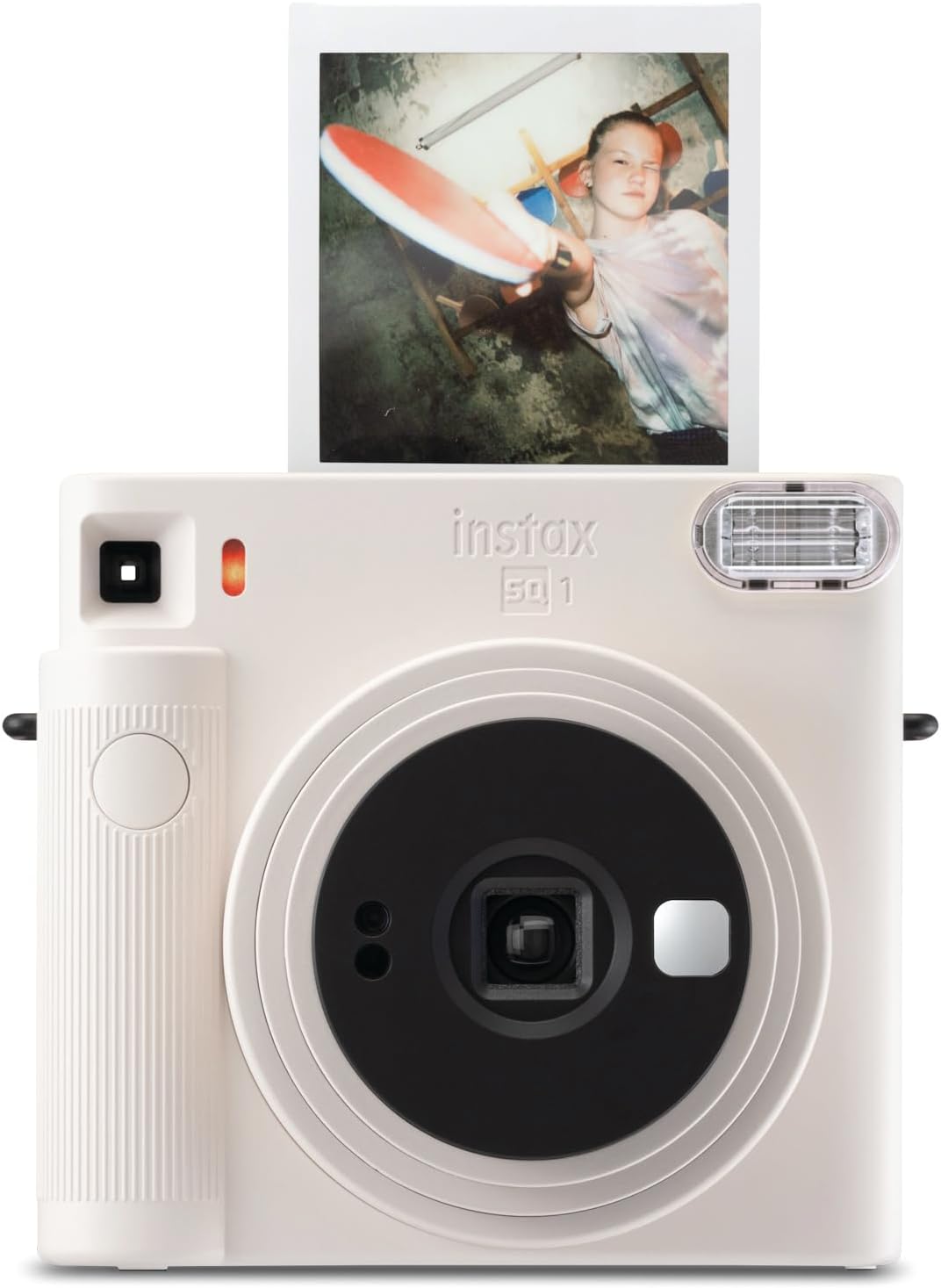
Figure 1: Front View. This image displays the front of the Instax Square SQ1 camera in chalk white. Key features visible include the lens, flash, viewfinder, shutter button, and the film ejection slot from which a square instant photo is emerging.

Figure 2: Rear View. This image shows the back of the Instax Square SQ1 camera. Prominent features include the film compartment door, the viewfinder eyepiece, and the film counter display.

Figure 3: Side View (Lens Extended). This image illustrates the side profile of the Instax Square SQ1 camera with its lens barrel extended, indicating the camera is powered on and ready for use.

Figure 4: Top View. This image provides a top-down view of the Instax Square SQ1 camera, highlighting the film ejection slot where printed photos emerge.
Setup
1. Battery Installation
The Instax Square SQ1 uses two CR2 lithium batteries.
- Open the battery compartment cover located on the side of the camera.
- Insert the two CR2 batteries, ensuring correct polarity (+/-) as indicated inside the compartment.
- Close the battery compartment cover securely.
2. Loading Instax Square Film
Use only FUJIFILM Instax Square Instant Film with this camera.

Figure 5: Instax Square Film Dimensions. This diagram illustrates the physical dimensions of the Instax Square film pack, measuring 72mm in width and 86mm in height, with the actual image area being 62mm x 62mm.
- Open the film compartment cover on the back of the camera.
- Align the yellow mark on the film pack with the yellow mark on the camera's film compartment.
- Gently insert the film pack straight into the compartment. Do not press down on the film pack.
- Close the film compartment cover. The camera will automatically eject the black film cover. This indicates the film is loaded correctly.
- The film counter on the back of the camera will display "10", indicating 10 exposures remaining.
Note: Do not open the film compartment cover until all 10 photos have been taken, as this will expose the film and render it unusable.
Operating the Camera
1. Turning On/Off
To turn the camera on, rotate the lens ring from the "OFF" position to the "ON" position. The lens will extend.To turn the camera off, rotate the lens ring back to the "OFF" position. The lens will retract.

Figure 6: Lens Retracted (OFF). This image shows the Instax Square SQ1 camera with its lens fully retracted, indicating the camera is powered off.

Figure 7: Lens Extended (ON). This image displays the Instax Square SQ1 camera with its lens extended, indicating the camera is powered on and ready to capture photos.
2. Taking a Photo
The Instax Square SQ1 features automatic exposure, simplifying the photo-taking process.
- Turn the camera on by rotating the lens ring to "ON".
- Look through the viewfinder to frame your shot.
- Press the shutter button. The flash will fire automatically, and the photo will be ejected from the top of the camera.
- Allow the photo to develop naturally. Do not shake or bend the print. Development typically takes 90 seconds to a few minutes, depending on ambient temperature.
3. Selfie Mode
For close-up shots and selfies, use the dedicated Selfie Mode.
- With the camera on, rotate the lens ring one more click past "ON" to the "SELFIE" position. The lens will extend further.
- Use the small mirror next to the lens to compose your selfie.
- Hold the camera approximately 30-50 cm (12-20 inches) from your face.
- Press the shutter button to take the photo.
Maintenance
Cleaning the Camera
- Wipe the camera body with a soft, dry cloth.
- For the lens and viewfinder, use a soft cloth specifically designed for optical lenses. Do not use abrasive cleaners or solvents.
- Keep the film ejection slot clear of dust and debris.
Storage
- Store the camera in a cool, dry place away from direct sunlight and extreme temperatures.
- Remove batteries if the camera will not be used for an extended period to prevent leakage.
- Store unused film packs in their original packaging in a cool, dry place.
Troubleshooting
| Problem | Possible Cause | Solution |
|---|---|---|
| Camera does not turn on. | Batteries are dead or incorrectly inserted. | Replace batteries with new CR2 batteries, ensuring correct polarity. |
| Photo does not eject. | Film pack is empty or incorrectly loaded. | Check film counter. If 0, replace film pack. Re-load film pack, ensuring yellow marks align. |
| Photos are too dark/light. | Insufficient or excessive lighting for auto-exposure. | Ensure adequate lighting. Avoid shooting directly into bright light sources or in very dark environments. |
| Flash does not fire. | Flash is charging or camera is off. | Wait for flash to charge (indicator light). Ensure camera is on. |
| Film counter shows "S" or "0". | "S" indicates no film or film cover. "0" indicates no film remaining. | Load a new film pack. |
Specifications
| Feature | Detail |
|---|---|
| Film | FUJIFILM instax SQUARE Instant Film |
| Photo Picture Size | 62 mm x 62 mm |
| Lens | 2 components, 2 elements, f = 65.75 mm, 1:12.6 |
| Viewfinder | Inverted Galilean finder, 0.4x with target spot |
| Shooting Range | 0.3 m and beyond (0.3 m to 0.5 m in Selfie Mode) |
| Shutter | Programmed electronic shutter 1/2 to 1/400 sec. Slow synchro for low light. |
| Exposure Control | Automatic, Lv 5.0 to 15.5 (ISO 800) |
| Film Ejection | Automatic |
| Film Developing Time | Approx. 90 seconds (varies depending on the ambient temperature) |
| Flash | Constant firing flash (automatic light adjustment), recycle time: 6.5 seconds or less (when using new batteries), effective flash range: 0.3 to 2.2 m |
| Power Supply | Two lithium batteries (CR2) |
| Dimensions | 130.7 mm x 118.6 mm x 57.5 mm (5.15 x 4.6 x 2.26 inches) |
| Weight | 390 g (13.8 ounces) (without batteries, strap, and film pack) |
Warranty and Support
Warranty Information
FUJIFILM products are manufactured to the highest quality standards. For specific warranty terms and conditions, please refer to the warranty card included with your product or visit the official FUJIFILM website for your region. Keep your proof of purchase for warranty claims.
Customer Support
If you encounter any issues not covered in this manual or require further assistance, please contact FUJIFILM customer support.
- Online Support: Visit the official FUJIFILM website for FAQs, drivers, and software downloads.
- User Manual (PDF): For a downloadable PDF version of the user manual, please refer to the following link: FUJIFILM Instax Square SQ1 User Manual PDF
- Contact Information: Refer to the FUJIFILM website for regional contact numbers and email support.
Related documentsInstax Square SQ1


Ask a question about this manual
Ask about setup, troubleshooting, compatibility, parts, safety, or missing instructions. Manuals+ will review the question and use this page’s manual context to help answer it.