
1. Product Overview
The WOLFBOX Portable Air Compressor YD-382 is a compact and efficient device designed for inflating various items, primarily vehicle tires. It features a double-cylinder design for rapid inflation, a digital display for accurate pressure readings, and an automatic shut-off function for convenience and safety.

Image: The WOLFBOX Portable Air Compressor showing its compact design and approximate dimensions (9.8in length, 6.7in height, 3.3in width).
Key Features:
- Double Cylinder Design: Ensures faster inflation compared to single-cylinder models.
- Rapid Inflation: Air flow of 70L/min, capable of inflating a standard tire from 0 to 35 PSI in approximately 100 seconds.
- LCD Digital Gauge: Provides accurate tire pressure readings with selectable units (PSI, KPA, BAR, KG/CM²).
- Automatic Stop: Automatically ceases inflation once the preset pressure is reached.
- Integrated LED Light: For illumination during nighttime or low-light operations.
- Versatile Power Options: Can be powered via a 12V car cigarette lighter socket or directly from the car battery using alligator clips.
- Multi-purpose Nozzles: Includes additional nozzles for various inflatables like bicycles, motorcycles, balls, and air cushions.
2. Setup
Before operating the air compressor, ensure your vehicle engine is running to provide adequate power.
- Connect Power:
- Insert the 12V car cigarette lighter plug into your vehicle's cigarette lighter socket.
- Alternatively, if the cigarette lighter connection does not provide sufficient power or is unavailable, use the provided alligator clips to connect directly to your car battery (red clip to positive terminal, black clip to negative terminal).
- Connect Air Hose: Screw the air hose connector onto the tire valve stem. Ensure a tight seal to prevent air leakage.
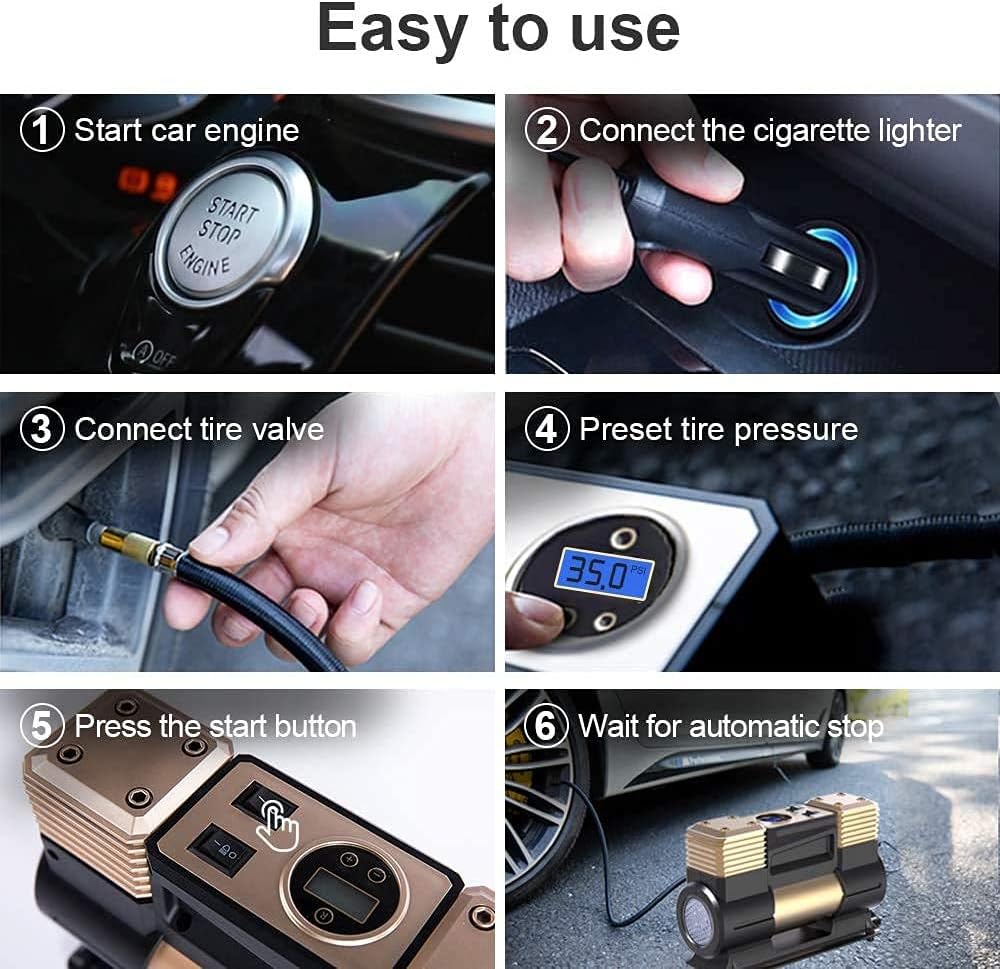
Image: Visual guide demonstrating the setup process, including starting the car engine, connecting to the cigarette lighter, attaching to the tire valve, and setting pressure.
3. Operating Instructions
Follow these steps to inflate your tires or other items:
- Power On: Ensure the compressor is connected to a power source and the vehicle engine is running.
- Set Desired Pressure: Use the digital display and control buttons to set the target pressure. The display allows selection between PSI, KPA, BAR, and KG/CM². Refer to your vehicle's manual or tire sidewall for recommended tire pressure.
- Start Inflation: Press the start button on the compressor. The unit will begin inflating, and the digital display will show the current pressure.
- Automatic Stop: The compressor will automatically shut off once the preset pressure is reached.
- Disconnect: Carefully disconnect the air hose from the tire valve. A small amount of air may escape during disconnection, which is normal.
- Use LED Light: If operating in low light conditions, activate the independent LED light switch for improved visibility.

Image: A close-up view of the digital display showing a preset pressure of 35.0 PSI, with buttons for adjustment.
Video: This video demonstrates the features and operation of the WOLFBOX Double Cylinders Air Compressor, including setting the digital pressure and the inflation process.
Using Multi-purpose Nozzles:
The compressor comes with various nozzles for different inflation needs. Select the appropriate nozzle and attach it to the air hose before connecting to the item to be inflated.

Image: Illustration of the multi-purpose nozzles included with the air compressor, suitable for cars, SUVs, bicycles, rubber boats, and balls.
4. Maintenance
Proper maintenance ensures the longevity and optimal performance of your WOLFBOX air compressor.
- Cleaning: Wipe the exterior of the compressor with a soft, damp cloth. Do not use harsh chemicals or abrasive cleaners.
- Storage: Store the compressor in a cool, dry place, away from direct sunlight and extreme temperatures. Ensure the hose and power cords are neatly coiled to prevent damage.
- Check Connections: Periodically inspect the air hose, power cords, and connectors for any signs of wear or damage. Replace if necessary.
- Cool-down Periods: For extended inflation tasks, allow the compressor to cool down after approximately 10-15 minutes of continuous use to prevent overheating.
5. Troubleshooting
If you encounter issues with your WOLFBOX air compressor, refer to the following common solutions:
- Compressor Does Not Turn On:
- Ensure the vehicle engine is running.
- Check the 12V cigarette lighter socket for power. If it's not working, try using the provided alligator clips to connect directly to the car battery.
- Verify that all connections are secure.
- Slow Inflation or Low Pressure:
- Ensure the air hose is tightly screwed onto the tire valve to prevent leaks.
- Check for any kinks or obstructions in the air hose.
- Confirm the power source is providing sufficient current (e.g., a strong battery connection).
- Unit Overheats:
- Allow the compressor to cool down for at least 10-15 minutes after continuous use.
- Ensure the unit is placed on a stable, flat surface with adequate ventilation during operation.
- "ERROR" Message on Display:
- This may indicate an internal malfunction or a power issue. Disconnect the unit, wait a few minutes, and reconnect. If the error persists, contact customer service.
6. Specifications
| Specification | Value |
|---|---|
| Model Number | YD-382 |
| Brand | WOLFBOX |
| Voltage | 12 Volts (DC) |
| Power Source | Corded Electric |
| Maximum Pressure | 150 PSI |
| Air Flow Capacity | 70 Liters Per Minute |
| Noise Level | 65 Decibels |
| Recommended Uses | Tire Inflation |
| Additional Features | Pressure Detection, LED Light |
7. Warranty and Support
WOLFBOX provides comprehensive support for its products.
- Warranty: This product comes with a 1-year warranty from the date of purchase.
- Returns and Exchanges: A 90-day return and exchange policy is available.
- Defects: Returns are accepted for product defects.
Customer Service Contact:
For any questions or support, please contact WOLFBOX customer service:
- Email: service@wolfbox.com
- Phone: +1 888 296 8399