
Introduction
This manual provides essential instructions for the safe and effective use of your HOT TOOLS Professional Rose Gold Digital Extra Long Flat Iron. Please read all instructions carefully before use and retain for future reference.

Image: The HOT TOOLS Professional Rose Gold Digital Extra Long Flat Iron, featuring its sleek black design, rose gold styling plates, and a clear digital temperature display.
Important Safety Instructions
When using electrical appliances, especially when children are present, basic safety precautions should always be followed, including the following:
- DANGER: Keep away from water. As with most electrical appliances, electrical parts are electrically live even when the switch is off. To reduce the risk of death by electric shock:
- Always unplug this appliance immediately after using.
- Do not use while bathing or in a shower.
- Do not place or store appliance where it can fall or be pulled into a tub or sink.
- Do not place in or drop into water or other liquid.
- If an appliance falls into water, unplug it immediately. Do not reach into the water.
- WARNING: To reduce the risk of burns, electrocution, fire, or injury to persons:
- An appliance should never be left unattended when plugged in.
- Close supervision is necessary when this appliance is used by, on, or near children or individuals with certain disabilities.
- Use this appliance only for its intended use as described in this manual. Do not use attachments not recommended by the manufacturer.
- Never operate this appliance if it has a damaged cord or plug, if it is not working properly, or if it has been dropped or damaged, or dropped into water.
- Keep the cord away from heated surfaces. Do not wrap the cord around the appliance.
- Never use while sleeping.
- Never drop or insert any object into any opening.
- Do not use outdoors or operate where aerosol (spray) products are being used or where oxygen is being administered.
- Do not use an extension cord with this appliance.
- This appliance is hot when in use. Do not let eyes or bare skin touch heated surfaces.
- Do not place the heated appliance directly on any surface while it is operating.
- Always store the appliance in a location free from moisture.
Product Components
Familiarize yourself with the key features of your flat iron for optimal use.

Image: An annotated diagram illustrating the various parts of the flat iron, including the multi-directional rose gold plates, digital temperature display, power/temperature controls, plate locking switch, and the professional swivel cord.
- Rose Gold Plates: 1.5-inch extra-long plates designed for consistent heat distribution and smooth styling.
- Digital Temperature Display: Provides precise temperature readings in Fahrenheit and Celsius.
- Temperature Control Buttons: Allows adjustment of heat settings up to 455°F.
- Power Button: Activates and deactivates the appliance.
- Plate Locking Switch: Secures the plates together for compact storage and travel.
- Professional Swivel Cord: An 8-foot cord that rotates 360 degrees for tangle-free operation.
- 2-Hour Auto Shut-off: For enhanced safety, the appliance automatically turns off after 2 hours of inactivity.

Image: A detailed view of the rose gold styling plates, highlighting their smooth finish and extra-long design.
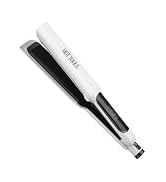
Image: A close-up of the digital display, clearly showing the temperature reading and options for Fahrenheit and Celsius, along with an ION indicator.
Setup and First Use
- Ensure your hair is clean, completely dry, and free of tangles before styling.
- Plug the flat iron into a standard electrical outlet.
- Place the flat iron on a heat-resistant surface, away from flammable materials.
Operating Instructions
Follow these steps for effective hair straightening:
- Power On: Press and hold the power button until the digital display illuminates.
- Set Temperature: Use the '+' and '-' buttons to adjust the temperature to your desired heat setting. The iron heats up quickly to a maximum of 455°F (235°C). Start with a lower temperature and increase as needed for your hair type.
- Section Hair: Divide your hair into manageable sections, approximately 1-2 inches wide.
- Straighten: Take one section of hair and place it between the heated plates, close to the roots. Gently clamp the plates together and glide the iron slowly and steadily down the hair section, from root to tip. Avoid holding the iron in one place for too long to prevent heat damage.
- Repeat: Continue with the remaining sections of hair until desired straightness is achieved.
- Power Off: After styling, press and hold the power button to turn off the appliance.
- Cool Down: Unplug the flat iron from the outlet and allow it to cool completely on a heat-resistant surface before storing.
- Plate Lock: Engage the plate locking switch to keep the plates closed for compact storage or travel.
Care and Maintenance
Proper care ensures the longevity and performance of your flat iron.
- Cleaning: Ensure the appliance is unplugged and completely cool before cleaning. Wipe the styling plates and exterior surfaces with a soft, damp cloth. Do not use abrasive cleaners, solvents, or harsh chemicals. Never immerse the appliance in water.
- Storage: Store the cooled flat iron in a dry, safe location. Do not wrap the power cord tightly around the appliance, as this can damage the cord. Use the plate locking switch to keep the plates closed during storage.
Troubleshooting Guide
If you encounter issues with your flat iron, refer to the following common problems and solutions:
| Problem | Possible Cause | Solution |
|---|---|---|
| Appliance does not turn on or heat up. | Not properly plugged in; power button not activated; electrical outlet issue. | Ensure the plug is fully inserted into a working outlet. Press and hold the power button until the display lights up. Test the outlet with another appliance. |
| Temperature is not stable or consistent. | Not enough time for heating; incorrect temperature setting. | Allow a few moments for the iron to reach and stabilize at the selected temperature. Adjust temperature settings as needed. |
| Hair is pulling or snagging. | Hair not properly detangled; too much hair in one section. | Ensure hair is thoroughly brushed and detangled before use. Work with smaller, more manageable sections of hair. |
| Appliance feels excessively hot to touch. | Normal operation for styling tools; improper handling. | Avoid touching the heated plates or barrel. Only handle the cool-touch areas of the appliance. Always place on a heat-resistant surface. |
Technical Specifications
- Model Number: HT7113RG
- Plate Material: Rose Gold
- Plate Size: 1.5-inch Extra Long
- Maximum Temperature: 455°F (235°C)
- Cord Length: 8 ft Professional Swivel Cord
- Voltage: Universal Dual Voltage
- Auto Shut-off: 2 Hours
- Product Dimensions: 2.45 x 13.75 x 5.7 inches
- Weight: 1.61 Pounds
Warranty and Customer Support
For detailed warranty information regarding your HOT TOOLS Professional Rose Gold Digital Extra Long Flat Iron, please refer to the warranty card included with your product packaging or visit the official HOT TOOLS website.
If you require further assistance, troubleshooting, or have questions not covered in this manual, please contact HOT TOOLS customer service through their official channels.


