
1. Introduction
Thank you for choosing the Alpicool T60-LG Dual Temperature Control Portable Car Fridge Freezer. This versatile appliance is designed to keep your food and beverages fresh and cold, or even frozen, during your travels, camping trips, or any outdoor adventure. Its robust design and dual-zone functionality make it an ideal companion for trucks, RVs, boats, and general travel. Please read this manual thoroughly before operation to ensure safe and efficient use.

Figure 1: Alpicool T60-LG Portable Car Fridge Freezer.
2. Key Features
- Storage Space: Exterior Size 28.5"x14.2"x21.6", 63 Quart (60 Liter) capacity, fits approximately 75 x 12oz cans of Cola.
- Dual Temperature Control: Features a detachable sensor divider to switch between a single temperature zone or two independent temperature zones within one unit.
- Freezes Without Ice: Powered by an LG compressor, capable of cooling down to -4°F (-20°C), offering powerful chilling performance. Temperatures can be adjusted for a fridge zone and a freezer zone simultaneously.
- Car Battery Protection: Equipped with a temperature memory function and 3 different levels (Low, Med, High) for battery protection to prevent vehicle battery drain.
- Convenient Design: Includes foldable handles and wheels for easy portability, a built-in LED light for interior visibility, and an internal basket for organized storage.

Figure 2: Overview of Alpicool T60-LG key features including storage, dual temperature control, LG compressor, battery protection, anti-shaking design, mute low noise operation, built-in LED light, and wide temperature range.
3. Setup
3.1 Unpacking and Inspection
Carefully remove the fridge freezer from its packaging. Inspect the unit for any signs of damage during transit. Retain the packaging for future storage or transport.
3.2 Placement
Place the unit on a stable, level surface. Ensure adequate ventilation around the compressor area. The vibration-resistant design allows for safe operation even when driving on rough roads.
3.3 Power Connection
The Alpicool T60-LG can be powered by:
- 12V/24V DC: Use the provided DC power cord to connect to your vehicle's cigarette lighter socket or a compatible DC power source.
- 110-240V AC: Use the provided AC adapter to connect to a standard household power outlet.
3.4 Initial Cooling
Before loading items, it is recommended to plug in the unit and allow it to cool down to your desired temperature for at least 30 minutes. This ensures optimal performance.

Figure 3: Internal view of the Alpicool T60-LG, showing the dual compartments and removable baskets.
4. Operating Instructions
4.1 Control Panel
The unit features a digital control panel for electronic temperature control. Use the buttons to adjust settings, switch between modes, and monitor the internal temperature.

Figure 4: Close-up of the LCD control panel and examples of multi-application use for the Alpicool T60-LG.
4.2 Temperature Adjustment
The temperature control range is -4°F to 68°F (-20°C to +10°C). For dual-zone operation, the detachable sensor divider allows for different temperatures in each compartment. Remove the divider to operate as a single-zone unit.
4.3 Operating Modes
The unit offers ECO and HH (High) modes. ECO mode prioritizes energy efficiency, while HH mode provides faster cooling performance.
4.4 Battery Protection System
The 3-stage car battery protection system prevents your vehicle's battery from running down. Select Low, Med, or High protection level based on your battery type and usage scenario.
4.5 Mobile App Control
The Alpicool T60-LG can be controlled via a mobile application on your smartphone. This app allows you to monitor the temperature, change settings, and adjust battery protection levels remotely, which is particularly useful when the unit is in the back of an RV or vehicle.

Figure 5: Examples of typical usage scenarios for the Alpicool T60-LG, including vehicle, camping, boat, and sport activities.
5. Maintenance
5.1 Cleaning
Regularly clean the interior and exterior of the fridge freezer with a damp cloth and mild detergent. Do not use abrasive cleaners or harsh chemicals. Ensure the unit is unplugged before cleaning.
5.2 Defrosting
If ice builds up inside, unplug the unit and allow the ice to melt naturally. Use the integrated drain plug to remove excess water. Do not use sharp objects to remove ice.
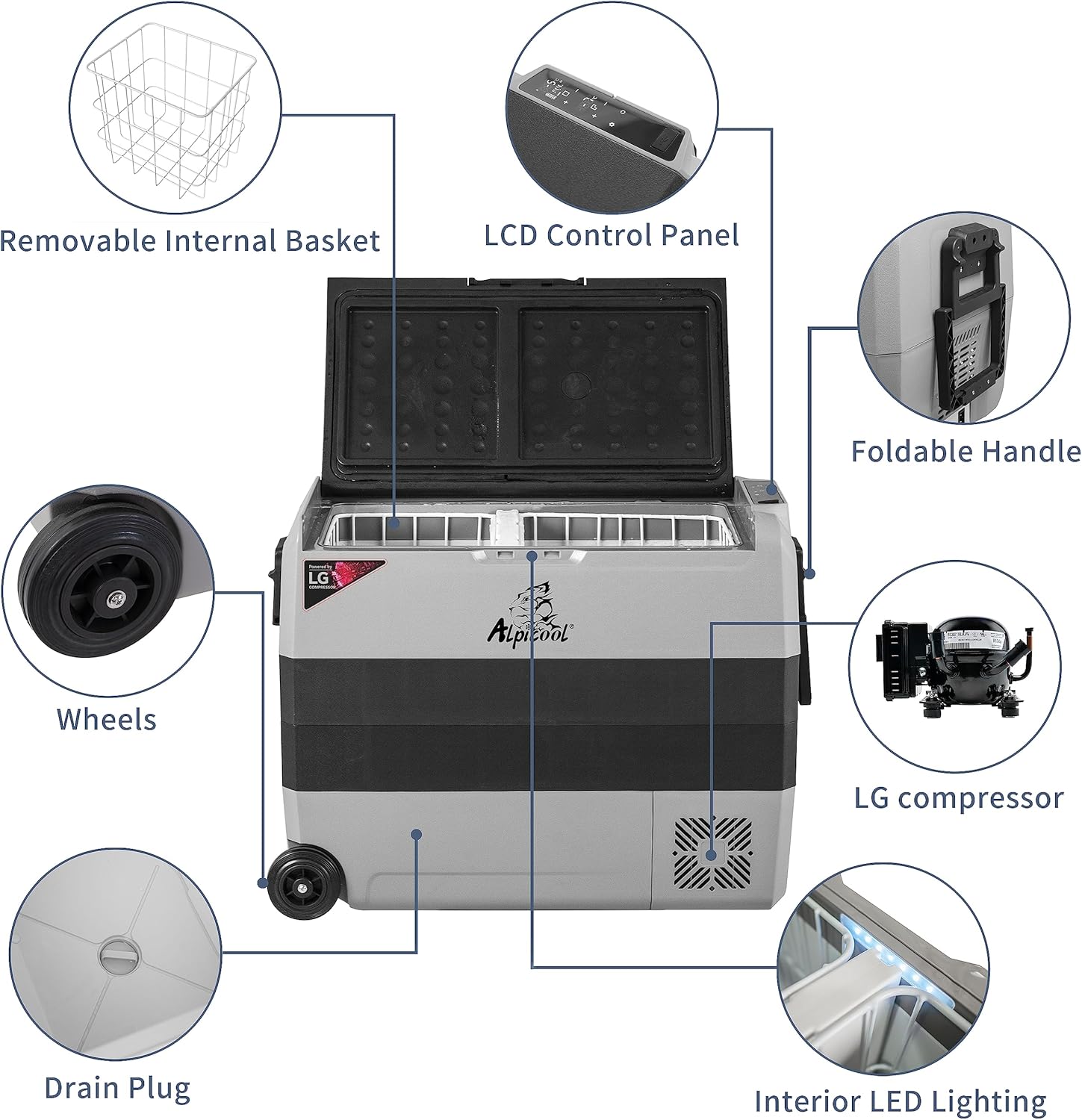
Figure 6: Diagram illustrating key components of the Alpicool T60-LG, including the drain plug, wheels, foldable handle, LCD control panel, LG compressor, removable internal basket, and interior LED lighting.
5.3 Storage
When not in use for extended periods, ensure the unit is clean and dry. Store it in a cool, dry place with the lid slightly ajar to prevent odors and mold growth.
6. Troubleshooting
If you encounter issues with your Alpicool T60-LG, please consider the following common solutions:
- Unit not powering on: Check power connections (DC or AC) and ensure the power source is active. Verify the battery protection setting is not too high for your current battery voltage.
- Insufficient cooling: Ensure the lid is properly sealed. Check for obstructions around the ventilation grilles. Verify the temperature setting is appropriate for desired cooling.
- Unusual noise: Some operational noise from the compressor is normal. Ensure the unit is on a stable surface and not vibrating against other objects.
For persistent issues, please refer to the support section.
7. Specifications
| Feature | Specification |
|---|---|
| Brand Name | Alpicool |
| Model Info | T60-LG |
| Item Weight | 37.4 pounds |
| Product Dimensions | 28.46 x 14.17 x 21.57 inches |
| Item model number | T60-LG |
| Capacity | 63 Quarts |
| Installation Type | Freestanding |
| Part Number | AlP-LG |
| Form Factor | Chest |
| Special Features | Portable |
| Color | APC-T60-LG |
| Voltage | 12 Volts |
| Wattage | 45 watts |
| Door Material Type | Plastic |
| Batteries Required? | No |
| Number Of Doors | 1 |
| Date First Available | August 14, 2020 |
| Configuration | Compact Internal Freezer |
| Finish Type | Matte |
8. Warranty
For detailed warranty information, please refer to the warranty card included with your product or contact Alpicool customer service directly. Warranty terms and conditions may vary.
9. Support
For further assistance, product registration, or to explore other Alpicool products, please visit the official Alpicool store:
