
1. Introduction
Thank you for choosing the TFCFL Manual Pasta Maker. This commercial-grade pasta machine is designed for ease of use and durability, allowing you to create fresh homemade pasta, noodles, and dumpling wrappers. Constructed from food-grade stainless steel, it offers reliable performance for both home and light commercial applications.
Key features include:
- Premium Food-Grade Stainless Steel Construction: Ensures rust-resistance and durability for long-term use.
- Adjustable Thickness Settings: Multiple settings to create various pasta types, from thin wonton skins to thick noodles.
- Smooth Manual Operation: Ergonomic hand crank and smooth bearings provide easy and stable control.
- All-in-One Multifunctional Design: Combines dough pressing, noodle cutting, and includes a noodles hanger.
- Compact & Practical: Space-saving design, easy to assemble and store.
2. Product Overview and Components
The TFCFL Manual Pasta Maker is designed for efficient pasta production. Familiarize yourself with its main components before assembly and operation.

Figure 2.1: Assembled TFCFL Manual Pasta Maker with fresh pasta sheets.
Main components include:
- Main Body with Rollers
- Dough Hopper/Tray
- Handwheel
- Handwheel Handle
- Noodle Cutter (3mm width, other widths may be available)
- Adjustable Knobs for Roller Gap
- Fixing Clamp (for securing to countertop)
- Assembly Screws and Tools

Figure 2.2: Stainless steel dough hopper/tray.

Figure 2.3: Internal view of rollers, bearings, and gears.
3. Setup and Assembly
Follow these steps to assemble your TFCFL Manual Pasta Maker:
- Attach the Dough Hopper: Align the plate holes of the dough hopper with the corresponding screw points on the machine's top frame. Secure it by tightening the screws.
- Install the Handwheel: Turn the middle of the handwheel in a clockwise direction and screw it onto the drive shaft located on the side of the machine.
- Attach the Handwheel Handle: Screw the handle onto the large handwheel.
- Insert Noodle Cutter: If using a noodle cutter, slide it into the designated slot at the bottom of the machine, ensuring the gears align properly.
- Secure to Countertop: Use the stable fixing clamp (not shown in all images, but typically included) to securely attach the pasta maker to a countertop, preventing wobbling during operation.

Figure 3.1: Visual guide for assembling the pasta maker.
Assembly Video
Video 3.1: Official instructional video demonstrating the preparation of dough, pressing pasta sheets, and cutting noodles using the TFCFL Manual Pasta Maker.
4. Operating Instructions
Follow these steps to make fresh pasta and noodles:
4.1 Dough Preparation
- Mix flour and water in a ratio of approximately 4:10 (4 parts water to 10 parts flour) to create a flour fluff.
- Ensure the flour fluff is as dry as possible for optimal results.
4.2 Pressing Pasta Sheets
- Pour the prepared flour fluff into the noodle hopper.
- Adjust the red knob on the side of the machine to the left to set the distance between the rollers to approximately 5mm. This is for initial pressing.
- Begin turning the handwheel to press the dough.
- Fold the pressed dough sheet in two layers and press it again. Repeat this process several times until the dough is smooth and uniform. This 'wakes up' the dough and improves its texture.
- Gradually adjust the red knob to the right to decrease the roller gap to about 3mm. Press the dough several more times until it is smooth and flat, reaching your desired thickness for pasta sheets or dumpling wrappers.

Figure 4.1: Dough being pressed into sheets.
4.3 Cutting Noodles
- Once you have a smooth, flat dough sheet of desired thickness, ensure the noodle cutter is installed.
- Adjust the red knob to the right to set the distance between the noodle cutting sticks to approximately 2mm for fine noodles, or 3mm for medium noodles, or 6mm for wider noodles.
- Feed the dough sheet through the noodle cutter while turning the handwheel. Fresh noodles will emerge from the bottom.
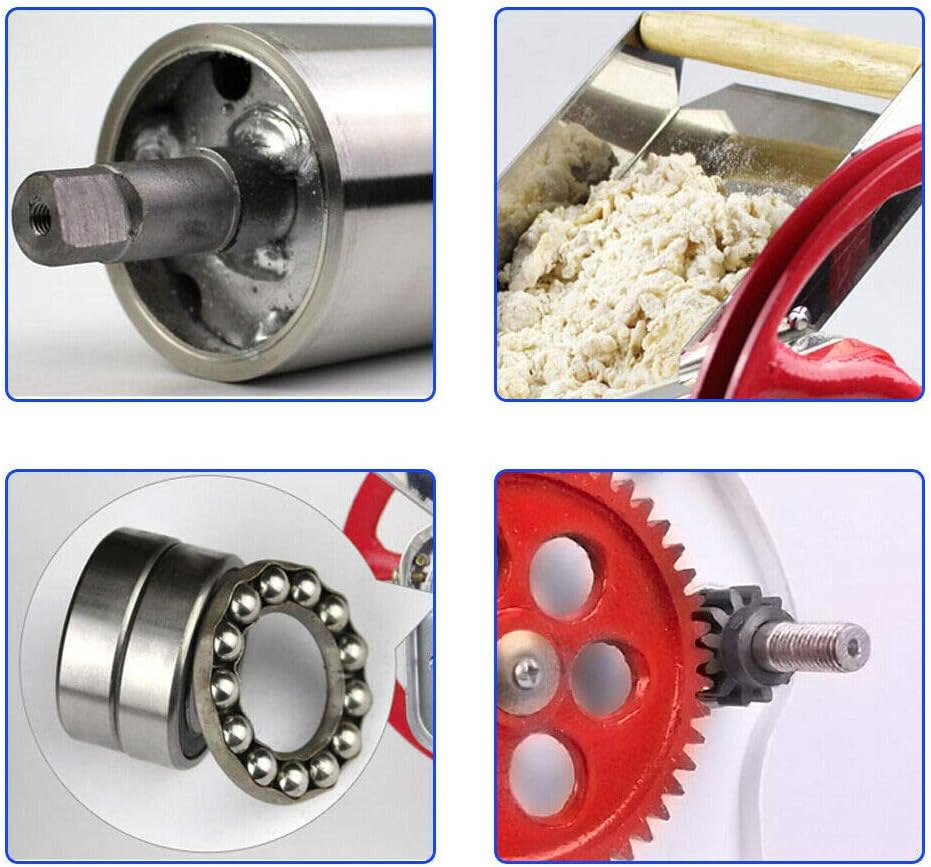
Figure 4.2: Noodle cutting process.

Figure 4.3: Freshly cut noodles from the machine.
4.4 Making Dumpling Wrappers
After pressing the dough to your desired thickness (e.g., 3mm), use a round cutter to cut out individual dumpling wrappers from the pasta sheet.
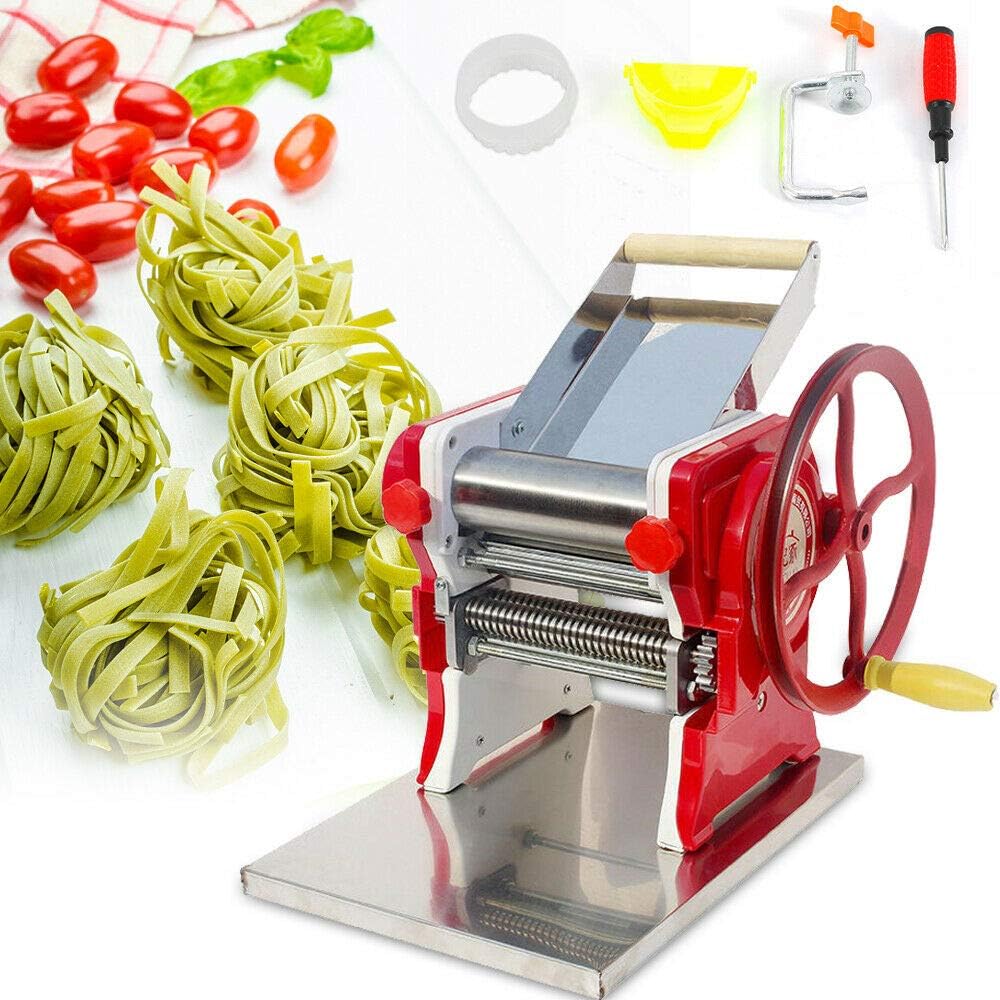
Figure 4.4: Example of pasta sheets and accessories.
5. Maintenance and Cleaning
Proper maintenance ensures the longevity and hygiene of your pasta maker.
- Immediate Cleaning: Clean the machine immediately after each use to prevent dough from drying and hardening on the rollers and cutters.
- Disassembly for Cleaning: The roller scrapers are held by springs and can be removed by hand for thorough cleaning. It is advisable to wear gloves during this process to prevent injury if a spring dislodges. The noodle cutter is also designed for easy cleaning.
- Dishwasher Safe: The TFCFL Manual Pasta Maker is dishwasher safe for convenient cleaning.
- Lubrication: Periodically lubricate accessible gears with food-grade mineral oil to maintain smooth operation. Avoid using cooking oils, as they can become rancid and gel over time.
- Storage: Store the machine in a dry place when not in use. Its compact structure allows for easy storage.
6. Troubleshooting
If you encounter issues with your pasta maker, consider the following:
- Dough Not Feeding/Pressing Properly: Ensure your dough consistency is correct. It should be firm and not too sticky or too dry. Adjust flour-to-water ratio if necessary.
- Noodles Sticking Together: Lightly dust the dough sheets and cut noodles with flour to prevent sticking. Ensure the machine is clean and free of old dough residue.
- Difficulty Turning Handwheel: Check for any obstructions in the rollers or cutter. Ensure the machine is properly lubricated. If the dough is too stiff, it may be difficult to press; adjust dough consistency.
- Uneven Pasta Sheets: Ensure the dough is evenly fed into the rollers. Fold and re-press the dough multiple times to achieve a smooth, uniform sheet.
7. Specifications
| Brand | TFCFL |
| Model Number | Commercial Pasta Machines |
| Color | Silver |
| Material | Stainless Steel |
| Item Weight | 27.2 Pounds |
| Product Dimensions (L x W x H) | 14.9" x 11" x 10.2" |
| Blade Material | Stainless Steel |
| Included Components | 1* Noodles Cutter, Other Accessories for Assembly |
| Number of Thickness Settings | 6 |
| Operation Mode | Manual |
| Dishwasher Safe | Yes |
| Minimum Sheet Thickness | 1.5 Millimeters |
| Maximum Sheet Thickness | 4 Millimeters |
| Number of Blades | 2 (for different noodle widths) |
8. Warranty and Support
Specific warranty information for the TFCFL Manual Pasta Maker is not provided in the product details. For warranty claims, technical support, or replacement parts, please contact the manufacturer, KAHE, or the seller, KAHERACHEL, directly through your purchase platform or their official contact channels.