
Introduction
Thank you for choosing the TOZO T12 Wireless Bluetooth Earbuds. These earbuds are designed to provide a superior audio experience with advanced features such as Bluetooth 5.0 technology, intuitive touch controls, and IPX8 waterproofing. This manual will guide you through the setup, operation, and maintenance of your new earbuds.
What's in the Box
Upon unboxing your TOZO T12 earbuds, please ensure all the following items are present:
- TOZO T12 Bluetooth Earbuds with Charging Case
- Ear Tips (various sizes)
- USB Charging Cable
- Quick Start Guide and User Manual
Product Overview
The TOZO T12 earbuds feature a compact design with a digital LED display charging case. They are equipped with 10mm large speaker drivers for powerful bass and clear sound.

Image: TOZO T12 Earbuds and Charging Case. This image displays the champagne-colored earbuds nestled within their open charging case, showcasing the digital LED battery display.

Image: TOZO T12 Earbud Components. An exploded view of an earbud highlighting the 10mm large speaker driver and internal acoustic structure, emphasizing the ORIGX Acoustic technology.
Setup
1. Charging the Earbuds and Case
Before first use, fully charge the earbuds and the charging case. The case features a digital LED display to show battery consumption.
- Place the earbuds into the charging case.
- Connect the charging case to a power source using the provided USB-C cable for fast charging (approx. 1.5 hours).
- Alternatively, place the charging case on a wireless charger for wireless charging (less than 2 hours).
- A single charge provides over 6 hours of playtime, with the charging case extending total playtime to 28 hours.

Image: TOZO T12 Charging Case Battery Display. This image shows the charging case with earbuds inside, displaying the battery percentage on its LED screen. It highlights the 50mAh earbud battery and 500mAh case battery.

Image: TOZO T12 Wireless Charging. The charging case is shown on a wireless charging pad, illustrating its compatibility with wireless charging. Icons indicate 11 hours playtime per charge, 48 hours with case, and 1.5 hours fast charge.
2. Bluetooth Pairing
The TOZO T12 earbuds utilize advanced Bluetooth 5.3 technology for a fast and stable connection.
- Take both earbuds out of the charging case. They will automatically power on and pair with each other.
- Once paired, one earbud's indicator light will flash red and blue, indicating it's ready to pair with your device.
- Open the Bluetooth settings on your mobile phone or other device.
- Search for "TOZO-T12" in the list of available devices and select it to connect.
- Once connected, you will hear a confirmation prompt, and the indicator lights on both earbuds will turn off.

Image: TOZO T12 One-Step Pairing. This image illustrates the simple pairing process, showing the earbuds being taken out of the case and the "TOZO-T12" option appearing in a phone's Bluetooth settings.
Operating Instructions
1. Wearing Your Earbuds
The TOZO T12 earbuds are designed with ergonomic silicone ear caps for a comfortable and secure fit, even during active movements.
- Choose the ear tips that best fit your ears for optimal sound quality and comfort.
- Insert the earbuds into your ear canals and gently rotate them until they feel snug and secure.

Image: TOZO T12 Earbud Fit Diagram. A diagram illustrating the proper way to insert and secure the earbud in the ear canal for a comfortable and stable fit.
2. Touch Controls
The TOZO T12 earbuds feature sensitive touch control sensors for easy management of music playback, calls, and voice assistants.
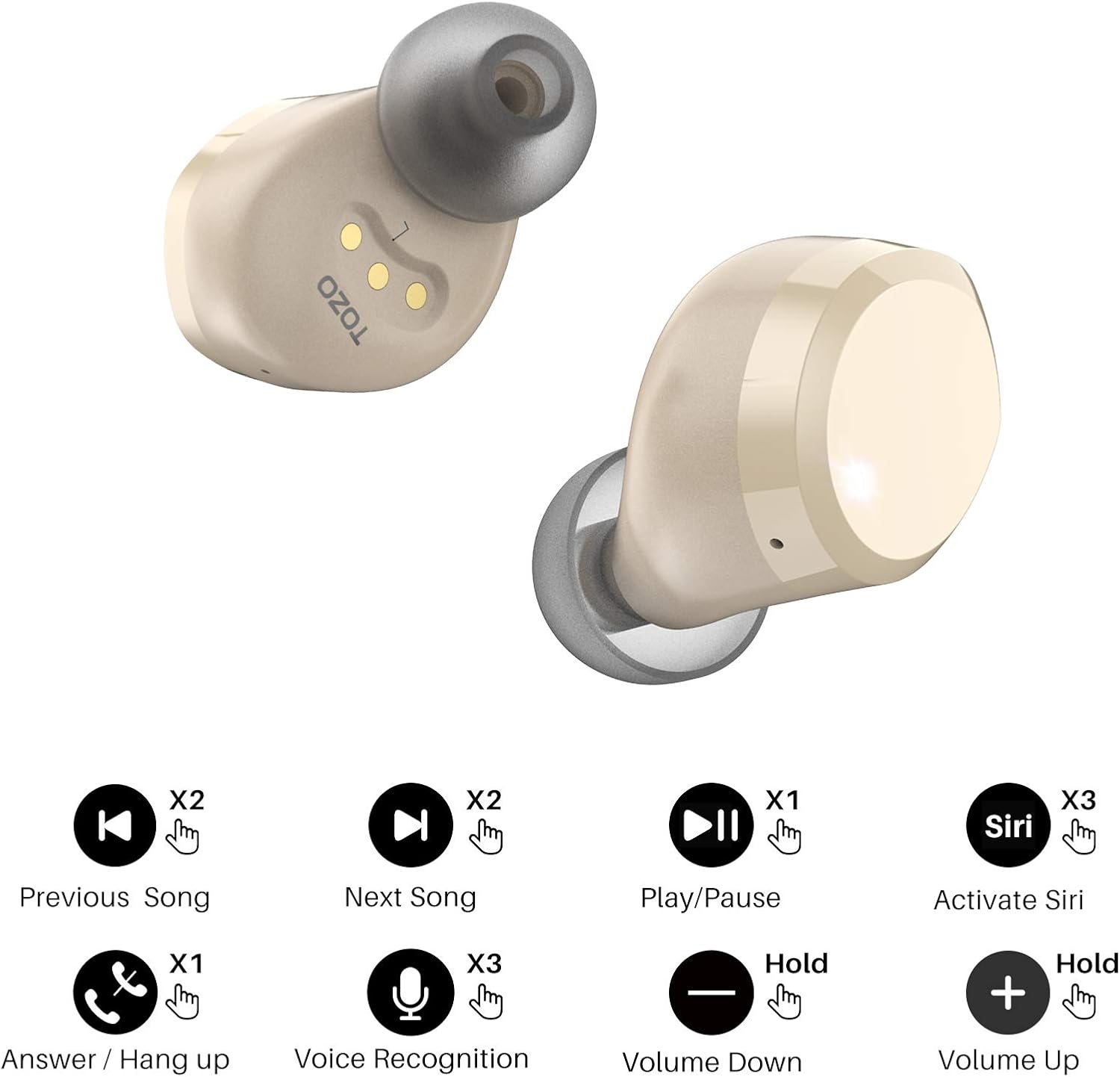
Image: TOZO T12 Touch Control Functions. This graphic displays the various touch gestures and their corresponding functions for both left and right earbuds, including play/pause, skip tracks, answer/hang up calls, volume control, and voice assistant activation.
| Action | Function |
|---|---|
| Press once (L/R) | Play/Pause Music, Answer Call |
| Press twice (L) | Previous Song |
| Press twice (R) | Next Song |
| Press three times (L/R) | Activate Voice Assistant (Siri, Google Assistant) |
| Hold (L) for 2 seconds | Volume Down |
| Hold (R) for 2 seconds | Volume Up |
| Hold (L/R) for 2 seconds during call | Reject Call |
| Press once during call (L/R) | Hang Up Call |
Maintenance
1. Water Resistance (IPX8)
The TOZO T12 earbuds and charging case feature an IPX8 waterproof rating, meaning they can be submerged in water up to 1 meter deep for 30 minutes. This makes them suitable for sports and protection against sweat, water, and rain.

Image: TOZO T12 IPX8 Waterproof Rating. This image shows the earbuds and charging case partially submerged in water, demonstrating their IPX8 water resistance against splashes and submersion.
Important: While waterproof, it is recommended to dry the earbuds and charging case thoroughly before placing them back in the case or charging to prevent damage to the charging contacts.
2. Cleaning
To maintain optimal performance and hygiene:
- Regularly clean the ear tips with a soft, damp cloth.
- Use a dry cotton swab to gently clean the charging contacts on both the earbuds and inside the charging case.
- Avoid using harsh chemicals or abrasive materials for cleaning.
Troubleshooting
If you encounter any issues with your TOZO T12 earbuds, please refer to the following common solutions:
- Earbuds not pairing with each other:
Place both earbuds back into the charging case. Close the lid, wait a few seconds, then open the lid and take them out again. They should automatically pair. If not, try resetting them (refer to the full user manual for specific reset instructions if available).
- Earbuds not connecting to device:
Ensure Bluetooth is enabled on your device. Forget "TOZO-T12" from your device's Bluetooth list and try pairing again from scratch.
- Only one earbud working:
Place both earbuds back in the case, then take them out. Ensure they are charged. If the issue persists, try resetting the earbuds.
- Low volume or poor sound quality:
Check the ear tip size for a secure fit. Clean any debris from the ear tips or earbud speakers. Adjust the volume on both your device and the earbuds.
- Charging issues:
Ensure the charging cable is securely connected. Clean the charging contacts on both the earbuds and the case. Try a different charging cable or power adapter. For wireless charging, ensure the case is correctly positioned on the wireless charger.
For more detailed troubleshooting or persistent issues, please refer to the full user manual or contact TOZO customer support.
Specifications
| Feature | Detail |
|---|---|
| Brand | TOZO |
| Model Name | T12 |
| Color | Champagne |
| Ear Placement | In-Ear |
| Form Factor | In-Ear |
| Impedance | 32 Ohms |
| Noise Control | Environmental Noise Cancellation (Passive Noise Reduction) |
| Frequency Response | 2 Hz - 20,000 Hz |
| Sensitivity | 101 dB |
| Connectivity Technology | Wireless (Bluetooth) |
| Bluetooth Version | 5.3 |
| Bluetooth Range | 10 Meters |
| Control Type | Touch (Call Control, Media Control, Volume Control, Voice Assistant) |
| Earbud Battery Life | 11 hours (average) |
| Case Battery Life | 48 hours (average) |
| Earbud Charging Time | 2 hours |
| Case Charging Time | 1.5 hours (fast charge via USB-C), less than 2 hours (wireless) |
| Case Battery Capacity | 500 mAh |
| Audio Driver Type | Dynamic |
| Audio Driver Size | 10 Millimeters |
| Water Resistance Level | IPX8 (Waterproof) |
| Special Features | Built-in Microphone, Wireless Charging, Touch Control, Water Resistant |
| Compatible Devices | Smartphones, Tablets, Laptops, Desktops, Smart TVs, Cars (with Bluetooth support) |
Warranty and Support
TOZO products are designed with quality and customer satisfaction in mind. For warranty information, technical support, or any inquiries regarding your TOZO T12 earbuds, please refer to the official TOZO website or contact their customer service directly.
You can also find additional resources and contact information on the TOZO Brand Store on Amazon.
For detailed user guides, you may also consult the provided PDF documents:


