
Introduction
This manual provides detailed instructions for the safe and efficient use of your T-SUN 30W 2000LM Rechargeable LED Work Light. This portable and waterproof COB floodlight is designed for various applications, including emergency lighting, outdoor activities, camping, garage work, and repairs. Please read this manual thoroughly before operation.
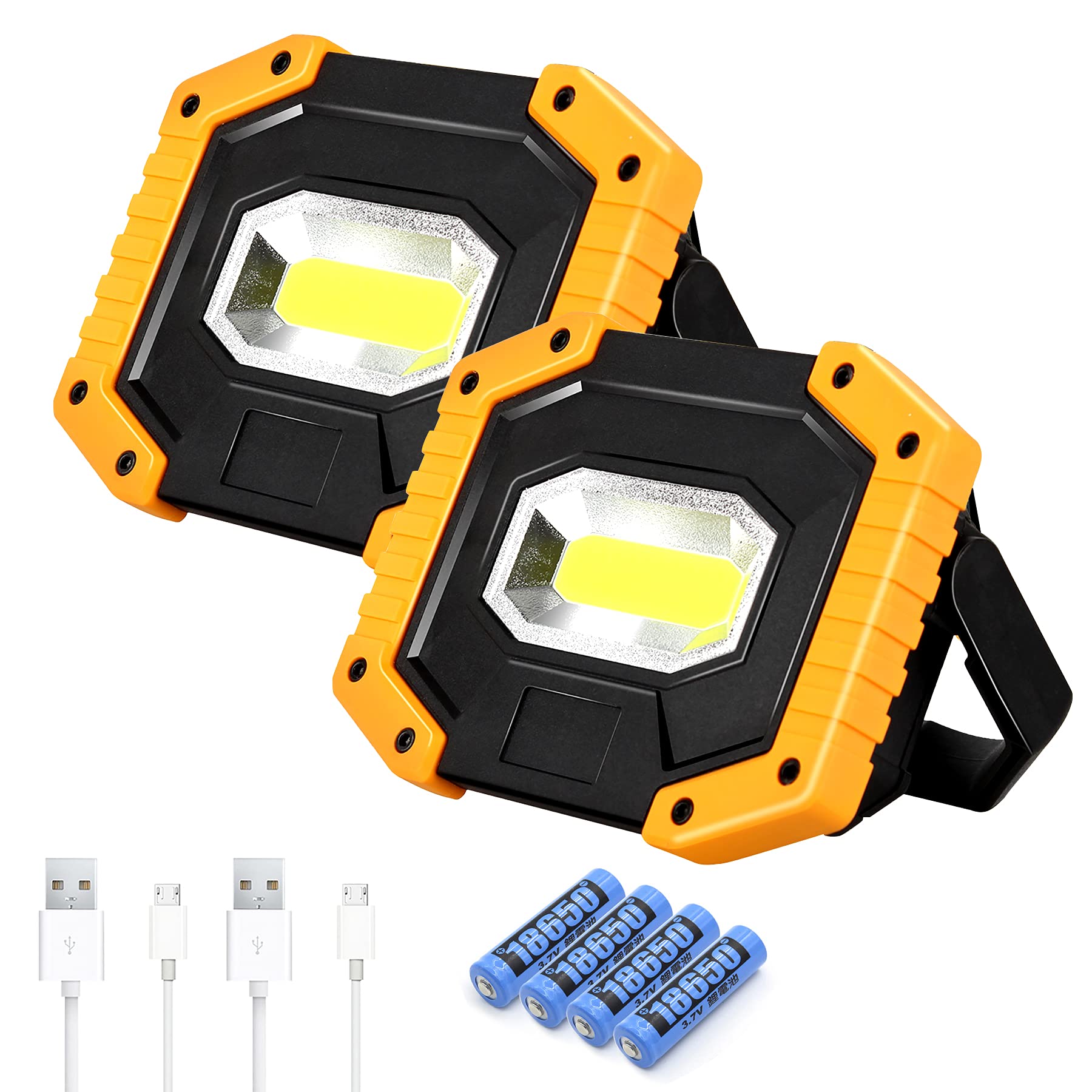
Image: T-SUN 30W 2000LM Rechargeable LED Work Light with its adjustable stand.
Package Contents
- 2 x T-SUN Rechargeable LED Work Lights
- 2 x USB Charging Cables
- 4 x 18650 Lithium-Ion Batteries (pre-installed)
Setup
1. Battery Installation and Preparation
Your T-SUN work light comes with pre-installed 18650 Lithium-Ion batteries. Before first use or charging, it is crucial to remove the white isolating strip from the battery compartment to allow electrical contact.
- Locate the battery compartment cover on the back of the work light.
- Carefully open the cover.
- Remove the white isolating strip positioned between the battery and the contact point.
- Ensure the batteries are correctly seated according to polarity markings.
- Close the battery compartment cover securely.

Image: Rear view of the work light showing the battery compartment and USB ports. The red tab indicates the protective cover for the charging ports.
2. Charging the Work Light
The work light can be charged using the provided USB cable.
- Open the red protective cover on the back of the light to expose the Micro USB charging input port.
- Connect the smaller end of the USB charging cable to the Micro USB input port on the work light.
- Connect the larger end of the USB cable to a compatible USB power adapter (not included) or a computer USB port.
- The charging indicator light will illuminate during charging and change color or turn off when fully charged.
- Once charging is complete, disconnect the cable and securely close the protective cover to maintain water resistance.
Note: The work light supports two types of batteries: 2 x rechargeable 18650 batteries (included) or 4 x AA batteries (not included). Ensure the correct battery type is used.
Operating Instructions
1. Power On/Off and Light Modes
The work light features three lighting modes: High, Low, and Flash. These modes are controlled by a single power button.
- Press the red power button once to turn on the light in High mode.
- Press the power button a second time to switch to Low mode.
- Press the power button a third time to activate the Flash mode (emergency signal).
- Press the power button a fourth time to turn the light Off.

Image: The T-SUN work light illustrating its three lighting modes: High, Low, and Flash.
2. Adjustable Handle and Positioning
The work light is equipped with a 180° adjustable folding stand, allowing for versatile positioning.
- The handle can be rotated to serve as a stand, allowing the light to be placed on flat surfaces at various angles.
- It can also be used to hang the light from hooks, branches, or other suitable fixtures.
- The compact design makes it easy to carry and store.

Image: The work light demonstrating its 180° rotatable stand for flexible positioning.
3. Power Bank Function
The T-SUN work light can also function as a power bank to charge other devices.
- Open the red protective cover on the back of the light.
- Connect your device's USB charging cable to the USB output port on the work light.
- The work light will begin charging your device.
- Close the protective cover after use to maintain water resistance.

Image: The work light's portable charging ports, illustrating its capability to charge various devices.
4. Usage Scenarios
The T-SUN work light is suitable for a wide range of applications:
- Emergency: Ideal for power outages, hurricane weather, or roadside emergencies.
- Outdoor Activities: Perfect for camping, fishing, hiking, and other outdoor adventures.
- Work: Provides bright illumination for workshops, garages, construction sites, and repair tasks.

Image: Work light illuminating a car engine for repairs.

Image: Work light providing illumination for night fishing.

Image: Work light illuminating the interior of a tent during camping.
Maintenance
1. Cleaning
To ensure optimal performance and longevity, keep your work light clean.
- Wipe the exterior of the light with a soft, damp cloth.
- Do not use abrasive cleaners or solvents, as these may damage the finish or internal components.
- Ensure the USB port cover is closed when cleaning to prevent water ingress.
2. Battery Care
Proper battery care extends the life of your work light.
- Recharge the batteries regularly, even if the light is not in frequent use, to maintain battery health.
- Avoid fully discharging the batteries before recharging.
- If storing the light for an extended period, charge it to approximately 50% and recharge every 3-6 months.
- If using AA batteries, ensure they are of good quality and replace them as a set.
Troubleshooting
- Light does not turn on:
- Ensure the white isolating strip has been removed from the battery compartment.
- Check if the batteries are properly installed and charged.
- If using AA batteries, ensure they are fresh and correctly oriented.
- Light is dim or flickers:
- The battery charge may be low. Recharge the unit.
- Ensure battery contacts are clean and free of debris.
- Device not charging from power bank function:
- Ensure the work light has sufficient battery charge.
- Verify that the USB cable is securely connected to both the work light and your device.
- Check if your device is compatible with USB charging.
- Water ingress despite IP65 rating:
- Ensure the red protective cover for the USB ports is securely closed.
- The IP65 rating protects against water jets, but not prolonged submersion. Avoid submerging the device.
Specifications
| Feature | Specification |
|---|---|
| Brand | T-SUN |
| Model | 30W |
| Light Source Type | COB LED |
| Brightness | 2000 Lumens |
| Light Modes | High / Low / Flash |
| Power Source | Battery Powered (2 x 18650 Lithium-Ion or 4 x AA) |
| Voltage | 5 Volts (DC) |
| Wattage | 30 Watts |
| Waterproof Rating | IP65 |
| Material | High-quality Plastic Shell |
| Product Dimensions | 5.31"L x 3.74"W x 1.45"H |
| Special Features | Impact Resistant, Portable, Rechargeable, Power Bank Function |

Image: Detailed dimensions of the T-SUN Rechargeable LED Work Light.

Image: Illustration of the work light's IP65 waterproof rating, indicating resistance to heat, rain, wind, and snow.
Safety Information
- Do not look directly into the LED light when it is on, as it can cause eye damage.
- Keep out of reach of children.
- Do not disassemble or modify the product.
- Use only specified batteries and charging cables.
- Avoid exposing the product to extreme temperatures or direct sunlight for prolonged periods.
- Ensure the USB port cover is sealed when not in use to maintain water resistance.
Product Overview Video
Video: An official overview of the T-SUN 30W LED Rechargeable Work Lights, demonstrating its features and functionality.
