
Introduction
This manual provides detailed instructions for the installation, operation, and maintenance of your Walfront HY08AC-2 Wi-Fi Programmable Thermostat. This intelligent central climate thermostat is designed for precise temperature control in heating, air conditioning, and ventilation systems, excluding electric baseboards. Its high-reliability microcomputer ensures anti-interference performance, and the Wi-Fi capability allows for convenient remote access via smartphone or computer.
The thermostat features an intuitive LCD display that shows ambient temperature, heating or cooling status, fan speed, and time. Constructed from high-quality fireproof ABS material, it is designed for durability and reliable performance.
Package Contents
Please verify that all items are present in the package:
- 1 x Walfront HY08AC-2 Thermostat Unit
- 2 x Mounting Screws
- 1 x User Manual (this document)
Product Overview
The Walfront HY08AC-2 thermostat features a clear LCD display and easy-to-use buttons for controlling your climate system. Below are images illustrating the thermostat's components and design.

Figure 1: Front view of the Walfront HY08AC-2 Thermostat, showing the LCD screen displaying temperature, time, and mode, along with the power, set, fan, and arrow buttons below.
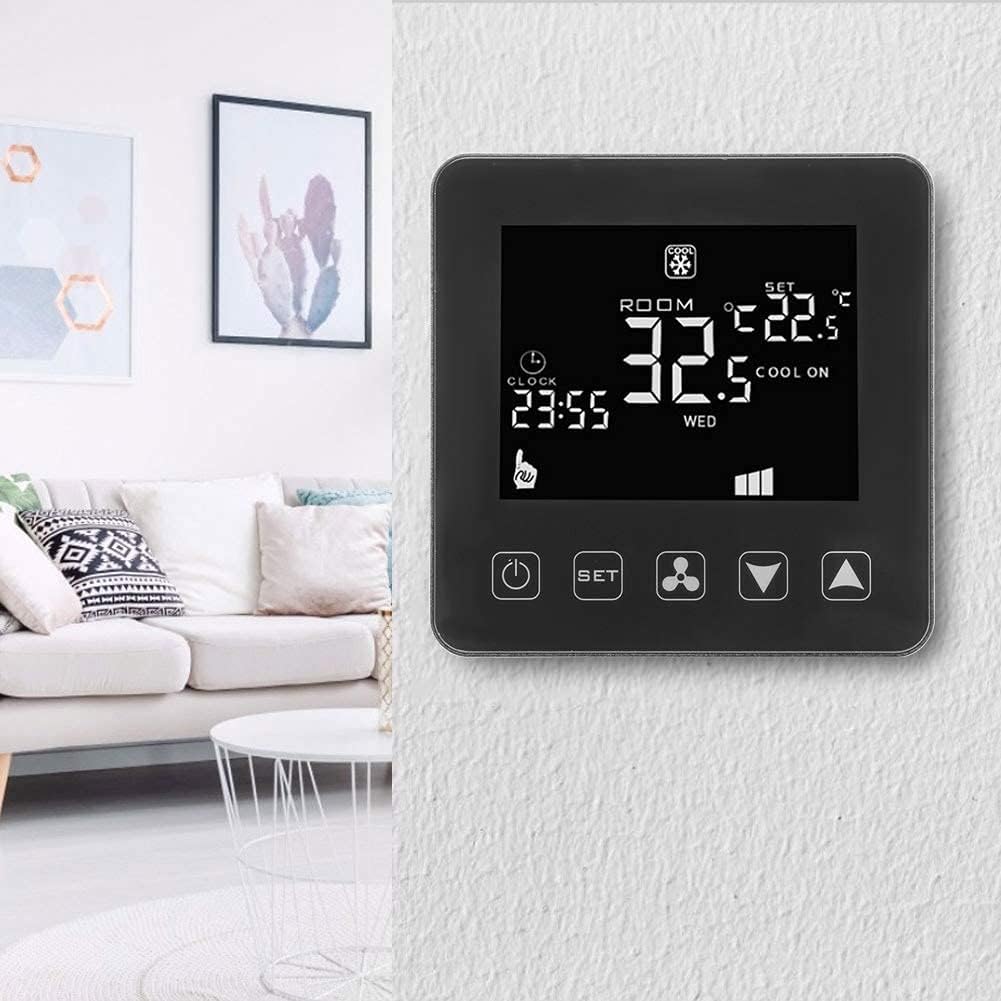
Figure 2: The Walfront HY08AC-2 Thermostat installed on a wall, demonstrating its compact and modern appearance within a home environment.

Figure 3: Rear view of the thermostat's base plate, highlighting the clearly labeled wiring terminals for electrical connections.

Figure 4: An exploded view of the thermostat, separating the main display unit from its wall-mounted base, illustrating the two primary components.
Setup and Installation
Proper installation is crucial for the thermostat's optimal performance. It is recommended that installation be performed by a qualified electrician.
1. Physical Installation
- Power Off: Before beginning installation, ensure that the main power supply to your HVAC system is turned off at the circuit breaker to prevent electrical shock.
- Mounting Location: Choose a central location on an interior wall, away from direct sunlight, drafts, or heat sources that could affect temperature readings.
- Separate Base Plate: Gently separate the front display unit from the back mounting plate.
- Wiring: Connect the electrical wires from your HVAC system to the corresponding terminals on the back mounting plate. Refer to Figure 3 for terminal layout. Ensure all connections are secure. The thermostat operates on AC 200-240V.
- Mounting: Secure the back mounting plate to the wall using the provided screws.
- Attach Thermostat: Carefully reattach the front display unit to the mounted back plate, ensuring it clicks securely into place.
- Power On: Restore power to your HVAC system at the circuit breaker. The thermostat display should illuminate.
2. Initial Setup and Wi-Fi Connection
After powering on, the thermostat will be ready for initial configuration and Wi-Fi connection for remote control.
- Download App: For smartphone control, download the "Tuya Smart" app.
- For Android devices, search "Tuya Smart" on Google Play Store.
- For iOS devices, search "Tuya Smart" on the Apple App Store.
- Register/Login: Open the app and register a new account or log in if you already have one.
- Add Device: Follow the in-app instructions to add your new thermostat. This typically involves putting the thermostat into pairing mode (refer to the thermostat's on-screen prompts or a quick press of the Wi-Fi button if available) and connecting it to your home Wi-Fi network.
- Configure Settings: Once connected, you can configure various settings through the app, including time, temperature units, and programming schedules.
Operating Instructions
The Walfront HY08AC-2 thermostat offers both manual and smart control options.
Manual Operation (Thermostat Buttons)
- Power Button (ⓘ): Press to turn the thermostat ON or OFF.
- Set Button (SET): Press to cycle through different modes (e.g., Heating, Cooling, Fan Only) or to enter programming settings.
- Fan Button (⚙): Controls the fan speed or mode (e.g., Auto, Low, Medium, High).
- Up/Down Arrows (▼ / ▲): Adjust the desired temperature setting or navigate through menu options.
LCD Display Information
The LCD display provides real-time information:
- ROOM Temperature: Displays the current ambient temperature.
- SET Temperature: Shows the desired temperature setting.
- Mode Indicator: Icons for Heating (e.g., flame), Cooling (e.g., snowflake), or Fan Only.
- Clock: Displays the current time.
- Wi-Fi Status: An icon indicating Wi-Fi connection status.
- Fan Speed: Indicates the current fan speed setting.
Smart Control (Tuya Smart App)
Once connected to the Tuya Smart app, you can:
- Remotely adjust temperature settings from anywhere.
- Change operating modes (Heating/Cooling/Fan).
- Set and manage programmable schedules for energy efficiency.
- Monitor current room temperature and system status.
- Receive notifications and alerts.
Maintenance
The Walfront HY08AC-2 thermostat requires minimal maintenance to ensure long-term performance.
- Cleaning: Periodically wipe the thermostat's surface with a soft, dry cloth. Do not use abrasive cleaners, solvents, or chemical sprays, as these can damage the display or casing.
- Avoid Obstructions: Ensure that the thermostat's vents (if any) are not blocked by furniture, curtains, or other objects, as this can affect accurate temperature readings.
- Software Updates: Keep the Tuya Smart app updated to the latest version to ensure optimal performance and access to new features. Firmware updates for the thermostat may also be available through the app.
Troubleshooting
If you encounter issues with your Walfront HY08AC-2 thermostat, refer to the following common problems and solutions:
| Problem | Possible Cause | Solution |
|---|---|---|
| Thermostat display is blank. | No power supply. | Check the circuit breaker for your HVAC system. Ensure the thermostat is properly wired and connected to a 200-240V AC supply. |
| Cannot connect to Wi-Fi. | Incorrect Wi-Fi password, weak signal, or thermostat not in pairing mode. | Verify your Wi-Fi password. Ensure the thermostat is within range of your Wi-Fi router. Put the thermostat into Wi-Fi pairing mode as per app instructions. Restart your router if necessary. |
| Temperature reading seems inaccurate. | Thermostat location affected by external factors (direct sunlight, drafts, heat sources). | Ensure the thermostat is not exposed to direct sunlight, drafts from windows/doors, or heat from appliances. Relocate if necessary. |
| HVAC system not responding to thermostat. | Incorrect wiring, system fault, or thermostat mode setting. | Double-check wiring connections. Ensure the thermostat is set to the correct mode (Heating/Cooling). If the issue persists, consult a qualified HVAC technician. |
Specifications
Detailed technical specifications for the Walfront HY08AC-2 Thermostat:
| Product Type | Wi-Fi Programmable Thermostat |
| Model Number | HY08AC-2 (Walfront28tgsh7n5f) |
| Brand | Walfront |
| Material | Fireproof ABS |
| Operating Voltage | AC 200-240V |
| Load Current | 3A |
| IP Rating | IP20 |
| Accuracy | ± 0.5 °C |
| Temperature Display Range | 0 - 70 °C |
| Setting Range | 5 °C - 35 °C |
| Sensor | NTC (10K) 1 % |
| Working Environment | -10 to 60 °C |
| Item Weight | Approx. 235 g |
| Controller Type | iOS, Android (via Tuya Smart App) |
Support Information
For further assistance or technical support, please refer to the following resources:
- Tuya Smart App: The primary source for managing your thermostat and accessing smart features. Ensure your app is always updated.
- Online Resources: Check the Walfront brand store on Amazon or the Tuya Smart app's help section for FAQs and additional support documentation.
- Professional Assistance: For complex installation or system issues, it is recommended to contact a qualified HVAC professional.
Note: No specific warranty information was provided with this product. Please refer to your purchase documentation for any applicable warranty details.