
Introduction
This manual provides detailed instructions for the installation, operation, and maintenance of your LUTEC 6222W-D2D Dusk to Dawn Dual-Head Flood Light. Please read this manual thoroughly before installation and retain it for future reference. This flood light is designed for outdoor use, providing 3500 lumens of bright 5000K daylight white illumination with a durable, waterproof design.
Safety Information
WARNING: Risk of electric shock. Disconnect power at the fuse or circuit breaker before installation or servicing. All wiring connections must be in accordance with local and national electrical codes. If you are not familiar with proper electrical wiring connections, consult a qualified electrician.
- Ensure the power supply is turned off before beginning installation.
- Do not install on surfaces that are not structurally sound.
- This fixture is intended for use with a 120V AC power supply.
- Do not attempt to modify the fixture.
- Wear safety glasses and gloves during installation.
Package Contents
Verify that all components are present before beginning installation:
- LUTEC 6222W-D2D Dual-Head Flood Light
- Mounting Hardware
- Power Cord (for hardwired connection)
Specifications
| Feature | Specification |
|---|---|
| Model Number | 6222W-D2D |
| Material | Aluminum, Polycarbonate |
| Dimensions (L x W x H) | 9.29" x 6.14" x 4.6" |
| Wattage | 32 Watts |
| Brightness | 3500 Lumens |
| Color Temperature | 5000K (Daylight White) |
| Voltage | 120 Volts |
| Indoor/Outdoor Usage | Outdoor |
| Water Resistance Level | IP65 Waterproof |
| Light Source | LED |
| Lifespan | 50,000+ Hours |

Image: Product dimensions for the LUTEC 6222W-D2D flood light.

Image: Super brightness features of the flood light.

Image: Solid material construction (Aluminum+PC).
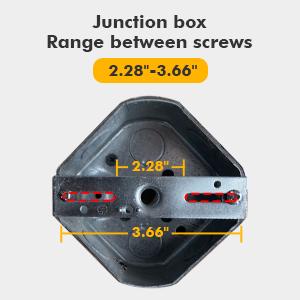
Image: Cellular Anti-Glare lens design.

Image: IP65 Waterproof rating demonstration.

Image: Extended lifespan of 50,000+ hours.
Setup and Installation
This flood light is designed for wall-mount installation and requires hardwiring. Professional installation is recommended if you are unfamiliar with electrical wiring.
Installation Steps:
- Prepare for Installation: Turn off power at the circuit breaker or fuse box. Ensure the power is completely disconnected before proceeding.
- Mounting Plate Installation: Attach the mounting plate to the junction box. The junction box should have a screw range between 2.28" and 3.66" for compatibility.
- Wiring Connections: Connect the fixture's wires to your household wiring according to local electrical codes. Typically, this involves connecting live to live, neutral to neutral, and ground to ground. Secure all connections with wire nuts.
- Secure the Fixture: Align the flood light fixture with the mounting plate and secure it using the provided screws. Ensure a tight seal to maintain the waterproof rating.
- Adjust Light Heads: The dual light heads are 360° adjustable. Loosen the adjustment screws, position the light heads to your desired coverage area, and then tighten the screws to secure them.
- Restore Power: Once installation is complete and all connections are secure, restore power at the circuit breaker.
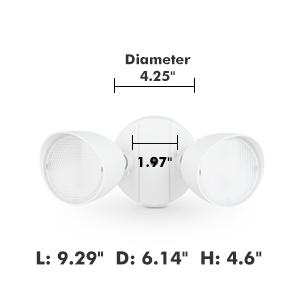
Image: Junction box screw range compatibility.
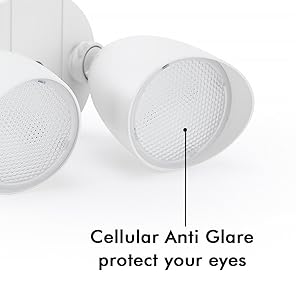
Image: Securing the flood light during installation.

Image: Adjustable light head design.
Operating Instructions
The LUTEC 6222W-D2D flood light features a built-in dusk-to-dawn sensor for automatic operation.
Dusk to Dawn Functionality:
- The integrated sensor detects ambient light levels.
- At dusk, when natural light diminishes, the flood light will automatically turn on to full brightness.
- The light will remain on throughout the night.
- At dawn, when natural light increases, the flood light will automatically turn off.

Image: Dusk to Dawn operation.
No manual control is typically needed for the dusk-to-dawn feature once installed. Ensure the sensor is not obstructed by objects or other light sources that could interfere with its operation.
Maintenance
The LUTEC 6222W-D2D flood light requires minimal maintenance.
- Cleaning: Periodically clean the fixture with a soft, damp cloth. Do not use abrasive cleaners or solvents, as these can damage the finish or electrical components.
- Inspection: Regularly inspect the fixture for any signs of damage, loose wiring, or wear. If any issues are found, disconnect power and consult a qualified electrician or contact customer support.
- LEDs: The integrated LED light source is designed for long life and is not user-replaceable.
Troubleshooting
If you experience issues with your flood light, refer to the following common problems and solutions:
| Problem | Possible Cause | Solution |
|---|---|---|
| Light does not turn on at night. | 1. Power is off. 2. Sensor obstructed or receiving too much light. 3. Faulty wiring connection. | 1. Check circuit breaker/fuse. 2. Ensure sensor is clear and not exposed to other light sources (e.g., streetlights, other fixtures). 3. Verify all wiring connections are secure (consult an electrician if unsure). |
| Light stays on during the day. | 1. Sensor obstructed or dirty. 2. Sensor is faulty. | 1. Clean the sensor lens. Ensure no objects are blocking sunlight from reaching the sensor. 2. Contact customer support for assistance. |
| Light flickers or is dim. | 1. Loose wiring connection. 2. Power supply issue. 3. Fixture damage. | 1. Check all wiring connections. 2. Consult an electrician to check power supply. 3. Contact customer support. |
Warranty and Support
LUTEC provides a 3-year manufacturer's warranty for this product. This warranty covers defects in materials and workmanship under normal use.
For technical assistance, warranty claims, or any other inquiries, please contact LUTEC customer service. We offer 7*24h after-sales service to address any issues that may arise.
Please visit the official LUTEC website or refer to your purchase documentation for specific contact information.


