
ION TOTALPAPREMIERXUS
ION Audio Total PA Premier User Manual
Model: TOTALPAPREMIERXUS
Product Overview
The ION Audio Total PA Premier is a high-power, bi-amplified sound system designed to deliver clear, vibrant audio across large areas. This all-in-one loudspeaker system integrates exciting lighting effects with robust sound capabilities, making it suitable for various events and applications. It features a 15-inch woofer and a 1-inch tweeter, along with a multi-channel mixer and versatile input options.
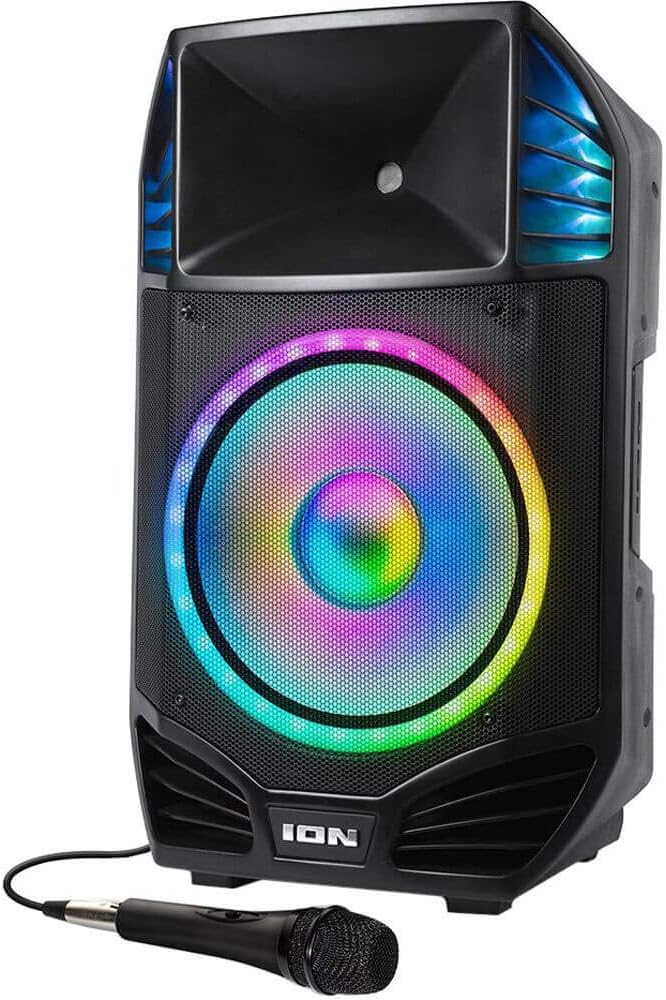
Image: The Total PA Premier speaker shown with the included wired microphone. The speaker features a large illuminated woofer and integrated handles.
What's Included:
- Total PA Premier Speaker
- Microphone
- 1/8” (3.5 mm) Aux Cable
- 3-prong IEC cable (Power Cable)
- Tripod Stand
- Safety & Warranty Manual (This document serves as the user manual)
Features
- High-Power Sound: 500-watt bi-amplified sound system with a 15” (381mm) woofer and 1” (2.5mm) tweeter.
- Multi-Channel Mixer: Includes Master Volume and XLR inputs for versatile connectivity.
- Tonal Adjustment: Separate bass and treble controls for precise sound customization.
- Microphone Echo Effect: Enhances vocal performances, ideal for karaoke.
- Bluetooth Connectivity: Streams music wirelessly from any Bluetooth-enabled device with voice prompts for easy pairing.
- Wireless Stereo-Link: Connects wirelessly to an additional Total PA Premier unit for expanded sound coverage.
- Integrated Media Player: Built-in FM radio, USB port, and SD card slot for playing digital music files.
- USB Charge Port: 1A USB charge port to keep your devices powered.
- Multiple Inputs: 1/8-inch (3.5mm) and ¼-inch inputs for connecting various audio equipment.
- Portability: Built-in handles and wheels for easy transport.
- Durability: Rugged construction with integrated handles and a steel speaker grille.
- Dynamic Lighting: Woofer glows in multiple colors with a dazzling circular motion effect, synchronizing with the music.
Setup
Unpacking and Placement:
- Carefully remove all contents from the packaging.
- Place the Total PA Premier speaker on a stable, flat surface.
- For optimal sound projection, use the included tripod stand to elevate the speaker to the perfect height. Ensure the stand is fully extended and locked securely before placing the speaker on it.
Power Connection:
Connect the included 3-prong IEC power cable to the power input on the rear of the Total PA Premier and then to a grounded power outlet.

Image: The rear panel of the Total PA Premier, displaying the main control interface, various audio inputs, power connection, and integrated wheels for transport.
Connections
The Total PA Premier offers a variety of input options for connecting different audio sources.

Image: A detailed view of the multi-channel mixer section on the speaker's rear panel, highlighting the various volume controls and input jacks.
- Microphone Inputs (XLR / 1/4-inch): Connect the included microphone or other dynamic microphones to the XLR or 1/4-inch microphone inputs. Adjust the individual microphone volume controls.
- Auxiliary Inputs (1/8-inch / 1/4-inch): Use the 1/8-inch (3.5mm) or 1/4-inch inputs to connect external audio devices suchs as smartphones, tablets, or other audio players using the appropriate cables.
- XLR Line Input: For professional audio equipment, use the XLR line input.
- XLR Mix Output: Connect this output to another PA system or mixer to expand your sound setup.
- USB Port: Insert a USB flash drive containing audio files (MP3, WAV, WMA) into the USB port for playback. This port also functions as a 1A charging port for mobile devices.
- SD Card Slot: Insert an SD card containing audio files into the SD card slot for playback.
Operating Instructions
Power On/Off:
Press the Power button located on the rear panel to turn the unit on or off.
Master Volume and Tonal Controls:
Use the Master Volume knob to adjust the overall output level of the speaker. The separate Bass and Treble control knobs allow for fine-tuning of the low and high frequencies to achieve your desired sound.

Image: A close-up view of the dedicated bass and treble control knobs, used for precise tonal adjustments of the audio output.
Bluetooth Pairing:
To stream audio wirelessly from a Bluetooth device:
- Ensure your Bluetooth device is within range (up to 100 ft / 30.5 m).
- Turn on the Total PA Premier. The unit will automatically enter Bluetooth pairing mode, indicated by voice prompts.
- Go to your device’s Bluetooth settings and select "ION Audio Total PA Premier" from the list of available devices.
- Once paired, the Bluetooth LED will illuminate solid, and you will hear a confirmation tone.
- To disconnect, turn off Bluetooth on your device or press the Bluetooth button on the Total PA Premier.

Image: The Bluetooth logo displayed alongside the Total PA Premier speaker, indicating its wireless audio streaming capability.
FM Radio Operation:
Press the Mode button to switch to FM Radio mode. Use the Tune/Track buttons to scan for radio stations. Press and hold to auto-scan.
USB/SD Playback:
Insert a USB flash drive or SD card into the respective slot. The unit will automatically switch to USB/SD mode and begin playing compatible audio files. Use the Play/Pause and Tune/Track buttons to control playback.
Microphone Usage and Echo Effect:
Connect the microphone to one of the microphone inputs. Adjust the microphone volume using its dedicated knob. To add an echo effect, turn the Echo knob on the mixer panel to your desired level.

Image: The included wired microphone positioned in front of the Total PA Premier speaker, illustrating its use for vocal input.
Lighting Effects:
The Total PA Premier features dynamic multi-colored lighting on the woofer that can react to the music. Use the Light Mode button on the control panel to cycle through different lighting patterns or turn the lights off.

Image: A close-up view of the speaker's woofer, showcasing its vibrant multi-colored illumination and circular light motion effect.
Wireless Stereo-Link:
To link two Total PA Premier units wirelessly for stereo sound:
- Ensure both units are powered on and not connected to any Bluetooth device.
- On one unit (this will be the primary unit), press and hold the Link button.
- On the second unit (this will be the secondary unit), press and hold the Link button.
- The units will automatically connect, and audio will play in stereo across both speakers.
Maintenance
- Cleaning: Wipe the exterior of the speaker with a soft, dry cloth. Do not use abrasive cleaners or solvents.
- Storage: When not in use, store the speaker in a cool, dry place, away from direct sunlight and extreme temperatures.
- Transport: Utilize the built-in handles and wheels for easy and safe transport of the unit.
- Power Cable: Always disconnect the power cable from the outlet when not in use or during electrical storms.
Troubleshooting
| Problem | Possible Solution |
|---|---|
| No Sound Output |
|
| Bluetooth Not Connecting |
|
| Distorted Sound |
|
| Lights Not Working |
|
| Unit Shuts Off Unexpectedly |
|
Specifications
| Feature | Detail |
|---|---|
| Output Power | 500 Watts (Peak) |
| Woofer Size | 15 inches (381mm) |
| Tweeter Size | 1 inch (2.5mm) |
| Bluetooth Range | Up to 100 ft (30.5 m) |
| Inputs | XLR, 1/8-inch (3.5mm) Aux, 1/4-inch, USB, SD Card |
| Outputs | XLR Mix Output |
| USB Charge Port | 1A |
| Power Source | AC (3-prong IEC cable) |
| Dimensions (L x W x H) | 21.36 x 18.36 x 30 inches (54.25 x 46.63 x 76.2 cm) |
| Weight | 42.4 pounds (19.23 kg) |
| Model Number | TOTALPAPREMIERXUS |
| UPC | 842655101936 |
Warranty and Support
For warranty information and technical support, please refer to the official ION Audio website or contact their customer service department. Keep your proof of purchase for warranty claims.
Online Resources: Visit www.ionaudio.com for product registration, support articles, and contact information.
Official Product Videos
No official product videos from the seller were found in the provided data for this product. Please refer to the manufacturer's website for any available video resources.
Related documentsTOTALPAPREMIERXUS


Ask a question about this manual
Ask about setup, troubleshooting, compatibility, parts, safety, or missing instructions. Manuals+ will review the question and use this page’s manual context to help answer it.