
1. Introduction
The Datavideo SE-3200 is a professional 12-channel digital video switcher designed for high-definition video production environments. It supports native 1080p/60 3G HD video processing and offers a comprehensive set of features for live event production, broadcasting, and studio applications. This manual provides detailed instructions for the setup, operation, and maintenance of your SE-3200 switcher.
2. Important Safety Information
- Power Supply: Use only the specified power adapter. Ensure the power cord is not damaged or pinched.
- Ventilation: Do not block ventilation openings. Ensure adequate airflow around the unit to prevent overheating.
- Moisture: Do not expose the unit to rain, moisture, or liquids. Operating in damp conditions can cause electric shock.
- Servicing: Do not attempt to service this product yourself. Refer all servicing to qualified service personnel.
- Placement: Place the unit on a stable, level surface. Avoid placing it near heat sources or in direct sunlight.
3. Package Contents
Please verify that all items listed below are included in your package:
- Datavideo SE-3200 Main Processing Unit (2U rackmount)
- Datavideo SE-3200 Control Panel
- Power Adapter/Cable
- USB Cable (for firmware upgrades)
- User Manual (this document)
4. Product Overview
4.1. Front Panel

The front panel of the SE-3200 control unit provides access to all operational controls. This includes input selection buttons for Program and Preset rows, transition controls (T-bar, CUT, AUTO), keyer controls, Picture-in-Picture (PIP) settings, and various effects buttons. The layout is designed for intuitive and efficient live production switching.
4.2. Rear Panel
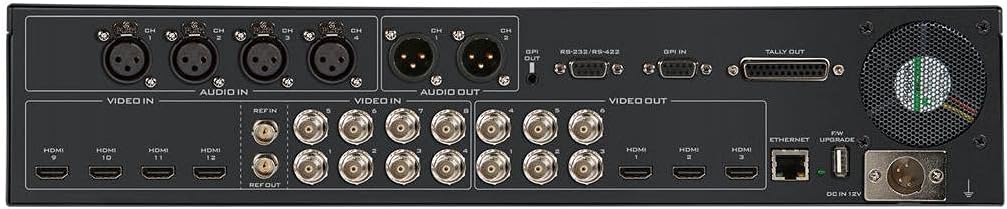
The rear panel of the main processing unit houses all input and output connections. It features 8 SDI inputs and 4 HDMI inputs, allowing for a total of 12 video sources. For outputs, there are 6 SDI and 3 HDMI ports. Additionally, the rear panel includes 4 XLR analog audio inputs, 2 XLR analog audio outputs, GenLock, RS-232/RS-422 control ports, GPI, Tally output, Ethernet for remote control and streaming, and a USB port for firmware upgrades.
5. Setup Guide
Follow these steps for initial setup of your Datavideo SE-3200:
- Mounting: Install the 2U main processing unit into a standard 19-inch rack. Place the control panel on a stable surface or integrate it into your control room setup.
- Connect Control Panel: Connect the control panel to the main processing unit using the provided cable.
- Video Inputs: Connect your video sources (cameras, media players, computers) to the SDI (1-8) and HDMI (9-12) input ports on the rear panel. The SE-3200 features frame synchronizers on all inputs.
- Video Outputs: Connect your program monitors, recorders, and streaming encoders to the SDI (1-6) and HDMI (1-3) output ports.
- Audio Connections: Connect your audio sources to the 4 XLR analog audio inputs. Connect your audio monitoring or mixing equipment to the 2 XLR analog audio outputs.
- GenLock: If synchronizing with external equipment, connect your reference signal to the GenLock input.
- Power: Connect the power adapter to the main processing unit and then to a suitable power outlet. Power on the unit.
- Network (Optional): Connect an Ethernet cable for remote control or streaming functionalities.
6. Operating Instructions
The SE-3200 offers a wide range of features for professional video switching. This section covers basic operation.
6.1. Input Selection
- Use the numbered buttons on the PROGRAM row to select the video source currently on air.
- Use the numbered buttons on the PRESET row to select the next video source to be transitioned to.
6.2. Transitions
- CUT: Press the CUT button for an instantaneous switch between Program and Preset.
- AUTO: Press the AUTO button for an automatic transition (mix or wipe) based on the selected transition type and duration.
- T-Bar: Manually control the speed and direction of transitions using the T-bar fader.
- Wipe Patterns: Select various wipe patterns and adjust border width, color, and softness using the dedicated controls.
6.3. Keying Functions
The SE-3200 features 4 upstream keyers and 2 DSKs.
- Chroma Key: Used for green/blue screen effects. Select the keyer, enable Chroma Key, and adjust parameters for a clean key.
- Luma Key: Keys based on brightness levels.
- Linear Key: Keys using a fill and key source.
- DSK (Downstream Keyer): Used for graphics, lower thirds, and titles over the main program output.
6.4. Picture-in-Picture (PIP)
The switcher supports 4 independent PIPs. Configure the size, position, and source for each PIP using the dedicated controls on the panel.
6.5. Still Store and Logo Insertion
The SE-3200 allows you to store still images and logos for instant recall and insertion into your program. Refer to the on-screen menu for managing still stores.
6.6. Audio Control
The switcher provides embedded audio processing and analog audio inputs/outputs. Monitor audio levels on the multiview output and adjust as needed. Audio delay up to 16 fields or 8 frames per channel is available.
7. Maintenance
- Cleaning: Use a soft, dry cloth to clean the exterior of the unit. Do not use liquid or aerosol cleaners.
- Ventilation: Regularly check that the ventilation openings are clear of dust and obstructions.
- Firmware Updates: Periodically check the Datavideo website for firmware updates to ensure optimal performance and access to new features. Use the USB port for updates.
8. Troubleshooting
- No Video Output:
- Ensure all video cables are securely connected.
- Verify that the correct input is selected on the Program row.
- Check monitor input selection.
- No Audio:
- Check audio cable connections.
- Verify audio levels on the multiview.
- Ensure audio embedding/de-embedding settings are correct.
- Unit Not Powering On:
- Check power cable connection and power outlet.
- Ensure the power adapter is functioning correctly.
- Keyer Not Working:
- Verify keyer is enabled and the correct key type (Chroma, Luma, Linear) is selected.
- Adjust keyer parameters (threshold, gain, clip) for optimal results.
9. Technical Specifications
| Feature | Specification |
|---|---|
| Product Dimensions | 21.75 x 15 x 12.5 inches |
| Item Weight | 16 pounds |
| Item Model Number | SE-3200 |
| Total Video Inputs | 12 (8 x SDI, 4 x HDMI) |
| Total Video Outputs | 9 (6 x SDI, 3 x HDMI) |
| Analog Audio Inputs | 4 x XLR |
| Analog Audio Outputs | 2 x XLR |
| Internal Frame Synchronizers | 12 (All Inputs) |
| Video Processing | Native 1080p/60 3G HD |
| Keyers | 4 Upstream (Chroma, Linear, Luma), 2 DSK |
| Picture-in-Picture (PIP) | 4 independent PIPs |
| Transitions | Wipe, Mix, Cut, Stinger |
| Connectivity | Ethernet, RS-232/RS-422, GPI, Tally, USB |
10. Warranty and Support
Datavideo products are covered by a manufacturer's warranty. For specific warranty terms and conditions, please refer to the warranty card included with your product or visit the official Datavideo website. For technical support, service, or further assistance, please contact your local Datavideo dealer or visit the Datavideo support portal online.


