
1. Introduction
Thank you for purchasing the SIHUADON R108 Portable Multi-Band DSP Radio. This compact and lightweight radio offers high-sensitivity reception across FM, AM, LW, SW, and Airband frequencies. It features a DSP receiver for enhanced performance, a backlit LCD screen, and convenient functions like a sleep timer and alarm clock. This manual provides detailed instructions to help you get the most out of your device.
2. Product Overview
Key Features:
- Multi-band reception: FM Stereo, AM, LW, SW, Airband.
- Digital Signal Processing (DSP) for improved reception and sound quality.
- Compact and lightweight design (12.8 x 3.1 x 7.6 cm).
- Backlit LCD screen for easy viewing, especially at night.
- 500 memory presets for storing your favorite stations.
- Built-in sleep timer and alarm clock functions.
- Temperature display.
- USB Type-C rechargeable with a BL-5C battery (included).
- External antenna jack and headphone jack.
Frequency Bands:

Image: The SIHUADON R108 radio showing its supported frequency ranges: FM (64-108MHz), AM (522-1710KHz), SW (1711-29999KHz), LW (150-450KHz), and Airband (118-137MHz).
Components and Controls:
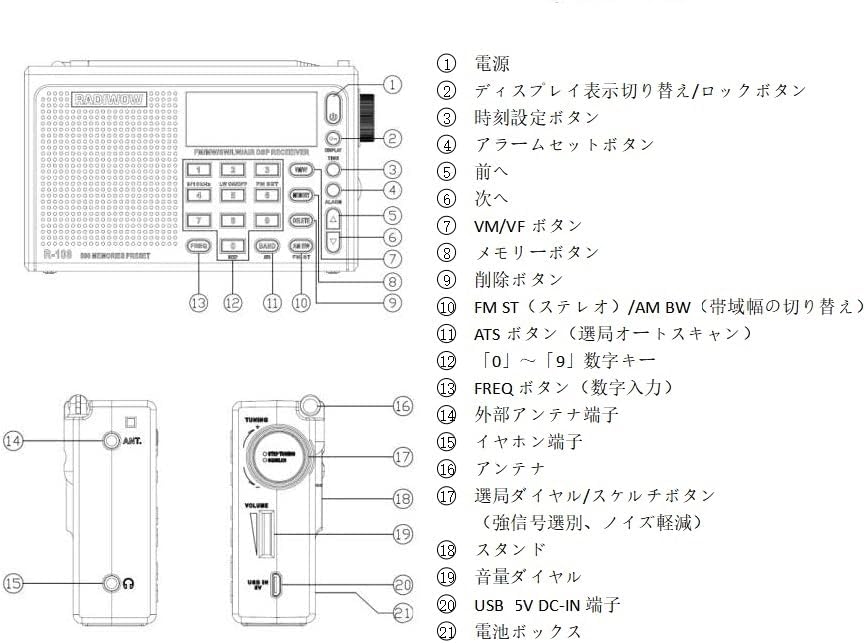
Image: Detailed diagram of the SIHUADON R108 radio's physical controls.
- Power Button: Turns the radio on/off.
- Display Switch/Lock Button: Toggles display information or locks/unlocks buttons.
- Time Setting Button: Used to set the current time.
- Alarm Set Button: Used to set the alarm time.
- Previous Button: Navigates to the previous station or setting.
- Next Button: Navigates to the next station or setting.
- VM/VF Button: Switches between Memory (VM) and Frequency (VF) modes.
- Memory Button: Stores or recalls preset stations.
- Delete Button: Deletes stored memory presets.
- FM ST / AM BW Button: Toggles FM stereo mode or adjusts AM bandwidth.
- ATS Button: Initiates Automatic Tuning System (auto-scan).
- 0-9 Numeric Keys: For direct frequency input.
- FREQ Button: Confirms numeric frequency input.
- External Antenna Terminal: Connects an external antenna for improved reception.
- Earphone Jack: For private listening.
- Antenna: Telescopic rod antenna for FM/SW/Airband.
- Tuning Dial/Squelch Button: Adjusts frequency or squelch level (for noise reduction).
- Stand: Integrated stand for upright positioning.
- Volume Dial: Adjusts the audio volume.
- USB 5V DC-IN Terminal: For charging the battery and powering the radio.
- Battery Compartment: Houses the BL-5C rechargeable battery.
LCD Display Indicators:

Image: Explanation of the various icons and information displayed on the LCD screen.
- Battery consumption indicator
- FM stereo status indicator
- Sleep indicator
- Alarm indicator (radio or buzzer)
- SQUELCH indicator
- Temperature (Temp)
- Digital number display (4 Digits)
- Signal indicators (dB: signal strength unit, S/N: Signal to Noise Ratio unit)
- Alarm indicator
- Meter band indicator
- Preset memory address indicator
- Sound Mode indicator
- Tuning speed: FAST / SLOW / STOP
- Frequency unit: KHz for MW, LW & SW; MHz for FM
- Master Digits
- Band indicator
- Key-lock indicator
3. Setup
Battery Installation:
The SIHUADON R108 uses a BL-5C rechargeable battery. For safe long-distance transportation, a small insulating card is inserted to separate the power supply. Please remove this card before first use.
- Open the battery compartment cover on the back of the radio.
- Locate and remove the small insulating card.
- Ensure the BL-5C battery is correctly inserted with the polarity matching the diagram inside the compartment.
- Close the battery compartment cover securely.

Image: The radio's battery compartment and USB Type-C charging port.
Charging the Radio:
Connect the provided USB Type-C charging cable to the USB 5V DC-IN terminal on the side of the radio and plug the other end into a compatible USB power adapter (not included) or a computer's USB port. The battery indicator on the LCD screen will show charging status.
Antenna Setup:
For optimal reception, extend the telescopic rod antenna fully when listening to FM, SW, or Airband. For AM/LW, the radio uses a built-in ferrite bar antenna, but an external antenna can be connected to the external antenna terminal for improved reception on all bands.

Image: The radio features a 50cm rod antenna, an internal AM antenna, and supports an external antenna for enhanced signal reception.
4. Operating Instructions
Power On/Off:
Press the Power Button (①) to turn the radio on or off.
Band Selection:
Press the BAND button to cycle through FM, AM, LW, SW, and Airband frequencies.
Tuning Methods:
- Manual Tuning: Rotate the Tuning Dial (⑰) to manually adjust the frequency. The tuning speed can be adjusted (FAST/SLOW/STOP) via the tuning knob.
- Direct Frequency Input: Press the FREQ button (⑬), then use the 0-9 Numeric Keys (⑫) to enter the desired frequency, and press FREQ again to confirm.
- Automatic Tuning System (ATS): Press the ATS button (⑪) to automatically scan and store available stations in the current band.
- Memory Presets: Use the MEMORY button (⑧) to store or recall up to 500 preset stations.
Volume Control:
Rotate the Volume Dial (⑲) to increase or decrease the audio output.
Alarm and Sleep Timer:
- Setting Alarm: Press the Alarm Set Button (④) to enter alarm setting mode. Use the numeric keys or tuning dial to set the desired alarm time.
- Sleep Timer: The radio features a sleep timer that can be set from 0 to 120 minutes, allowing the radio to turn off automatically after a set period.
Squelch Function:
The Squelch function (part of ⑰ Tuning dial/Squelch button) helps to reduce background noise, especially useful for weak signals or Airband reception. Adjust the squelch level from OFF to 9 to find the optimal setting.
Headphone Use:
Connect 3.5mm headphones to the Earphone Jack (⑮) for private listening. The radio's internal speaker will be muted automatically.
Video Demonstration of Features:
Video: This video demonstrates various functions of the SIHUADON R108 radio, including setting the alarm and sleep timer, tuning methods, volume control, charging, battery installation, antenna usage, anti-slip mats, and the reset button.
5. Maintenance
- Cleaning: Wipe the radio with a soft, dry cloth. Do not use abrasive cleaners or solvents.
- Battery Care: To prolong battery life, avoid fully discharging the battery frequently. If the radio will not be used for an extended period, charge it periodically.
- Storage: Store the radio in a cool, dry place away from direct sunlight and extreme temperatures.
6. Troubleshooting
| Problem | Possible Cause | Solution |
|---|---|---|
| No power / Radio does not turn on | Battery not installed correctly or discharged. Insulating card still present. | Ensure the insulating card is removed. Install the BL-5C battery correctly. Charge the battery using the USB Type-C cable. |
| Poor reception / Static noise | Weak signal. Antenna not extended. Interference from electronic devices. | Fully extend the telescopic antenna. Try connecting an external antenna. Move the radio away from other electronic devices. Adjust the Squelch level. |
| Impact sound when switching bands (with headphones) | Characteristic of DSP radios, especially with headphones. | This is a known characteristic and may not be fully avoidable. Reduce volume before switching bands. |
| Noise when using external power supply | Interference from switching-type USB chargers. | Use a linear power supply or a high-quality, low-noise USB charger if available. Operate on battery power for critical listening. |
| Display issues (dim, hard to read) | Viewing angle or backlight setting. | Adjust the viewing angle. Ensure the backlight is on (if applicable) and at an appropriate brightness. |
| Settings not saved after power off | Potential software or memory issue. | Perform a reset using the RESET button (if available). Ensure battery is not completely drained. |
7. Specifications
| Feature | Detail |
|---|---|
| Brand | RADIWOW |
| Model Number | R108 |
| Color | Grey |
| Product Dimensions (L x W x H) | 12.8 x 3.1 x 7.6 cm |
| Item Weight | 0.33 kg |
| Connectivity Technology | USB |
| Tuner Technology | AM/FM/LW/SW/Airband (DSP) |
| Power Source | USB IN 5V, BL-5C Lithium-ion Battery (1 included) |
| Display Type | LCD |
| Product Exterior Material | Plastic |
| Included Components | SIHUADON R-108 Shortwave Radio, USB charging cable, External antenna, Instruction manual, BL-5C rechargeable battery |
8. Warranty and Support
Warranty Information:
This radio comes with a one-year warranty from the date of purchase. Please retain your proof of purchase for warranty claims.
Customer Support:
If you encounter any problems or have questions regarding your SIHUADON R108 radio, please do not hesitate to contact our customer support. We are committed to resolving any issues you may have.
For support, please refer to the contact information provided with your purchase or visit the official RADIWOW website.


