
1. Introduction
This manual provides detailed instructions for the AT&T BL102-2 DECT 6.0 2-Handset Cordless Phone system. This system is designed to offer clear communication, extended range, and features such as a digital answering machine and Smart Call Blocker to manage unwanted calls. Please read this manual thoroughly to ensure proper setup and operation of your new phone system.

Image: The AT&T BL102-2S 2-Handset Digital Answering System with Smart Call Blocker, showing the base unit and two cordless handsets.
2. Package Contents
Ensure all items are present in your package:
- 1 x Base unit with digital answering system
- 2 x Cordless handsets
- 2 x Handset chargers
- 2 x Power adapters for base unit and charger
- 1 x Telephone line cord
- 2 x Ni-MH rechargeable battery packs
- 1 x Wall mount bracket (optional)

Image: A complete view of the AT&T BL102-2S phone system components, including the main base, two handsets, and their respective charging cradles.
3. Setup
3.1 Battery Installation
- Open the battery compartment cover on the back of each handset.
- Connect the battery pack plug into the jack inside the compartment, ensuring correct polarity.
- Place the battery pack inside the compartment.
- Close the battery compartment cover.
3.2 Connecting the Base Unit
- Plug one end of the telephone line cord into the TEL LINE jack on the back of the base unit.
- Plug the other end of the telephone line cord into a telephone wall jack.
- Plug the small end of the base unit power adapter into the POWER jack on the back of the base unit.
- Plug the large end of the base unit power adapter into an electrical outlet not controlled by a wall switch.
3.3 Connecting the Handset Charger
- Plug the small end of the charger power adapter into the POWER jack on the back of the charger.
- Plug the large end of the charger power adapter into an electrical outlet not controlled by a wall switch.
3.4 Initial Charging
Place each handset in its respective base unit or charger. The CHARGE light on the handset will illuminate. Allow the handsets to charge for at least 10 hours before first use to ensure optimal battery performance.
3.5 Wall Mounting (Optional)
The base unit can be mounted on a wall using the included wall mount bracket. Refer to the separate wall mounting guide for detailed instructions.

Image: The AT&T BL102-2S base unit is shown mounted on a kitchen wall, illustrating its table-and-wall mountable design.
4. Key Features
- Unsurpassed Range: Experience extended coverage and clarity throughout your home or office, enabled by a unique antenna design and advanced noise-filtering technology.

Image: A visual representation of the phone's long-range capability, showing a handset in one room and the base unit in another, both connected.
- Digital Answering System: Records up to 22 minutes of incoming messages, outgoing announcements, and memos. Features include voice-guided setup, remote access, message retrieval from both handset and base, and message time stamps.

Image: The base unit's answering system controls are highlighted, showing the 'ANSWER ON/OFF' button, 'PLAY/STOP' button, and an LED message counter.
- Smart Call Blocker: Automatically blocks robocalls from ringing through. You can permanently blacklist up to 1,000 numbers with one touch. The system also allows screening of unknown callers.

Image: The phone handset and base are shown with a graphic indicating a call being blocked, illustrating the Smart Call Blocker feature.
Video: This video demonstrates how to unblock a telephone number from the Smart Call Blocker list on VTech phone systems, which is applicable to this AT&T model.
- Caller ID Announce: The handset announces the name of the caller, allowing you to decide whether to answer or block the call without needing to look at the screen.

Image: The phone handset is shown displaying an incoming call with the caller's name, demonstrating the Caller ID Announce feature.
- Large 2-inch Screen, Big Text, Lighted Keypad: High-contrast text on the extra-large screen ensures easy readability of caller ID and call history. The enlarged font and lighted keypad facilitate easy dialing in low-light conditions, beneficial for visually impaired users.

Image: A close-up of the handset's large screen, emphasizing the clear display and large text for easy viewing.

Image: A hand pressing the large, illuminated buttons on the handset, highlighting the ease of dialing.
- Handset Speakerphone, Audio Assist, Intercom: The full-duplex speakerphone on the handset allows natural conversations. Audio Assist instantly boosts volume and enhances sound frequencies for clearer speech. Intercom allows communication between handsets.

Image: A person holding the handset to their ear, with the 'AUDIO ASSIST' button on the side of the handset circled, indicating its function.

Image: Two handsets are shown, one on the main base and another on a charging cradle, with speaker icons indicating the speakerphone capability.
- Visual Ringer: A bright red visual ringer on the handset makes incoming calls easily noticeable, especially in noisy environments or for those with hearing impairments.
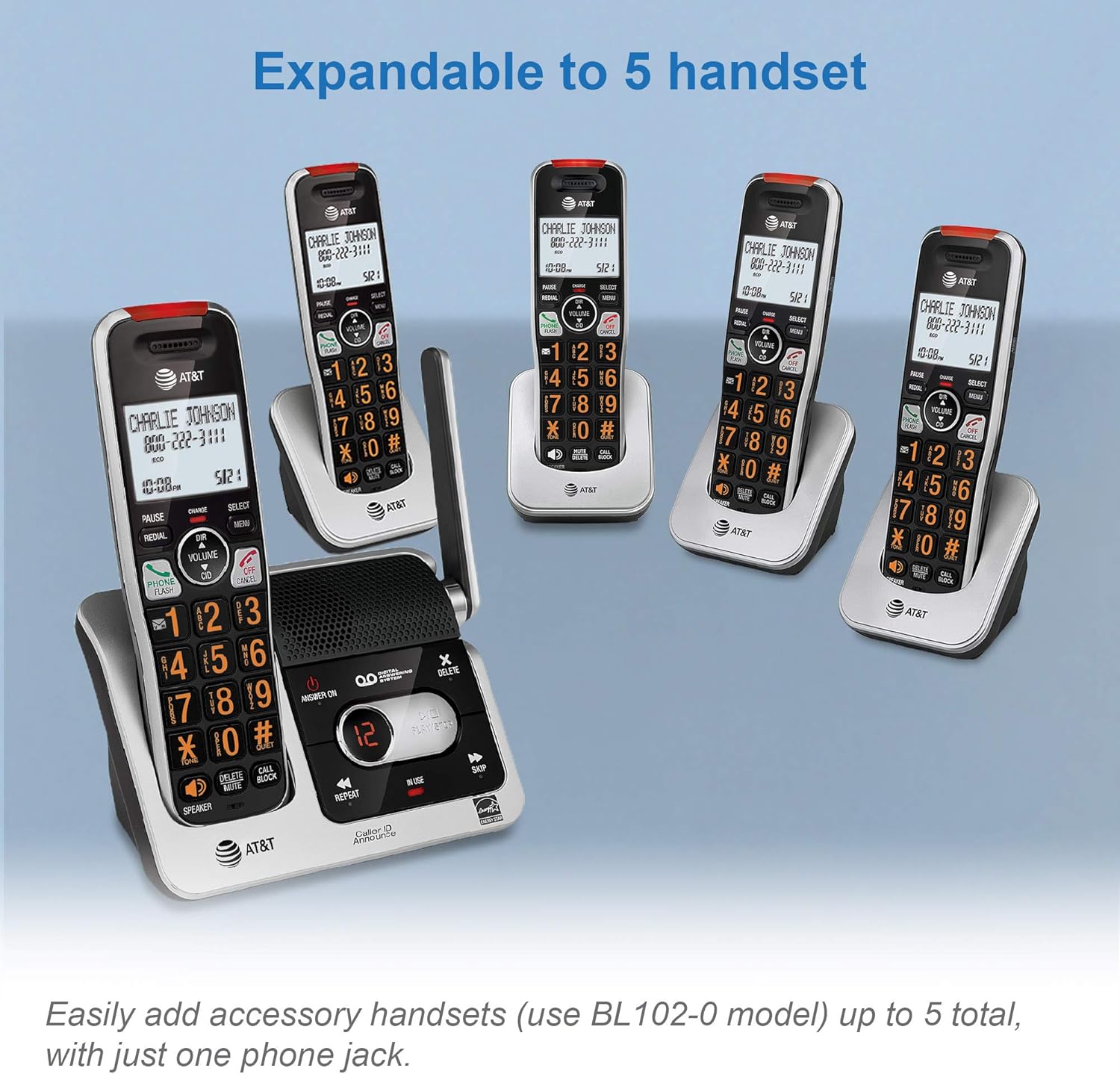
Image: A close-up of the top of the handset, showing the red visual ringer flashing to indicate an incoming call.
- Expandable System: The base unit supports up to 5 total handsets (using BL102-0 accessory handsets) with just one phone jack, allowing for expanded coverage.
Image: The main base unit is shown alongside several additional handsets and chargers, demonstrating the system's expandability.
- Quiet Mode: Silences the ringer on all handsets and the base unit for a specified period.
- ECO Mode: Power-conserving technology to optimize battery life.
- Conference Call Capability: Supports conferencing between an outside line and up to 4 cordless handsets.
- Phonebook Directory: Stores up to 50 names and numbers.
- Caller ID/Call Waiting History: Stores up to 50 name and number entries.
- Voicemail Waiting Indicator: Notifies you of new voicemail messages.
- Quick Access Key for Voicemail: Dedicated button for easy voicemail access.
- Last 10 Number Redial: Quickly redial recently called numbers.
- Mute Function: Mute your microphone during a call.
- Any Key Answer: Answer incoming calls by pressing any key on the handset.
- Multi-language Setup Menu: English/Spanish/French options for menu display.

Image: A comprehensive list detailing various features of the phone system, including call blocking, visual ringer, quiet mode, and intercom.
5. Operating Instructions
5.1 Making and Answering Calls
- To Make a Call: Pick up a handset, press TALK/FLASH or SP-PHONE, then dial the number.
- To Answer a Call: When the phone rings, press TALK/FLASH or SP-PHONE, or any dialing key (Any Key Answer).
- To End a Call: Press OFF/CANCEL or place the handset back in the charger.
- Speakerphone: Press SP-PHONE to activate or deactivate the speakerphone during a call.
- Volume Adjustment: During a call, press VOLUME DIR or CID to adjust the listening volume.
5.2 Using the Digital Answering System
- Turn On/Off: Press ANSWER ON/OFF on the base unit.
- Play Messages: Press PLAY/STOP on the base unit.
- Skip/Repeat: During message playback, press SKIP to go to the next message or REPEAT to replay the current message.
- Delete Message: During message playback, press DELETE on the base unit.
5.3 Smart Call Blocker
The Smart Call Blocker helps filter unwanted calls. You can manage your block list and screening options through the handset menu.
- To Block a Number: During an incoming call or after reviewing Caller ID history, press CALL BLOCK on the handset.
- To Review/Delete Blocked Numbers: Access the Smart Call Blocker menu via the handset.

Image: A detailed graphic explaining how the Smart Call Blocker works, including settings for screening different types of calls.
6. Maintenance
- Cleaning: Clean the phone and charger surfaces with a soft, damp cloth. Do not use harsh chemicals or abrasive cleaners.
- Battery Care: For optimal battery life, fully charge the handsets regularly. If the phone will not be used for an extended period, remove the batteries.
- Environmental Conditions: Avoid exposing the phone to extreme temperatures, direct sunlight, or moisture.
7. Troubleshooting
If you experience issues with your phone system, try the following solutions:
| Problem | Solution |
|---|---|
| No dial tone | Ensure the telephone line cord is securely connected to both the base unit and the wall jack. Check if the power adapter is plugged in correctly. |
| Handset not charging | Ensure the handset is properly seated in the charger. Verify the charger's power adapter is connected to a working electrical outlet. Clean the charging contacts on the handset and charger. |
| Poor sound quality/static | Move closer to the base unit. Ensure the phone is not near other electronic devices that may cause interference. Check the telephone line cord for damage. |
| Cannot make/receive calls | Check if the handset battery is charged. Ensure the telephone line is active. If using Smart Call Blocker, verify the number is not blocked. |
| Answering system not recording | Ensure the answering system is turned ON. Check if the memory is full; delete old messages if necessary. |
8. Specifications
- Model Number: BL102-2S
- Telephone Type: DECT 6.0 Cordless
- Number of Handsets: 2 (Expandable up to 5)
- Answering System Type: Digital
- Answering System Recording Time: Up to 22 minutes
- Call Block Directory: Up to 1,000 entries
- Phonebook Capacity: 50 names and numbers
- Caller ID History: 50 entries
- Power Source: Battery Powered (Ni-MH rechargeable batteries)
- Material: Plastic
- Color: Silver/Black
- Base Unit Dimensions (L x W x H): 17.5 x 9.9 x 21.2 cm (approx. 6.9 x 3.9 x 8.3 inches)
- Handset Dimensions (L x W x H): 17.5 x 5.0 x 2.5 cm (approx. 6.9 x 2.0 x 1.0 inches)
- Manufacturer: AT&T (VTech)
- Country of Origin: China
8.1 Product Dimensions

Image: A diagram illustrating the height, width, and length of the base unit in both inches and centimeters.

Image: A diagram illustrating the height, width, and length of the cordless handset in both inches and centimeters.
9. Warranty and Support
Your AT&T BL102-2 DECT 6.0 2-Handset Cordless Phone is covered by a limited warranty. For specific warranty details, technical support, or to register your product, please visit the manufacturer's official website or refer to the warranty card included in your package. Keep your purchase receipt as proof of purchase.


