
SOONWELL MT1
SOONWELL MT1 RGBW LED Tube Light User Manual
Model: MT1
Brand: SOONWELL
Introduction
The SOONWELL MT1 RGBW LED Tube Light is a versatile and portable lighting solution designed for photography and videography. It features a wide color temperature range, RGBW mode for custom colors, and various special effects. Its robust IP68 waterproof rating allows for use in diverse environments, including underwater.
This manual provides detailed instructions for setting up, operating, maintaining, and troubleshooting your MT1 LED Tube Light to ensure optimal performance and longevity.
Package Contents
Upon unboxing your SOONWELL MT1 LED Tube Light, please verify that all components listed below are present and in good condition:
- SOONWELL MT1 RGBW LED Tube Light
- Mini Tripod
- USB Type-C Charging Cable
- Padded Carry Case
- User Manual (this document)
- Lanyard
- Multi-lamp splicing plate (1/4" screw hole connector)

Image: All items included in the SOONWELL MT1 package, laid out neatly. This includes the main tube light, a small tripod, a USB-C cable, a carrying case, a wrist lanyard, and a black connector piece for joining multiple lights.
Setup
Initial Charging
Before first use, fully charge the MT1 LED Tube Light. Connect the supplied USB Type-C charging cable to the charging port on the light and plug the other end into a compatible USB power adapter (not included). A full charge typically takes approximately 4 hours and provides up to 2.8 hours of runtime at maximum brightness.

Image: A detailed view of the SOONWELL MT1's end, highlighting the USB Type-C charging port for power input and the 1/4" screw mount for attachment to accessories.
Mounting Options
- Mini Tripod: The MT1 comes with a mini tripod that can be screwed into the 1/4"-20 threaded mounting hole located at the bottom of the light. This provides stable tabletop or ground placement.
- Standard Tripods/Stands: The 1/4"-20 threaded mounting hole is compatible with most standard camera tripods, light stands, and other photographic accessories.
- Magnetic Attachment: The light features a built-in magnet module, allowing it to be securely attached to metal surfaces. This is useful for quick setup in various environments.
- Multi-Lamp Splicing: For extended lighting setups, multiple MT1 units can be connected using the provided 1/4" screw hole connector plate. This allows for creating longer light tubes or custom configurations.

Image: An illustration demonstrating the internal magnet module of the MT1, indicating its capability to adhere to metallic surfaces for flexible positioning.
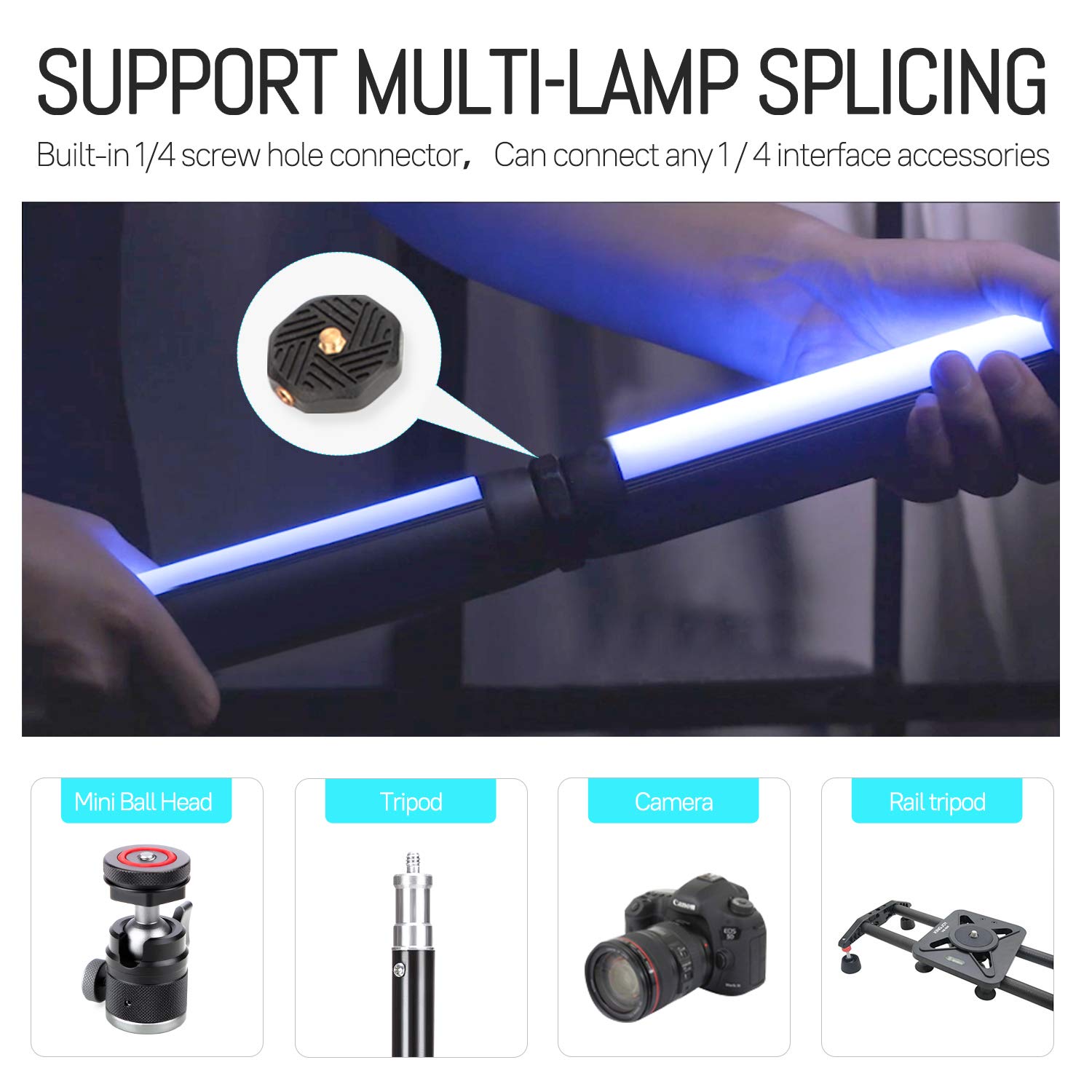
Image: Two SOONWELL MT1 tube lights are shown joined together using the dedicated splicing connector, illustrating the multi-lamp splicing feature.
Operating Instructions
Controls Overview
The MT1 features an intuitive control panel with an OLED screen for easy navigation and setting adjustments.
Image: A close-up of the MT1's control interface, showing the power switch, record/enable light button, forward/backward switches, mode switch, and the OLED display.
- Long press: Power switch (On/Off)
- Short press: Record/Enable light (Function varies by mode)
- Forward Switch (>): Increase value, navigate forward
- Backward Switch (<): Decrease value, navigate backward
- Mode Switch (M): Cycle through different lighting modes (CCT, HSI, Effects)
- OLED Screen: Displays current settings, battery level, and mode information.
Lighting Modes and Adjustments
Press the 'M' (Mode) button to cycle through the available lighting modes:
- CCT Mode (Correlated Color Temperature):
Adjust color temperature from 1600K (warm) to 20000K (cool). Use the forward/backward switches to change the value. This mode offers precise white balance control.
- HSI Mode (Hue, Saturation, Intensity):
Provides access to a full spectrum of colors. Use the forward/backward switches to adjust:
- Hue (0-360°): Select the desired color.
- Saturation (0-100%): Control the purity or intensity of the color.
- Intensity (0-100%): Adjust the overall brightness of the light.
- Brightness Adjustment (0-100%):
In both CCT and HSI modes, the brightness can be steplessly dimmed from 0% to 100% using the forward/backward switches after selecting the intensity parameter.

Image: A graphic illustrating the range of adjustments available for the MT1, including brightness from 0-100%, color temperature from 1600K-20000K, and HSI color adjustment from 0-360 degrees.
Special Effects
The MT1 includes 20 pre-programmed special effects to simulate various lighting scenarios. Cycle through these effects using the mode button and adjust parameters with the forward/backward switches if applicable.
- CCT Flash
- Hue Flash
- Storm
- Police Car
- TV
- Fire
- Disco
- Bad Bulb
- Fireworks
- Explosion
- Lightning
- Candle
- White Cycle
- Warm Cycle
- CCT Jump
- CCT Cycle
- HSI Cycle
- HSI Jump
- Welding
- Party

Image: A visual chart displaying the names of the 20 distinct special effects that can be activated on the MT1 light, such as Storm, Fire, and Police Car.
Waterproof Operation (IP68)
The SOONWELL MT1 is IP68 rated, meaning it is dust-tight and protected against continuous immersion in water up to 16 feet (5 meters) deep. This allows for creative use in wet environments or underwater photography/videography.
- Ensure the USB Type-C port cover is securely closed before submerging the light.
- After use in water, rinse the light with fresh water and dry thoroughly before charging or opening any ports.

Image: The SOONWELL MT1 tube light is shown partially submerged in water, with water splashing around it, emphasizing its IP68 waterproof capability.
Maintenance
- Cleaning: Use a soft, dry cloth to clean the exterior of the light. For stubborn dirt, a slightly damp cloth can be used. Avoid abrasive cleaners or solvents.
- Battery Care: To prolong battery life, avoid fully discharging the battery frequently. If storing the light for an extended period, charge it to approximately 50-70% and recharge every 3-6 months.
- Storage: Store the light in its padded carry case in a cool, dry place away from direct sunlight and extreme temperatures.
- Water Exposure: After using the light in water, always rinse it with fresh water and wipe it dry completely before storing or charging. Ensure the USB port cover is sealed during and after water exposure until fully dry.
Troubleshooting
| Problem | Possible Cause | Solution |
|---|---|---|
| Light does not turn on. | Battery is depleted. | Charge the light using the USB Type-C cable. |
| Light does not charge. | Faulty cable or power adapter; charging port obstruction. | Try a different USB Type-C cable and power adapter. Check the charging port for debris. |
| Brightness or color settings are not changing. | Incorrect mode selected; controls unresponsive. | Ensure you are in the correct mode (CCT or HSI) for adjustments. Restart the device. |
| Light flickers or behaves erratically. | Low battery; internal malfunction. | Charge the battery fully. If the issue persists, contact customer support. |
| Water ingress after underwater use. | USB port cover not securely closed. | Immediately power off the device and do not attempt to charge. Contact customer support. Always ensure the port cover is sealed before water exposure. |
Specifications
| Feature | Detail |
|---|---|
| Model | MT1 |
| Brand | SOONWELL |
| Color Temperature Range | 1600K - 20000K |
| CRI (Color Rendering Index) | 96+ |
| TLCI (Television Lighting Consistency Index) | 97+ |
| Brightness Adjustment | 0% - 100% Stepless Dimming |
| HSI Adjustment | 0-360° Hue, 0-100% Saturation, 0-100% Intensity |
| Special Effects | 20 pre-programmed effects (e.g., Storm, Police Car, Fire, Disco) |
| Waterproof Rating | IP68 (submersible up to 16 feet / 5 meters) |
| Battery Type | Built-in Lithium-Ion |
| Battery Life (Max Brightness) | Approx. 2.8 hours |
| Charging Port | USB Type-C |
| Mounting | 1/4"-20 Threaded Hole, Built-in Magnet |
| Item Weight | 500 g |
| Package Dimensions | 55.37 x 8.13 x 7.37 cm |
Warranty and Support
SOONWELL products are manufactured to high quality standards. For information regarding warranty coverage, please refer to the warranty card included with your product or visit the official SOONWELL website.
If you encounter any issues or have questions not covered in this manual, please contact SOONWELL customer support through their official channels. Provide your product model (MT1) and a detailed description of the issue for prompt assistance.
For the latest support information and contact details, please visit: www.soonwell.com
Ask a question about this manual
Ask about setup, troubleshooting, compatibility, parts, safety, or missing instructions. Manuals+ will review the question and use this page’s manual context to help answer it.