
Shark LA322
Contents
Shark Navigator ADV Corded Vacuum
Model: LA322
Introduction
The Shark LA322 Navigator ADV Corded Vacuum is engineered to provide powerful and efficient cleaning across various surfaces in your home. Its innovative Lift-Away design offers exceptional versatility, allowing you to easily transition from upright vacuuming to portable cleaning for stairs, furniture, and hard-to-reach areas. Equipped with advanced filtration and user-friendly features, this vacuum is designed to enhance your cleaning experience.

The Shark LA322 Navigator ADV Corded Vacuum, ready for use.
Safety Information
Please read all instructions carefully before using your Shark Navigator ADV Corded Vacuum. Keep this manual for future reference.
- Always unplug the vacuum cleaner from the electrical outlet before performing any adjustments, cleaning, or maintenance.
- Do not use the vacuum cleaner outdoors or on wet surfaces.
- Do not allow children to operate the vacuum cleaner. Keep the vacuum and its cord out of reach of children.
- Do not handle the plug or vacuum cleaner with wet hands.
- Use only as described in this manual. Use only manufacturer’s recommended attachments.
- Keep hair, loose clothing, fingers, and all parts of body away from openings and moving parts.
- Do not pick up anything that is burning or smoking, such as cigarettes, matches, or hot ashes.
- Do not use without dust cup and/or filters in place.
- The Anti-Allergen Complete Seal Technology ensures that 99.99% of dust and allergens are captured inside the vacuum, expelling cleaner air.
What's Included
Your Shark Navigator ADV Corded Vacuum comes with the following components:
- Main Vacuum Unit (Motorized Floor Nozzle, Lift-Away Pod, Wand, Handle)
- 8" Crevice Tool
- Pet Multi Tool

All components included with your Shark Navigator ADV Corded Vacuum.
Setup
Follow these steps to assemble your Shark Navigator ADV Corded Vacuum:
- Insert the Wand into the Motorized Floor Nozzle until it clicks securely.
- Place the Lift-Away Pod onto the Wand and slide it down until it clicks into place.
- Insert the Handle into the top of the Wand until it clicks securely.
- Connect the Hose to the back of the Lift-Away Pod by pushing it in until it clicks.
- Attach the Crevice Tool and Pet Multi Tool to the accessory posts on the vacuum for convenient storage.
- Unwind the power cord from the cord hooks.
Operating Instructions
Powering On and Surface Selection
Plug the power cord into an electrical outlet. Press the power button located on the main unit to turn the vacuum on. Select the appropriate surface setting:
- Hard Floor Setting: For bare floors and delicate area rugs.
- Carpet Setting: For low-pile to high-pile carpets.
Adjust the suction control slider on the handle from MIN to MAX to customize suction for different cleaning tasks and surfaces.
Upright Vacuuming
With the vacuum fully assembled, gently step on the floor nozzle and pull the handle back to recline the vacuum. Begin vacuuming by moving the unit forward and backward over the desired surface. The advanced swivel steering allows for effortless maneuverability around furniture and obstacles.

Effective cleaning on both carpets and hard floors.
Lift-Away Mode
For versatile above-floor cleaning, detach the Lift-Away pod from the floor nozzle. Simply step on the red foot pedal located on the floor nozzle and lift the pod away. This mode is ideal for cleaning stairs, upholstery, and other elevated surfaces.
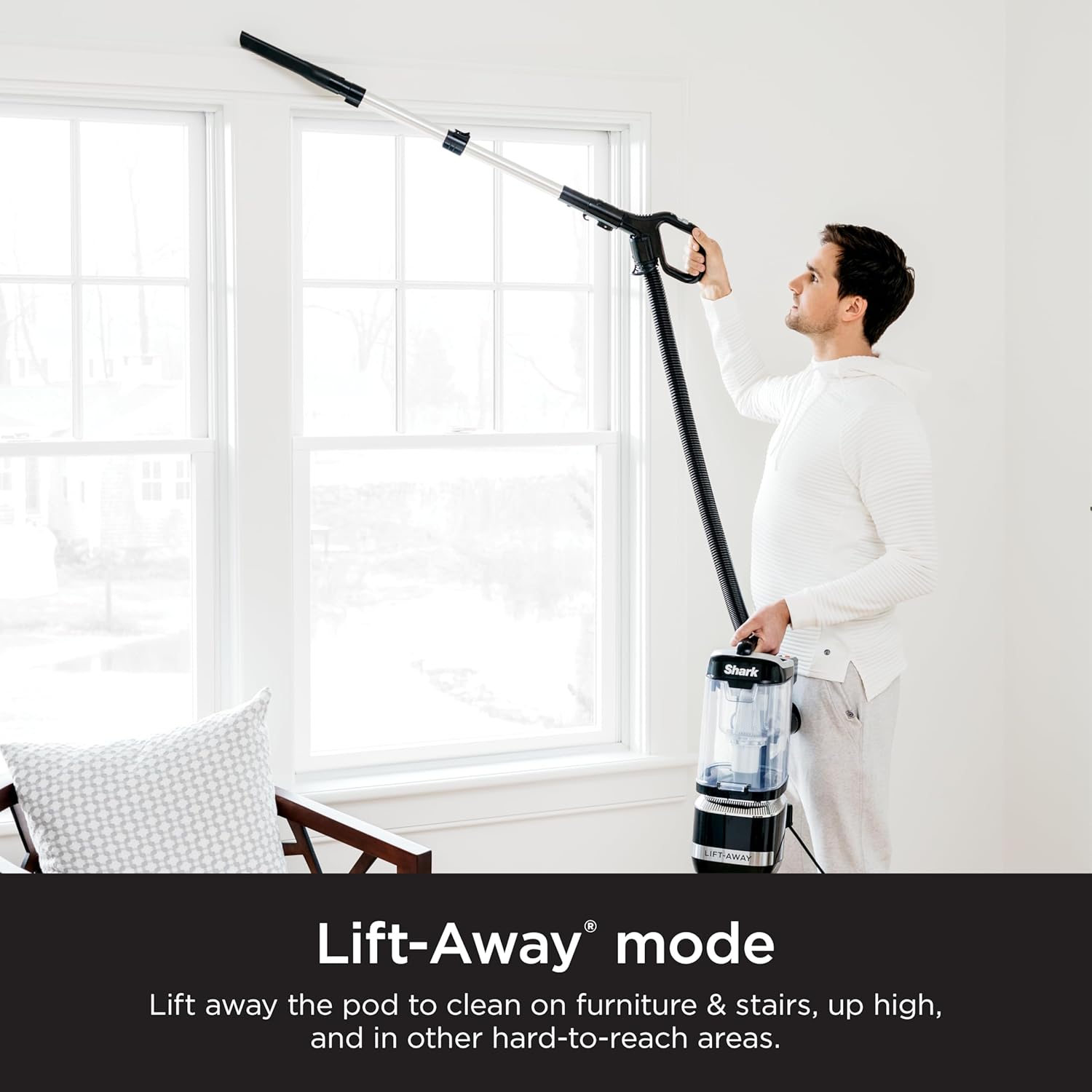
Utilizing Lift-Away mode for convenient stair cleaning.

The Lift-Away pod provides power for above-floor cleaning.
Using Attachments
Attach the 8" Crevice Tool or Pet Multi Tool directly to the handle, wand, or Lift-Away pod hose for specialized cleaning. The Crevice Tool is excellent for tight spaces, while the Pet Multi Tool is designed for effective pet hair pickup on various surfaces.

Extended reach with the wand for cleaning hard-to-reach spaces.
LED Headlights
The motorized floor nozzle features powerful LED headlights that illuminate hidden debris, dust, and pet hair, making it easier to spot and clean messes in dimly lit areas or under furniture.

LED headlights reveal hidden debris for thorough cleaning.
Maintenance
Regular maintenance ensures optimal performance of your Shark Navigator ADV Corded Vacuum.
Emptying the Dust Cup
Empty the dust cup after each use or when debris reaches the MAX FILL line. To empty, press the dust cup release button and lift the dust cup off the pod. Hold the dust cup over a trash bin and press the bottom release latch to open the bottom of the dust cup. Close the bottom flap until it clicks. For a more thorough empty, you can also open the top lid.
Cleaning Filters
The vacuum features washable HEPA and foam/felt filters. Rinse the foam and felt filters every 3 months, or as needed, under running water until the water runs clear. Allow them to air-dry completely for at least 24 hours before reinstalling. The HEPA filter should be tapped clean periodically and rinsed annually. Do not use soap or other cleaning agents on the filters.
Brushroll Maintenance
Periodically check the brushroll for any hair, string, or debris that may be wrapped around it. Use scissors to carefully cut away any obstructions. The brushroll is designed for easy access to facilitate cleaning.
Troubleshooting
If your Shark Navigator ADV Corded Vacuum is not performing as expected, consult the following common issues and solutions:
- Vacuum not picking up debris: Check for blockages in the hose, dust cup, nozzle, or filters. Ensure the dust cup is properly seated and filters are clean and dry.
- Vacuum turns off: The vacuum may have overheated. Turn off the vacuum, unplug it, and allow it to cool for at least 45 minutes. Clear any blockages and clean filters before restarting.
- Brushroll not spinning: Ensure the vacuum is in the Carpet setting. Check for blockages in the nozzle or brushroll.
- Poor suction: Verify that the suction control slider is set to MAX. Check for full dust cup or clogged filters.
For issues not covered here, please refer to the support section.
Specifications
| Feature | Specification |
|---|---|
| Brand | Shark |
| Model Name | LA322 Navigator Lift-Away ADV |
| Special Feature | Anti-Allergen, Lightweight, Portable |
| Filter Type | Washable HEPA + Foam and Felt Filters |
| Included Components | Crevice Tool, Pet Multi Tool |
| Is Cordless? | No |
| Capacity | 1.9 Quarts |
| Wattage | 960 watts |
| Hose Length | 6 Feet |
| Form Factor | Upright |
| Color | Black |
| Product Dimensions | 10"L x 12"W x 46.5"H |
| Noise Level | 80 dB |
| Amperage | 10 Amps |
| Item Weight | 12.3 pounds |
Warranty & Support
The Shark LA322 Navigator ADV Corded Vacuum comes with a 5-Year Limited Warranty. For warranty details, product registration, or technical support, please visit the official Shark website or contact their customer service. Keep your purchase receipt as proof of purchase for warranty claims.
No official seller videos are available for embedding at this time.
Ask a question about this manual
Ask about setup, troubleshooting, compatibility, parts, safety, or missing instructions. Manuals+ will review the question and use this page’s manual context to help answer it.