
AMOCAM RFID100
AMOCAM 125kHz ID Key Fob Tags Instruction Manual
Model: RFID100
1. Introduction
This manual provides essential information for the proper use and understanding of your AMOCAM 125kHz ID Key Fob Tags. These key fobs are designed for read-only access control applications, offering a convenient and reliable solution for various entry systems. Please read this manual thoroughly before use to ensure optimal performance and compatibility.
2. Product Overview
The AMOCAM 125kHz ID Key Fobs are pre-programmed, read-only RFID tags commonly used in door entry access control systems. Each fob is equipped with a unique digital ID number and a durable metal keyring for easy attachment and portability.
- Functionality: 125kHz ID key fobs tags (Read only).
- Compatibility: Compatible with standard EM ID access devices or ID readers, and other universal frequency unencrypted 125kHz tags like EM4100/4102.
- Unique ID: Each key fob is pre-programmed with a unique digit ID number.
- Design: Each keyfob includes a metal keyring for convenience.
- Durability: Water resistant casing made of ABS Plastic.
- Applications: Widely used in apartments, offices, access control systems, hotel locks, school campus access, identification, and parking lot entry.

Image: A collection of blue AMOCAM 125kHz ID key fobs, demonstrating the quantity and design. Each fob is oval-shaped with a small hole for the keyring.

Image: Close-up of a single blue key fob, highlighting the unique pre-programmed ID number printed on its surface.
3. Specifications
| Feature | Detail |
|---|---|
| Product Dimensions | 7 x 5 x 0.8 inches (Package size) |
| Item Weight | 14.4 ounces (for 100 PCS) |
| Model Number | RFID100 |
| Casing Material | ABS Plastic |
| Color | Blue |
| Approx. Fob Size | 1.3 x 1.1 x 0.2 inches (35mm x 28mm x 6mm) |
| Frequency | 125kHz |
| Type | EM-ID Card (Read Only) |
| Quantity | 100 PCS |
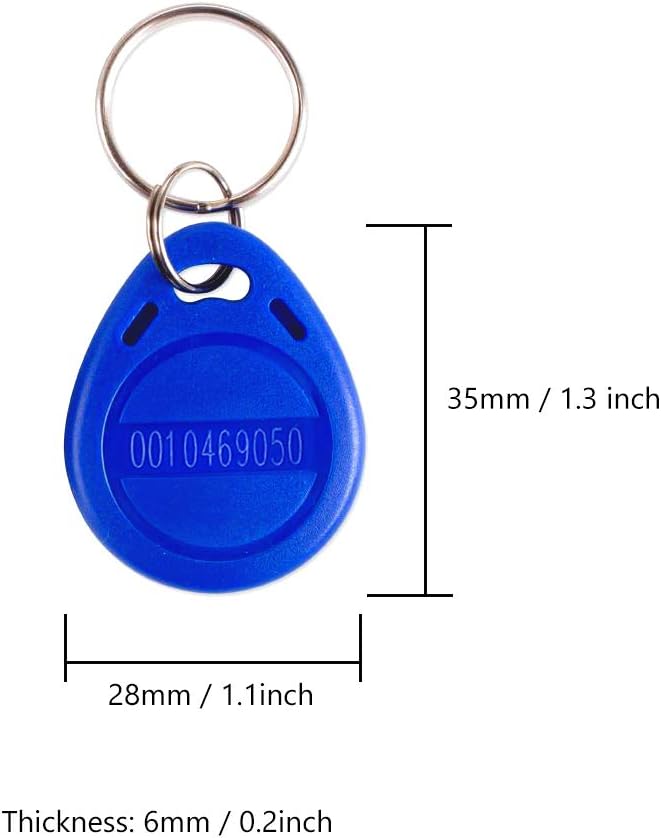
Image: Diagram showing the approximate dimensions of a single key fob in both millimeters and inches.
4. Compatibility and Important Notes
It is crucial to understand the compatibility of these key fobs with your existing access control system.
- Read-Only: These RFID key fobs are read-only and not rewritable. They cannot be programmed or re-programmed by the user.
- Frequency: They operate at 125kHz and are compatible with standard EM ID access devices or ID readers that support unencrypted 125kHz tags (e.g., EM4100/4102).
- Incompatibility: These key fobs are not compatible with UHF readers or encrypted readers. They will not work with brands such as HID, Cobra, APCiK, Paradox, Radio, Honeywell, Kaba, Isonas, and similar encrypted systems.
Attention: Please consult your technician or the manufacturer of your access control system to ensure your reader will support normal (non-encrypted) standard 125kHz RFID cards/fobs before purchasing or attempting to use these key fobs.

Image: A key fob accompanied by a critical warning regarding its read-only functionality and specific brand incompatibilities. This emphasizes the need for checking system compatibility.
5. Setup and Integration
Since these key fobs are read-only and pre-programmed with unique IDs, their setup primarily involves integrating them with a compatible 125kHz access control system.
- Verify System Compatibility: Before attempting to use the key fobs, ensure your access control reader or system supports unencrypted 125kHz EM-ID tags. Refer to your access control system's manual or consult its manufacturer.
- Enroll Key Fobs: Each key fob has a unique ID number printed on its surface. To grant access, you must enroll these unique ID numbers into your access control system's database. The process for enrollment varies by system, but typically involves:
- Accessing the system's programming mode or software.
- Entering the unique ID number of each key fob manually, or by using a master card/enrollment reader to scan the fob.
- Assigning the enrolled ID to a specific user or access level within the system.
- Test Functionality: After enrollment, test each key fob by presenting it to the access control reader to ensure it grants access as intended.
For detailed instructions on enrolling new access credentials, please refer to the user manual of your specific access control system.
6. Operating Instructions
Operating the AMOCAM 125kHz ID Key Fobs is straightforward once they are properly enrolled in a compatible access control system.
- Present the Key Fob: Hold the key fob close to the designated reading area of your access control reader. The optimal distance may vary depending on the reader, but typically it is within a few centimeters (1-3 inches).
- Wait for Confirmation: The reader will typically provide an audible beep or a visual indicator (e.g., a green light) to confirm that the key fob has been successfully read and access has been granted.
- Access Granted: If the key fob is recognized and authorized by the system, the door or gate will unlock, or the barrier will open.
Ensure there are no metallic objects or other RFID tags directly between the key fob and the reader, as this may interfere with the reading process.
7. Maintenance
The AMOCAM 125kHz ID Key Fobs are designed for durability and require minimal maintenance.
- Cleaning: If necessary, wipe the key fobs with a soft, damp cloth. Avoid using harsh chemicals or abrasive cleaners.
- Storage: Store key fobs in a cool, dry place away from direct sunlight and extreme temperatures.
- Avoid Damage: While water resistant, avoid prolonged submersion in water or exposing them to excessive force or impact, which could damage the internal chip.
8. Troubleshooting
If you encounter issues with your AMOCAM 125kHz ID Key Fobs, consider the following troubleshooting steps:
| Problem | Possible Cause | Solution |
|---|---|---|
| Key fob does not grant access. |
|
|
| Intermittent access or unreliable reading. |
|
|
If issues persist after following these steps, please contact AMOCAM customer support or your access control system provider for further assistance.
9. Warranty and Support
AMOCAM is committed to providing quality products and customer satisfaction. We offer after-sales support and services to all our customers worldwide.
- For product inquiries, technical assistance, or warranty claims, please visit the official AMOCAM store on Amazon or contact their customer service directly.
- Privacy and security are top priorities for AMOCAM. They are committed to protecting your privacy and ensuring your data is secure.
You can find more information and contact details by visiting the AMOCAM Store on Amazon.
Ask a question about this manual
Ask about setup, troubleshooting, compatibility, parts, safety, or missing instructions. Manuals+ will review the question and use this page’s manual context to help answer it.