
1. Introduction
This manual provides instructions for the UBay Universal Remote Control, model R51M/E, designed as a replacement for various Midea R51 Series air conditioners. This remote offers essential functions for controlling your air conditioning unit, including temperature adjustment, mode selection, fan speed control, and timer settings. No programming or complex setup is required for its use.

Image 1.1: Front and back view of the UBay Universal Remote Control R51M/E. The front features a display screen and various control buttons, while the back shows the battery compartment and model information.
2. Safety Information
- Battery Handling: Use only AAA batteries. Do not mix old and new batteries, or different types of batteries.
- Battery Installation: Ensure batteries are inserted with correct polarity (+/-). Incorrect installation can cause damage or leakage.
- Battery Disposal: Dispose of used batteries according to local regulations. Do not incinerate batteries.
- Long-Term Storage: If the remote control will not be used for an extended period, remove the batteries to prevent leakage and potential damage.
- Environmental Conditions: Avoid exposing the remote to direct sunlight, high temperatures, humidity, or strong impacts.
3. Package Contents
The package includes the following items:
- 1 x UBay Universal Remote Control (Model R51M/E)
- Batteries are not included.
4. Setup
4.1. Battery Installation
- Locate the battery compartment cover on the back of the remote control.
- Slide the cover downwards or press the latch and lift to open.
- Insert two (2) AAA batteries, ensuring the positive (+) and negative (-) terminals align correctly with the markings inside the compartment.
- Replace the battery compartment cover, sliding it back into place until it clicks securely.
4.2. Initial Use
This remote control is pre-programmed for compatible Midea R51 Series air conditioners. No additional programming or code entry is required. Once batteries are installed, the remote is ready for immediate use.
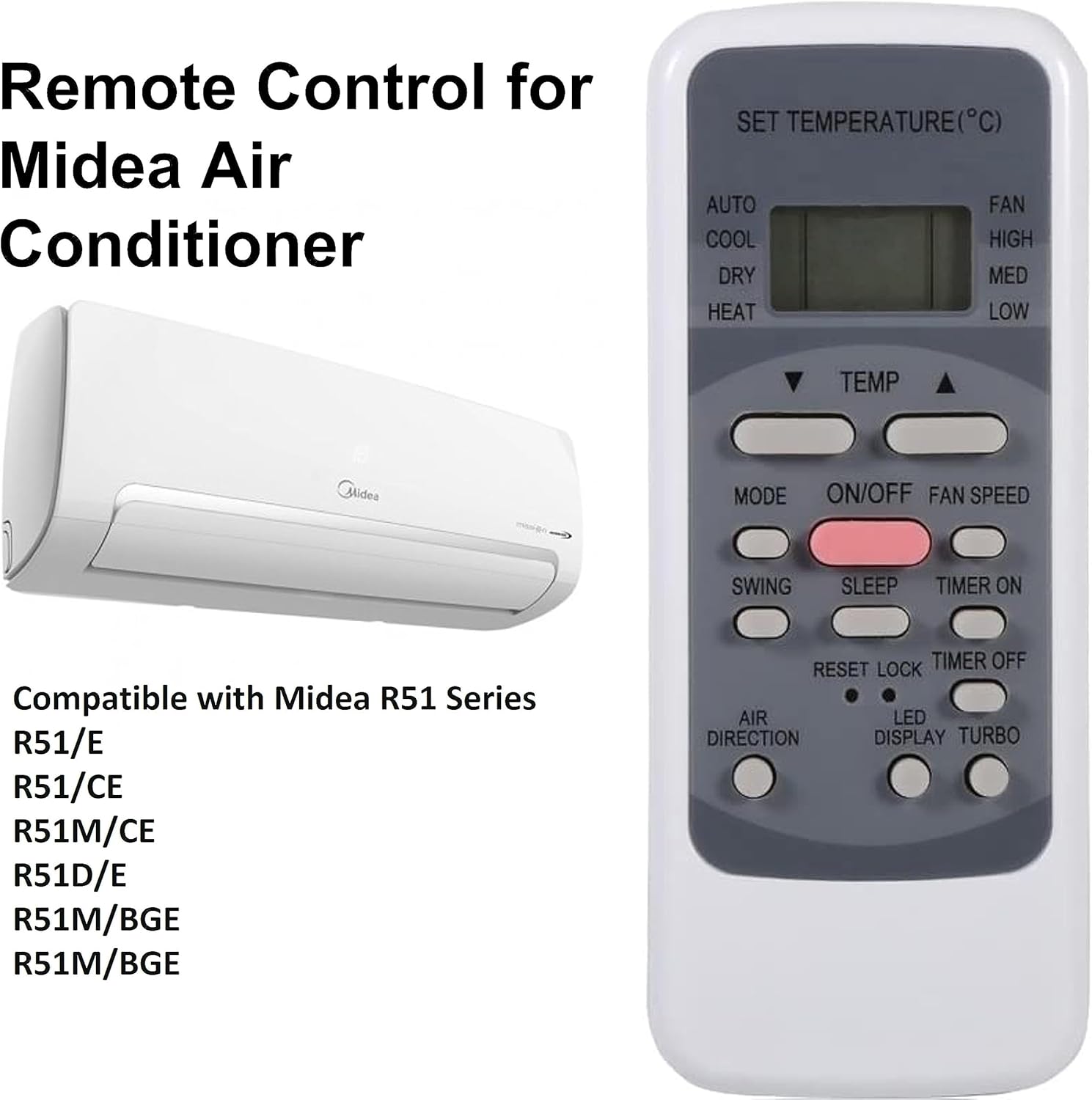
Image 4.1: The UBay Universal Remote Control R51M/E shown alongside a Midea air conditioner unit, illustrating its intended use and compatibility with Midea R51 Series models.
5. Operating Instructions
Point the remote control directly at the air conditioner's receiver when operating. Ensure there are no obstructions between the remote and the unit.
5.1. Button Functions Overview

Image 5.1: A detailed view of the UBay Universal Remote Control R51M/E, highlighting the display screen and the layout of its various function buttons.
- ON/OFF: Powers the air conditioner on or off.
- MODE: Cycles through operating modes: AUTO, COOL, DRY, HEAT, FAN.
- TEMP ▲ / ▼: Adjusts the desired temperature up or down.
- FAN SPEED: Cycles through fan speeds: AUTO, HIGH, MED, LOW.
- SWING: Activates or deactivates the automatic louver swing function.
- SLEEP: Activates the sleep mode for comfortable nighttime operation.
- TIMER ON: Sets a timer for the air conditioner to turn on automatically.
- TIMER OFF: Sets a timer for the air conditioner to turn off automatically.
- RESET: Resets the remote control settings (may require a pointed object).
- LOCK: Locks the remote control buttons to prevent accidental changes.
- LED DISPLAY: Controls the LED display on the air conditioner unit (on/off).
- TURBO: Activates maximum cooling or heating for rapid temperature change.
- AIR DIRECTION: Adjusts the vertical airflow direction.
5.2. Setting the Clock and Timer
The remote control features a built-in clock and timer functions. Refer to your air conditioner's original manual for specific instructions on synchronizing the remote's clock with the unit, as this may vary by model. Generally, the TIMER ON and TIMER OFF buttons are used to set scheduled operations.
6. Troubleshooting
| Problem | Possible Cause | Solution |
|---|---|---|
| Remote not responding | Dead or incorrectly inserted batteries. Obstruction between remote and AC unit. | Replace batteries with new AAA batteries, ensuring correct polarity. Remove any obstructions. Ensure remote is pointed directly at the AC unit. |
| Buttons not working | Remote is in LOCK mode. | Press the LOCK button to unlock the remote. |
| Batteries frequently lose contact / remote turns off | Loose battery compartment or contacts. | Ensure batteries are firmly seated. If the issue persists, gently adjust the battery contacts or consider replacing the remote if it's defective. |
| Air conditioner does not respond to specific functions | Function not supported by your specific AC model. | Verify if your Midea R51 Series air conditioner model supports the specific function (e.g., TURBO, LED DISPLAY). |
7. Specifications
- Model: R51M/E
- Compatible Models: Midea R51 Series (R51/E, R51/CE, R51M/CE, R51D/E, R51M/BGE) and other compatible brands like TOSHIBA, Electrolux, CONIA, Westinghouse, VESTEL, QUUL, LASKO, NASCO.
- Power Source: 2 x AAA Batteries (not included)
- Connectivity Technology: Infrared
- Product Dimensions: 5.5 x 2.2 x 0.6 inches
- Item Weight: 1.76 ounces
- Special Feature: Universal replacement, no programming required
8. Warranty and Support
For warranty information or technical support, please refer to the seller or manufacturer's contact details provided at the time of purchase. Keep your purchase receipt as proof of purchase.