
Introduction
This manual provides instructions for the proper use and maintenance of your Wireless Gear True Wireless Bluetooth 5.0 Mini Earbuds. Please read this manual thoroughly before using the product to ensure optimal performance and longevity.
What's in the Box:
- True Wireless Mini Earbuds (Left and Right)
- USB Charging Base
Safety Information
- Do not expose the earbuds or charging base to extreme temperatures, moisture, or corrosive materials.
- Avoid dropping or subjecting the device to strong impacts.
- Do not attempt to disassemble or modify the product. This will void the warranty and may cause damage.
- Keep out of reach of children.
- Use only the provided charging base.
- Prolonged listening at high volume levels may cause hearing damage. Adjust volume to a safe level.
Product Overview
Familiarize yourself with the components of your True Wireless Mini Earbuds.

Image: Close-up view of a single Wireless Gear earbud, highlighting the touch control button on its outer surface.
- Earbuds: Left and Right earbuds with built-in microphones and touch controls.
- USB Charging Base: Compact base for charging the earbuds, featuring an integrated USB plug.
Setup
1. Charging the Earbuds
Before first use, fully charge the earbuds. The charging base provides additional hours of playback.
- Insert both earbuds into the charging base. Ensure they are seated correctly.
- Plug the integrated USB connector of the charging base into any standard USB power source (e.g., computer USB port, USB wall adapter).
- The indicator lights on the earbuds will show charging status (refer to product packaging for specific light behavior if available).
- A full charge provides approximately 1.5 hours of playtime from the earbuds, with the charging base offering an additional 8 hours.
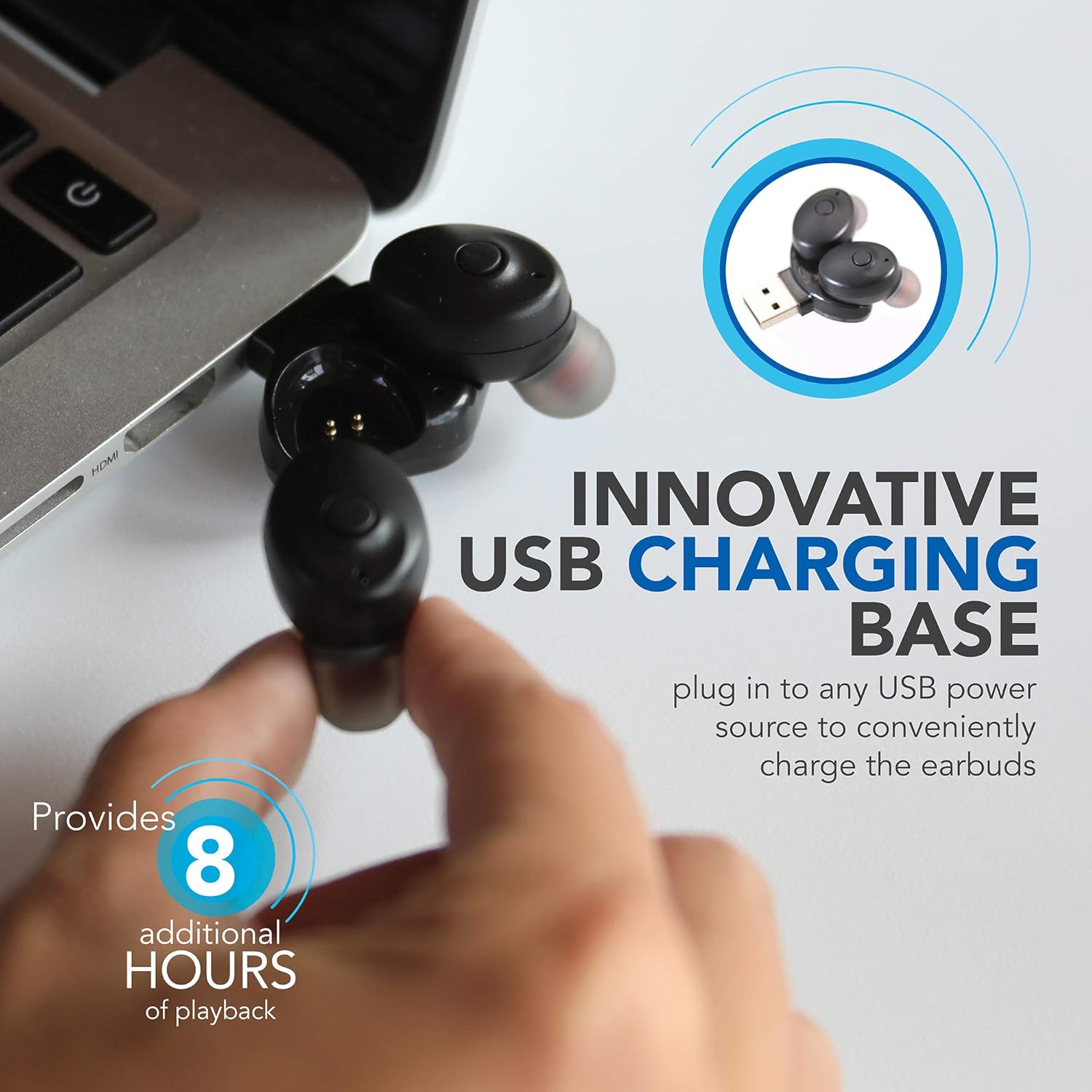
Image: Wireless Gear earbuds placed in their USB charging base, which is plugged into a laptop's USB port.
2. Pairing with a Device
The earbuds feature auto-pair and auto-power on functionality for seamless connection.
- Ensure the earbuds are charged.
- Remove both earbuds from the charging base. They will automatically power on and enter pairing mode.
- On your smartphone, MP3 player, tablet, or laptop, navigate to the Bluetooth settings.
- Search for available devices and select "Wireless Gear Earbuds" (or similar name) from the list.
- Once connected, you will hear an audible confirmation, and the indicator lights on the earbuds will change (refer to product packaging for specific light behavior if available).
- The earbuds will automatically reconnect to the last paired device when removed from the charging base, if Bluetooth is enabled on the device.

Image: Wireless Gear earbuds positioned next to a smartphone, illustrating the pairing process.
Operating Instructions
Power On/Off
- Power On: Remove the earbuds from the charging base. They will automatically power on.
- Power Off: Place the earbuds back into the charging base. They will automatically power off and begin charging.
Touch Controls
Each earbud features a touch-sensitive area for controlling various functions. The specific functions may vary slightly between left and right earbuds or depend on the operating system of your connected device.
- Play/Pause Music: Single tap on either earbud.
- Next Song: Double tap on the right earbud (or specific earbud as per device).
- Previous Song: Double tap on the left earbud (or specific earbud as per device).
- Answer/End Call: Single tap on either earbud during an incoming call or active call.
- Reject Call: Press and hold on either earbud during an incoming call.
- Activate Voice Assistant (Siri for iOS): Triple tap on either earbud.

Image: A woman smiling while wearing a Wireless Gear earbud, demonstrating comfortable fit and discreet design.
Making and Receiving Calls
The built-in microphone allows for hands-free calling. Intelligent noise reduction ensures clear communication.
- When a call comes in, tap either earbud once to answer.
- To end a call, tap either earbud once.
- To reject an incoming call, press and hold either earbud.
Maintenance
Cleaning
Regular cleaning helps maintain sound quality and hygiene.
- Gently wipe the earbuds and charging base with a soft, dry, lint-free cloth.
- Do not use abrasive cleaners, alcohol, or chemical solvents.
- Periodically check the speaker mesh for debris. Use a soft brush or cotton swab to carefully remove any buildup.

Image: Close-up view of the speaker mesh on a Wireless Gear earbud, showing fine details.
Storage
- When not in use, store the earbuds in their charging base to protect them and keep them charged.
- Store in a cool, dry place away from direct sunlight and extreme temperatures.
Troubleshooting
If you encounter issues with your earbuds, refer to the following common solutions:
| Problem | Possible Solution |
|---|---|
| Earbuds not powering on. | Ensure earbuds are charged. Place them in the charging base and connect to a USB power source for at least 30 minutes. |
| Earbuds not pairing with device. |
|
| Only one earbud is working. |
|
| Poor sound quality or intermittent connection. |
|
Specifications
| Feature | Detail |
|---|---|
| Connectivity Technology | Bluetooth 5.0 |
| Wireless Communication Technology | Bluetooth |
| Included Components | Headphones, Charger |
| Specific Uses For Product | Home, Sports and Exercise, Travel |
| Compatible Devices | Phones, MP3 players, Tablets, Laptops |
| Control Type | Touch Control |
| Cable Feature | Without Cable |
| Battery Life (Earbuds) | Up to 1.5 hours |
| Additional Battery Life (Charging Base) | 8 hours |
| Total Battery Life | 9.5 Hours (Earbuds + Charging Base) |
| Bluetooth Range | 10 Meters (33 feet) |
| Earpiece Shape | Rounded Tip |
| Item Weight | 1.44 ounces |
| Manufacturer | ESI Wireless Accessories |
| ASIN | B08FF73J9X |
| GTIN/UPC | 680988106811 |
Warranty Information
No specific warranty information is provided in the product details. Please refer to the product packaging or contact the retailer/manufacturer directly for warranty terms and conditions.
Support
For further assistance or technical support, please contact Wireless Gear customer service. Contact details are typically found on the product packaging or the manufacturer's official website.


