
BLACK+DECKER Li2000 & BDL190S
BLACK+DECKER Cordless Screwdriver & Line Laser Stud Sensor User Manual
Model: Li2000 & BDL190S
Important Safety Information
Please read and understand all safety warnings and instructions before operating this product. Failure to follow the warnings and instructions may result in electric shock, fire, and/or serious injury. Keep this manual for future reference.
- Always wear appropriate personal protective equipment, such as safety glasses.
- Keep work area clean and well lit. Cluttered or dark areas invite accidents.
- Do not operate power tools in explosive atmospheres, such as in the presence of flammable liquids, gases or dust.
- Keep children and bystanders away while operating a power tool. Distractions can cause you to lose control.
- Store idle tools out of reach of children and do not allow persons unfamiliar with the power tool or these instructions to operate the power tool.
- Use the correct tool for your application.
- Do not abuse the cord. Never use the cord for carrying, pulling or unplugging the power tool.
- Do not expose power tools to rain or wet conditions. Water entering a power tool will increase the risk of electric shock.
Package Contents
- BLACK+DECKER 3.6V Cordless Screwdriver (Li2000)
- BLACK+DECKER Auto-Leveling Interior Line Laser with Stud Sensor (BDL190S)
- Charging Adapter
- Flat Head Bit
- Phillips Head Bit
Product Overview
The BLACK+DECKER Li2000 Cordless Screwdriver and BDL190S Line Laser Stud Sensor are designed for various household tasks, from assembling furniture to hanging pictures with precision.

Image: The BLACK+DECKER Li2000 Cordless Screwdriver and BDL190S Line Laser Stud Sensor shown together.
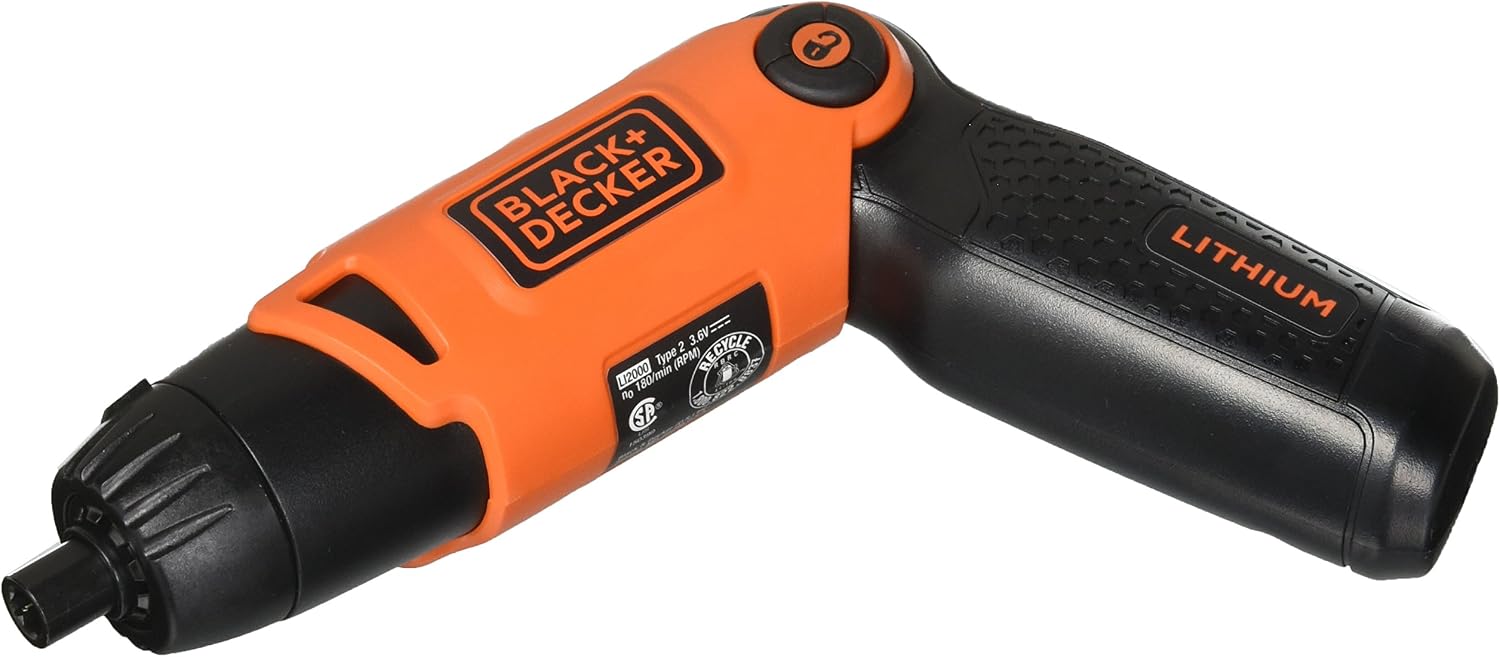
Image: Close-up view of the BLACK+DECKER Li2000 Cordless Screwdriver, highlighting its compact design and lithium battery indicator.
Key Features
- Lithium Ion Battery holds a charge for up to 18 months.
- Three-position handle lets you work in tight spaces.
- Spindle lock allows manual screw driving and greater control.
- Auto-Leveling Line Laser for accurate alignment.
- Integrated Stud Sensor for locating studs behind walls.
Setup
Charging the Battery (Cordless Screwdriver)
The cordless screwdriver is powered by an internal Lithium-Ion battery. Before first use, fully charge the battery. Connect the provided charging adapter to the charging port located at the base of the screwdriver handle. Plug the adapter into a standard wall outlet. The charging indicator light will illuminate during charging and turn off when fully charged. A full charge typically takes several hours.
Attaching/Changing Bits (Cordless Screwdriver)
To attach a screwdriver bit, simply push the desired bit (e.g., flat head or Phillips head) firmly into the hexagonal chuck at the front of the tool until it clicks into place. To remove a bit, pull it straight out. The chuck is designed to hold standard 1/4-inch hex shank bits.
Operating Instructions
Using the Cordless Screwdriver
The BLACK+DECKER Li2000 features a three-position pivoting handle for versatility in various working conditions. To adjust the handle position, press the button near the pivot point and rotate the handle to your desired angle: straight, angled, or pistol grip. Release the button to lock the handle in place.

Image: The cordless screwdriver with its handle in an angled position, suitable for tight spaces.

Image: The cordless screwdriver with its handle extended to a straight position, ideal for reaching into narrow areas.
To operate the screwdriver, slide the forward/reverse switch located on the top of the tool. Push the switch forward for driving screws (clockwise rotation) and backward for removing screws (counter-clockwise rotation). Press the trigger to activate the motor. The tool also features a spindle lock, allowing for manual tightening or loosening of screws when the motor is off or for added control.
Using the Line Laser Stud Finder
The BLACK+DECKER BDL190S BullsEye Auto-Leveling Interior Line Laser with Stud Sensor is designed to project a level line and detect studs. To use, press and hold the 'PUSH AND HOLD' button on the side of the unit. The laser will automatically level itself and project a horizontal line. Move the unit slowly across the wall surface. When a stud is detected, the indicator lights on the display will illuminate, and an audible alert may sound. The laser line provides a visual guide for hanging items straight.

Image: Close-up view of the BLACK+DECKER BDL190S Line Laser Stud Sensor, showing its display and controls.
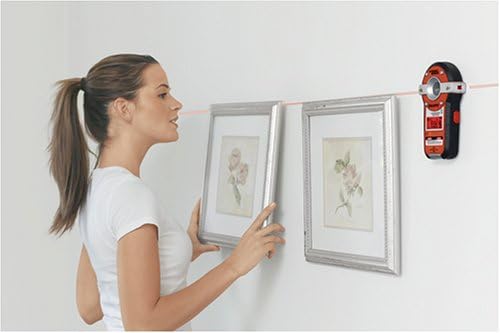
Image: A woman using the line laser to ensure two picture frames are hung perfectly level on a wall.
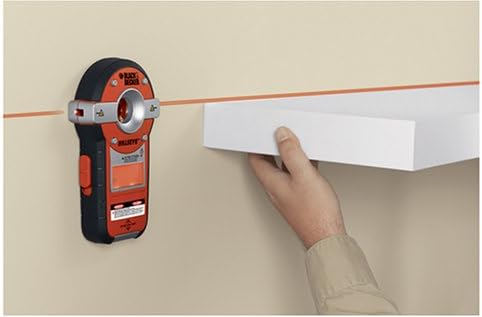
Image: A hand using the line laser to guide the installation of a straight shelf on a wall.
Maintenance
Regular maintenance ensures the longevity and optimal performance of your tools.
- Cleaning: Wipe down the tools with a clean, damp cloth after each use. Do not use harsh chemicals or abrasive cleaners.
- Storage: Store the tools in a dry, cool place, away from direct sunlight and moisture. Ensure the battery of the screwdriver is charged periodically if stored for long durations to maintain battery health.
- Bit Care: Keep screwdriver bits clean and free of debris. Replace worn or damaged bits to prevent stripping screws.
Troubleshooting
Refer to the table below for common issues and their solutions.
| Problem | Possible Cause | Solution |
|---|---|---|
| Screwdriver not turning on. | Battery is depleted. | Charge the battery fully. |
| Screwdriver lacks power. | Low battery charge. | Recharge the battery. |
| Stud sensor not detecting studs. | Incorrect usage or wall material. | Ensure firm contact with the wall and slow, consistent movement. Not suitable for all wall types (e.g., lath and plaster). |
| Laser line is not level. | Unit not on a stable surface or outside auto-leveling range. | Place the unit on a flat, stable surface. Ensure it is within its specified leveling range. |
Specifications
| Feature | Detail |
|---|---|
| Brand | BLACK+DECKER |
| Model | Li2000 (Screwdriver) & BDL190S (Stud Sensor) |
| Power Source | Battery Powered |
| Voltage | 3.6 Volts (DC) |
| Battery Type | Lithium Ion |
| Handle Positions | 3 (Pivoting) |
| Special Features | Cordless, Auto-leveling Line Laser, Stud Sensor, Spindle Lock |
| Included Components | Cordless Screwdriver, Line Laser, Charging Adapter, Flat Head Bit, Phillips Head Bit |
Warranty and Support
This BLACK+DECKER product comes with a manufacturer's warranty. For specific warranty details, including duration and coverage, please refer to the warranty card included in your product packaging or visit the official BLACK+DECKER website.
For technical support, troubleshooting assistance, or to inquire about replacement parts, please contact BLACK+DECKER customer service. Contact information can typically be found on the product packaging or their official website.
Related documentsLi2000 & BDL190S


Ask a question about this manual
Ask about setup, troubleshooting, compatibility, parts, safety, or missing instructions. Manuals+ will review the question and use this page’s manual context to help answer it.