

Product Overview
The Hugolog Latchbolt Electronic Lock provides keyless entry and enhanced security for your home or office. Constructed from high-hardness aluminum alloy, it offers anti-collision and anti-smashing properties, meeting FCC SDOC certifications for a high safety factor. Its design integrates convenience with robust protection.
Key features include:
- Durable construction with high-hardness aluminum alloy.
- Easy installation requiring only a screwdriver.
- Keypad security with a 3-minute lockout after 10 incorrect entries.
- Back-lit keys for visibility in low light.
- Low battery status prompt.
- IP54 waterproof rating for outdoor use.
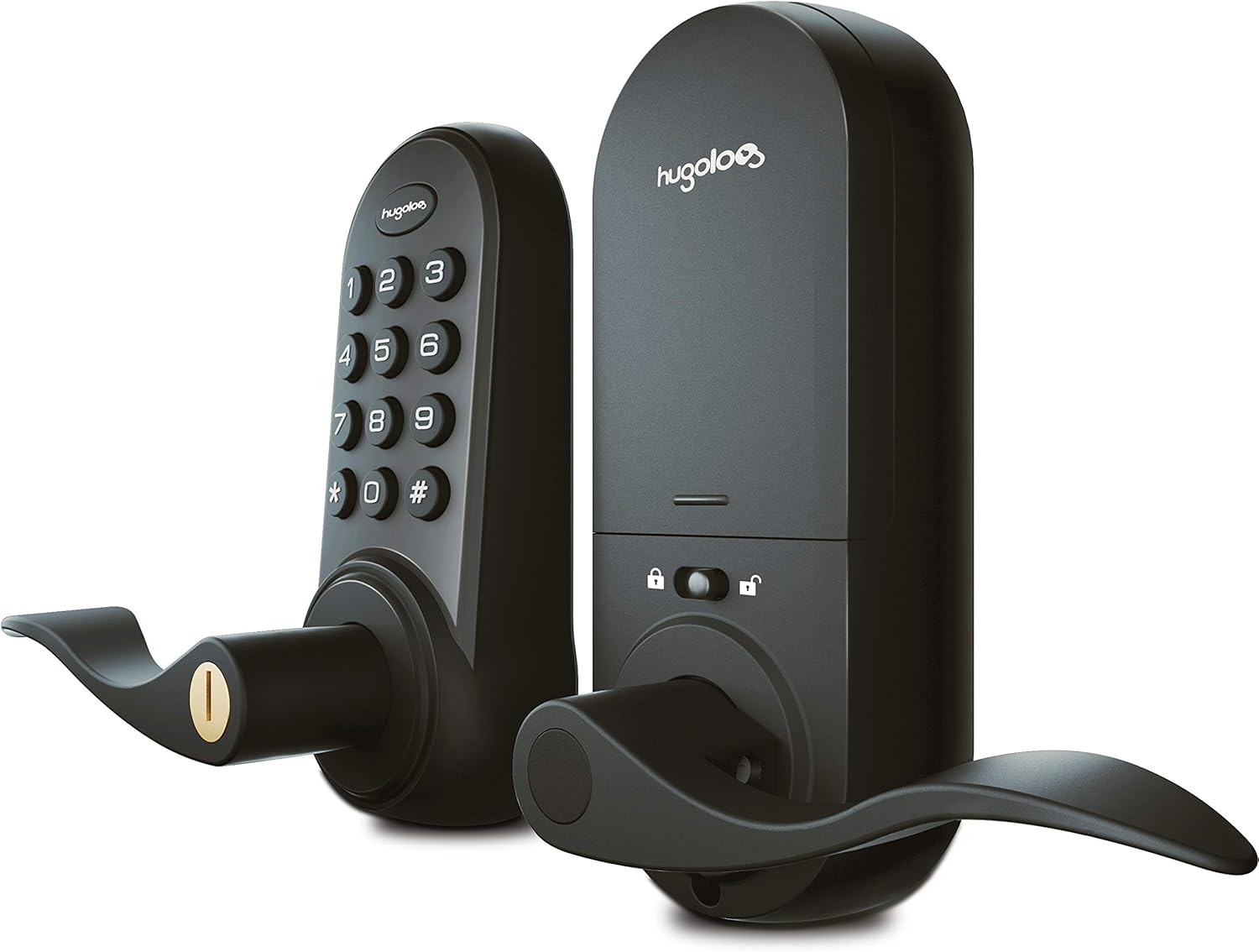
Key Features Explained
This electronic lock is designed with several features to enhance security and user convenience:
- Motorized Deadbolt: Provides secure locking and unlocking.
- Auto Lock: Automatically secures the door after a set period, ensuring peace of mind.
- Key Free: Offers keyless entry via the keypad.
- 20 User Pin Codes: Allows for multiple unique access codes for different users.
- Anti-Peep Passcode: Protects your code from being observed by allowing you to enter random digits before or after your actual code.
- Status Indicator: Provides visual feedback on the lock's status.


Package Contents
Please verify that all components are present in your package before beginning installation:
- Exterior Assembly (1)
- Interior Assembly (1)
- Bolt (1)
- Mounting Plate (1)
- Battery Cover (1)
- Backup Key (1)
- Cover Screws (3)
- Latch/Strike Screws (2)
- Reinforcement Plate (1)
- Reinforcement Screws (2)
- Mounting Screws (2)
Installation Guide
The Hugolog Latchbolt Lock is designed for straightforward installation, typically requiring only a screwdriver. It is suitable for door thicknesses ranging from 35-50mm and door hole diameters of 38mm or 54mm. The bolt's backset can be self-adjusted to either 60mm or 70mm.
While detailed step-by-step instructions are provided in the physical manual, the general installation process involves:
- Prepare the door by ensuring the correct thickness and hole dimensions.
- Install the latch bolt into the door edge, adjusting the backset as needed.
- Mount the exterior assembly, feeding the cable through the door hole.
- Attach the mounting plate to the door.
- Connect the cable from the exterior assembly to the interior assembly.
- Secure the interior assembly to the mounting plate.
- Install batteries and the battery cover.
- Test the lock's functionality using both the keypad and mechanical key.

Operating Instructions
Unlocking the Door
- Using Keypad: Enter your valid user code or master code, then press the '#' key. Rotate the lever to open the door.
- Using Mechanical Key: Insert the backup key into the keyhole and turn to unlock the door.
Locking the Door
- Automatic Locking: The lock is equipped with an auto-lock feature that will re-lock the door automatically after a few seconds once it has been unlocked.
- Manual Locking: To manually lock the door, press any key on the keypad for 2 seconds.
Anti-Peep Passcode
To prevent others from observing your passcode, you can enter random digits before or after your actual code. The lock will still recognize the correct sequence within the longer string of numbers.


Programming Codes
The lock supports the creation of unique access codes for various users, with the capacity for up to 20 user PIN codes. Refer to your detailed manual for specific programming steps, which typically involve:
- Setting the Master Code: This is the primary code used for programming and managing other user codes.
- Adding User Codes: Follow the instructions to add new individual access codes.
- Deleting User Codes: Remove existing user codes as needed.

Maintenance
Battery Replacement
The lock will provide a status prompt when the battery level is less than 20%, indicating it's time to replace the batteries. Refer to the manual for instructions on accessing the battery compartment and replacing the batteries.
Cleaning
To clean the lock, use a soft, dry cloth. Avoid using abrasive cleaners, solvents, or harsh chemicals, as these can damage the finish or internal components.
Water Resistance
The electronic latchbolt has an IP54 waterproof rating, making it suitable for daily outdoor use. However, it is not recommended for use in severe external environments where it might be exposed to extreme weather conditions or prolonged submersion.
Troubleshooting
| Problem | Solution |
|---|---|
| Keypad not responding or lock not opening with code. | Check battery level and replace if low. Ensure correct code is entered followed by '#'. If 10 incorrect attempts were made, the keypad will be locked for 3 minutes. Wait for the lockout period to expire. |
| Handle not turning or lock mechanism stuck. | Verify that the lock was installed correctly and all components are properly aligned. Ensure the bolt is not obstructed. |
| Low battery warning. | Replace batteries immediately to ensure continued operation. |
| Lock not programming new codes. | Ensure you are following the programming steps precisely as outlined in the detailed manual. Verify the master code is correct. A factory reset may be necessary if issues persist. |
Specifications
| Property | Value |
|---|---|
| Brand | Hugolog |
| Special Feature | Waterproof |
| Lock Type | Keypad |
| Material | Aluminum, Metal, Zinc |
| Recommended Uses For Product | Security |
| Style | Iconic |
| Color | BLK |
| Number of Pieces | 1 |
| Finish Type | Brushed |
| Included Components | Backup Key*1 Exterior Assembly*1 Bolt*1 Mounting Plate*1, Interior Assembly*1 Cover Screws*3 Battery Cover*1, Latch/Strike Screws*2 Reinforcement Plate*1, Reinforcement Screws*2 Mounting Screws*2 |
| Controller Type | Hand Control, Mechanical knob |
| Shape | Oval |
| Control Method | Touch |
| Connectivity Protocol | Bluetooth |
| UPC | 711731000206 |
| Manufacturer | Hugolog |
| Item Weight | 4.97 pounds |
| Package Dimensions | 9 x 8.6 x 3.75 inches |
| Size | Iconic |
| Finish | Brushed |
| Usage | Door Thickness: 35-50mm Dimension of the door hole: 38mm/54mm Bolt ships with backset in 60mm position or 70mm backset position. |
| Batteries Included? | No |
| Batteries Required? | No |
| ASIN | B08FD5217Z |
| Date First Available | August 7, 2020 |
Warranty and Support
Hugolog is committed to providing a secure and convenient smart home experience. For any inquiries, technical assistance, or support, please refer to the official Hugolog resources.
Support options may include:
- Live Chat support.
- Professional customer service team.
For more information and to explore other products, visit the official Hugolog store: Hugolog Store on Amazon
