
Product Overview
This manual provides instructions for the ZdalaMit 101018E0025 Replacement Remote Control, designed for various Philips Roku TV models. This remote is a direct replacement and requires no programming or pairing.

Figure 1: Front view of the ZdalaMit 101018E0025 Replacement Remote Control, showing all buttons including the directional pad, playback controls, and streaming service shortcuts.
Compatible TV Models
The 101018E0025 remote control is compatible with the following Philips Roku TV models:
- 40PFL4662/F7
- 32PFL4664/F7
- 65PFL4864/F7
- 50PFL4864/F7
- 55PFL4864/F7
- 32PFL4764/F7
- 32PFL4763/F7
- 50PFL4763/F7
- 43PFL4763/F7
- 43PFL4662/F7
- 43PFL4962/F7
- 55PFL5756/F7
- 43PFL5756/F7
- 50PFL5756/F8
Setup and Installation
This replacement remote control is designed for immediate use with compatible Philips Roku TV models. No complex programming or pairing procedures are required.
- Obtain Batteries: Ensure you have two (2) 1.5V AAA alkaline batteries. Batteries are not included with the remote control.
- Open Battery Compartment: Locate the battery compartment on the back of the remote control. Slide the battery cover downwards or press the latch to open it.
- Insert Batteries: Insert the two AAA batteries, ensuring the positive (+) and negative (-) terminals align correctly with the indicators inside the compartment.
- Close Battery Compartment: Replace the battery cover by sliding it back into place until it clicks securely.
- Ready for Use: The remote control is now ready to operate your compatible Philips Roku TV.

Figure 2: Side profile of the remote control, highlighting its ergonomic shape and the location of volume and mute buttons on the side.
Operating Instructions
The 101018E0025 remote functions identically to the original Philips Roku TV remote. Point the remote directly at your television for optimal performance.
- Power Button: Press the red power button (⏻) at the top to turn the TV on or off.
- Directional Pad (D-Pad): Use the circular blue pad with arrow keys (Up, Down, Left, Right) to navigate menus and select options.
- OK Button: Press the "OK" button in the center of the D-Pad to confirm selections.
- Back Button: Use the left-pointing arrow button (←) to go back to the previous screen or menu.
- Home Button: Press the house icon button (⌂) to return to the Roku TV home screen.
- Playback Controls:
- ⏪ (Rewind): Skip backward or rewind content.
- ⏸ (Play/Pause): Play or pause content.
- ⏭ (Fast Forward): Skip forward or fast forward content.
- Instant Replay: Use the curved arrow button (↻) to jump back a few seconds in video playback.
- Star Button: The asterisk button (∗) provides access to options or settings within certain apps or menus.
- Sleep Timer: The crescent moon button (☽) may activate a sleep timer function on some TV models.
- Volume Controls: Buttons on the side of the remote (Volume Up, Volume Down, Mute) control the TV's audio.
- Quick Access Buttons: Dedicated buttons for Netflix, Hulu, Vudu, and Sling provide direct access to these streaming services.

Figure 3: The remote control being used to operate a television, demonstrating its intended function in a home environment.
Maintenance
Proper maintenance ensures the longevity and optimal performance of your remote control.
- Cleaning: Wipe the remote control with a soft, dry cloth. For stubborn dirt, slightly dampen the cloth with water or a mild, non-abrasive cleaner. Avoid excessive moisture.
- Battery Replacement: Replace batteries when the remote's responsiveness decreases or it stops functioning. Always replace both batteries simultaneously with new ones.
- Storage: Store the remote in a cool, dry place away from direct sunlight and extreme temperatures.
- Avoid Drops: Protect the remote from physical impact, as drops can damage internal components.
Troubleshooting
If you encounter issues with your remote control, refer to the following common solutions:
| Problem | Possible Cause | Solution |
|---|---|---|
| Remote not responding. | Dead or incorrectly inserted batteries. | Replace batteries with new 1.5V AAA alkaline batteries, ensuring correct polarity (+/-). |
| Remote has limited range or intermittent response. | Weak batteries; Obstruction between remote and TV; Infrared sensor on TV is blocked. | Replace batteries. Ensure a clear line of sight to the TV's infrared sensor. Remove any obstructions. |
| Specific buttons not working. | Dirt or debris under the button; Internal malfunction. | Clean the remote surface. If the issue persists, the remote may require replacement. |
| Remote does not control TV. | Incompatible TV model; Remote malfunction. | Verify your TV model is listed in the "Compatible TV Models" section. If compatible, try replacing batteries. |
Specifications
| Feature | Detail |
|---|---|
| Model Number | 101018E0025 |
| Brand | ZdalaMit |
| Power Supply | 2 x 1.5V AAA Alkaline Batteries (not included) |
| Compatible Devices | Philips Roku Televisions |
| Max Supported Devices | 1 (Television) |
| Color | Black |
| Special Feature | Ergonomic Design |
| Product Dimensions | 4.8 x 1.2 x 0.55 inches |
| Item Weight | 1.5 ounces |
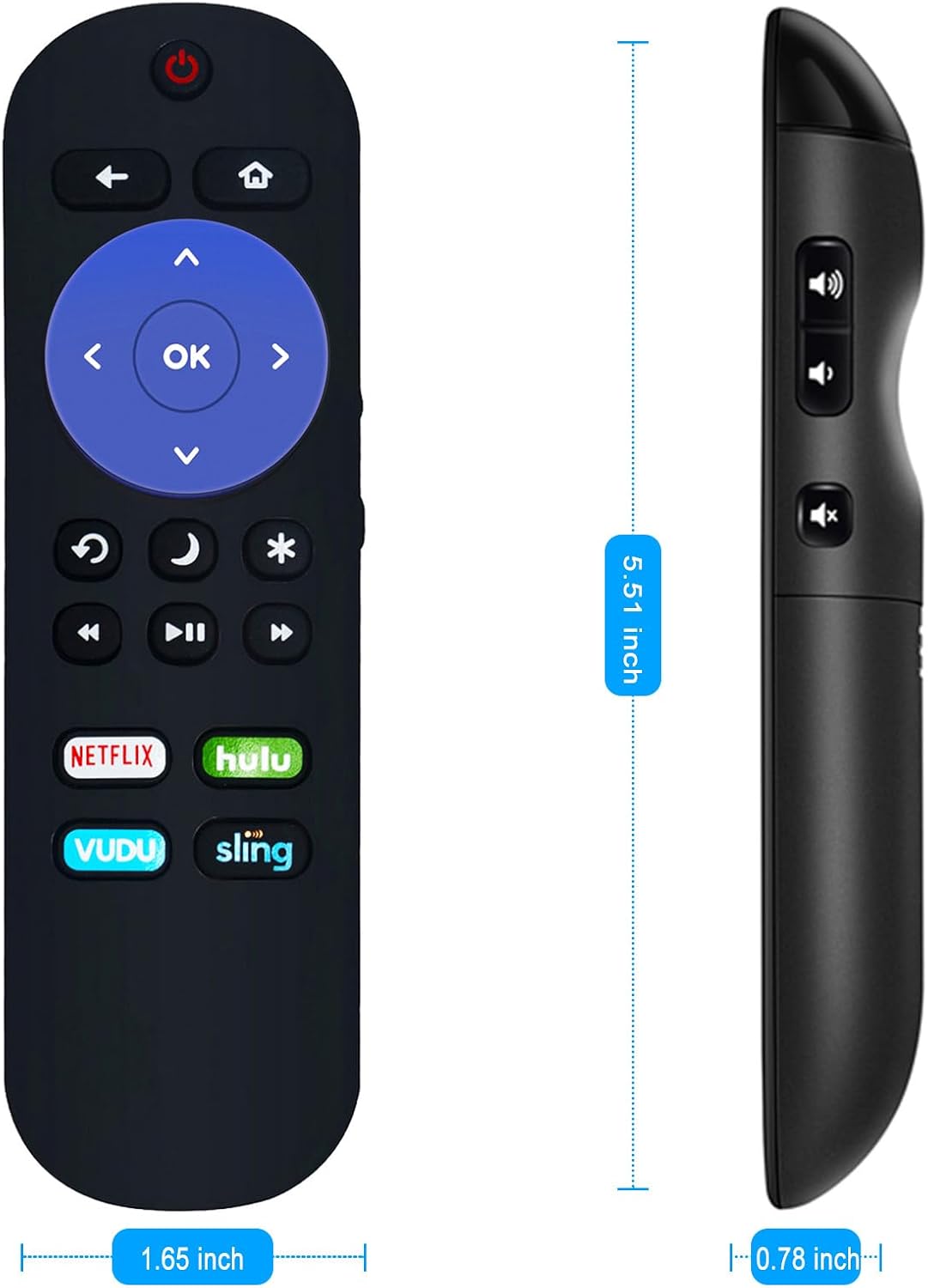
Figure 4: Dimensions of the remote control, showing its approximate length of 5.51 inches and width of 1.65 inches.
Warranty and Support
For any queries or assistance regarding your ZdalaMit replacement remote control, please contact the seller or manufacturer directly.
While specific warranty details are not provided in this manual, please retain your purchase receipt for any potential warranty claims or returns.
Contact information for support is typically available through your point of purchase or the product listing.