
Introduction
Thank you for choosing the WE PC Speakers 2.0. This manual provides detailed instructions for the setup, operation, and maintenance of your new speaker system. Please read this manual carefully before use to ensure optimal performance and longevity of your product.
Product Overview
The WE PC Speakers 2.0 are designed to deliver quality audio for your computer, gaming, or movie experiences. Featuring a compact design with metallic grilles and RGB lighting, these speakers offer both aesthetic appeal and functional performance. They support both Bluetooth and 3.5mm jack connections, powered conveniently via USB.
Key Features:
- Quality Sound: Engineered for excellent audio output, enhancing your music, games, and films.
- Compact Design with RGB Lighting: Space-saving design with metallic grilles and dynamic RGB lighting that synchronizes with your music.
- Easy and Quick Installation: Simple plug-and-play setup via USB and 3.5mm jack.
- Bluetooth Connectivity: Seamlessly connect with smartphones, tablets, and other Bluetooth-enabled devices.
- USB Powered: Flexible power options, allowing use as portable Bluetooth speakers.
Package Contents:
- 2 x WE PC Speakers (Left and Right)
- Integrated USB Power Cable
- Integrated 3.5mm Audio Jack Cable
- Instruction Manual (this document)
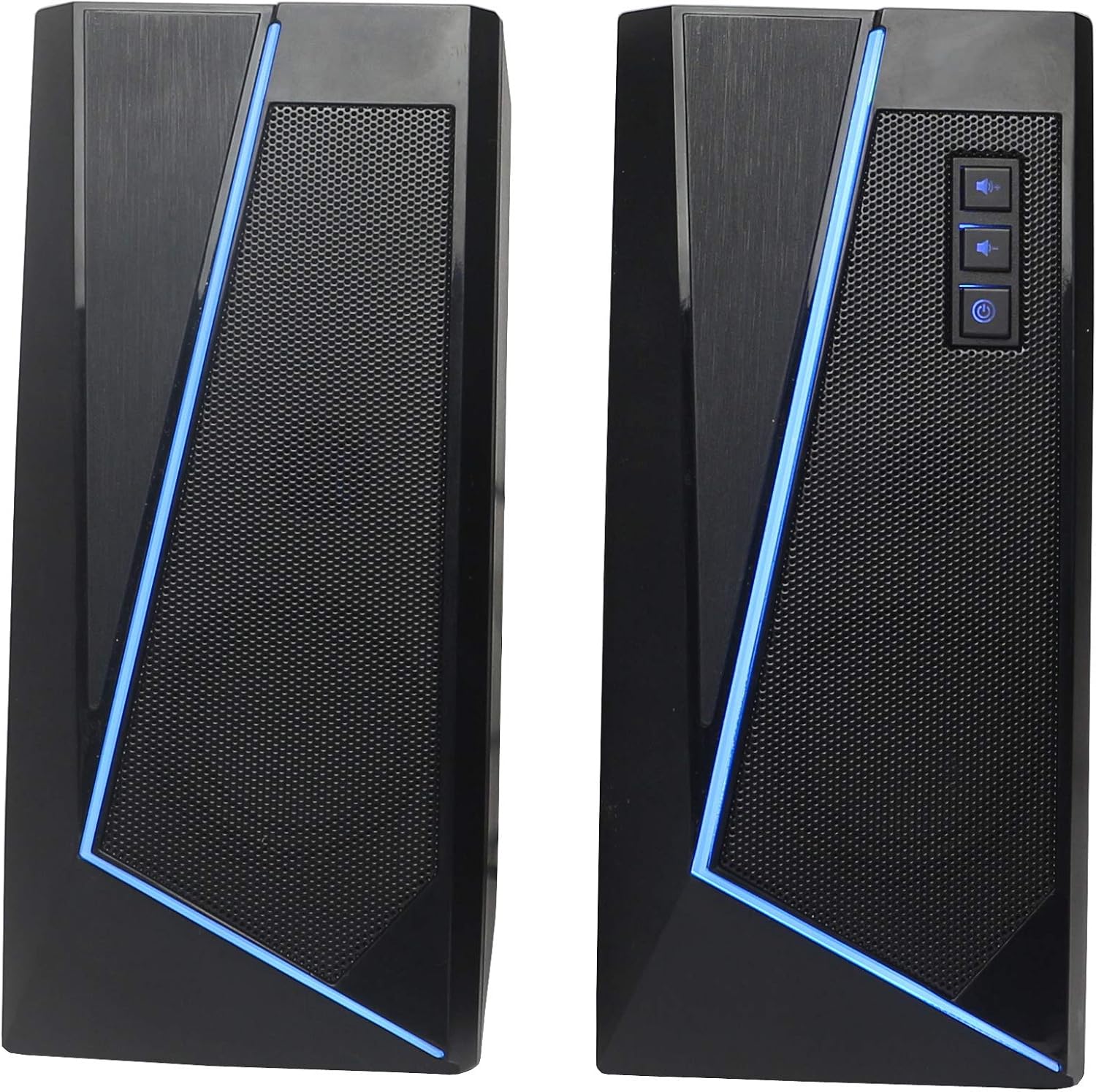
Image 1: Front view of the WE PC Speakers, showcasing their compact design and blue RGB lighting. The right speaker features tactile control buttons.

Image 2: Another front view of the WE PC Speakers, highlighting the design with a gold-colored trim. The right speaker shows the control panel.
Setup
- Positioning: Place the left and right speakers on a stable surface, ensuring they are equidistant from your listening position for optimal stereo sound.
- Power Connection: Connect the integrated USB cable from the speakers to an available USB port on your computer, laptop, or a USB power adapter (5V/1A recommended). The speakers will power on and the RGB lighting will activate.
- Audio Connection (Wired): For wired audio, plug the integrated 3.5mm audio jack cable into the headphone or audio output port of your computer, smartphone, or other audio source.
- Audio Connection (Bluetooth): For wireless audio, proceed to the "Operating Instructions - Bluetooth Connection" section.
Operating Instructions
Controls:
The right speaker features tactile controls for power and volume adjustment:
- Power Button: Press to turn the speakers on or off.
- Volume Up Button: Press to increase the volume.
- Volume Down Button: Press to decrease the volume.
Note: The actual icons on the product may vary slightly.
Bluetooth Connection:
- Ensure the speakers are powered on.
- On your smartphone, tablet, or other Bluetooth-enabled device, navigate to the Bluetooth settings.
- Enable Bluetooth and search for available devices.
- Select "WE Speakers" (or similar name) from the list of found devices to pair.
- Once paired, the speakers will emit a confirmation sound, and you can play audio wirelessly.
Wired Connection (3.5mm Jack):
- Ensure the speakers are powered on via the USB cable.
- Plug the integrated 3.5mm audio jack cable into the audio output port of your device (e.g., computer, MP3 player).
- The speakers will automatically switch to wired input if a signal is detected.
RGB Lighting:
The speakers feature integrated RGB LED lighting that activates automatically when powered on. The lighting cycle is designed to synchronize with your music, creating an immersive audio-visual experience.

Image 3: Side view of the WE PC Speakers, illustrating the dynamic RGB lighting in various colors. The control panel is visible on the right speaker.
Maintenance
- Cleaning: Use a soft, dry cloth to clean the speaker surfaces. Do not use liquid cleaners or abrasive materials.
- Storage: When not in use for extended periods, store the speakers in a cool, dry place away from direct sunlight and extreme temperatures.
- Avoid Water: While the product is listed as "waterproof" in specifications, it is generally best practice to avoid direct exposure to water or high humidity to prevent damage to electronic components.
Troubleshooting
| Problem | Possible Cause | Solution |
|---|---|---|
| No sound from speakers. |
|
|
| Bluetooth device cannot find speakers. |
|
|
| RGB lighting not working. |
|
|
Specifications
| Model Number | WEENCPC20LED |
| Brand | WE |
| Speaker Type | Satellite |
| Connectivity Technology | Auxiliary, Bluetooth, USB |
| Audio Output Mode | Stereo |
| Speaker Output Power | 6W RMS total (2 x 3W RMS per speaker), 12 Watts Peak Power |
| Speaker Size | 3 Inches |
| Control Method | Tactile |
| Power Source | Cable (USB) |
| Special Features | Bluetooth, RGB LED Lighting |
| Recommended Uses | For computer |
| Compatible Devices | Personal Computer, Smartphone, Tablet |
| Waterproof | Yes (as per specifications) |
Warranty and Support
The WE PC Speakers come with a 2-year warranty. For any questions, technical assistance, or warranty claims, please contact WE customer service. As a French brand, WE ensures customer support is available to address your inquiries within 24 hours, Monday to Friday.
For further assistance, please refer to the contact information provided with your purchase or visit the official WE website.

