
Introduction
The Thincol GM640 Grain Moisture Meter is a portable digital instrument designed for accurate measurement of moisture content and temperature in various grains. It is an essential tool for grain procurement, storage, and processing, ensuring optimal quality control.
This device offers dual functionality, measuring both moisture and temperature, and supports a wide range of grain types including rice, barley, wheat, feed, corn, rapeseed, and soybean. Key features include an LCD backlight for clear readings, multiple function support such as moisture standard setting and data hold, a detachable protective case, and a robust split probe for immediate measurements.
Package Contents
- 1 x GM640 Moisture Meter
- 1 x Test Probe
- 1 x User Manual (this document)

Image: The GM640 Grain Moisture Meter unit, its detachable probe, and the included user manual.
Setup
1. Battery Installation
The GM640 meter requires 3 x 1.5V AAA batteries (not included). To install:
- Locate the battery compartment cover on the back of the meter.
- Slide or unclip the cover to open.
- Insert three AAA batteries, ensuring correct polarity (+/-) as indicated inside the compartment.
- Replace the battery compartment cover securely.
2. Connecting the Test Probe
The test probe is essential for taking measurements. To connect:
- Identify the connector port on the top of the main meter unit.
- Align the probe's connector with the port and gently push to secure. Ensure a firm connection.
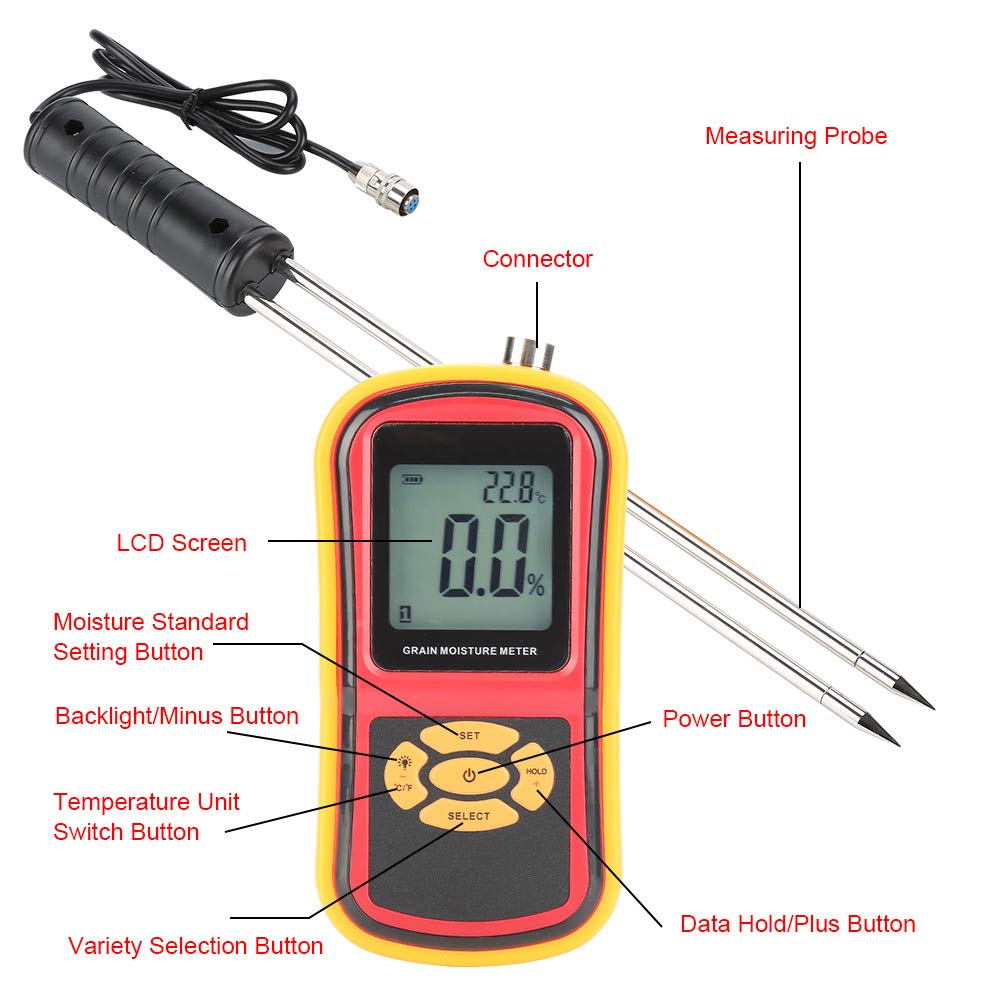
Image: The main meter unit, the measuring probe, and the connector point for assembly.
Operating Instructions
Meter Overview and Button Functions

Image: A detailed view of the GM640 meter's front panel, highlighting the LCD screen, buttons, and their respective functions.
- Power Button: Press to turn the meter ON or OFF.
- SELECT Button: Used to cycle through different grain varieties (codes 1-8).
- SET Button: For setting moisture standards or entering calibration mode.
- HOLD / + Button: Press to hold the current measurement on the display. Also used to increase values in setting modes.
- Backlight / - Button: Activates or deactivates the LCD backlight. Also used to decrease values in setting modes.
- °C/°F Button: Toggles the temperature display between Celsius and Fahrenheit.
LCD Display Information

Image: A close-up of the GM640's LCD screen, with numbered labels indicating the meaning of each displayed icon and value.
- Battery Power Symbol: Indicates remaining battery life.
- Data Hold Symbol: Appears when the data hold function is active.
- Temperature Measurement: Displays the current temperature reading.
- Measurement Unit Symbol: Shows the unit for temperature (°C or °F).
- Moisture Setting Symbol: Indicates a moisture setting mode.
- Water Content Overrun Symbol: Warns if moisture content exceeds a set limit.
- Moisture Measurement: Displays the current moisture percentage.
- Moisture Percentage Symbol: Indicates the unit for moisture (%).
- Grain Variety Code: Shows the currently selected grain type (1-8).
Taking a Measurement
- Power On: Press the Power button to turn on the meter.
- Select Grain Variety: Press the "SELECT" button repeatedly to choose the appropriate grain variety (e.g., Corn, Wheat, Rice). The corresponding grain code (1-8) will appear on the LCD.
- Insert Probe: Carefully insert the test probe into the grain sample. Ensure the probe is fully submerged and stable within the sample for accurate readings.
- Read Measurement: The moisture content (%) and temperature (°C/°F) will be displayed on the LCD screen.
- Hold Data (Optional): Press the "HOLD" button to freeze the current readings on the display. Press again to release.
- Change Temperature Unit (Optional): Press the "°C/°F" button to switch between Celsius and Fahrenheit temperature units.
- Backlight (Optional): Press the "Backlight" button to turn the LCD backlight on or off for better visibility in low light conditions.

Image: Visual representation of the GM640 meter's capability to measure moisture in multiple grain types, including corn, wheat, soybean, rice, and sesame.
Maintenance
Cleaning
To ensure the longevity and accuracy of your GM640 meter:
- Wipe the main unit with a soft, dry cloth. Do not use abrasive cleaners or solvents.
- After each use, clean the test probe thoroughly to remove any grain residue. A soft brush or cloth can be used. Ensure the probe is dry before storage.
- Do not immerse the meter or probe in water or any other liquid.
Storage
When not in use, store the GM640 meter and probe in a cool, dry place, away from direct sunlight and extreme temperatures. The meter comes with a detachable protective case:

Image: The GM640 meter with its protective rubber soft case, demonstrating how it can be removed or applied to safeguard the instrument.
The split protective case can be removed at any time and is designed to fully wrap the edge, protecting the instrument from harm.
Battery Replacement
When the low battery warning symbol appears on the LCD, replace all three AAA batteries promptly to ensure accurate readings and proper operation.
Troubleshooting
- Meter does not turn on: Check if batteries are installed correctly and have sufficient charge. Replace batteries if necessary.
- Inaccurate readings:
- Ensure the probe is clean and fully inserted into the grain sample.
- Verify that the correct grain variety is selected using the "SELECT" button.
- Check for "Water Content Overrun" symbol; if displayed, the moisture content may be outside the meter's measurable range.
- Ensure the probe connection is secure.
- LCD display is dim: Activate the backlight using the "Backlight" button. If still dim, replace batteries.
- "Over-standard prompt" appears: This indicates that the measured moisture content exceeds a pre-set standard. Adjust your grain storage or processing methods accordingly.
Specifications
| Parameter | Value |
|---|---|
| Model | GM640 |
| Moisture Content Measuring Range | 5% ~ 30% |
| Moisture Resolution | 0.5% |
| Moisture Accuracy | ±(1%RH + 0.5) |
| Temperature Measuring Range | -10 ~ 60°C (14 ~ 140°F) |
| Temperature Resolution | 0.1°C |
| Temperature Accuracy | ±2.5°C (±5°F) |
| Operating Temperature | 0 ~ 40°C (32 ~ 104°F) |
| Operating Humidity | 0 ~ 85% RH |
| Power Supply | 3 x 1.5V AAA Batteries (NOT included) |
| Meter Size | 15.5 x 8 x 3.5 cm (6.10 x 3.15 x 1.38 inches) |
| Probe Size | 41.8 x 3.5 cm (16.46 x 1.38 inches) |
| Weight | 505g (17.8oz) |
Warranty and Support
Warranty Information
Specific warranty terms and conditions for the Thincol GM640 Grain Moisture Meter are typically provided by the manufacturer or seller at the time of purchase. Please refer to any documentation included with your product or contact your point of purchase for detailed warranty information.
Customer Support
For technical assistance, troubleshooting beyond this manual, or inquiries regarding your product, please contact the manufacturer, Thincol, or the seller from whom you purchased the device. Contact information can usually be found on the product packaging or the seller's website.


