
1. Introduction
This manual provides essential information for the safe and effective use of your CS BATTERY replacement Li-ion battery. This battery is designed to be compatible with various barcode scanners, including specific models from Symbol and Honeywell. Please read this manual thoroughly before installation and use.
2. Safety Information and Warnings
Failure to follow these safety instructions may result in fire, electric shock, injury, or damage to the battery or device.
- Keep the battery dry: Avoid exposing the battery to moisture or liquids.
- Avoid metallic objects: Do not allow metal objects to come into contact with the battery terminals, as this can cause a short circuit.
- Use specified charger only: Always use a charger specifically designed for Li-ion batteries and compatible with your device.
- Do not short-circuit: Never intentionally short-circuit the battery terminals.
- Never expose to fire: Do not dispose of the battery in fire or expose it to high temperatures.
- Proper disposal: Dispose of used batteries according to local regulations. Do not dispose of with household waste.
- Avoid physical damage: Do not puncture, drop, or disassemble the battery.
- Overcharge/Overdischarge Protection: The battery features built-in protection against overvoltage, short-circuit, overheating, overcurrent, and overcharge. However, always follow charging guidelines.
- Legal Disclaimer: If the battery label is torn or replaced with other brand labels, returns may be refused. Verify compatibility before purchase.

Image: The battery is equipped with multiple protection features, including overvoltage, short-circuit, overheating, overcurrent, and overcharge protection, indicated by respective icons.
3. Product Specifications

Image: Visual representation of the battery's key specifications, including capacity, voltage, type, and energy rate.
| Specification | Value |
|---|---|
| Battery Type | Li-ion |
| Voltage | 3.7V |
| Capacity | 2600mAh |
| Energy Rate | 9.62Wh |
| Net Weight | 55g / 1.94oz |
| Dimensions (L x W x H) | 68.80 x 23.90 x 21.90mm (2.71 x 0.94 x 0.86 inches) |
| Certifications | CE, UL, ROSH |
4. Compatibility
This replacement battery is designed for use with the following barcode scanner models and part numbers:

Image: The replacement battery displayed alongside compatible barcode scanner models, illustrating its intended use.
Compatible Scanner Models:
- Honeywell 8800
- Symbol MT2000
- Symbol NGIS
- Symbol XS3478
- Symbol DS3478
- Symbol DS3578
- Symbol DSS3478
- Symbol LS3478
- Symbol LS3478ER
- Symbol LS3578
Compatible Battery Part Numbers:
- Motorola 21-62606-01
- Symbol 21-62606-01
- Symbol BTRY-LS34IAB00-00
5. Setup and Installation
Follow these general steps to install the replacement battery. Refer to your scanner's original user manual for specific instructions on battery compartment access.
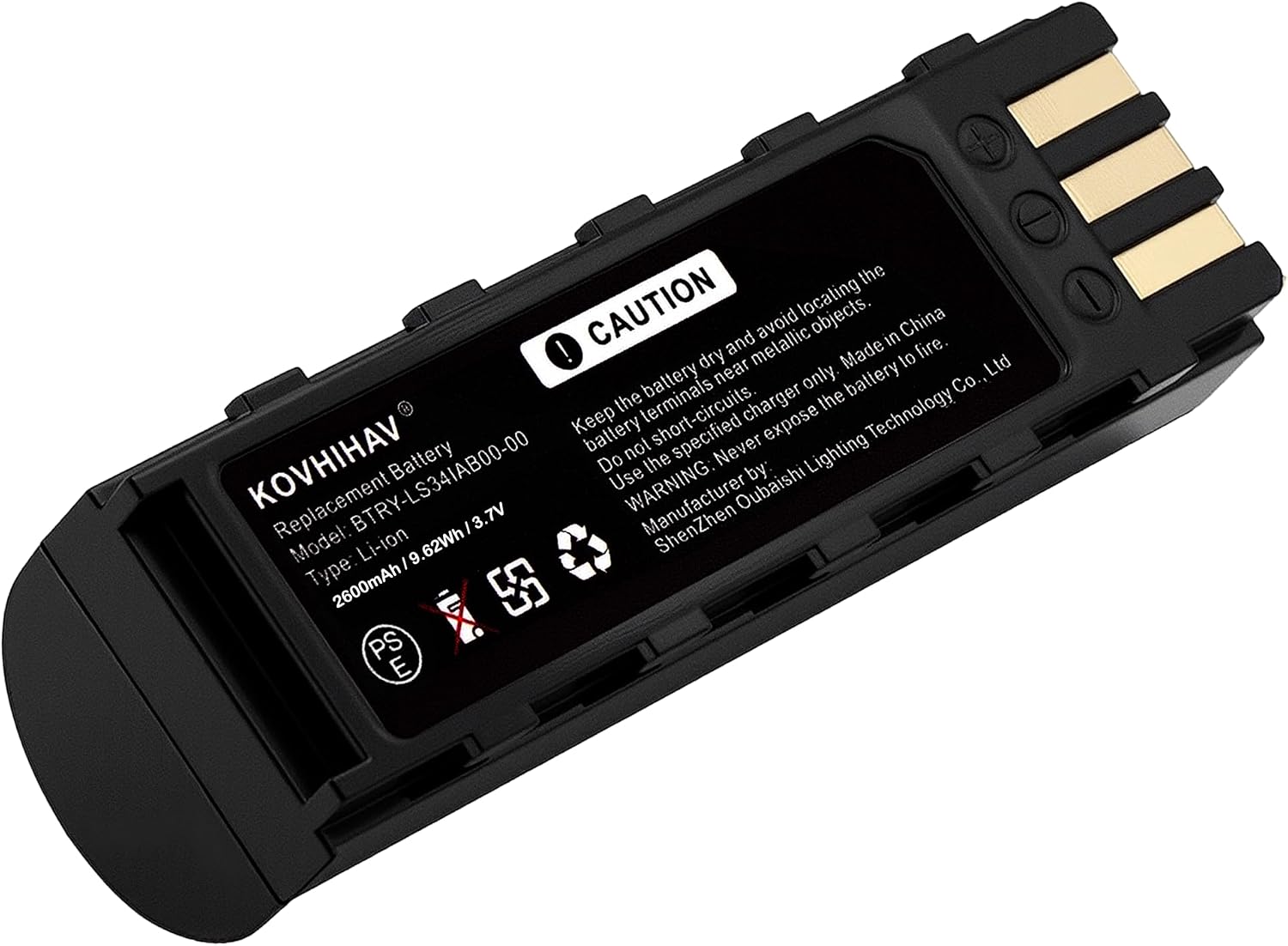
Image: A detailed view of the replacement battery, highlighting its design and electrical contacts for proper installation.
- Power Off Device: Ensure your barcode scanner is completely powered off before attempting battery replacement.
- Locate Battery Compartment: Identify and open the battery compartment on your scanner. This usually involves a latch or screw.
- Remove Old Battery: Carefully remove the old battery. Note its orientation.
- Insert New Battery: Insert the CS BATTERY replacement battery into the compartment, ensuring the contacts align correctly with the device's terminals. Do not force the battery.
- Secure Compartment: Close and secure the battery compartment.
- Initial Charge: It is recommended to fully charge the new battery before its first use.

Image: A close-up showing the battery's contact points, crucial for correct insertion into the device.
6. Operating Instructions
Once installed and charged, the battery operates as a standard power source for your compatible barcode scanner.
- Charging: Connect your scanner to its original or a compatible charger. The charging indicator on your scanner will typically show the charging status.
- First Use: For optimal performance, fully charge the battery before its initial use.
- Discharge: Avoid completely draining the battery frequently, as this can reduce its overall lifespan.
- Temperature: Operate the battery within the recommended temperature range specified by your scanner's manufacturer.
7. Maintenance and Storage
Proper care and storage can extend the life of your battery.
- Regular Charging: If the battery is not used for an extended period, charge it to approximately 50-70% capacity every 3-6 months.
- Storage Conditions: Store the battery in a cool, dry place away from direct sunlight and extreme temperatures.
- Cleaning: Keep the battery contacts clean using a dry, soft cloth.
- Avoid Full Discharge: While the battery has overdischarge protection, consistently running it to 0% can still impact its long-term health.
8. Troubleshooting
If you encounter issues with your replacement battery, consider the following:
- Battery Not Charging:
- Ensure the battery is correctly seated in the scanner.
- Verify the charger is functioning and properly connected.
- Check for any debris or corrosion on the battery or scanner contacts.
- Short Battery Life:
- Confirm the battery is fully charged before use.
- Review scanner settings that might consume excessive power (e.g., screen brightness, wireless features).
- Battery capacity naturally degrades over time with usage cycles.
- Device Not Powering On:
- Ensure the battery is charged and correctly installed.
- Test with another known-good battery if available to rule out a scanner issue.
If problems persist, contact customer support for further assistance.
9. Warranty and Support
CS BATTERY is committed to providing quality replacement batteries. While specific warranty periods are not detailed here, the product is designed with robust protection features (CE, UL, ROSH certified) and aims for reliable performance.
For technical support, warranty inquiries, or assistance with your battery, please contact the seller or manufacturer directly. When contacting support, please provide your purchase details and the battery's model information.
Note: As per the legal disclaimer, returns may be refused if the battery label is altered or removed. Please ensure to verify the applicable machine model and battery original code before purchase to ensure perfect compatibility.


