
1. Introduction
The Oumefar DT2236B is a professional handheld digital tachometer designed for accurate measurement of rotational speed (RPM) and surface speed. It utilizes both photo (non-contact) and contact measurement techniques, making it a versatile tool for motor testing, vehicle inspection, and various industrial applications. This device incorporates microcomputer (CPU) and laser technology for reliable performance and features an ultra-large LCD screen for clear readings.
2. Safety Information
WARNING: This device uses a laser. Avoid direct eye exposure to the laser beam. Do not point the laser at people or animals. Use caution during operation.
- Read all instructions carefully before operating the device.
- Do not attempt to disassemble or modify the tachometer.
- Ensure batteries are inserted with correct polarity.
- Keep the device away from water, high temperatures, and strong magnetic fields.
- Remove batteries if the device will not be used for an extended period.
3. Product Overview and Components
The DT2236B tachometer is designed for ease of use and durability. Below are the main components and package contents.
3.1 Package Contents
- 1 x Photo/Contact Tachometer (DT2236B)
- 1 x User Manual (this document)
- 3 x Reflective Paper sheets
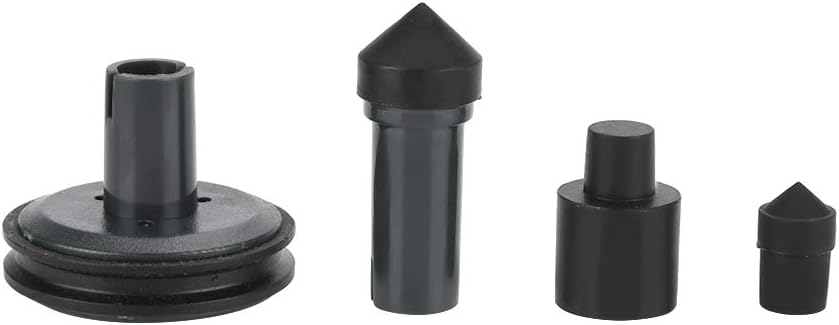
- 4 x Tachometer Accessories (for contact measurement)
- 1 x Black Carrying Bag
3.2 Device Layout


- LCD Display: Shows measurement readings, units, and battery status.
- Mode Switch: Toggles between Photo Tach (RPM), Contact Tach (RPM), and Surface Speed (m/min) modes.
- Memory Button: Stores and recalls maximum, minimum, and last measured values.
- Laser Emitter/Receiver: For non-contact (photo) RPM measurements.
- Contact Shaft: For attaching contact accessories for contact RPM and surface speed measurements.
4. Specifications
| Parameter | Value |
|---|---|
| Model | DT2236B |
| Photo Tach Measuring Range | 2.5 ~ 99,999 RPM |
| Contact Tach Measuring Range | 0.5 ~ 19,999 RPM |
| Surface Speed Measuring Range | 0.05 ~ 1,999.9 m/min |
| Resolution (Photo Tach) | 0.01 RPM (2.5-999.99 RPM), 0.1 RPM (1,000-9,999.9 RPM), 1 RPM (over 10,000 RPM) |
| Resolution (Contact Tach) | 0.01 RPM (0.5-999.99 RPM), 0.1 RPM (1,000-9,999.9 RPM), 1 RPM (over 10,000 RPM) |
| Resolution (Surface Speed) | 0.01 m/min (0.05-99.99 m/min), 0.1 m/min (over 100 m/min) |
| Accuracy | ±(0.05% + 1 digit) |
| Sampling Time | 0.5 seconds (over 120 RPM) |
| Detecting Distance (Photo) | 50 ~ 500 mm |
| Screen | 5 digits, 18mm (0.6") LCD |
| Range Select | Auto-Ranging |
| Test Base | 6MHz Quartz crystal |
| Battery | 3 x 1.5V AAA batteries (NOT included) |
| Power Consumption | Approx. 45mA |
| Dimensions | 20 x 7.5 x 3.5 cm (7.87 x 2.95 x 1.38 in) |
| Weight | Approx. 286g (10.1 oz) |

5. Setup
5.1 Battery Installation
- Locate the battery compartment cover on the back of the device.
- Slide or unclip the cover to open it.
- Insert three (3) 1.5V AAA batteries, ensuring correct polarity (+/-) as indicated inside the compartment.
- Replace the battery compartment cover securely.
5.2 Preparing for Photo (Non-Contact) Measurement
For accurate non-contact measurements, a reflective surface is required on the rotating object.
- Cut a small piece of the provided reflective paper (approximately 1-2 cm square).
- Attach the reflective paper to the rotating shaft or disk of the object to be measured. Ensure it is flat and securely adhered.
- The reflective tape should be placed on a clean, non-reflective part of the object.

5.3 Preparing for Contact Measurement
For contact measurements, select the appropriate accessory from the package.
- Identify the contact shaft at the bottom of the tachometer.
- Choose the suitable contact accessory (e.g., cone, funnel, or wheel) based on the surface you intend to measure.
- Firmly attach the selected accessory to the contact shaft. Ensure it is seated correctly to prevent inaccurate readings or detachment during use.

6. Operating Instructions
6.1 Powering On/Off
Press the power button (usually integrated with the measurement trigger) to turn the device on. The LCD will illuminate. Release the button to turn off the device (it may have an auto-off feature after a period of inactivity).
6.2 Selecting Measurement Mode
Use the mode switch located on the front panel to toggle between the three measurement modes:
- Photo Tach (RPM): For non-contact rotational speed measurement.
- Contact Tach (RPM): For contact rotational speed measurement.
- Surface Speed (m/min): For contact linear speed measurement.

6.3 Photo (Non-Contact) RPM Measurement
- Ensure reflective tape is applied to the rotating object (refer to Section 5.2).
- Select the 'Photo Tach' mode using the mode switch.
- Hold the tachometer at a distance of 50mm to 500mm from the reflective tape.
- Aim the laser beam at the reflective tape. The laser indicator will help you target correctly.
- Press and hold the measurement button. The RPM reading will appear on the LCD.
- Release the button to stop measurement. The last reading will remain on the display.

6.4 Contact RPM Measurement
- Attach the appropriate contact accessory to the tachometer's shaft (refer to Section 5.3).
- Select the 'Contact Tach' mode using the mode switch.
- Gently press the contact accessory against the center of the rotating shaft or surface.
- Press and hold the measurement button. The RPM reading will appear on the LCD.
- Release the button to stop measurement.
6.5 Surface Speed Measurement (m/min)
- Attach the wheel-shaped contact accessory to the tachometer's shaft (refer to Section 5.3).
- Select the 'Surface Speed' mode using the mode switch.
- Place the wheel firmly against the moving surface (e.g., conveyor belt, wire, cable).
- Press and hold the measurement button. The surface speed reading in m/min will appear on the LCD.
- Release the button to stop measurement.
6.6 Memory Function
The DT2236B automatically stores the maximum, minimum, and last measured values. To recall these values:
- After a measurement, press the 'MEMORY' button.
- Each press will cycle through: MAX (maximum value), MIN (minimum value), and LAST (last measured value).
- The corresponding indicator (MAX/MIN/LAST) will be displayed on the LCD.
7. Maintenance
7.1 Cleaning
- Wipe the device with a soft, dry cloth.
- Do not use abrasive cleaners or solvents.
- Keep the laser lens and contact accessories clean for accurate readings.
7.2 Battery Replacement
When the battery low indicator appears on the LCD, replace all three AAA batteries as described in Section 5.1. Dispose of old batteries responsibly.
7.3 Storage
Store the tachometer in its black carrying bag in a cool, dry place when not in use. Remove batteries if storing for extended periods to prevent leakage.
8. Troubleshooting
| Problem | Possible Cause | Solution |
|---|---|---|
| Device does not power on | Dead or incorrectly installed batteries | Check battery polarity; replace with fresh AAA batteries. |
| Low battery indicator appears | Batteries are low | Replace all three AAA batteries. |
| Inaccurate Photo Tach reading |
|
|
| Inaccurate Contact Tach/Surface Speed reading |
|
|
| No reading on display |
|
|
9. Warranty and Support
9.1 Warranty Information
This Oumefar DT2236B Tachometer is typically covered by a standard manufacturer's warranty against defects in materials and workmanship. Please refer to your purchase documentation or contact your retailer for specific warranty terms and duration.
9.2 Customer Support
For technical assistance, troubleshooting beyond this manual, or warranty claims, please contact the retailer or the manufacturer directly. Keep your purchase receipt or proof of purchase handy when seeking support.