
Introduction
This manual provides comprehensive instructions for the BLACK+DECKER BD40K27-B1 Push & Go Cordless Screwdriver Set. This 4V cordless screwdriver is designed for various light-duty repair tasks and furniture assembly, offering convenience and ease of use with its Push & Go functionality and e-clutch system. Please read this manual carefully before operating the tool to ensure safe and efficient use.
Important Safety Information
Always follow basic safety precautions when using electric tools to reduce the risk of fire, electric shock, and personal injury.
- Keep work area clean and well lit. Cluttered or dark areas invite accidents.
- Do not operate power tools in explosive atmospheres, such as in the presence of flammable liquids, gases or dust. Power tools create sparks which may ignite the dust or fumes.
- Keep children and bystanders away while operating a power tool. Distractions can cause you to lose control.
- Dress properly. Do not wear loose clothing or jewelry. Keep your hair, clothing and gloves away from moving parts.
- Use personal protective equipment. Always wear eye protection. Protective equipment such as dust mask, non-skid safety shoes, hard hat, or hearing protection used for appropriate conditions will reduce personal injuries.
- Avoid accidental starting. Ensure the switch is in the off-position before connecting to battery pack, picking up or carrying the tool.
- Do not overreach. Keep proper footing and balance at all times. This enables better control of the power tool in unexpected situations.
- Maintain power tools. Check for misalignment or binding of moving parts, breakage of parts and any other condition that may affect the power tool’s operation. If damaged, have the power tool repaired before use.
- Use the power tool, accessories and tool bits etc. in accordance with these instructions, taking into account the working conditions and the work to be performed. Use of the power tool for operations different from those intended could result in a hazardous situation.
- Recharge only with the charger specified by the manufacturer. A charger that is suitable for one type of battery pack may create a risk of fire when used with another battery pack.
- Use power tools only with specifically designated battery packs. Use of any other battery packs may create a risk of injury and fire.
Package Contents
The BLACK+DECKER BD40K27-B1 Cordless Screwdriver Set includes the following items:
- 1 x BLACK+DECKER BD40K27-B1 Cordless Screwdriver
- 27 x Accessories (various screwdriver bits)
- 1 x Charger (integrated or separate, assuming included as batteries are included)
- Instruction Manual
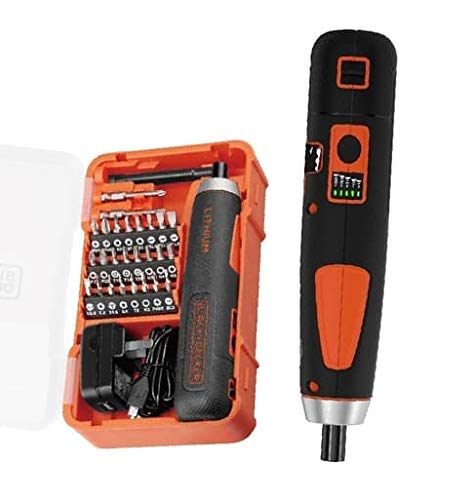
Image: The BLACK+DECKER BD40K27-B1 Cordless Screwdriver Set, showing the screwdriver and a selection of its 27 accessories.
Setup
1. Charging the Battery
The BD40K27-B1 screwdriver is powered by an integrated Lithium-Ion battery. Before first use, ensure the battery is fully charged. Connect the charger to a standard power outlet and then to the screwdriver's charging port. An indicator light will typically show the charging status. Allow sufficient time for a full charge as specified in the charging instructions (usually a few hours).
2. Attaching Accessories
To attach a screwdriver bit:
- Select the appropriate bit for your task from the 27 included accessories.
- Insert the bit firmly into the screwdriver's chuck until it clicks into place.
- To remove, pull the bit straight out from the chuck.
Operating Instructions
1. Push & Go Operation
The BD40K27-B1 features a "Push & Go" mechanism for intuitive operation. To start driving a screw:
- Ensure the correct bit is securely installed.
- Place the bit onto the screw head.
- Apply gentle forward pressure to the screwdriver. The motor will automatically engage and begin driving the screw.
- Release pressure to stop the motor.
2. E-Clutch System
The e-clutch system allows you to select the appropriate torque setting for your application, preventing overtightening or damage to fasteners and materials. Refer to the markings on the tool (if present) or the specific instructions for adjusting the torque. Start with a lower torque setting and increase if more power is needed.
3. Cable Cutter/Shear Function
This tool includes a built-in cable cutter/shear for added utility. Locate the cable cutter on the tool body. Position the cable within the cutting jaws and apply pressure to cut. Use this feature only for appropriate cable types and sizes as specified by the manufacturer to avoid damage to the tool or injury.
Maintenance
1. Cleaning
Keep the tool's ventilation slots clean to prevent overheating. Use a soft, damp cloth to wipe down the exterior of the screwdriver. Do not use harsh chemicals or abrasive cleaners. Ensure the tool is dry before storage or further use.
2. Storage
Store the screwdriver and its accessories in a dry, secure location, out of reach of children. Avoid storing in direct sunlight or extreme temperatures.
3. Battery Care
For optimal battery life, avoid fully discharging the battery frequently. Recharge the battery when its performance begins to diminish. If storing for extended periods, charge the battery to approximately 50% capacity.
Troubleshooting
| Problem | Possible Cause | Solution |
|---|---|---|
| Screwdriver does not operate. | Battery is discharged. | Charge the battery fully. |
| Screwdriver stops during operation. | Overload protection activated. | Reduce pressure or use a lower torque setting. Allow tool to cool. |
| Bit slips from screw head. | Incorrect bit size or worn bit. | Ensure correct bit is used and fully seated. Replace worn bits. |
| Screw is not driven fully. | Insufficient torque setting. | Increase the torque setting using the e-clutch system. |
Specifications
| Feature | Detail |
|---|---|
| Model Number | BD40K27-B1 |
| Brand | BLACK+DECKER |
| Voltage | 4V |
| Battery Type | Lithium Ion (Integrated) |
| Number of Accessories | 27 |
| Head Style | Clutch Head |
| Material (Handle) | Plastic |
| Product Dimensions (L x W x H) | 20.5 x 12.5 x 6 cm |
| Weight | 680 g |
| Recommended Uses | Furniture assembly, General repair and maintenance |
Warranty and Support
For warranty information, technical support, or service inquiries, please refer to the warranty card included with your product or visit the official BLACK+DECKER website. Keep your proof of purchase for any warranty claims.
Online Support: www.blackanddecker.com


