
Introduction
This manual provides essential instructions for the safe and effective use of your CS BATTERY replacement battery. Please read this manual thoroughly before installation and operation to ensure optimal performance and safety.
Product Compatibility
This replacement battery is designed for specific Logitech Ultimate Ears speaker models. Verify your device and original battery part numbers before proceeding.
Compatible Device Models:
- UE MegaBoom
- UE MegaBoom 3
- S-00147
- S-00171
Note: This battery is not applicable to the UE Boom series.
Compatible Battery Part Numbers:
- 533-000116
- 533-000138
- 533-000146
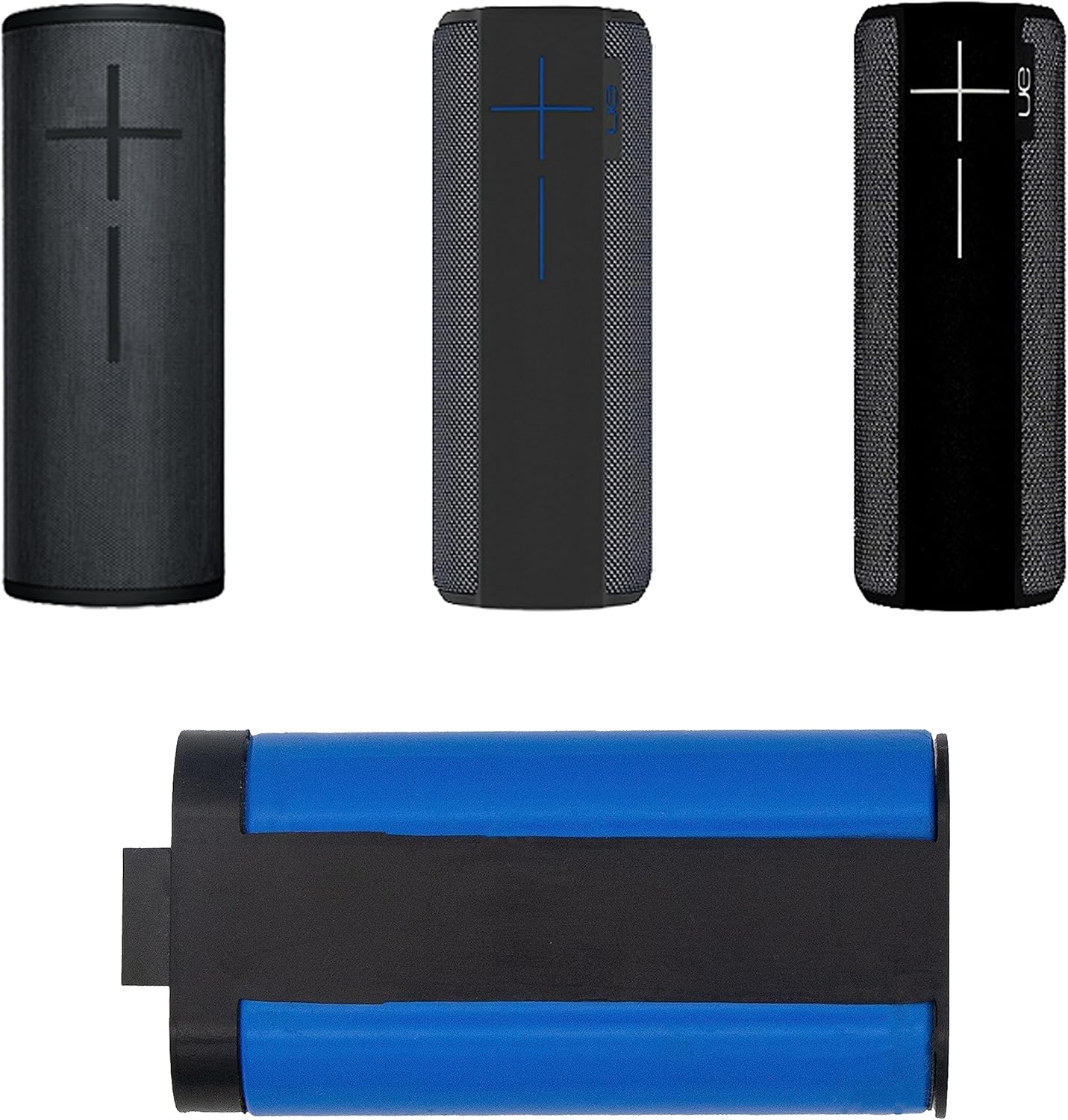
This image illustrates the compatible Logitech UE MegaBoom speakers and the replacement battery, highlighting the form factor for comparison.
Safety Precautions
Failure to follow these precautions may result in battery expansion, leakage, explosion, or personal injury.
- Do not over-discharge, squeeze, incinerate, or heat the battery.
- Do not short-circuit the battery terminals.
- Do not weld directly on the battery surface.
- Do not use or heat the battery outside the allowed temperature range.
- Do not disassemble the battery internally.
- When the battery reaches its termination voltage, remove it from the instrument promptly.
- Keep the battery dry and avoid locating it near metallic objects.
- Use only the specified charger.

This image displays various safety icons indicating the battery's protective features, such as protection against overcharging, extreme temperatures, overcurrent, and short circuits, along with its recyclable nature.
Setup: Battery Installation
Replacing the battery in your Logitech UE MegaBoom speaker requires careful handling. It is recommended to consult online video tutorials for visual guidance on disassembling the speaker, as the process can be intricate.
Required Tools (Not Included, except pry tool):
- Small Phillips head screwdriver
- Plastic pry tool (often included with replacement battery)
Installation Steps:
- Pry off the cover: Carefully use a plastic pry tool to release the speaker's cover, typically located at the top or bottom, which may have a pull ring. Exercise caution to avoid damaging the speaker's casing or internal components.
- Access the main board: Once the cover is removed, locate the main board. Gently remove any rubber rings or seals securing the main board.
- Disconnect the old battery: Carefully pull out the main board to access the battery connector. Disconnect the old battery from its port.
- Insert the new battery: Connect the new CS BATTERY replacement battery to the main board connector, ensuring a secure fit.
- Reassemble the speaker: Carefully place the main board back into position, reattach any rubber rings or seals, and then secure the speaker cover. Ensure all components are properly aligned before closing.
Important Note: The speaker's waterproof seal may be compromised after disassembly. Re-sealing the speaker to its original waterproof standard may require specialized tools or expertise.

This image visually guides the user through the initial steps of battery replacement, showing how to access the internal components of the speaker.

This image shows the CS BATTERY replacement battery alongside a blue plastic pry tool, which is often used for opening electronic devices during battery replacement.
Operating Instructions
Initial Charging and Calibration:
For optimal performance and accurate battery percentage detection, it is recommended to calibrate the new battery after installation:
- Charge the battery to 100% using the original high-quality charging head and data cable.
- Allow the speaker to discharge completely until it turns off.
- Plug the speaker back in and charge it overnight (at least 8-12 hours) to ensure a full charge cycle.
The new battery will perform best after completing 2 to 3 complete charge and discharge cycles.
Regular Charging:
You can continue to charge the replaced battery with the original charger. Always use a high-quality charging head and data cable for the best charging results.
Maintenance
- Storage: If storing the battery for an extended period, ensure it is charged to approximately 50-70% and stored in a cool, dry place.
- Cleaning: Keep the battery terminals clean and free from dust or debris.
- Temperature: Avoid exposing the battery to extreme temperatures (very hot or very cold) as this can degrade performance and lifespan.
Troubleshooting
| Problem | Possible Cause | Solution |
|---|---|---|
| Battery not charging | Incorrect installation, faulty charger/cable, or initial calibration issue. |
|
| Short battery life after replacement | Battery not fully calibrated, or speaker power consumption issues. |
|
| Speaker not turning on | Battery not connected, completely discharged, or speaker malfunction. |
|
Specifications
| Feature | Detail |
|---|---|
| Battery Type | Li-ion |
| Voltage | 7.4 V |
| Capacity | 3400 mAh / 25.16 Wh |
| Dimensions | 3.07 x 1.48 x 0.74 inches |
| Weight | 4.2 ounces |
| Manufacturer | Cameron Sino (HENZENS) |
Warranty and Support
For warranty information or technical support, please refer to the seller's policies on the platform where the purchase was made. Ensure you retain your proof of purchase.
Legal Disclaimer: If the battery label is altered or removed, warranty claims may be voided. Always verify the applicable machine model and original battery code before purchase and installation.


