
1. Product Overview
The Center RF Wireless 7-Day Programmable Thermostat offers efficient and automatic control for home heating systems. This thermostat combines a multitude of features with intuitive heating time and temperature control, making it suitable for various domestic applications. It incorporates adaptive control technology to precisely maintain the internal temperature by adjusting the heating system's output to current demand, enhancing efficiency and ensuring Boiler Plus compliance. Additionally, its optimal start/stop technology learns your heating system's response times to activate and deactivate heating at the most appropriate moments, significantly improving efficiency and comfort. Designed with user-friendliness in mind, it features only 5 large, soft-touch buttons and a clear, easy-to-understand display.

Image 1: The Center RF Wireless 7-Day Programmable Thermostat (left) and its accompanying RF receiver unit (right).
2. Key Features
- Minimalist and Modern Design: Blends discreetly into any home environment.
- Boiler Plus Compliant: Meets modern efficiency standards.
- Adaptive Control Function: Helps to precisely and efficiently maintain the required temperature setting.
- Optimal Start/Stop Technology: Significantly increases the efficiency of your heating system by learning optimal heating and cooling times.
- Factory Pre-linked to RF Receiver: Ensures simple and hassle-free installation.
- Flexible Installation: Includes a wall backplate and a table stand.
- Large Backlit LCD Screen: Displays time and temperature for easy reading.
- Simple User Interface: Features only 5 buttons for easy operation and program setup.
- 7-Day and 5/2-Day Heating Program: Allows customization to match your lifestyle and maximize energy savings.
- Multiple Temperature Periods: Choice of up to 4 independent temperature periods per day with a copy function.
- Battery Powered: With a low power indicator for convenience.
- 'Active'/'In Use' Confirmation: Easily identifies if heating is on or off.
- Clock Format Options: 24-hour and 12-hour display formats available.
- Built-in Memory: Retains user program indefinitely.
- ErP Class IV (+2%): Energy efficiency rating according to (EU) 811/2013.
3. Package Contents
Please ensure all components are present before beginning installation:
- Center RF Wireless 7-Day Programmable Thermostat Unit
- RF Receiver Unit
- Wall Mounting Plate
- Table Stand
- AA Batteries (2x)
- Instruction Manual
4. Safety Information
IMPORTANT: Read these instructions fully prior to use to ensure correct and safe operation of your wireless thermostat. Failure to do so may result in damage or injury.
- Professional Installation: This product must be installed by a competent person.
- Power Disconnection: To ensure your safety, make sure the mains power is switched OFF at the consumer unit before accessing any wiring.
- Wiring Precautions: To prevent a short circuit from loose wires:
- For multi-core cables, only remove enough outer insulation to allow secure fixing of the cores into the terminal block.
- For single core cables, secure them together with a cable tie as close as possible to the terminal block.
- Battery Safety: Ensure correct battery polarity when inserting. Do not mix old and new batteries, or different types of batteries. Dispose of used batteries responsibly.
5. Setup and Installation
The thermostat and receiver unit within this package are pre-bound at the factory, simplifying the initial setup process.
5.1. Choosing a Location
Select a location for the thermostat that is representative of the room temperature, away from direct sunlight, drafts, or heat sources (e.g., radiators, lamps). The RF receiver should be installed near your boiler or heating system.
5.2. Mounting Options
The thermostat offers ultimate installation flexibility with both a wall mounting plate and a table stand included. The receiver unit is typically wall-mounted near the boiler.
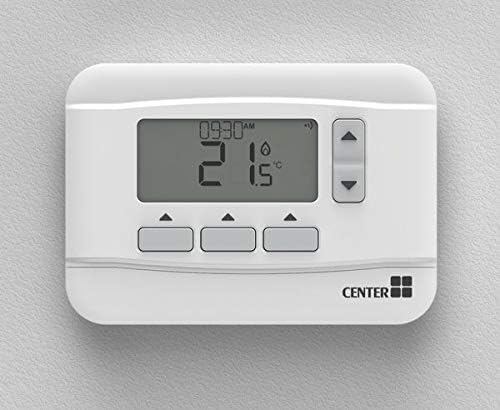
Image 2: The Center RF Wireless Thermostat can be conveniently mounted on a wall.
5.3. Powering the Thermostat
The thermostat is battery-powered. Insert the two AA batteries (included) into the battery compartment, ensuring correct polarity. A low power indicator will appear on the display when batteries need replacing.
5.4. Receiver Wiring (Professional Installation Required)
The RF receiver unit requires wiring to your heating system. This procedure must be carried out by a qualified and competent person. Refer to the wiring diagram provided in the full installation guide for detailed instructions. Ensure mains power is disconnected before commencing any wiring work.
6. Operating Instructions
The thermostat features a large, backlit LCD screen and a simple interface with only 5 buttons for easy navigation and control.

Image 3: A close-up view of the thermostat's clear LCD display, showing current time and temperature.
6.1. Display Information
The LCD screen displays the current time, current room temperature, and the set target temperature. An 'Active' or 'In Use' confirmation icon indicates when the heating system is currently operating.
6.2. Button Functions
The 5 soft-touch buttons allow you to:
- Adjust temperature settings (Up/Down arrows).
- Navigate through menus and confirm selections.
- Access programming modes.
6.3. Setting Time and Date
Follow the on-screen prompts to set the current time and date. The thermostat supports both 24-hour and 12-hour clock formats. It also features an automatic summer time change function.
6.4. Manual Temperature Override
You can temporarily override the programmed schedule by manually adjusting the temperature using the Up/Down arrows. The thermostat will revert to the program at the next scheduled change.
7. Programming Your Thermostat
The Center thermostat offers flexible programming options to suit your lifestyle and maximize energy savings.
7.1. Choosing a Program Mode
You can select between a 7-day heating program (individual settings for each day of the week) or a 5/2-day program (weekdays share one program, weekend days share another).
7.2. Setting Temperature Periods
For each day (or weekday/weekend block), you can set up to 4 independent temperature periods. Each period consists of a start time and a target temperature. For example:
- Period 1: 06:00 - 21°C (Wake up)
- Period 2: 09:00 - 18°C (Leave for work/school)
- Period 3: 17:00 - 20°C (Return home)
- Period 4: 22:00 - 16°C (Sleep)
7.3. Copy Function
To simplify programming, a copy function allows you to duplicate settings from one day to another, or from one period to another.
7.4. Saving Your Program
Once you have set your desired program, ensure you save the settings. The built-in memory will retain your program indefinitely, even during power outages or battery changes.
8. Maintenance
8.1. Battery Replacement
When the low power indicator appears on the display, it's time to replace the batteries. Open the battery compartment, remove the old batteries, and insert new AA batteries, ensuring correct polarity. The thermostat's memory will retain your program during this process.
8.2. Cleaning
Clean the thermostat's exterior with a soft, dry cloth. Do not use abrasive cleaners, solvents, or spray directly onto the unit, as this may damage the display or internal components.
9. Troubleshooting
If you encounter issues with your Center RF Wireless Thermostat, please refer to the following common problems and solutions:
| Problem | Possible Cause | Solution |
|---|---|---|
| Thermostat display is blank or dim. | Low or dead batteries. | Replace the AA batteries. |
| Heating not turning on/off as programmed. | Incorrect program settings; RF signal interference; Receiver issue. | Verify program settings. Ensure thermostat and receiver are within range and not blocked by large metal objects. Check receiver power. |
| Temperature reading seems inaccurate. | Thermostat placed in an unsuitable location (e.g., direct sunlight, draft). | Relocate the thermostat to a more central area, away from direct heat sources or drafts. |
| Thermostat enters 'Fail-Safe' mode. | Loss of communication with the receiver. | Check power to the receiver. Ensure the thermostat and receiver are paired. If issues persist, contact support. |
The thermostat also includes a Frost Protection feature, which will automatically activate the heating if the temperature drops to a critical level to prevent pipes from freezing.
For complex issues not covered here, or if troubleshooting steps do not resolve the problem, please contact Center customer support.
10. Specifications
| Specification | Detail |
|---|---|
| Brand | CENTER |
| Model Number | 5029125649128 |
| Color | White |
| Package Dimensions | 15.9 x 11.5 x 10.7 cm |
| Item Weight | 440 grams |
| Features | Programmable |
| Connectivity Technology | RF Wireless (Thermostat to Receiver), Wi-Fi (as per specification, potential for smart home integration) |
| Included Components | Wall mounting plate, table stand |
| Power Source | Battery Powered |
| Display Type | LCD |
| Controller Type | Push Button |
| ErP Class | IV (+2%), (EU) 811/2013 |
11. Warranty and Support
The Center RF Wireless Thermostat is designed for reliability and features built-in memory to ensure your programmed settings are retained indefinitely. For any technical assistance, warranty claims, or further inquiries, please refer to the contact information provided with your product packaging or visit the official Center brand website for support resources.