
MINKUROW 32x24 LED Lighted Bathroom Mirror
MINKUROW 32"x 24" LED Lighted Bathroom Mirror User Manual
Model: 32x24 LED Lighted Bathroom Mirror
1. Product Overview
The MINKUROW 32"x 24" LED Lighted Bathroom Mirror is a wall-mounted vanity mirror designed for bathroom environments. It features integrated LED lighting with adjustable color temperature and a touch-sensitive control switch. Constructed with a copper-free silver mirror and multiple protective layers, it offers high optical quality and durability. The mirror is IP44 waterproof rated, ensuring safe operation in wet conditions.

Figure 1: Front view of the MINKUROW 32"x 24" LED Lighted Bathroom Mirror.
2. Safety Information
- Always disconnect power before installation or maintenance.
- Installation should be performed by a qualified electrician if you are unsure.
- Do not expose the mirror to excessive moisture beyond its IP44 rating.
- Handle the mirror with care to prevent breakage.
- Ensure the mounting surface is structurally sound to support the mirror's weight (approximately 17.56 pounds).
3. Package Contents
Please check the package contents carefully. If any items are missing or damaged, contact customer support.
- LED Lighted Bathroom Mirror (1 unit)
- Mounting Hardware (screws, wall plugs, mounting bracket)
- US Plug power cord
- User Manual (this document)
4. Setup and Installation
This mirror is designed for wall-mounted vertical installation. Ensure you have the necessary tools (drill, hammer, screwdriver, measuring tape, level) before beginning.
- Prepare the Wall: Choose a suitable location on the wall, ensuring it is clean, dry, and capable of supporting the mirror's weight. Use a level to mark the desired height and position for the mounting bracket.
- Drill Holes: Based on the mounting bracket's pre-drilled holes, mark the drilling points on the wall. Use an appropriate drill bit for your wall type (e.g., masonry bit for concrete, wood bit for studs). Drill holes at the marked locations.
- Insert Wall Plugs: Gently tap the provided wall plugs (if applicable for your wall type) into the drilled holes using a hammer until they are flush with the wall surface.
- Attach Mounting Bracket: Align the mounting bracket with the wall plugs and secure it firmly to the wall using the provided screws and a screwdriver. Ensure the bracket is level and securely fastened.
- Hang the Mirror: Carefully lift the mirror and align the hanging slots on the back of the mirror with the mounting bracket. Gently lower the mirror onto the bracket, ensuring it is securely seated. Leave a distance of approximately 5mm from the wall for proper ventilation and wiring.
- Connect Power: Plug the mirror's power cord into a standard US electrical outlet.

Figure 2: Visual guide for wall mounting the mirror.
5. Operating Instructions
The mirror features a touch-sensitive switch for controlling the LED lighting and adjusting its color temperature.
- Power On/Off: To turn the light ON or OFF, briefly press the circular touch button located on the mirror's surface (within 1 second).
- Adjust Color Temperature: To change the light color from white (6000K) to warm white (approximately 3500K), press and hold the circular touch button for 3 seconds. Release the button once the desired color temperature is achieved.
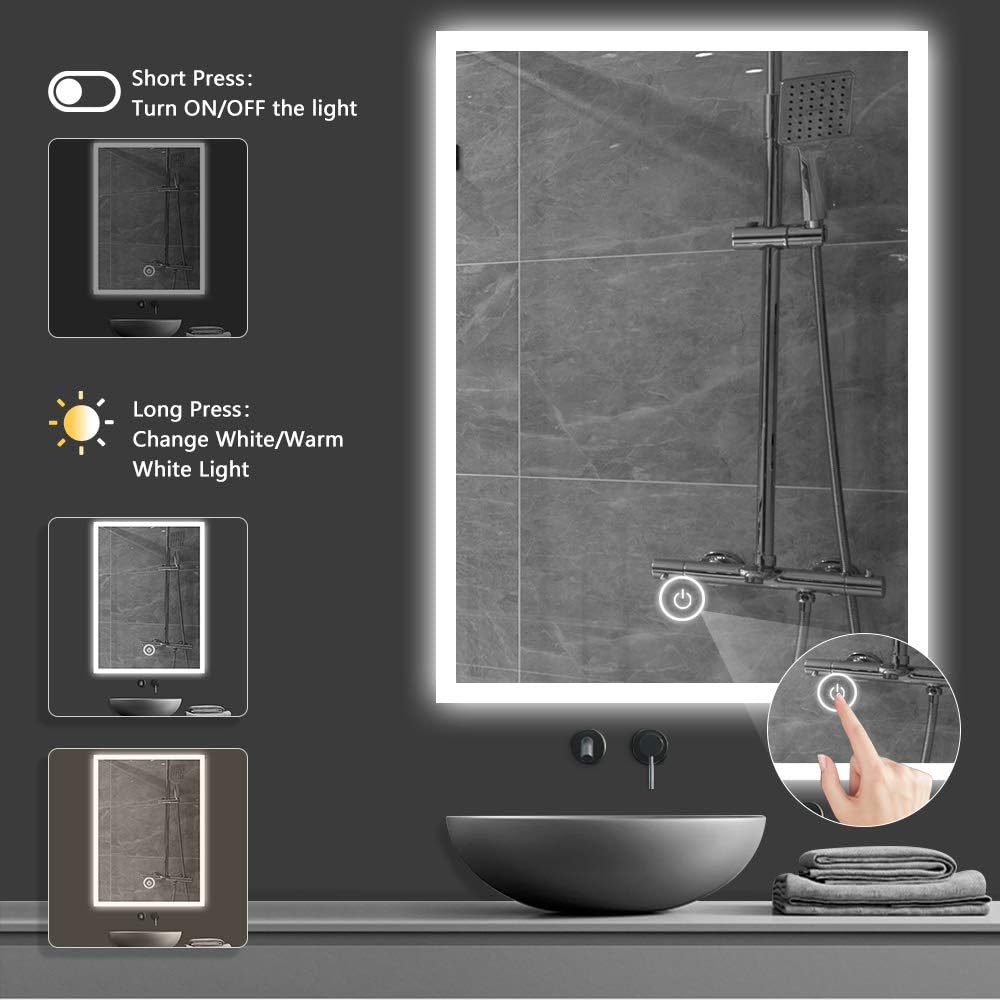
Figure 3: Touch switch operation for light control and color temperature adjustment.

Figure 4: Details on LED color temperature and lifespan.
6. Maintenance
- Cleaning: Use a soft, damp cloth and a mild, non-abrasive glass cleaner to clean the mirror surface. Avoid using harsh chemicals or abrasive materials that could damage the mirror or its coating.
- Frame Care: Wipe the aluminum frame with a soft, dry cloth.
- Electrical Components: Ensure the power is disconnected before cleaning near electrical components. Do not spray water directly onto the mirror's edges or electrical parts.
- Inspection: Periodically inspect the mounting hardware and electrical connections to ensure they remain secure.
7. Troubleshooting
| Problem | Possible Cause | Solution |
|---|---|---|
| Light does not turn on. | No power supply; loose connection; faulty switch. | Check if the mirror is properly plugged in. Ensure the power outlet is functional. Verify all connections are secure. If the issue persists, contact customer support. |
| Light flickers or is dim. | Unstable power supply; LED degradation (unlikely given lifespan). | Ensure stable power supply. If flickering continues, contact customer support. |
| Touch switch is unresponsive. | Moisture on switch; temporary malfunction. | Ensure the touch switch area is dry and clean. Try unplugging the mirror for a few minutes and then plugging it back in to reset. |
8. Specifications
| Feature | Detail |
|---|---|
| Brand | MINKUROW |
| Model | 32"L x 24"W LED Lighted Bathroom Mirror |
| Product Dimensions | 32"L x 24"W (80cm x 60cm) |
| Thickness | Approximately 3.47 cm (1.37 inches) |
| Item Weight | 17.56 pounds |
| Frame Material | Aluminum |
| Mirror Material | Copper-Free Silver Mirror (Float Glass with multiple protective layers) |
| Mounting Type | Wall Mount (Vertical) |
| Special Features | Adjustable Light Color (White/Warm White), Lighted, Touch Sensor, IP44 Waterproof |
| LED Color Temperature | 6000K (White) to ~3500K (Warm White) |
| LED Lifespan | 100,000 hours |
| CRI | >80 |
| Power Source | US Plug (AC 110-120V) |
| Waterproof Rating | IP44 |

Figure 5: Product dimensions.

Figure 6: High-quality silver mirror construction layers.
9. Warranty and Support
For warranty information, technical support, or assistance with installation and operation, please contact MINKUROW customer service. Refer to your purchase documentation for specific warranty terms and contact details.
Customer Support: Please visit the official MINKUROW website or contact the seller through your purchase platform for support.
Ask a question about this manual
Ask about setup, troubleshooting, compatibility, parts, safety, or missing instructions. Manuals+ will review the question and use this page’s manual context to help answer it.