
1. Important Safety Information
Please read all instructions carefully before using the massage chair. Failure to follow these safety guidelines may result in injury or damage to the product.
- Always follow the assembly instructions carefully. Do not attempt to assemble the chair without proper adult supervision.
- Keep the power cord away from heat sources and liquids to prevent fire or electrical shock.
- Do not use the chair if you are pregnant, have a heart condition, or any other medical condition that could be affected by heat or massage. Consult a physician before use if you have any health concerns.
- Always turn off the chair and unplug it when not in use.
- Do not leave the chair unattended while in use.
- The maximum weight capacity is 136 kilograms (approximately 300 pounds). Exceeding this limit may cause damage to the chair or injury to the user.
2. Product Overview
The BestMassage Shiatsu Massage Chair is designed to provide a comprehensive massage experience with various features for relaxation and comfort.
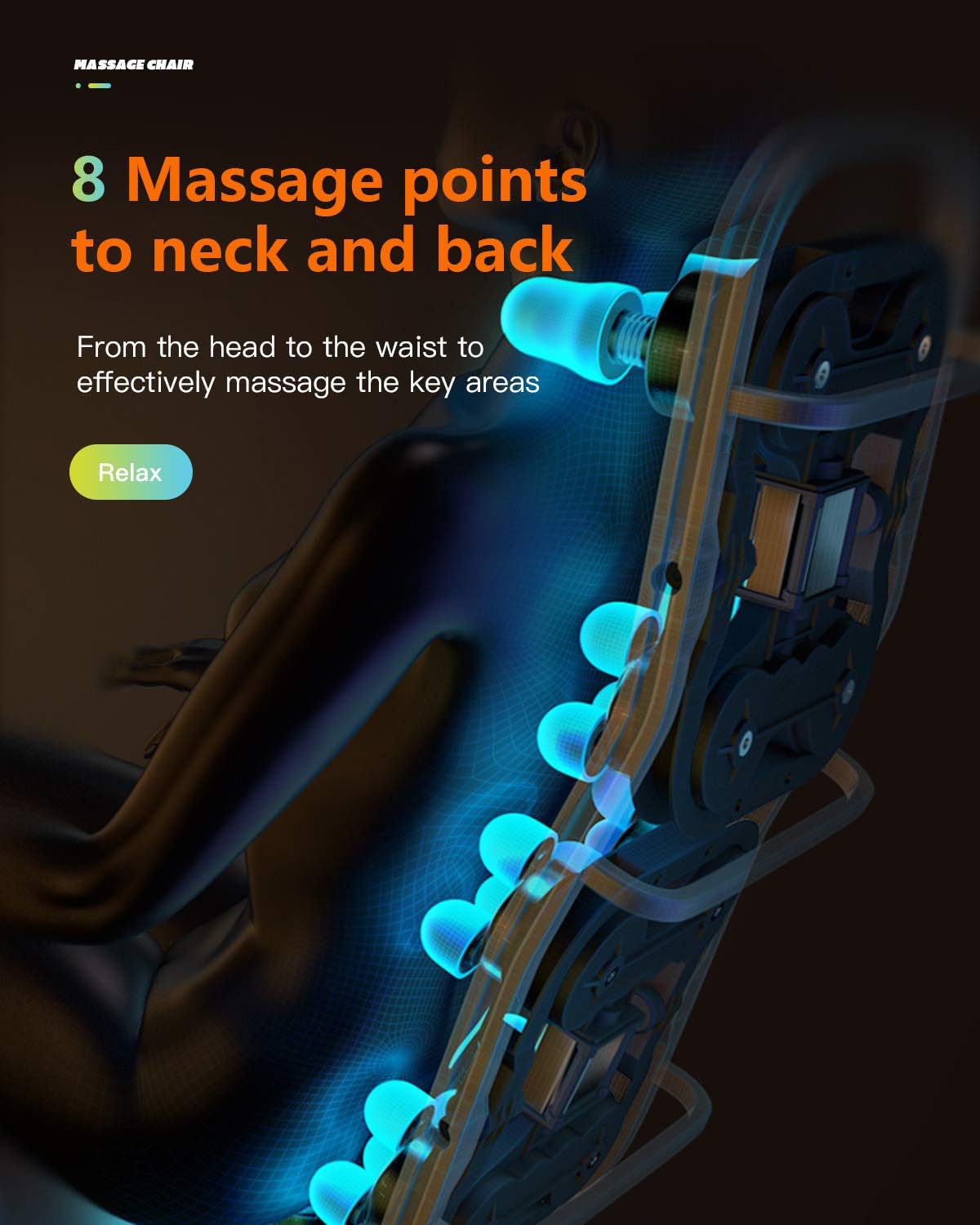
Image: The BestMassage Shiatsu Massage Chair, showcasing its design and presence in a home environment.
Key Features:
- Zero Gravity Mode: Positions the body to minimize the strain of gravity on the vertebrae, promoting full body relaxation.
- Humanized Packaging Design: Features split three-box packaging for easier transportation and assembly.
- Easy Mobility: Equipped with two rollers at the bottom for convenient movement. A knob on the right side of the left lower wheel allows for locking the chair in place.
- Diverse Massage Functions: Includes three power level back massages, controlled heating, adjustable airbag function, eight fixed point module massages, and three different automatic massage methods.
- Special Stretching Programs: Designed for full body stretching.
- Dual Foot Rollers: Located in the feet area for targeted foot massage.
- Customizable Massage: Allows adjustment of power speed and airbag pressure.
- USB Charging Port: Conveniently located on the left side of the control panel for charging electronic devices.

Image: An overview of the chair's full body massage capabilities, highlighting air pressure massage, zero gravity mode, various massage techniques, waist heating, and foot rollers.

Image: Visual representation of the six distinct massage techniques offered by the chair, including kneading, shiatsu, and tapping variations.
3. Setup and Assembly
The massage chair is designed for convenient assembly with its split three-box packaging. Follow these general steps for setup:
- Unpack Components: Carefully remove all parts from the three packages. Ensure all components are present according to the packing list (refer to the separate packing list if provided).
- Connect Main Sections: Follow the specific instructions in the included assembly guide to connect the main sections of the chair. This typically involves attaching the backrest, seat, and footrest components.
- Secure Connections: Ensure all connections, including any air tubes or electrical cables, are securely fastened. The design often uses color-coded air tubes for ease of connection.
- Position the Chair: Place the chair in your desired location. The chair features two rollers for easy movement.
- Lock Wheels: To fix the chair in position, locate the knob on the right side of the left lower wheel and screw it to the right until the chair is stable.
- Power Connection: Plug the power cord into a suitable electrical outlet.

Image: Dimensional diagram of the massage chair, indicating its height, width, and length in both upright and reclined positions.
4. Operating Instructions
Familiarize yourself with the control panel to utilize the various massage functions.
4.1 Zero Gravity Mode
Activate the zero-gravity mode to recline the chair into a position that elevates your legs above your heart, reducing pressure on your spine and enhancing the massage experience. This mode is designed to provide a deeply relaxed state.

Image: The chair demonstrating its zero gravity recline, minimizing gravitational strain on the spine.
4.2 Massage Functions
- Back Massage: The chair offers three power levels for back massage. It features eight fixed point module massages targeting key areas from the neck to the waist.
- Automatic Programs: Select from three different automatic massage methods for a varied experience.
- Airbag Massage: Adjustable airbag functions provide compression massage to areas such as shoulders, arms, and calves.
- Heat Therapy: Controlled heating is available, typically in the lumbar area, to promote blood circulation and ease joint pains.
- Foot Rollers: Dual foot rollers are integrated to soothe the soles and heels of your feet.

Image: Illustration detailing the 8 massage points designed to target the neck and back for effective relief.

Image: Visual guide to the airbag massage system, highlighting areas like shoulders, arms, calves, and feet for targeted relief.

Image: Depiction of the built-in waist heater, illustrating how heat therapy promotes blood circulation and eases joint pain.
4.3 USB Charging Port
A USB charging port is conveniently located on the left side of the control panel. Use this port to charge your phone or other compatible electronic devices while enjoying your massage.

Image: A composite image highlighting the chair's mobility features, the USB charging port, foot rollers, and a guide for suitable user heights (5 ft to 6.2 ft).
5. Maintenance
Proper maintenance ensures the longevity and optimal performance of your massage chair.
- Cleaning: For general cleaning, use a soft, damp cloth to spot clean the leather surface. Avoid using harsh chemicals or abrasive cleaners, as these can damage the material.
- Storage: When not in use for extended periods, unplug the chair and store it in a dry, cool place away from direct sunlight.
- Inspection: Periodically inspect the power cord and all connections for any signs of wear or damage. If any damage is found, discontinue use and contact customer support.
6. Troubleshooting
If you encounter any issues with your massage chair, refer to the following common troubleshooting tips:
- Chair Not Turning On: Ensure the power cord is securely plugged into both the chair and a working electrical outlet. Check if the power switch on the chair is in the 'ON' position.
- Massage Functions Not Working: Verify that the chair is powered on and not in standby mode. Check the control panel for any error indicators. Ensure no objects are obstructing the massage rollers or airbags.
- Unusual Noises: Minor operational noises are normal. If you hear loud or unusual grinding/clunking sounds, turn off the chair immediately and contact customer support.
- Remote Control Issues: Check the batteries in the remote control. Ensure there are no obstructions between the remote and the chair's receiver.
- Discomfort During Massage: Adjust the intensity settings. If discomfort persists, discontinue use. The chair is suitable for users between 5 ft and 6.2 ft; ensure your height is within this range for optimal comfort and function.
If these steps do not resolve the issue, please contact BestMassage customer support for further assistance.
7. Specifications
Detailed specifications for the BestMassage Shiatsu Massage Chair:
| Brand | BestMassage |
| Model Name | Shiatsu Massage Chairs |
| Color | Black |
| Material | Leather (exterior), Foam (fill) |
| Product Dimensions (D x W x H) | 55"D x 28"W x 41"H |
| Size (H x W x L) | 4'7" H x 2'4" W x 4'7" L |
| Item Weight | 24 pounds |
| Maximum Weight Recommendation | 136 Kilograms |
| Back Style | Continuous Back |
| Special Feature | Arm Rest, Cushion Availability, Foot Massage |
| Product Care Instructions | Spot Clean |
| Recommended Uses | Office, Massage |
| Room Type | Indoor |
| Age Range | Adult |
| Reclining Position Count | 2 |
| UPC | 195030018061 |
8. Warranty and Support
For warranty information, product support, or to address any concerns not covered in this manual, please contact BestMassage customer service. Refer to your purchase documentation for specific warranty terms and contact details.
BestMassage is committed to ensuring customer satisfaction. If you have any questions or require assistance, please do not hesitate to reach out to our support team.


