
1. Introduction
This manual provides essential information for the safe and efficient operation, maintenance, and troubleshooting of your Ryobi RY40007VNM 40-Volt Brushless Expand-It Cordless Trimmer Power Head. This power head is designed to be used with various Ryobi Expand-It attachments, offering versatility for different outdoor tasks. It features a brushless motor for enhanced power and durability, and a variable speed trigger with a 2-speed setting for optimal control.

Figure 1: Ryobi RY40007VNM 40-Volt Brushless Expand-It Cordless Trimmer Power Head (Battery and attachments not included)
2. Safety Information
WARNING: Read all safety warnings, instructions, illustrations, and specifications provided with this power tool. Failure to follow all instructions may result in electric shock, fire, and/or serious injury.
General Safety Precautions:
- Always wear eye protection, hearing protection, and heavy-duty gloves when operating the tool.
- Keep children and bystanders at a safe distance (at least 50 feet/15 meters) from the operating area.
- Do not operate the tool in wet conditions or in the presence of flammable liquids or gases.
- Ensure the work area is clear of debris and obstacles.
- Inspect the tool and attachments for damage before each use. Do not use if damaged.
- Always remove the battery pack before making any adjustments, changing accessories, or storing the tool.
Battery Safety:
- Use only Ryobi 40-Volt lithium-ion battery packs and chargers.
- Do not expose battery packs to water or extreme temperatures.
- Store battery packs in a cool, dry place away from direct sunlight.
- If the battery pack is damaged, do not use it. Contact customer service for replacement.
3. Setup
3.1 Unpacking
Carefully remove all components from the packaging. Ensure all items listed below are present:
- Ryobi RY40007VNM Power Head
- Auxiliary Handle
- Operator's Manual (this document)
Note: Battery, charger, and Expand-It attachments are sold separately.
3.2 Installing the Auxiliary Handle
- Loosen the knob on the auxiliary handle.
- Slide the handle onto the shaft of the power head to a comfortable operating position.
- Tighten the knob securely to prevent the handle from rotating during use.
3.3 Installing the Battery Pack
- Align the ribs on the battery pack with the grooves in the battery port of the power head.
- Slide the battery pack into the power head until it clicks securely into place.

Figure 2: Proper battery insertion into the power head.
3.4 Attaching Expand-It Attachments
The RY40007VNM power head is designed for use with Ryobi Expand-It attachments. To attach an accessory:
- Ensure the power head is turned off and the battery pack is removed.
- Align the shaft of the desired Expand-It attachment with the coupling on the power head.
- Push the attachment shaft into the coupling until the locking button on the attachment snaps into the alignment hole on the power head.
- Tighten the coupling knob securely to ensure a firm connection.
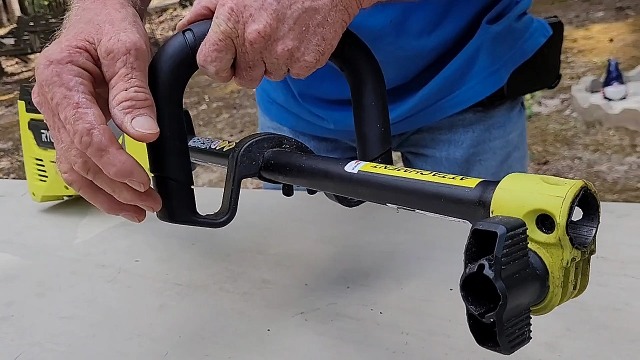
Figure 3: The quick-attachment mechanism for Expand-It accessories.
4. Operating Instructions
4.1 Powering On/Off
- To start the tool, depress the safety lever switch with your thumb, then squeeze the variable speed trigger.
- To stop the tool, release the variable speed trigger.
4.2 Speed Selection
The power head features a 2-speed selector switch (High/Low) located near the trigger. This allows you to adjust the power output based on the task and attachment being used.
- High Speed: For demanding tasks requiring maximum power, such as heavy trimming or blowing.
- Low Speed: For lighter tasks, increased control, or to conserve battery life, such as delicate trimming around flower beds or sweeping light debris.
4.3 Variable Speed Trigger
The trigger provides variable speed control. Squeezing the trigger further increases the speed and power of the attached accessory. This allows for precise control during operation.
5. Maintenance
Regular maintenance ensures optimal performance and extends the life of your power head.
5.1 General Cleaning
- Always remove the battery pack before cleaning.
- Use a clean, damp cloth to wipe down the exterior of the power head.
- Remove any debris from the air vents to prevent overheating.
- Do not use strong detergents or solvents, as these may damage plastic parts.
5.2 Trimmer Line Replacement (for Trimmer Attachments)
If using a trimmer attachment, the line will need periodic replacement. Refer to your specific trimmer attachment's manual for detailed instructions. Generally, this involves:
- Remove the battery pack.
- Locate the line spool on the trimmer head.
- Follow the instructions for your specific head type (e.g., bump feed, fixed line) to feed new trimmer line through the head.

Figure 4: Trimmer head showing line for replacement.
5.3 Storage
- Remove the battery pack from the power head before storing.
- Store the power head and attachments in a dry, secure location, out of reach of children.
- Avoid storing in direct sunlight or areas with extreme temperatures.
6. Troubleshooting
If you encounter issues with your Ryobi RY40007VNM power head, consult the following table:
| Problem | Possible Cause | Solution |
|---|---|---|
| Tool does not start | Battery not installed correctly; Battery discharged; Safety lever not engaged; Trigger not squeezed. | Ensure battery is fully seated; Charge battery; Depress safety lever before squeezing trigger. |
| Reduced power or performance | Battery low; Attachment clogged; Tool operating in Low speed; Damaged attachment. | Charge battery; Clear any obstructions from attachment; Switch to High speed; Inspect attachment for damage. |
| Attachment shaft broken or damaged | Excessive force or impact; Wear and tear. | Discontinue use immediately. Contact Ryobi customer service for replacement parts or service. |
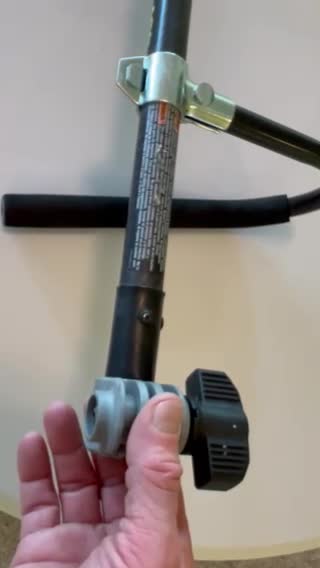
Figure 5: Example of a damaged attachment shaft, requiring replacement.
7. Specifications
| Feature | Detail |
|---|---|
| Model Number | RY40007VNM |
| Power Source | 40-Volt Lithium-Ion Battery (not included) |
| Motor Type | Brushless |
| Speed Control | Variable with 2-speed trigger |
| Max Speed | 8000 RPM |
| Attachment Capable | Yes (Ryobi Expand-It attachments) |
| Item Weight | 5.5 Pounds |
| UPC | 728370632569 |
8. Warranty and Support
For warranty information, please refer to the warranty card included with your product or visit the official Ryobi website. Keep your purchase receipt as proof of purchase for warranty claims.
If you require technical assistance, replacement parts, or have questions not covered in this manual, please contact Ryobi customer support. Contact details can typically be found on the product packaging or the official Ryobi website.


