
1. Introduction
This manual provides comprehensive instructions for the safe and effective use of your SHARPER IMAGE Digital Touchless Smart Forehead Thermometer. Designed for quick and accurate temperature measurement, this device utilizes infrared technology for contactless scans. Please read this manual thoroughly before use and retain it for future reference.
2. Safety Information
- Do not immerse the thermometer in water or other liquids.
- Keep the device away from direct sunlight and extreme temperatures.
- Do not drop or subject the thermometer to strong impacts.
- This device is intended for household use. Consult a medical professional for health concerns.
- Keep out of reach of children.
- Ensure the sensor is clean before each use for accurate readings.
3. Package Contents
Verify that all items are present in your package:
- 1 x SHARPER IMAGE Digital Touchless Smart Forehead Thermometer
- 1 x User Manual (this document)

Figure 1: Package contents and battery requirement. Note: 2 AAA 1.5V batteries are required and not included.
4. Product Features
- Contactless Operation: Measures temperature from 1-3 cm away.
- High Precision: Utilizes infrared sensors for accurate readings.
- Memory Function: Stores the last 32 temperature readings.
- Quick Measurement: Provides readings in approximately 1 second.
- Silent Mode: Option to mute sounds for undisturbed use.
- LED Glow Light: Backlit digital display for visibility in various lighting conditions.

Figure 2: Key features of the thermometer, including its precision and memory capabilities.
5. Setup
5.1 Battery Installation
- Locate the battery compartment cover on the handle of the thermometer.
- Slide the cover open.
- Insert two (2) AAA 1.5V batteries, ensuring correct polarity (+/-).
- Close the battery compartment cover securely.
Note: Batteries are not included with the device. Always use new batteries of the same type.
6. Operating Instructions
6.1 Taking a Temperature Reading
- Ensure the thermometer is clean and the sensor is unobstructed.
- Point the thermometer at the center of the forehead, maintaining a distance of 1-3 cm (0.31 - 1.81 inches).
- Press the measurement button (often indicated by a thermometer icon or a trigger).
- The temperature reading will appear on the LED display within approximately 1 second.

Figure 3: Proper technique for taking a touchless temperature reading.
6.2 Silent Mode
To enable or disable silent mode, press the mute button (often indicated by a speaker icon with a cross) located on the side or front of the device. This allows for temperature checks without audible beeps, ideal for not disturbing sleeping individuals.
6.3 Memory Function
The thermometer automatically stores the last 32 temperature readings. To access these readings, press the "Mem" button. Each press will cycle through the stored temperatures, allowing you to monitor changes over time.
7. Maintenance and Care
- Cleaning: Wipe the thermometer body and sensor with a soft, damp cloth. Do not use abrasive cleaners or immerse the device in water.
- Storage: Store the thermometer in a cool, dry place, away from direct sunlight and extreme temperatures.
- Battery Replacement: Replace batteries when the low battery indicator appears on the display. Remove batteries if the device will not be used for an extended period.
8. Troubleshooting
| Problem | Possible Cause | Solution |
|---|---|---|
| No display/Device won't turn on | Dead or incorrectly installed batteries. | Replace batteries with new AAA 1.5V batteries, ensuring correct polarity. |
| Inaccurate readings | Dirty sensor, incorrect measuring distance, or environmental factors. | Clean the sensor with a soft cloth. Ensure proper measuring distance (1-3 cm). Avoid drafts or extreme temperature changes in the environment. Allow the thermometer to acclimate to room temperature for 30 minutes if moved from a different environment. |
| "Lo" or "Hi" displayed | Temperature is outside the measurable range. | Ensure the thermometer is pointed correctly at the forehead and within the operating temperature range. |
9. Specifications
| Model Number | 1013507 |
| Brand | SHARPER IMAGE |
| Measurement Type | Infrared, Touchless |
| Scanning Distance | 1-3 cm (0.31 - 1.81 inches) |
| Power Source | 2 x AAA 1.5V Batteries (not included) |
| Memory Storage | 32 readings |
| Display Type | Digital, Backlit LED |
| Material | Plastic |
| Product Dimensions | Approximately 9.09 x 3.98 x 2.17 inches |
| Product Weight | Approximately 9.7 ounces |
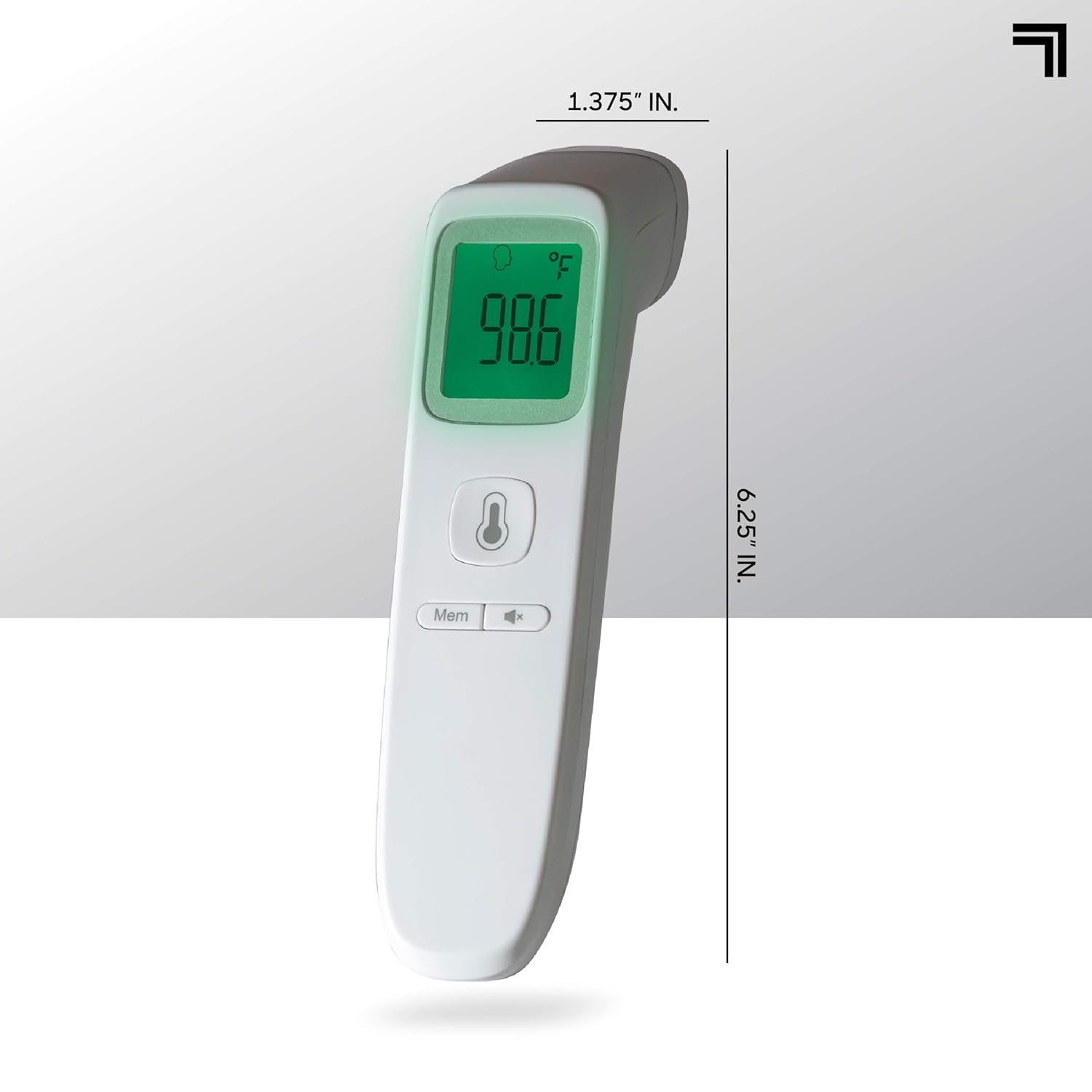
Figure 4: Physical dimensions of the thermometer.
10. Warranty and Support
For warranty information or technical support, please refer to the product packaging or contact SHARPER IMAGE customer service directly. Contact details can typically be found on the manufacturer's official website or on the product's retail packaging.
Please visit the official SHARPER IMAGE website for the most up-to-date support information.