
1. Introduction
The TCL Alto 6 2.0 Channel Home Theater Sound Bar (Model TS6100-NA) is designed to enhance your audio experience, providing bigger and clearer sound for your entertainment. This soundbar is Roku TV Ready, ensuring seamless integration with TCL Roku TVs for easy setup, sound settings access, and remote compatibility. Featuring Dolby Digital decoding, it delivers maximized sound clarity and virtual surround sound. It also supports wireless music streaming via Bluetooth from various devices. The Alto 6 offers three specialized sound modes: Movie, Music, and TV, to optimize audio for different content types.

Figure 1.1: Front view of the TCL Alto 6 Sound Bar, showcasing its sleek black design.
2. Important Safety Information
Please read all safety and operating instructions carefully before using this product. Keep these instructions for future reference. Adhere to all warnings on the product and in the operating instructions.
- Water and Moisture: Do not use this apparatus near water.
- Cleaning: Clean only with a dry cloth.
- Ventilation: Do not block any ventilation openings. Install in accordance with the manufacturer's instructions.
- Heat: Do not install near any heat sources such as radiators, heat registers, stoves, or other apparatus (including amplifiers) that produce heat.
- Power-Cord Protection: Protect the power cord from being walked on or pinched, particularly at plugs, convenience receptacles, and the point where they exit from the apparatus.
- Lightning: Unplug this apparatus during lightning storms or when unused for long periods of time.
- Servicing: Refer all servicing to qualified service personnel. Servicing is required when the apparatus has been damaged in any way.
3. What's in the Box
Verify that all components are present in the packaging:
- Soundbar
- Power Cord
- Optical cable
- HDMI cable
- 3.5mm-3.5mm cable
- Wall Mount Kit
- Remote Control
4. Product Features
- DOLBY DIGITAL: Dolby Digital decoding maximizes sound clarity and creates incredible room-filling virtual surround sound.
- STREAM MUSIC WIRELESSLY: Use your Bluetooth-enabled device to wirelessly stream music on your sound bar.
- LOUD, CLEAR SOUND IN A COMPACT DESIGN: Enjoy your favorite movies, TV shows, and music with enhanced sound quality.
- SPECIALIZED SOUND MODES: Specialized sound modes bring Movies, Music, and TV to life.
- QUICK AND HASSLE-FREE SETUP: With HDMI, USB, AUX, optical, or Bluetooth connections, you can go from unboxing to listening in minutes.

Figure 4.1: Angled view of the soundbar, highlighting its compact and sleek design.
5. Setup
5.1 Physical Placement
Place the soundbar on a flat, stable surface below your television. Ensure there is adequate space for ventilation around the unit. The soundbar can also be wall-mounted using the included wall mount kit and template.
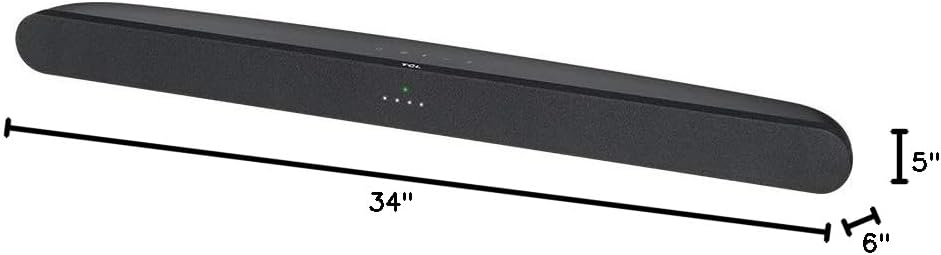
Figure 5.1: Dimensions of the soundbar, showing its length of 34 inches, depth of 6 inches, and height of 5 inches.
5.2 Connecting Your Soundbar
The TCL Alto 6 soundbar offers multiple connectivity options:
- HDMI ARC (Recommended): Connect the included HDMI cable from the HDMI ARC port on your soundbar to the HDMI ARC port on your TV. This allows for control of the soundbar volume with your TV remote.
- Optical: Connect the included Optical cable from the Optical port on your soundbar to the Optical Digital Audio Out port on your TV.
- AUX: Use the included 3.5mm-3.5mm cable to connect the AUX port on your soundbar to the headphone jack or AUX output on your device.
- USB: Insert a USB drive into the USB port for playing audio files.
- Bluetooth: For wireless connection, refer to the Bluetooth Pairing section.

Figure 5.2: Rear view of the soundbar, displaying the power input, HDMI ARC, Optical, AUX, and USB ports.
6. Operating Instructions
6.1 Power On/Off
Press the Power button on the soundbar or the remote control to turn the unit on or off.
6.2 Volume Control
Use the Volume Up (+) and Volume Down (-) buttons on the soundbar or remote control to adjust the volume level.
6.3 Input Selection
Press the Source button on the soundbar or remote control to cycle through available input sources: HDMI ARC, Optical, AUX, USB, and Bluetooth.
6.4 Sound Modes
Optimize your audio experience with specialized sound modes:
- Movie Mode: Enhances dialogue clarity and accentuates impactful sounds for a cinematic experience.
- Music Mode: Provides pristine accuracy for instruments, vocals, and bass, ideal for listening to music.
- TV Mode: Isolates speech from ambient background noise, making TV content easier to follow.
7. Bluetooth Pairing
To connect your Bluetooth-enabled device to the soundbar:
- Ensure the soundbar is powered on.
- Press the Source button on the soundbar or remote until the Bluetooth indicator light flashes. This indicates the soundbar is in pairing mode.
- On your mobile device (smartphone, tablet, or laptop), enable Bluetooth and search for available devices.
- Select "TCL Alto 6" or "TS6100-NA" from the list of devices.
- Once connected, the Bluetooth indicator light on the soundbar will turn solid. You can now stream audio wirelessly.
8. Maintenance
Proper maintenance ensures the longevity and optimal performance of your soundbar:
- Cleaning: Use a soft, dry cloth to clean the exterior of the soundbar. Do not use liquid cleaners or aerosol sprays.
- Ventilation: Keep the ventilation openings clear of dust and debris.
- Storage: If storing the soundbar for an extended period, unplug it from the power outlet and store it in a cool, dry place.
9. Troubleshooting
If you encounter issues with your TCL Alto 6 soundbar, refer to the following common problems and solutions:
| Problem | Possible Cause | Solution |
|---|---|---|
| No power | Power cord not securely connected. | Ensure the power cord is firmly plugged into the soundbar and a working power outlet. |
| No sound | Incorrect input selected; TV volume too low or muted; cables not connected properly. | Select the correct input source. Increase soundbar and TV volume. Check all audio cable connections. |
| Bluetooth connection issues | Soundbar not in pairing mode; device too far; interference. | Ensure soundbar is in Bluetooth pairing mode. Move device closer to soundbar. Avoid obstacles and other wireless devices. |
| Remote control not working | Batteries are dead or inserted incorrectly; obstacle between remote and soundbar. | Replace batteries. Ensure line of sight between remote and soundbar. |
10. Specifications
| Feature | Detail |
|---|---|
| Model Name | TS6100-NA |
| Speaker Type | Soundbar |
| Surround Sound Channel Configuration | 2.0 |
| Output Wattage | 120 Watts |
| Connectivity Technology | Wired, Wireless (Bluetooth) |
| Wireless Communication Technology | Bluetooth |
| Bluetooth Range | 10 Meters |
| Compatible Devices | Laptop, Television, Tablet, Smartphone |
| Product Dimensions | 6"D x 34"W x 5"H |
| Item Weight | 4 Pounds |
| Color | Black |
| Control Method | Remote |
| Mounting Type | Wall Mount |
11. Warranty and Support
The TCL Alto 6 Sound Bar comes with a Limited Warranty. For detailed warranty information, technical support, or service inquiries, please refer to the official TCL support website or contact TCL customer service directly. You can also find additional resources and FAQs on the product support page.
For the most up-to-date information, please visit the TCL Store on Amazon or consult the official user guide provided with your product.