
Hotpoint HQ 5660S NE
Hotpoint 60 cm Induction Hob User Manual
Model: HQ 5660S NE
Product Overview
The Hotpoint 60 cm Induction Hob is a modern cooking appliance designed for efficiency and ease of use. It features four induction cooking zones, offering precise temperature control and rapid heating. This hob is equipped with advanced functions such as a booster for quick boiling, a child lock for safety, and an integrated timer for convenient cooking management. Its sleek black ceramic glass surface not only provides durability but also simplifies cleaning.
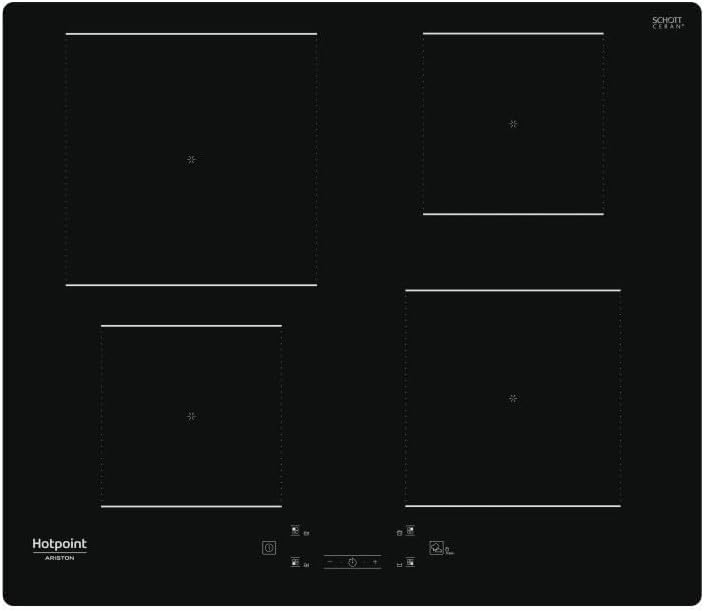
Figure 1: Top view of the Hotpoint 60 cm Induction Hob, showcasing its four cooking zones and minimalist design.
Safety Information
Before using the appliance, please read these safety instructions carefully. Keep them nearby for future reference. This manual provides important information regarding installation, use, and maintenance. The manufacturer cannot be held responsible for any injury or damage resulting from incorrect installation or improper use.
- Ensure the appliance is installed by a qualified technician in accordance with local regulations.
- Do not allow children to operate the appliance without supervision.
- Always disconnect the appliance from the power supply before performing any maintenance or cleaning.
- Avoid placing metallic objects on the hob surface as they may heat up.
- Do not use abrasive cleaning agents or sharp metal scrapers to clean the hob surface.
Setup and Installation
Proper installation is crucial for the safe and efficient operation of your induction hob. It is highly recommended that installation be performed by a qualified professional.
Unpacking
Carefully remove the hob from its packaging. Inspect the appliance for any signs of damage during transit. Retain the packaging materials for future transport or disposal.
Placement and Ventilation
The hob requires adequate ventilation to function correctly. Ensure there is sufficient space around the appliance as specified in the installation diagram (not provided in this manual, refer to separate installation guide). The dimensions for the product are approximately 51 cm (depth) x 59 cm (width) x 5.4 cm (height).
Electrical Connection
The appliance must be connected to the mains electricity supply by a qualified electrician. Ensure the voltage and frequency ratings on the appliance's rating plate match your household's electrical supply. The hob operates on an electrical power supply and uses induction technology.
Operating Instructions
This section details the basic operation of your Hotpoint Induction Hob.

Figure 2: Close-up of the hob's front control panel, showing touch controls for power, zone selection, and timer.
Turning On/Off
- To turn on: Touch and hold the Power button (usually indicated by a circle with a vertical line).
- To turn off: Touch and hold the Power button again.
Selecting a Cooking Zone and Adjusting Power
- Place a suitable induction-compatible pan on the desired cooking zone.
- Touch the corresponding zone selection button on the front control panel.
- Use the '+' and '-' buttons to adjust the power level. The hob offers 9 power levels, plus a booster function.
- The indicator light for the selected zone will illuminate, and the power level will be displayed.
Booster Function
The booster function provides maximum power to a selected cooking zone for a short period, ideal for rapidly boiling water or searing food. To activate, select the zone and press the Booster button (if available, or increase power to maximum beyond level 9).
Timer Function
The integrated timer allows you to set a cooking duration for a specific zone or as a general minute minder.
- To set for a zone: Select the cooking zone, then touch the Timer button. Use '+' and '-' to set the desired time. The zone will turn off automatically when the time expires.
- To use as a minute minder: Touch the Timer button without selecting a zone. Set the time. An alarm will sound when the time expires, but the hob will not turn off.
Child Lock
The child lock feature prevents accidental operation of the hob. To activate, touch and hold the Child Lock button (often indicated by a lock icon) for a few seconds until the indicator light illuminates. To deactivate, repeat the process.
Maintenance and Cleaning
Regular cleaning and maintenance will ensure the longevity and optimal performance of your induction hob.
Daily Cleaning
- Always ensure the hob is cool and disconnected from the power supply before cleaning.
- Wipe the ceramic glass surface with a soft cloth and warm soapy water after each use.
- For stubborn stains, use a specialized ceramic hob cleaner.
- Rinse thoroughly and dry with a clean cloth to prevent water marks.
Care for Ceramic Glass
- Avoid dropping heavy or sharp objects on the hob surface, as this can cause cracks.
- Do not drag pots and pans across the surface, as this may cause scratches.
- Clean up spills immediately, especially sugary liquids, to prevent them from burning onto the surface and causing permanent damage.
Troubleshooting
This section provides solutions to common issues you might encounter with your induction hob. If the problem persists, please contact customer support.
| Problem | Possible Cause | Solution |
|---|---|---|
| Hob does not turn on. | No power supply; child lock activated. | Check power connection and circuit breaker. Deactivate child lock. |
| Cooking zone not heating. | Incorrect cookware; pan not centered; zone not selected. | Use induction-compatible cookware. Center the pan. Select the correct cooking zone. |
| Display shows an error code (e.g., 'E'). | Overheating; internal fault; pan detection issue. | Turn off the hob, let it cool down. Ensure proper pan placement. If error persists, contact service. |
| Hob makes a buzzing or humming noise. | Normal operation of induction technology; fan noise. | This is normal and not a fault. The noise level may vary with power setting and cookware type. |
Specifications
Detailed technical specifications for the Hotpoint 60 cm Induction Hob, Model HQ 5660S NE.
- Brand: Hotpoint
- Model: HQ 5660S NE
- Product Dimensions (H x W x D): 5.4 cm x 59 cm x 51 cm (approx. 54 mm x 590 mm x 510 mm)
- Number of Cooking Zones: 4
- Power Levels: 9 + Booster
- Control Type: Touch controls, front position
- Surface Material: Ceramic Glass (Vitrocerámica)
- Color: Black
- Power Supply: Electrical, Induction
- Special Features: Timer, Child Lock
- ASIN: B08F2Q9YV3

Figure 3: The Hotpoint Induction Hob seamlessly integrated into a modern kitchen countertop.
Warranty and Support
Hotpoint products are manufactured to high standards and come with a manufacturer's warranty. For specific warranty terms and conditions, please refer to the warranty card included with your product or visit the official Hotpoint website.
Customer Support
If you require technical assistance, have questions about your product, or need to arrange a service visit, please contact Hotpoint customer support. You can typically find contact information on the official Hotpoint website or in the documentation provided with your appliance.
For more information, visit the official Hotpoint Store on Amazon.
Related documentsHQ 5660S NE


Ask a question about this manual
Ask about setup, troubleshooting, compatibility, parts, safety, or missing instructions. Manuals+ will review the question and use this page’s manual context to help answer it.