
1. Introduction
Thank you for choosing the INNOREL G54 Low Profile Tripod Ball Head. This manual provides essential information for the proper setup, operation, and maintenance of your ball head. Please read these instructions carefully before use to ensure optimal performance and longevity of the product.
2. Product Overview
2.1 Key Features
- Low Gravity Center Design: Enhances stability and locking force.
- 360° Panoramic View: Features precise scales for accurate panoramic photography.
- Anti-Lost Design: Knobs are designed to prevent accidental detachment.
- Dual U-notch Design: Allows for versatile shooting angles.
- High Load Capacity: Supports up to 66 lb (30 kg) while maintaining a lightweight structure.
- Durable Construction: Made from ultra-high-strength aviation aluminum alloy with CNC machining and anodic anodized finish.
2.2 Components
The INNOREL G54 ball head package includes the following components:
- G54 Ball Head
- Arca-Swiss Quick Release Plate
- Quality Certificate
- Warranty Card

Figure 1: INNOREL G54 Ball Head with highlighted features including low gravity center, hollow sphere, double U notch, 360 panoramic shooting, and anti-lost design. Specifications like max load, net weight, and dimensions are also shown.

Figure 2: Detailed view of the INNOREL G54 Ball Head, showing the scale, bubble spirit levels, panoramic lock knob, main lock knob, anti-drop design, bottom diameter, and 3/8" screw hole.

Figure 3: Arca-Swiss Quick Release Plate, illustrating its dimensions (2.76in/70mm length, 1.50in/38mm width, 0.39in/10mm thickness), natural rubber mats, 1/4" screw, and C-type handle.
3. Specifications
| Feature | Specification |
|---|---|
| Brand | INNOREL |
| Model | G54 |
| Material | Aluminum Alloy |
| Max Load | 66 lb / 30 kg |
| Net Weight | 1.65 lb / 0.75 kg |
| Ball Diameter | 2.13 in / 54 mm |
| Bottom Diameter | 2.95 in / 75 mm |
| Height (without QR plate) | 3.74 in / 95 mm |
| Quick Release Plate Size | 2.76 x 1.50 x 0.39 in / 70 x 38 x 10 mm |
| Camera Mounting Screw | 1/4" |
| Tripod Mounting Screw | 3/8" |
| Compatible Devices | DSLR, Mirrorless Cameras, Camcorders, Monopods, Tripods (Arca-Swiss Standard compatible) |
4. Setup
4.1 Attaching the Ball Head to a Tripod
- Ensure your tripod has a 3/8" mounting screw.
- Align the 3/8" screw hole on the bottom of the G54 ball head with the mounting screw on your tripod.
- Rotate the ball head clockwise until it is securely tightened onto the tripod. Ensure it is firm and stable.

Figure 4: The G54 ball head (left) compared to a standard ball head (right), illustrating its lower gravity center for enhanced stability. The bottom diameter of 2.95in/75mm and 3/8" screw hole are visible.
4.2 Attaching the Camera to the Quick Release Plate
- Locate the 1/4" screw on the Arca-Swiss quick release plate.
- Align the 1/4" screw with the tripod mounting thread on the bottom of your camera.
- Rotate the screw (using the C-type handle or a coin if necessary) until the quick release plate is firmly attached to your camera. Ensure it is tight to prevent camera movement.
5. Operating Instructions
5.1 Mounting the Camera Assembly
- Ensure the main lock knob on the ball head is loosened enough to allow the quick release clamp to open.
- Slide the camera with the attached quick release plate into the clamp on the ball head.
- Push the quick release plate fully into the clamp until it clicks into place. The safety locking mechanism will engage.
- Tighten the quick release plate lock knob to secure the camera firmly.
5.2 Adjusting Camera Position
- Main Lock Knob: Loosen this knob to adjust the angle of the ball head. Once the desired angle is achieved, tighten the knob firmly to lock the camera in position.
- Panoramic Lock Knob: Loosen this knob to rotate the ball head horizontally for panoramic shots. The base features 360° scales with 12° increments for precise alignment. Tighten the knob to lock the panoramic rotation.
- Dual U-notch Design: The ball head features two U-notches. By tilting the ball into one of these notches, you can quickly switch between horizontal and vertical shooting orientations.
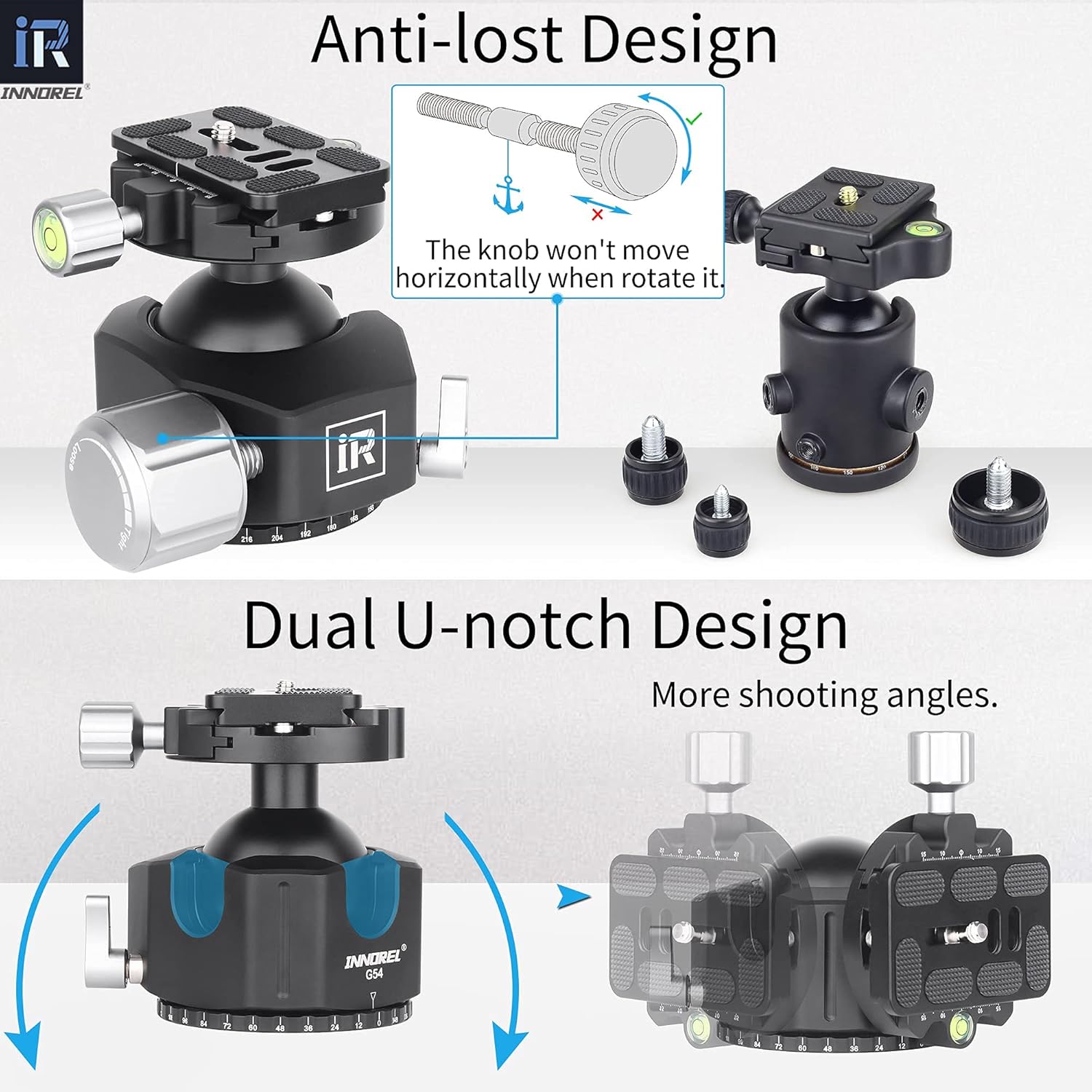
Figure 5: Illustration of the anti-lost design, where knobs cannot be screwed off, and the dual U-notch design allowing for more shooting angles by tilting the camera.

Figure 6: Demonstration of the 360° panoramic view capability, showing precise laser-engraved scales in 12° increments from 0°-360° on the base of the ball head.
6. Maintenance
- Keep the ball head clean and free from dust, dirt, and moisture.
- Use a soft, dry cloth to wipe down the surface. Avoid abrasive cleaners or solvents.
- Periodically check all screws and knobs to ensure they are securely tightened.
- Store the ball head in a protective bag or case when not in use to prevent scratches and damage.
- Avoid exposing the ball head to extreme temperatures or harsh chemicals.
7. Troubleshooting
| Problem | Possible Cause | Solution |
|---|---|---|
| Camera not stable / Ball head slips | Main lock knob not tightened sufficiently. Quick release plate not fully secured. | Ensure the main lock knob is tightened firmly. Verify the quick release plate is fully inserted and its lock knob is tight. |
| Quick release plate detaches unexpectedly | Quick release plate not fully engaged with the safety lock. | Always ensure the quick release plate clicks into place and the lock knob is tightened. The anti-lost design prevents knobs from unscrewing completely. |
| Panoramic rotation is stiff or uneven | Panoramic lock knob is too tight. Dirt or debris in the rotating mechanism. | Loosen the panoramic lock knob slightly. Clean the rotating base with a soft, dry cloth. |
| Ball head difficult to attach to tripod | Incorrect tripod screw size (e.g., 1/4" instead of 3/8"). | Confirm your tripod has a 3/8" mounting screw. Do not force the attachment. |
8. Warranty and Support
INNOREL Technologies Co., Ltd. provides a 2-year warranty for this product. This warranty covers manufacturing defects and ensures the product meets its specified performance.
For warranty claims, technical support, or any inquiries regarding your INNOREL G54 ball head, please contact INNOREL customer service. Refer to the warranty card included in your package for specific contact details or visit the official INNOREL website.
