

1. Introduction and Product Overview
This manual provides detailed instructions for the installation, operation, and maintenance of your XtremepowerUS 19" Sand Filter with 1.5HP Pool Pump. This system is designed to provide efficient and reliable filtration for above-ground swimming pools, ensuring clean and clear water quality.
Key features include:
- Optimized Flow Rates: Engineered for efficient water circulation and filtration.
- Low Noise Operation: Designed to run quietly for a more comfortable environment.
- Consistent Performance: Maintains optimal sand height for effective filtration and back-washing.
- Multi-Port Valve: Features a 5-way or 7-way multi-port valve for versatile operation modes.
- Large Strainer Basket: Equipped with an easy-open, quick-lock, transparent lid for convenient debris removal.

Image: The XtremepowerUS 19-inch sand filter system, showing the filter tank, 1.5HP pump, and connecting hose.
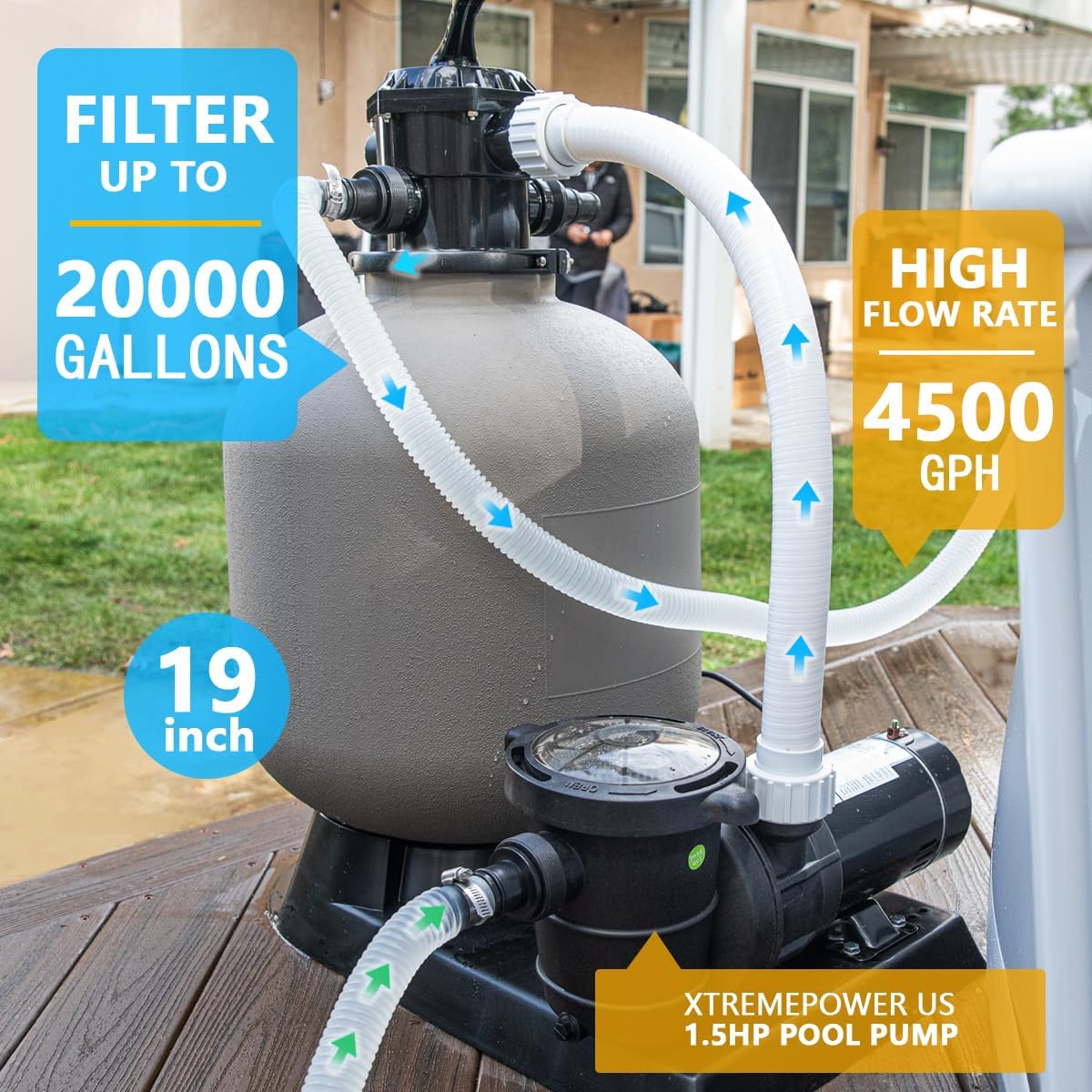
Image: Diagram illustrating the filter's capacity to filter up to 20,000 gallons and a high flow rate of 4500 GPH.

Image: A visual comparison showing cloudy green pool water "Before" filtration and clear blue pool water "After" filtration, demonstrating the system's effectiveness.
2. Safety Information
Please read all safety warnings and instructions carefully before installing or operating this product. Failure to follow these instructions can result in serious injury or property damage.
- Electrical Safety: Always disconnect power before servicing. Ensure the power source matches the pump's requirements (115V/60Hz). Do not operate if the power cord is damaged.
- Water Safety: Never operate the pump dry. Ensure the pump is primed with water before starting.
- Pressure Safety: Do not attempt to open the filter tank or multi-port valve while the system is under pressure. Always turn off the pump and relieve pressure before performing any maintenance.
- Placement: Install the filter system on a level, solid surface, away from direct sunlight and excessive moisture. Ensure adequate ventilation.
- Children: Keep children away from the filter system during operation and maintenance.
- California Warning: These pumps are capacitor start and not for use/sale in California.
3. Package Contents
Verify that all components are present and undamaged before beginning installation. If any parts are missing or damaged, contact XtremepowerUS customer support.
- Sand Filter Tank (19-inch)
- 1.5HP Pool Pump
- Multi-Port Valve
- Pressure Gauge
- Connecting Hoses and Clamps
- Base Platform
- User Manual
4. Setup and Installation
Follow these steps for proper installation of your sand filter system.
- Positioning: Place the base platform on a firm, level surface near your pool. Ensure it is within reach of a grounded electrical outlet.
- Assemble Tank and Pump: Secure the filter tank onto the base. Attach the pump to the base next to the filter tank.
- Install Laterals: Inside the filter tank, carefully install the laterals onto the standpipe. Ensure they are securely attached and spread out evenly at the bottom of the tank.
- Add Sand: Place a small amount of water in the bottom of the tank to cushion the laterals. Slowly add the recommended amount of filter sand (typically 175 lbs for this model) into the tank. Ensure the standpipe remains centered during this process.
- Attach Multi-Port Valve: Clean the top opening of the tank and the O-ring on the multi-port valve. Lubricate the O-ring with a silicone-based lubricant. Carefully place the multi-port valve onto the tank, ensuring the standpipe fits into the valve's opening. Secure the valve with the provided clamp or bolts.
- Connect Hoses: Connect the pump's discharge port to the "PUMP" port on the multi-port valve. Connect the "RETURN" port on the valve to your pool's return line. Connect the "WASTE" port to a suitable drainage area. Use hose clamps to secure all connections. The system uses NPT 1.5 inch internal threads for inlet and outlet connections.
- Install Pressure Gauge: Screw the pressure gauge into the designated port on the multi-port valve.

Image: Illustrates the NPT 1.5 inch internal thread for convenient inlet and outlet connections on the multi-port valve.
5. Operating Instructions
The multi-port valve controls the flow of water through the filter system. Always turn off the pump before changing the valve position.

Image: A close-up view of the multi-port valve, showing the handle and various settings.

Image: A diagram illustrating the seven different functions of the multi-port valve: Filter, Winter, Rinse, Backwash, Recirculate, and Waste.
5.1. Multi-Port Valve Positions:
- FILTER: Normal filtering. Water flows through the sand bed, trapping debris, and returns to the pool. This is the primary operating mode.
- BACKWASH: For cleaning the filter sand. Water flow is reversed, flushing trapped debris out through the waste port. Perform when pressure gauge reads 8-10 PSI above starting pressure.
- RINSE: Used after backwashing to flush out any remaining dirty water from the valve and sand bed, ensuring it doesn't return to the pool. Run for 30-60 seconds.
- WASTE/DRAIN: Bypasses the filter, sending water directly from the pool to the waste port. Used for lowering pool water level or vacuuming heavy debris directly to waste.
- RECIRCULATE/BYPASS: Circulates water through the pump and valve, bypassing the filter. Used for chemical distribution without filtering.
- CLOSED: Shuts off all flow to the filter or pool. Use when performing maintenance on the pump or filter.
- WINTER: Used for winterizing the filter system.
5.2. Initial Startup:
- Ensure all hose connections are secure and the pool is filled to the proper level.
- Set the multi-port valve to the "BACKWASH" position.
- Prime the pump by filling the strainer basket with water until the pump is full. Replace the lid securely.
- Turn on the pump. Allow it to backwash for 2-3 minutes or until the water flowing out of the waste line is clear.
- Turn off the pump.
- Set the multi-port valve to the "RINSE" position.
- Turn on the pump. Rinse for 30-60 seconds.
- Turn off the pump.
- Set the multi-port valve to the "FILTER" position.
- Turn on the pump. The system is now operating in normal filtration mode. Note the initial pressure gauge reading; this is your clean filter pressure.
6. Maintenance
Regular maintenance ensures optimal performance and longevity of your filter system.
6.1. Backwashing:
Backwash the filter when the pressure gauge reads 8-10 PSI above the clean filter pressure, or when pool water appears cloudy. Follow the "Initial Startup" steps for backwashing and rinsing.
6.2. Strainer Basket Cleaning:
Periodically check and clean the pump's strainer basket. Turn off the pump, close any necessary valves, and remove the transparent lid. Empty debris from the basket and rinse it. Replace the basket and lid, ensuring a tight seal.
6.3. Sand Replacement:
Filter sand typically needs to be replaced every 3-5 years, depending on usage and water quality. Consult a pool professional if unsure.
6.4. Winterization:
Before freezing temperatures, drain all water from the pump, filter, and hoses. Set the multi-port valve to "WINTER" or an open position to relieve pressure. Store the pump and valve in a dry, protected area if possible. Cover the filter tank to protect it from elements.
7. Troubleshooting
This section provides solutions to common issues you may encounter.
| Problem | Possible Cause | Solution |
|---|---|---|
| Low Water Flow / Low Pressure | Clogged strainer basket, dirty filter sand, air leak in suction line, closed valve. | Clean strainer basket. Backwash filter. Check all connections for air leaks. Ensure all valves are open. |
| Cloudy Pool Water | Dirty filter sand, insufficient filtration time, improper chemical balance, too much debris. | Backwash filter. Increase daily filtration time. Test and adjust pool chemicals. Vacuum pool. |
| Water Leaking from Valve/Connections | Loose connections, worn O-rings/gaskets, cracked housing. | Tighten hose clamps and connections. Inspect and replace O-rings/gaskets if worn. Contact support for cracked components. |
| Pump Not Priming | Air leak in suction line, low water level in pool, clogged impeller. | Check all suction side connections for leaks. Ensure pool water level is adequate. Clear any debris from impeller. |
8. Specifications
Technical specifications for the XtremepowerUS 19" Sand Filter with 1.5HP Pool Pump.
- Model Number: 75112
- Filter Tank Size: 19 inches
- Pump Horsepower: 1.5 HP
- Flow Rate: 4500 GPH (Gallons Per Hour)
- Voltage: 115V / 60Hz
- Filter Sand Capacity: Approximately 175 lbs
- Product Dimensions: 29.5 x 25.5 x 21.5 inches (L x W x H)
- Item Weight: 53.9 pounds
- Power Cord Length: 6 feet
- Inlet/Outlet Thread Size: NPT 1.5 inch internal thread

Image: Details on robust filtration capacity, indicating suitability for pools up to 20,000 gallons and a filter capacity of 175 lbs of sand.

Image: Highlights powerful performance with specifications for voltage (115V/60Hz) and flow rate (4500 GPH).

Image: Shows the durable build and design, along with key dimensions: 37 inches height, 21 inches width, and 30 inches depth, and a 6-foot power cord length.
9. Warranty and Support
XtremepowerUS offers various protection plans for your product. For specific warranty details, claims, or technical assistance, please refer to your purchase documentation or contact XtremepowerUS customer support directly.
Protection plans available include:
- 2-Year Protection Plan
- 3-Year Protection Plan
- Complete Protect (monthly plan covering eligible purchases)
For customer support, you may visit the XtremepowerUS Store on Amazon or refer to the contact information provided with your product packaging.


