
1. Introduction
Thank you for purchasing the Eonon GA2187J 10.1-inch Android 10 Car Navigation System. This manual provides essential information for the safe and efficient use of your device. Please read it thoroughly before installation and operation, and keep it for future reference.
The Eonon GA2187J is a 2-DIN car multimedia system featuring a 10.1-inch IPS touchscreen display, Android 10 operating system, GPS navigation, Bluetooth, Wi-Fi connectivity, and various multimedia functions.
2. Safety Information
- Professional Installation Recommended: Installation of this product requires technical expertise. It is strongly recommended to have the unit installed by a qualified professional to prevent damage to the product or your vehicle.
- Power Supply: This unit operates on a DC 12V power supply. Ensure correct voltage connections to avoid damage.
- Driving Safety: Do not operate the system in a way that distracts you from driving. Always prioritize road safety.
- Temperature: Avoid exposing the unit to extreme temperatures or direct sunlight for prolonged periods.
- Moisture: Keep the unit away from water and excessive moisture.
- Cleaning: Use a soft, dry cloth for cleaning. Do not use abrasive cleaners or solvents.
3. Product Overview
3.1 Key Features
- Android 10 Operating System
- 10.1-inch IPS Full Touch Capacitive Screen (1024x600 resolution)
- Quad-Core CPU (MTK 8227L 1.2GHz ARM A7)
- 2GB RAM, 16GB Internal Storage
- Built-in GPS Navigation
- Bluetooth 4.0 for Hands-Free Calling and Music Streaming
- Wi-Fi (2.4G) Connectivity
- USB and MicroSD Card Support (up to 64GB)
- Steering Wheel Control Compatibility
- Multi-language Support (85 languages including English and Japanese)
3.2 Package Contents
Verify that all items are present in the package:
- Eonon GA2187J Head Unit x1
- Power Cable x1
- GPS Antenna x1 (3m)
- Wi-Fi Antenna x1 (1.5m)
- AV Cable x2
- USB Cable x2 (1m)
- Microphone x1 (3m)
- 15A Fuse x1
- Disassembly Tool x1
- Mounting Screws x4
- User Manual x1

Image: Included accessories for the Eonon GA2187J car navigation system, showing cables, antennas, microphone, and tools.
4. Setup and Installation
4.1 Pre-Installation Checklist
- Ensure the vehicle's ignition is off and the battery is disconnected.
- Confirm compatibility with your vehicle's dashboard and wiring harness.
- Gather all necessary tools for installation.
4.2 Installation Dimensions
The unit has the following dimensions:
- Panel Size: 252 mm (Width) x 147 mm (Height)
- Installation Size: 178 mm (Width) x 125 mm (Length) x 100 mm (Height)
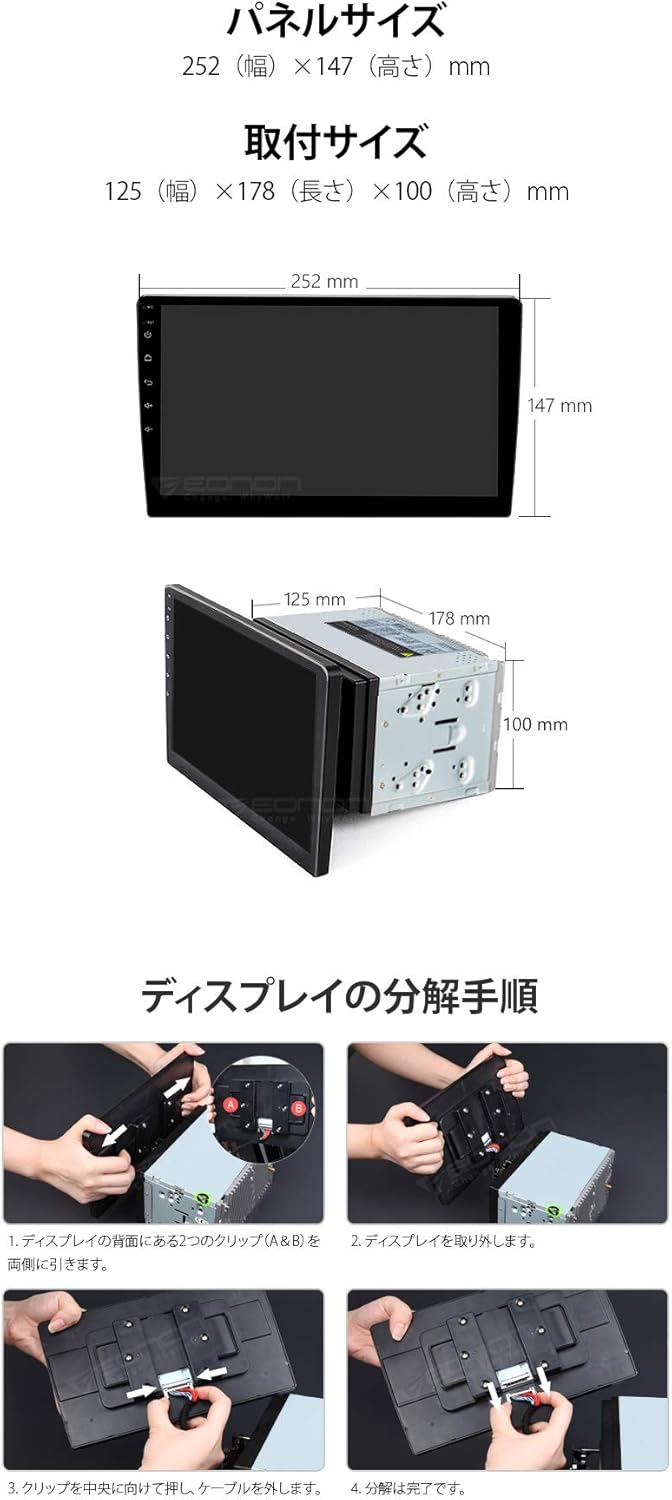
Image: Diagram showing the panel size, installation size, and steps for disassembling the display from the main unit.
4.3 Wiring Diagram
Refer to the detailed wiring diagram for proper connection of all components. Incorrect wiring can cause damage to the unit or vehicle.
Image: Comprehensive wiring diagram illustrating connections for power, speakers, antennas, USB, and other input/output ports.
Key Connections:
- Power Cable: Connect to vehicle's power supply (DC 12V).
- GPS Antenna: Mount in a location with a clear view of the sky.
- Wi-Fi Antenna: Connect for wireless network access.
- USB Cables: For connecting USB devices.
- External Microphone: For improved call quality.
- RCA Outputs: For connecting external displays or amplifiers.
- CAM IN: For connecting a rearview camera (sold separately).
5. Operating Instructions
5.1 Basic Operation
- Power On/Off: The unit powers on with the vehicle's ignition.
- Touchscreen: Navigate the interface using the 10.1-inch IPS full touch screen.
- Button Backlight: Customize the 7-color button backlight to match your vehicle's interior.
- Clock Display: The unit features a built-in clock display function.
- Power Status Memory: The system remembers its last state when powered off.
5.2 Android 10 System
The unit runs on Android 10, offering a familiar smartphone-like experience. You can install various applications from the app store.

Image: Screenshot of the Android 10 interface on the Eonon GA2187J, highlighting key features like CPU, RAM, and ROM specifications.
5.3 Navigation
The unit comes with built-in GPS navigation. You can use pre-installed map applications or download others from the app store. Online maps require an internet connection.
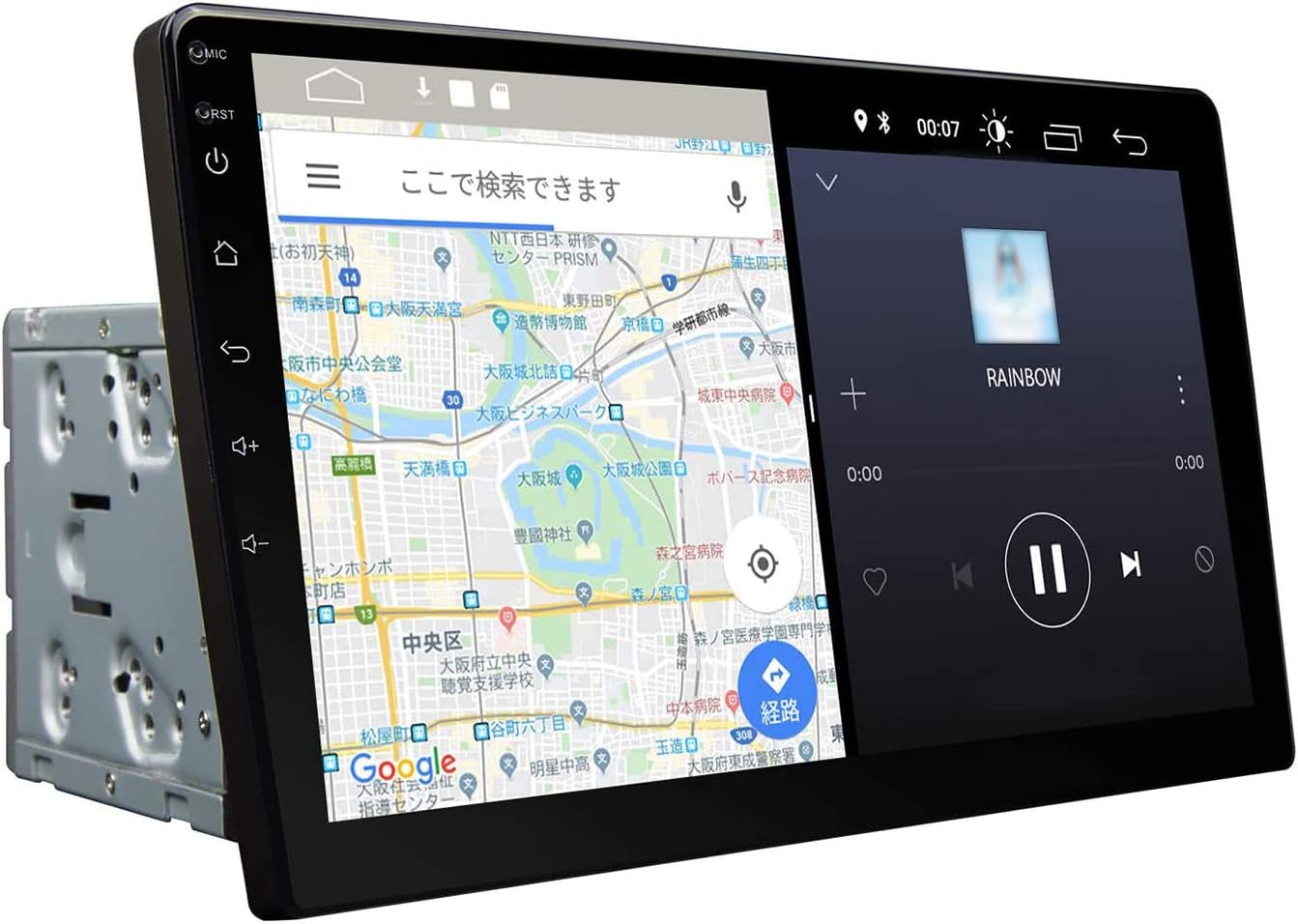
Image: The Eonon GA2187J display showing a navigation map on one side and a media player on the other, demonstrating multi-window functionality.
5.4 Connectivity
- Bluetooth 4.0:
- Pairing Password: 5802
- Device Name: EONON
- Supports hands-free calling, phonebook synchronization, and Bluetooth music playback.
- Features a built-in microphone and supports an external microphone for clearer calls.
- Wi-Fi (2.4G): Connect to available Wi-Fi networks for internet access, app downloads, and online services.
- 4G Dongle Support: The unit supports an external 4G dongle (sold separately) for mobile internet connectivity.
- iPhone Connection (PhoneLink): Connect your iPhone for integrated features.
- Android Smartphone Connection: For Android Auto functionality, a CarPlay USB dongle (EONON A0585, sold separately) may be required.
- MirrorLink: Supports screen mirroring from compatible smartphones.
5.5 Multimedia Playback
- USB / MicroSD: Supports USB flash drives and MicroSD cards up to 64GB.
- Video Formats: AVI, MKV, MP4, WMV, RMVB, MPG, and other Android video formats. Supports network streaming and 1080p video playback.
- Audio Formats: MP3, WMA, WAV, AC3, OGG, FLAC, and other audio formats. Supports network audio playback.
- Image Formats: JPEG, BMP, PNG, TIFF.
- Radio Tuner: Built-in radio tuner with 30 preset stations (FM18, AM12).
5.6 Advanced Features
- Multi-Window Display: Split the screen to display two applications simultaneously.
- RCA Full Screen Share: Output video from any mode to headrest monitors or flip-down monitors.
- Steering Wheel Control: Compatible with existing steering wheel controls for convenient operation.
- DSP (Digital Sound Field Processing): Enhances audio quality with a 30-band graphic equalizer and optimal sound stage selection.
- OBD2 Support: Compatible with EONON V0056 OBD2 dongle (sold separately) to display vehicle data.
- Backup Camera Linkage: Automatically switches to the backup camera view when reversing (camera sold separately, EONON A0119N A0121N A0130N compatible).
- TV Viewing: Supports external TV tuners (EONON V003S V0050, sold separately).

Image: Visual representation of iPhone connectivity, Digital Sound Field Processing (DSP), and the 30-band graphic equalizer interface.
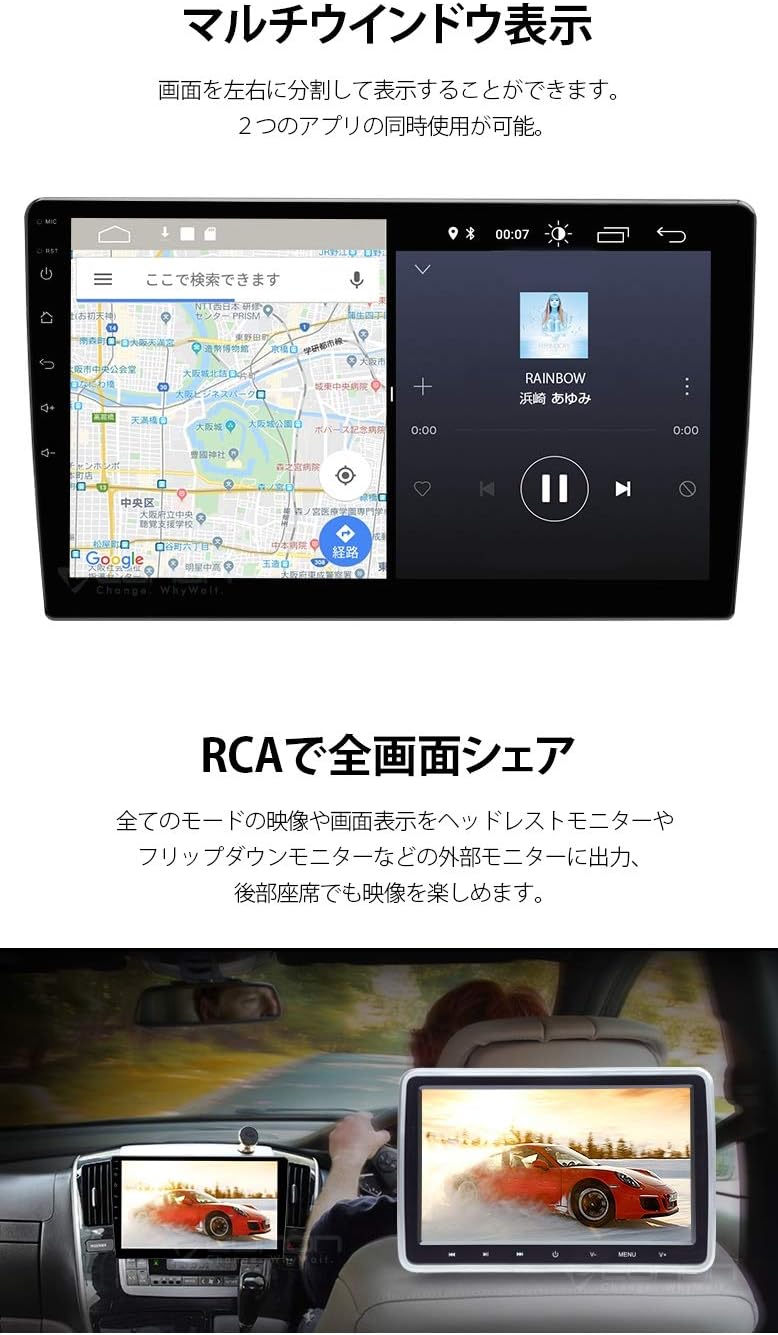
Image: The Eonon GA2187J display demonstrating multi-window functionality with navigation and media player, and an example of RCA full screen sharing to a rear monitor.

Image: Overview of various connectivity options and optional features including navigation, Wi-Fi/4G, TV viewing, OBD2, CarPlay, and backup camera integration.
6. Maintenance
- Screen Cleaning: Use a soft, lint-free cloth to gently wipe the screen. For stubborn smudges, slightly dampen the cloth with water or a screen-safe cleaner. Do not spray liquid directly onto the screen.
- General Cleaning: Keep the unit free from dust and debris. Use a soft brush or compressed air to clean vents and ports.
- Software Updates: Periodically check for software updates to ensure optimal performance and access to new features. Updates may be available through the system settings or the manufacturer's website.
- Avoid Harsh Chemicals: Do not use strong detergents, solvents, or abrasive cleaners, as they can damage the unit's finish or screen.
7. Troubleshooting
| Problem | Possible Cause | Solution |
|---|---|---|
| Unit does not power on. | Incorrect power connection, blown fuse, vehicle battery issue. | Check power cable connections. Inspect the 15A fuse. Ensure vehicle battery is charged. Consult a professional if issues persist. |
| No sound. | Volume too low, mute activated, incorrect speaker wiring. | Increase volume. Check if mute is active. Verify speaker connections according to the wiring diagram. |
| GPS signal lost or inaccurate. | GPS antenna not properly installed or obstructed. | Ensure GPS antenna is mounted in a clear, unobstructed location. Check antenna connection. |
| Bluetooth pairing failure. | Incorrect pairing password, device not in pairing mode, interference. | Ensure correct password (5802). Put your device in pairing mode. Try pairing in a different location to avoid interference. |
| Touchscreen unresponsive. | Temporary software glitch, screen damage. | Restart the unit. If the problem persists, contact support. |
For issues not listed here, or if troubleshooting steps do not resolve the problem, please contact customer support.
8. Specifications
| Feature | Detail |
|---|---|
| Operating System | Android 10 |
| CPU | MTK 8227L 1.2GHz ARM A7 Quad-Core |
| RAM | 2GB |
| Internal Memory | 16GB |
| Display Size | 10.1 inches |
| Display Resolution | 1024x600 |
| Display Type | IPS Full Touch Capacitive Screen |
| Bluetooth Version | 4.0 |
| Wi-Fi | 2.4Ghz |
| USB/MicroSD Support | Up to 64GB |
| Operating Voltage | DC 12V |
| Max Operating Current | ≤10A |
| Unit Weight | 1.95 kg |
| Gross Weight | 2.60 kg |
| Installation Dimensions (WxLxH) | 178 x 125 x 100 mm |
| Panel Dimensions (WxH) | 252 x 147 mm |
| Supported Languages | 85 types (including Japanese, English, Spanish, French, German, Portuguese, Italian, Russian, Turkish, Norwegian) |
Note: Specifications are subject to change without prior notice due to product improvements.
9. Warranty and Support
9.1 Manufacturer Warranty
This product comes with a 1-year manufacturer's warranty. To claim warranty service, the serial number displayed on the outer packaging (which cannot be reissued) is required. Initial defects are handled according to the manufacturer's warranty policy.
For detailed warranty information, please refer to the official Eonon website:
9.2 Technical Support
Please note that direct support for installation or usage methods is not provided by the manufacturer. It is highly recommended to consult a professional for installation in your vehicle.
For general inquiries or product information, please visit the Eonon official website or contact their customer service channels if available.
