
1. Introduction
The KETOTEK DC 6.5-100V 20A Voltmeter Ammeter is a versatile 4-in-1 digital multimeter designed for measuring voltage, current, active power, and energy consumption in DC electrical systems. This device is suitable for indoor use and can monitor batteries, solar systems, electric bike generators, and other DC applications. It features a large LCD with backlight, voltage alarm function, energy reset, and power-off data storage. An integrated shunt simplifies installation.
2. Package Contents
Please verify that all items are present in the package:
- 1 x KETOTEK DC Voltmeter Ammeter (Model: KT-D132)
- 1 x User Manual
3. Product Features
- 4-in-1 Measurement: Simultaneously displays voltage, current, active power, and energy.
- Wide Measurement Range: DC 6.5-100V voltage, 0-20A current, 0-2kW active power, and 0-9999kWh energy.
- LCD Display: Large, clear LCD with blue backlight for easy readability.
- Voltage Alarm: User-configurable voltage alarm threshold with flashing display.
- Energy Reset Function: Allows resetting accumulated energy data.
- Data Storage: Automatically saves data when power is off.
- Integrated Shunt: No external shunt required for current measurement up to 20A.

Image 1: The KETOTEK DC Voltmeter Ammeter displaying its four measurement parameters: voltage, current, power, and energy, along with their respective ranges.

Image 2: Visual representation of the meter's key functions: backlight control, voltage alarm, energy reset, and power-off data saving.
4. Specifications
| Parameter | Value |
|---|---|
| Brand | KETOTEK |
| Model | KT-D132 |
| Style | DC 20A |
| Voltage Measurement Range | DC 6.5V - 100V |
| Current Measurement Range | 0A - 20A |
| Active Power Measurement Range | 0W - 2kW |
| Energy Measurement Range | 0kWh - 9999kWh |
| Minimum Operating Voltage | 6.5 Volts DC |
| Maximum Operating Voltage | 100 Volts DC |
| Power Source | Battery Powered (from measured circuit) |
| Display Type | LCD with Backlight |
| Dimensions (L x W x H) | 8.5 x 5 x 2.4 cm |
| Item Weight | 100 Grams |
| Color | Black |
| Compliance | CE, 3C, FCC |
| UPC | 723260104911 |
| Manufacturer Part Number | KT-0132 |
Note: The 20A current rating is for short-term loads. For continuous operation exceeding 15A, consider a higher amperage version (e.g., 50A or 100A) to prevent damage to the device.

Image 3: Detailed dimensions of the KETOTEK DC Voltmeter Ammeter (Model KT-D132).
5. Safety Precautions
- This device is designed for indoor use only. Do not use it outdoors.
- Ensure the load does not exceed the rated voltage and current of the device (DC 6.5-100V, 20A).
- Always connect the device according to the provided wiring diagram. Incorrect wiring can lead to product damage or malfunction.
- If you intend to use a different connection method, consult with a qualified professional or contact customer support first.
- Keep the device away from water, moisture, and extreme temperatures.
- Do not attempt to disassemble or modify the device.
6. Installation and Wiring
The KETOTEK DC Voltmeter Ammeter features an integrated shunt, simplifying the wiring process. Follow the diagram below for correct installation.
Wiring Diagram
Connect the power supply and load as shown in the diagram. The device measures voltage across its input terminals and current through the integrated shunt.

Image 4: Wiring diagram for the KETOTEK DC Voltmeter Ammeter (Model KT-D132). Connect the positive and negative terminals of the DC input to the power supply, and the load in series with the current measurement path.
- Connect the positive terminal of your DC power supply to the '+' (DC input) terminal of the meter.
- Connect the negative terminal of your DC power supply to the '-' (DC input) terminal of the meter.
- Connect the positive terminal of your load to the '+' (Load) terminal of the meter.
- Connect the negative terminal of your load to the '-' (Load) terminal of the meter.
- Ensure all connections are secure and correct before applying power.
7. Operating Instructions
The device operates automatically once connected to a DC power source within its specified voltage range. The LCD will display voltage, current, power, and energy simultaneously.
Button Functions
The meter features a single button on the right side of the display for various functions:
- Short Press: Toggles the backlight ON/OFF.
- Long Press (3 seconds): Resets the accumulated energy (kWh) data. The energy value will flash, then reset to 0.
- Long Press (5 seconds): Enters the voltage alarm setting mode.
Voltage Alarm Setting
To set the voltage alarm threshold:
- Press and hold the button for 5 seconds until the voltage value on the display starts flashing. This indicates you are in alarm setting mode.
- Short press the button to adjust the voltage alarm threshold. Each short press will increment the value.
- Once the desired threshold is set, press and hold the button again for 3 seconds to save the setting and exit the alarm mode.
- If the measured voltage falls below the set alarm threshold, the display will flash to indicate a low voltage condition.
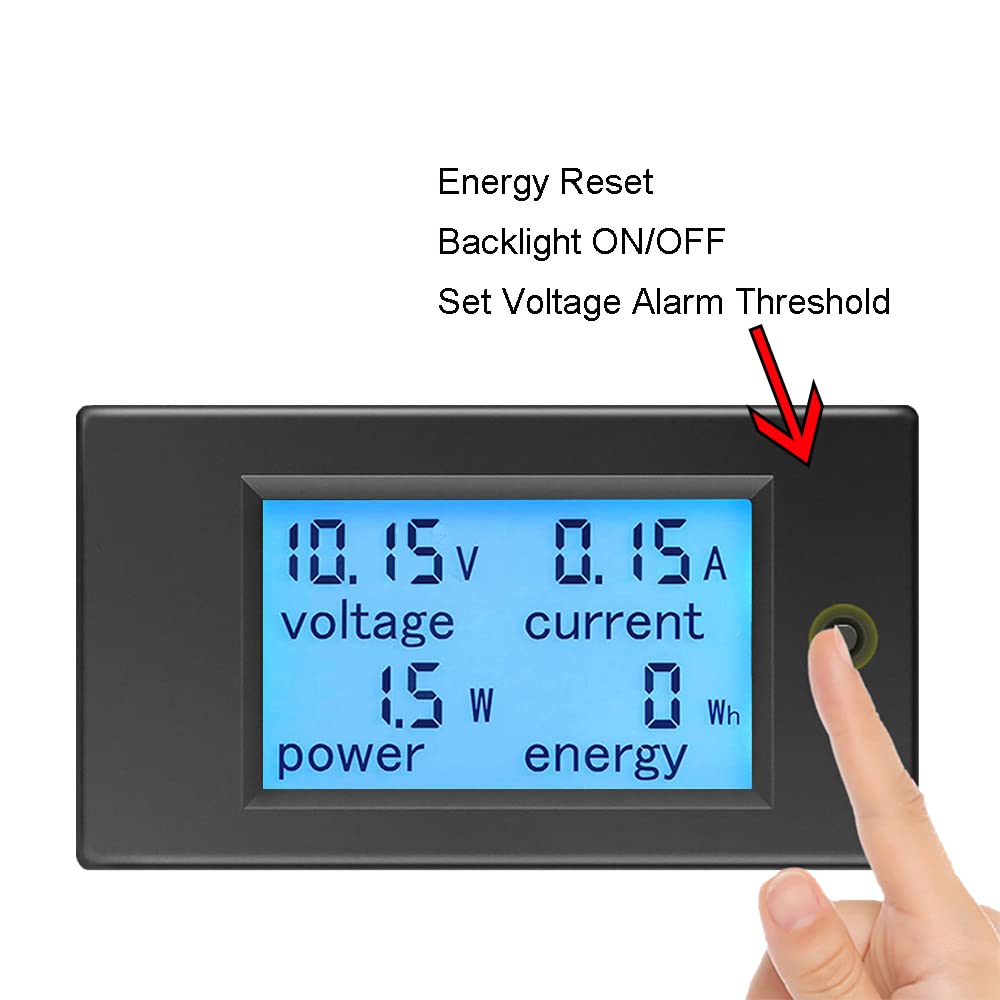
Image 5: Demonstrates the interaction with the control button for backlight, energy reset, and voltage alarm settings.
8. Maintenance
- Keep the device clean and dry. Use a soft, dry cloth to wipe the display and casing.
- Avoid using abrasive cleaners or solvents.
- Store the device in a cool, dry place when not in use.
- Regularly check wiring connections for tightness and signs of wear.
9. Troubleshooting
- No Display:
- Check if the DC input voltage is within the 6.5V-100V range. The device requires at least 6.5V to power on.
- Verify all wiring connections are correct and secure.
- Ensure the power supply is active.
- Incorrect Readings:
- Confirm the wiring matches the diagram precisely. Incorrect current path can lead to inaccurate readings.
- Ensure the load current does not exceed 20A for continuous operation. Overloading can affect accuracy or damage the device.
- Check for loose connections or damaged wires.
- Energy (kWh) Not Resetting:
- Ensure you are pressing and holding the button for approximately 3 seconds until the energy value flashes and resets.
- Voltage Alarm Not Working:
- Verify the alarm threshold is set correctly by entering the alarm setting mode (long press for 5 seconds).
- Ensure the measured voltage is actually below the set threshold.
10. Warranty and Support
KETOTEK products are manufactured to high-quality standards. For warranty information, please refer to the terms and conditions provided at the time of purchase or contact your retailer. If you encounter any issues or require technical assistance, please contact KETOTEK customer support through the official website or your purchase platform. Provide your product model (KT-D132) and a detailed description of the issue for efficient support.


